JavaScript is disabled. For a better experience, please enable JavaScript in your browser before proceeding.
You are using an out of date browser. It may not display this or other websites correctly.
You should upgrade or use an
alternative browser .
Solved My Laptop is getting slower from time to time please help !!!!!
Hello Guys,
i have a huge problem with my Laptop. Last week i installed Windows 7 and some days later my laptop is getting slower and slower and i don't know why ?? I am not be able to watch videos online or something like that. I tried everything to make my laptop faster but nothing helped me. So i hope u guys could help me that would be awesome
. Thanks in advance!! And BTW my cpu usage is constant 100%. My Laptop is a Compaq-Presario CQ56 219wm. Please help me fast my Laptop is really really slow
Windows 7 Ultimate SP1 x64 Intel Core I5-3570K 16GB Corsair Vengeance DDR3 1600 MHz Evga Geforce GTX 660 PC/Desktop Custom Windows 7 Ultimate SP1 x64 Intel Core I5-3570K Gigabyte Z77-D3H 16GB Corsair Vengeance DDR3 1600 MHz Evga Geforce GTX 660 Integrated HP 2009m 1600x900 2 Internal 500 GB 750 Watt Thermaltake VM600M1W2Z Dokker Tower Case Razer Deathstalker Ultimate Roccat Kova+ Kaspersky Antivirus 2013 Mozilla Firefox
Did you carry out a clean install of Windows 7 or was it an upgrade install?
Windows 7 Ultimate SP1 64-Bit Intel Core i7 870 @ 2.93GHz 8Gb Dual-Channel DDR3 @ 664MHz nVidia GeForce GTX 460 1024MB dedicated RAM HP Pavilion Elite 495UK Windows 7 Ultimate SP1 64-Bit Intel Core i7 870 @ 2.93GHz MSI 2A9C (CPU1) 8Gb Dual-Channel DDR3 @ 664MHz nVidia GeForce GTX 460 1024MB dedicated RAM Realtek HD Audio HP2310i 1920 x 1080 1x1954GB Hitachi HDS22020ALA 330 (RAID), 1x1954GB Hitachi External for backup and storage 460W HP Elite Air cooled Logitech K750 solar-powered keyboard Logitech Wireless M180 mouse 2Mb Pure Avanti Flow Internet Radio with iPod Dock, 64Gb iPod, HP USB Speakers, Sony MDR-V500 Headphones, Sony Vaio F-Series Laptop
New member
Pro User
Thread Starter
Clean install 2 times but the problem is coming back and i dont know why.
Windows 7 Ultimate SP1 x64 Intel Core I5-3570K 16GB Corsair Vengeance DDR3 1600 MHz Evga Geforce GTX 660 PC/Desktop Custom Windows 7 Ultimate SP1 x64 Intel Core I5-3570K Gigabyte Z77-D3H 16GB Corsair Vengeance DDR3 1600 MHz Evga Geforce GTX 660 Integrated HP 2009m 1600x900 2 Internal 500 GB 750 Watt Thermaltake VM600M1W2Z Dokker Tower Case Razer Deathstalker Ultimate Roccat Kova+ Kaspersky Antivirus 2013 Mozilla Firefox
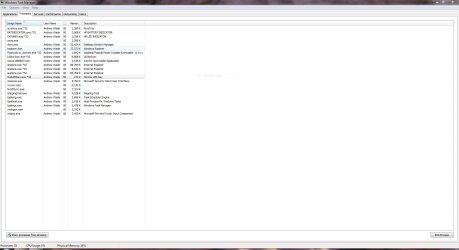
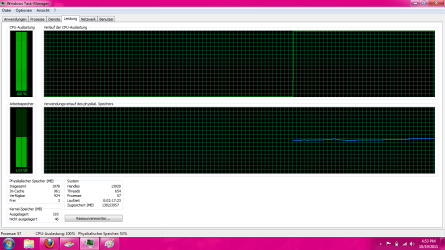
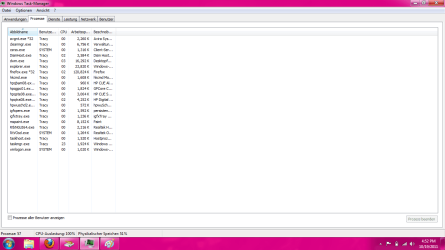
You need to have open Windows Task Manager and have a look at how many processes you've got running to see what's hogging your CPU.
Are you using more than one anti-virus program?
Have you checked for malware?
Windows 7 Ultimate SP1 64-Bit Intel Core i7 870 @ 2.93GHz 8Gb Dual-Channel DDR3 @ 664MHz nVidia GeForce GTX 460 1024MB dedicated RAM HP Pavilion Elite 495UK Windows 7 Ultimate SP1 64-Bit Intel Core i7 870 @ 2.93GHz MSI 2A9C (CPU1) 8Gb Dual-Channel DDR3 @ 664MHz nVidia GeForce GTX 460 1024MB dedicated RAM Realtek HD Audio HP2310i 1920 x 1080 1x1954GB Hitachi HDS22020ALA 330 (RAID), 1x1954GB Hitachi External for backup and storage 460W HP Elite Air cooled Logitech K750 solar-powered keyboard Logitech Wireless M180 mouse 2Mb Pure Avanti Flow Internet Radio with iPod Dock, 64Gb iPod, HP USB Speakers, Sony MDR-V500 Headphones, Sony Vaio F-Series Laptop
New member
Pro User
Thread Starter
Yea i checked both but no luck here is a photo.could be the x64 bit version cause this here?? Sorry its in German i hope u understand it
jjj.png
28.1 KB
· Views: 47
Process.png
34.7 KB
· Views: 38
Windows 7 Ultimate SP1 x64 Intel Core I5-3570K 16GB Corsair Vengeance DDR3 1600 MHz Evga Geforce GTX 660 PC/Desktop Custom Windows 7 Ultimate SP1 x64 Intel Core I5-3570K Gigabyte Z77-D3H 16GB Corsair Vengeance DDR3 1600 MHz Evga Geforce GTX 660 Integrated HP 2009m 1600x900 2 Internal 500 GB 750 Watt Thermaltake VM600M1W2Z Dokker Tower Case Razer Deathstalker Ultimate Roccat Kova+ Kaspersky Antivirus 2013 Mozilla Firefox
It's getting late here in the UK so I'm shutting down for the night, but with a bit of luck some more help should arrive soon.
Windows 7 Ultimate SP1 64-Bit Intel Core i7 870 @ 2.93GHz 8Gb Dual-Channel DDR3 @ 664MHz nVidia GeForce GTX 460 1024MB dedicated RAM HP Pavilion Elite 495UK Windows 7 Ultimate SP1 64-Bit Intel Core i7 870 @ 2.93GHz MSI 2A9C (CPU1) 8Gb Dual-Channel DDR3 @ 664MHz nVidia GeForce GTX 460 1024MB dedicated RAM Realtek HD Audio HP2310i 1920 x 1080 1x1954GB Hitachi HDS22020ALA 330 (RAID), 1x1954GB Hitachi External for backup and storage 460W HP Elite Air cooled Logitech K750 solar-powered keyboard Logitech Wireless M180 mouse 2Mb Pure Avanti Flow Internet Radio with iPod Dock, 64Gb iPod, HP USB Speakers, Sony MDR-V500 Headphones, Sony Vaio F-Series Laptop
New member
Pro User
Thread Starter
Alright i hope so
thanks and have a good night
Windows 7 Ultimate SP1 x64 Intel Core I5-3570K 16GB Corsair Vengeance DDR3 1600 MHz Evga Geforce GTX 660 PC/Desktop Custom Windows 7 Ultimate SP1 x64 Intel Core I5-3570K Gigabyte Z77-D3H 16GB Corsair Vengeance DDR3 1600 MHz Evga Geforce GTX 660 Integrated HP 2009m 1600x900 2 Internal 500 GB 750 Watt Thermaltake VM600M1W2Z Dokker Tower Case Razer Deathstalker Ultimate Roccat Kova+ Kaspersky Antivirus 2013 Mozilla Firefox
Something's definitely wrong - 100% CPU usage...need to have a look at the running processes.
HC4L: you're welcome to send me a PM if you'd prefer help in German.
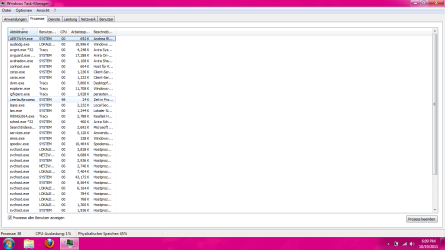
(Schick' mir eine private Nachricht, wenn Du auf Deutsch Hilfe haben möchtest.) EDIT: could you redo the screenshot showing your running processes, but with the checkbox "Prozesse aller Benutzer anzeigen" ticked on?
Windows 7 Professional SP1 32-bit Intel Core 2 Duo E6600 2.4GHz 4GB DDR2-667 (4x1GB in dual-channel config) nVidia GeForce 9800 GT PC/Desktop Custom-built Windows 7 Professional SP1 32-bit Intel Core 2 Duo E6600 2.4GHz Asus PL5D2 4GB DDR2-667 (4x1GB in dual-channel config) nVidia GeForce 9800 GT Creative X-Fi XtremeMusic Acer P236H 1920x1200 (DVI) OCZ SSD Vertex Plus 60GB SATA (Firmware 3.55), 64MB cache Antec TruePower 2.0 Cooler Master Centurion Too many fans Standard Microsoft wireless optical mouse AT&T U-verse (18mbit/sec) Microsoft Security Essentials Firefox Other devices:
New member
Pro User
Thread Starter
Sure there you go
Unbenannt.png
35 KB
· Views: 78
Windows 7 Ultimate SP1 x64 Intel Core I5-3570K 16GB Corsair Vengeance DDR3 1600 MHz Evga Geforce GTX 660 PC/Desktop Custom Windows 7 Ultimate SP1 x64 Intel Core I5-3570K Gigabyte Z77-D3H 16GB Corsair Vengeance DDR3 1600 MHz Evga Geforce GTX 660 Integrated HP 2009m 1600x900 2 Internal 500 GB 750 Watt Thermaltake VM600M1W2Z Dokker Tower Case Razer Deathstalker Ultimate Roccat Kova+ Kaspersky Antivirus 2013 Mozilla Firefox
Oh...I get it. This one was taken in Safe Mode. No good.
(We just exchanged PMs about this.)
Windows 7 Professional SP1 32-bit Intel Core 2 Duo E6600 2.4GHz 4GB DDR2-667 (4x1GB in dual-channel config) nVidia GeForce 9800 GT PC/Desktop Custom-built Windows 7 Professional SP1 32-bit Intel Core 2 Duo E6600 2.4GHz Asus PL5D2 4GB DDR2-667 (4x1GB in dual-channel config) nVidia GeForce 9800 GT Creative X-Fi XtremeMusic Acer P236H 1920x1200 (DVI) OCZ SSD Vertex Plus 60GB SATA (Firmware 3.55), 64MB cache Antec TruePower 2.0 Cooler Master Centurion Too many fans Standard Microsoft wireless optical mouse AT&T U-verse (18mbit/sec) Microsoft Security Essentials Firefox Other devices:
Generic information...List all the Security software you have ever had installed & currently have now on your computer please. When you find them you want to look those that say app hang, app crash, or anything that relates to the problem. http://support.microsoft.com/kb/929135
Win 7 Ultimate 64-bit. SP1. Intel i7 -720QM.[1.6GHz Turbo Boost 2.8GHz. 6... 8 DDR 3 RAM. 1066MHZ ATI 1024 MB. DDR3. Radeon HD5650 LAPTOP. HP Pavilion dv7-4010TX . Win 7 Ultimate 64-bit. SP1. Intel i7 -720QM.[1.6GHz Turbo Boost 2.8GHz. 6MB Cache.] 8 DDR 3 RAM. 1066MHZ ATI 1024 MB. DDR3. Radeon HD5650 17.3" High Definition Brightview LCD. LED Backlit. 1600 x 900. 640GB Laptop / notebook. Logitech Anywhere mouse. MX. ADSL [ but too slow ]


 . Thanks in advance!! And BTW my cpu usage is constant 100%. My Laptop is a Compaq-Presario CQ56 219wm. Please help me fast my Laptop is really really slow