My Local Disk E: is gone

asakapa123

New member
Local time
6:11 AM
Messages
2
Hi, I have a problem in my computer my games is not working because of Local Disk lost

I have Local Disk C,D and E where Local Disk E i save my games now i cant play when i open a program it says this below, but i didnt inserted a disk.

Pls help me
btw,thanks in advance
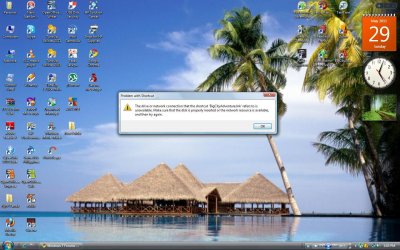
Problem With Shortcut

The Drive or network connection that the shorcut "BigCityAdventure.Ink" refers to is unavailable.Make sure that the disk is properly inserted or the network resource is available,and then try again.

Problem Computer.jpg
 
Last edited by a moderator:

My Computer My Computer

OS
Windows Vista
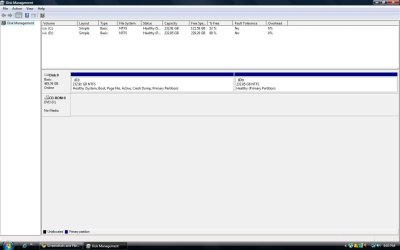
Can you please post a screenshot from Start -> Run -> DISKMGMT.MSC?

Please expand it to full-screen first, and spread the columns so that all the text between the column separators is visible.

Thanks.
 

My Computer My Computer

Computer type
PC/Desktop
Computer Manufacturer/Model Number
Home-built, two systems (1) and (2)
OS
Windows 7 Pro x64 (1), Win7 Pro X64 (2)
CPU
i5-3350p 3.1Ghz/6MB-cache (1); E8400 3.0Ghz/6MB-cache (2)
Motherboard
ASUS P8Z77-V Pro (1); ASUS P5Q3 (2)
Memory
8GB PC3-12800 DDR3 (1); 4GB PC3-10600 DDR3 (2)
Graphics Card(s)
ATI HD7750 (1), (see TV cards); ATI R7 250 (2)
Sound Card
Realtek ALC892 HD Audio (1); Realtek ALC1200 HD Audio (2)
Monitor(s) Displays
Eizo HD2441W LCD, Eizo S2433W (1); Eizo 24" S2433W (2)
Screen Resolution
1920x1200, 1920x1200 (1); 1920x1200 (2)
Hard Drives
(1) 1TB SATA-II (7200RPM), 2x2TB SATA-III (7200RPM), 250GB SATA-III (10000RPM) for OS; 2x2TB external USB 3.0

(2) 320GB SATA-II (7200RPM), 750GB SATA-II (7200RPM), 150GB SATA-II (10000RPM) for OS; 2TB external USB 3.0
PSU
Nesteq ECS-6001 600W (1); Nesteq ECS-5001 500W (2)
Case
Acousti-Case 360 (1) and (2)
Cooling
Noctua NH-U12P SE2 for CPU, 2x120mm case fans (1) and (2)
Keyboard
IBM PS/2 (1) and (2)
Mouse
Logitech MX Revolution wireless (1); Microsoft wired (2)
Internet Speed
100mbps down / 10mbps up
Antivirus
Microsoft Security Essentials; Malwarebyte Anti-Malware Pro
Browser
Firefox
Other Info
Ceton InfiniTV 4-tuner cablecard-enabled TV card as well as Hauppauge HVR-2250 OTA/ATSC 2-tuner TV card in (1), running under Win7 WMC
Here is the Screen Shot of Disk Management


tnx for helping
 

Attachments

  • Here.jpg
    Here.jpg
    60.5 KB · Views: 138

My Computer My Computer

OS
Windows Vista
Well... you're certainly correct. That second drive is gone.

Is that second drive with E on it a SATA, IDE or SCSI drive? Internal I assume, although you didn't specify. Or is it an external USB drive? Or something else?

Is it visible in the BIOS? If you get into the BIOS at machine boot time, does it show up in the list of hard drives? Or is it gone even from the BIOS's perspective?

Have you tried just pulling the power and data cables from it, and then re-seating them?

If it's a SATA drive, have you tried pulling the SATA connector to the motherboard and trying it in a different SATA connector on the board?
 

My Computer My Computer

Computer type
PC/Desktop
Computer Manufacturer/Model Number
Home-built, two systems (1) and (2)
OS
Windows 7 Pro x64 (1), Win7 Pro X64 (2)
CPU
i5-3350p 3.1Ghz/6MB-cache (1); E8400 3.0Ghz/6MB-cache (2)
Motherboard
ASUS P8Z77-V Pro (1); ASUS P5Q3 (2)
Memory
8GB PC3-12800 DDR3 (1); 4GB PC3-10600 DDR3 (2)
Graphics Card(s)
ATI HD7750 (1), (see TV cards); ATI R7 250 (2)
Sound Card
Realtek ALC892 HD Audio (1); Realtek ALC1200 HD Audio (2)
Monitor(s) Displays
Eizo HD2441W LCD, Eizo S2433W (1); Eizo 24" S2433W (2)
Screen Resolution
1920x1200, 1920x1200 (1); 1920x1200 (2)
Hard Drives
(1) 1TB SATA-II (7200RPM), 2x2TB SATA-III (7200RPM), 250GB SATA-III (10000RPM) for OS; 2x2TB external USB 3.0

(2) 320GB SATA-II (7200RPM), 750GB SATA-II (7200RPM), 150GB SATA-II (10000RPM) for OS; 2TB external USB 3.0
PSU
Nesteq ECS-6001 600W (1); Nesteq ECS-5001 500W (2)
Case
Acousti-Case 360 (1) and (2)
Cooling
Noctua NH-U12P SE2 for CPU, 2x120mm case fans (1) and (2)
Keyboard
IBM PS/2 (1) and (2)
Mouse
Logitech MX Revolution wireless (1); Microsoft wired (2)
Internet Speed
100mbps down / 10mbps up
Antivirus
Microsoft Security Essentials; Malwarebyte Anti-Malware Pro
Browser
Firefox
Other Info
Ceton InfiniTV 4-tuner cablecard-enabled TV card as well as Hauppauge HVR-2250 OTA/ATSC 2-tuner TV card in (1), running under Win7 WMC
first thing to try is if it is internal, shut down and replace the data cable.
 

My Computer My Computer

OS
Windows 7 Ultimate
CPU
Core2Duo E8400
Motherboard
Asus Rampage Formula Rev. 1
Memory
5 Gigs
Graphics Card(s)
Asus Nvidia 9500 Gt
Sound Card
Creative X-Fi Extreme Audio
Monitor(s) Displays
18 Inch LCD
Screen Resolution
1366x768
Hard Drives
c: wd 300 gig velociaptor, wd 1tb, wd 500 gig, wd 320 gig, and 2 wd 40 gig ide drives
PSU
600 watts
first thing to try is if it is internal, shut down and replace the data cable.


i would have said check BIOS. as it saves you opening the side of ur pc
 

My Computer My Computer

Computer Manufacturer/Model Number
Windows 7 Ultimate 64-bit
OS
Windows 7 Ultimate N 64-bit
CPU
AMD Black Edition - AMD Phenom X4 2.5 GHz Processor
Motherboard
Bio Star
Memory
8GB DDR2 800MHZ BRANDED
Graphics Card(s)
Palti NVIDIA GeForce GTX 460
Monitor(s) Displays
3D 23.6" & 22"
Screen Resolution
1920x1080@120Hz
Hard Drives
313GB SAMSUNG SAMSUNG HD321KJ
PSU
OCZ 600W StealthXStream PSU, PowerWhisper, Active PFC
Internet Speed
22793
first thing to try is if it is internal, shut down and replace the data cable.


i would have said check BIOS. as it saves you opening the side of ur pc

typically when something changes in the bios you know about it from messages you get during boot, so i normally ask for people to check their power cables, data cables first.
 

My Computer My Computer

OS
Windows 7 Ultimate
CPU
Core2Duo E8400
Motherboard
Asus Rampage Formula Rev. 1
Memory
5 Gigs
Graphics Card(s)
Asus Nvidia 9500 Gt
Sound Card
Creative X-Fi Extreme Audio
Monitor(s) Displays
18 Inch LCD
Screen Resolution
1366x768
Hard Drives
c: wd 300 gig velociaptor, wd 1tb, wd 500 gig, wd 320 gig, and 2 wd 40 gig ide drives
PSU
600 watts
If you are using Sata 1 cables, replace with Sata 2.
 

My Computer My Computer

OS
ME/XP/Vista/Win7
If you are using Sata 1 cables, replace with Sata 2.


can you explain what is the difference between SATA and SATA2 cable?
 

My Computer My Computer

Computer type
PC/Desktop
Computer Manufacturer/Model Number
Self Built PC
OS
Windows 7 pro 64bit. (SP1)
CPU
Intel core I5 2400
Motherboard
Gigabyte H61
Memory
8GB DDR3 Kingston
Graphics Card(s)
Gigabyte GF GTX650OC
Sound Card
Realtek HD audio
Monitor(s) Displays
LCD 20"
Screen Resolution
1600x900
Hard Drives
INTEL SSD 320 80GB +Seagate 7200.12 1TBx3
PSU
Coolermaster RX450W
Case
Coolermaster atx case
Cooling
stock cooler
Keyboard
logitech
Mouse
logitech
Internet Speed
FTTD 100mbps

My Computer My Computer

OS
Windows 7 Ultimate
CPU
Core2Duo E8400
Motherboard
Asus Rampage Formula Rev. 1
Memory
5 Gigs
Graphics Card(s)
Asus Nvidia 9500 Gt
Sound Card
Creative X-Fi Extreme Audio
Monitor(s) Displays
18 Inch LCD
Screen Resolution
1366x768
Hard Drives
c: wd 300 gig velociaptor, wd 1tb, wd 500 gig, wd 320 gig, and 2 wd 40 gig ide drives
PSU
600 watts
typically when something changes in the bios you know about it from messages you get during boot, so i normally ask for people to check their power cables, data cables first.


ok fair enough, but nobody had mentioned BIOS msgs
 

My Computer My Computer

Computer Manufacturer/Model Number
Windows 7 Ultimate 64-bit
OS
Windows 7 Ultimate N 64-bit
CPU
AMD Black Edition - AMD Phenom X4 2.5 GHz Processor
Motherboard
Bio Star
Memory
8GB DDR2 800MHZ BRANDED
Graphics Card(s)
Palti NVIDIA GeForce GTX 460
Monitor(s) Displays
3D 23.6" & 22"
Screen Resolution
1920x1080@120Hz
Hard Drives
313GB SAMSUNG SAMSUNG HD321KJ
PSU
OCZ 600W StealthXStream PSU, PowerWhisper, Active PFC
Internet Speed
22793
If you are using Sata 1 cables, replace with Sata 2.


can you explain what is the difference between SATA and SATA2 cable?

there isn't any. that is just a way for sites and companies to charge more for the same cable.


There is no difference in maximum transfer speeds between cables labelled as SATA vs. SATA2. The only difference is that SATA2 cables have a locking mechanism to stabilise connection.

SATA 2.PNG
 

My Computer My Computer

OS
ME/XP/Vista/Win7
Back
Top