My Local disk is corrupted and I cant fix with windows repair!

Jaffle

New member
Local time
2:00 PM
Messages
2
My Local disk is corrupted and I cant fix with windows repair! PLZ HELP!!! I can't find anything anywhere.
 

My Computer My Computer

At a glance

Windows 7 professional x64
OS
Windows 7 professional x64
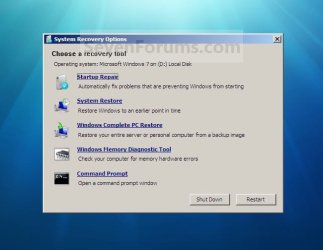
What kind of corruption is the drive/partition experiencing? Is it doing something it's not supposed to do? Or is it not doing something it should be doing? Which windows repair did you use? Did it bring up a screen like this:

System_Recovery_Options.jpg

If yes, did you access this System Recovery Options screen by using a system repair disk? A Windows 7 install disk? The more info you can provide the better the chances someone will be able to help.
 

My Computer My Computer

At a glance

Win 7 Pro 64-bitIntel i5 2.4 Ghz8GB DDR3Intel HD 3000
Computer type
Laptop
Computer Manufacturer/Model Number
Sony Vaio VPCEB47GM Laptop
OS
Win 7 Pro 64-bit
CPU
Intel i5 2.4 Ghz
Memory
8GB DDR3
Graphics Card(s)
Intel HD 3000
Sound Card
IDT High Definition
Monitor(s) Displays
15.6 WGXA Anti-Glare LED
Screen Resolution
1280x800
Hard Drives
640Gb 7200rpm
Antivirus
MSE
Browser
Opera (primary) with IE9 backup
Have you tried running a sfc /scannow ? and or a chkdsk /f/r
What makes you think it's corrupt?.
 

My Computer My Computer

At a glance

Windows 7 Home Premium 64 BitCore I7 1155 3.4GHZ8GB DDR 1600
Computer Manufacturer/Model Number
Cooler Master
OS
Windows 7 Home Premium 64 Bit
CPU
Core I7 1155 3.4GHZ
Memory
8GB DDR 1600
Hard Drives
64 GB SSD - OS
1TB - DATA
PSU
340 Watt Corsair
Case
Cooler Master
Cooling
Cooler Master
I have a Dell Latitude 6520 and was having the same problem, corrupted local C: and I hope this will help, it fixed mine. Turn on computer and immediately begin tapping F8 (before logo appears), screen will appear and "Repair Your Computer" will be highlighted, click on your enter key on keyboard. Windows will load files and then the System Recovery Options screen will appear. On Keyboard Input Method click US and then click Next. System Recovery Options screen will appear again, on User name box choose "user", on password type in your log in password for your computer and then click ok. System Recovery Options will appear again, click on Start Up Repair. Repair will begin, when it is finished, click on finish.


This took care of mine and it's working great now.

 

My Computer My Computer

At a glance

Windows 7 64 Bit
Computer type
Laptop
Computer Manufacturer/Model Number
Dell
OS
Windows 7 64 Bit
Antivirus
Norton
Browser
AOL
The original post is from 2013.

:rolleyes:
 

My Computers My Computers

  • At a glance

    7 X64i5 84002x8gb 3200mhz
    Computer type
    PC/Desktop
    OS
    7 X64
    CPU
    i5 8400
    Motherboard
    gigabyte b365m ds3h
    Memory
    2x8gb 3200mhz
    Hard Drives
    various
    PSU
    pure power 11 400w cm
    Case
    Coolermaster
    Cooling
    cryorig m9i
  • At a glance

    7x64g54008gb ddr4 2400
    Computer type
    PC/Desktop
    OS
    7x64
    CPU
    g5400
    Motherboard
    ga b365m ds3h
    Memory
    8gb ddr4 2400
    PSU
    xfx pro 450w
Thank you very much. P.S. Great quotes.
 

My Computer My Computer

At a glance

Windows 7 64 Bit
Computer type
Laptop
Computer Manufacturer/Model Number
Dell
OS
Windows 7 64 Bit
Antivirus
Norton
Browser
AOL
Back
Top