My mic doesnt work

Vgnwes

New member
Local time
11:25 PM
Messages
7
Hello all,

As the title says, my mic doesnt work! Yesterday is worked perfectly then i reset my computer and it stopped working.
WHen i press my push to talk key in Teamspeak people hear there self and even hear the music i am playing through my headset, but they cant hear me. I did almost everything i can found on the internet.

- Used the correct "holes".
- CHeck if its muted somewhere
- DOwnloaded newest drivers
- Check the entire sound page and tried everything!

additional information:

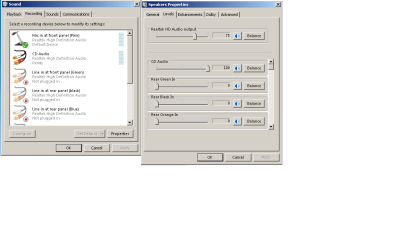
- I got like 6/7 lines in noted at my recording devices and they are all not plugged in.
- When i go to speaker > properties > levels there isnt a microphone there.
- use windows 7 btw.
- it also doesnt work @ windows sound recorder.

If you could help me i would be very gratefull!
ANd if you need anything else, just ask!!

Wessel
 

Attachments
  • Mic problems.png
    Mic problems.png
    17.5 KB · Views: 3

My Computer

Computer type
PC/Desktop
OS
windows 7 64
Yesterday is worked perfectly then i reset my computer and it stopped working

Exactly what did you do to "reset" the computer?

Also please fill in the "My System Specs". It helps us to try and help users.
 

My Computer

Computer type
PC/Desktop
Computer Manufacturer/Model Number
My Own Build
OS
Windows 10 64 bit
CPU
Intel i7 6700K
Motherboard
ASUS ROG Maximus VIII Hero
Memory
16GB Corsair Dominator
Graphics Card(s)
Intel CPU Graphics
Sound Card
RealTek
Monitor(s) Displays
27" Dell S2719dgf
Screen Resolution
2560X1440
Hard Drives
1 TB Samsung 850 EVO SSD for Win 10 Pro
500GB Samsung 850 EVO SSD for Win 10 Insider
2 TB drive for backup
PSU
EVGA Supernova 750G2
Case
BeQuiet Silent Base 600
Cooling
Deepcool Captain 120EX
Keyboard
Microsoft Wireless 2000
Mouse
Microsoft wireless
Internet Speed
100 MB/sec (Cable)
Antivirus
Microsoft Defender and Malwarebytes
Browser
Edge/Firefox
Other Info
Cakewalk (Sonar) by BandLab and Studio One 4.1 Pro recording studio software. MOTU 896Mk3 Hybrid recording interface, Frontier Tranzport wireless control unit, Behringer X-Touch Control Surface.
Five USB connected optical drives for CD Audio production using Nero BurningROM
Just restarted my computer!
 

My Computer

Computer type
PC/Desktop
OS
windows 7 64
Try a System Restore back to an available restore date that is BEFORE the problem.

System Restore can be accessed from Start/Programs/Accessories/System Tools. System Restore will not delete any user data, e-mails, etc.
 

My Computer

Computer type
PC/Desktop
Computer Manufacturer/Model Number
My Own Build
OS
Windows 10 64 bit
CPU
Intel i7 6700K
Motherboard
ASUS ROG Maximus VIII Hero
Memory
16GB Corsair Dominator
Graphics Card(s)
Intel CPU Graphics
Sound Card
RealTek
Monitor(s) Displays
27" Dell S2719dgf
Screen Resolution
2560X1440
Hard Drives
1 TB Samsung 850 EVO SSD for Win 10 Pro
500GB Samsung 850 EVO SSD for Win 10 Insider
2 TB drive for backup
PSU
EVGA Supernova 750G2
Case
BeQuiet Silent Base 600
Cooling
Deepcool Captain 120EX
Keyboard
Microsoft Wireless 2000
Mouse
Microsoft wireless
Internet Speed
100 MB/sec (Cable)
Antivirus
Microsoft Defender and Malwarebytes
Browser
Edge/Firefox
Other Info
Cakewalk (Sonar) by BandLab and Studio One 4.1 Pro recording studio software. MOTU 896Mk3 Hybrid recording interface, Frontier Tranzport wireless control unit, Behringer X-Touch Control Surface.
Five USB connected optical drives for CD Audio production using Nero BurningROM
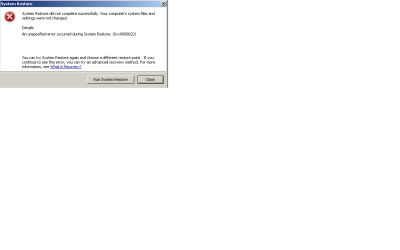
This happens when i do a system restore. Tried 2 different times.
 

Attachments

  • mic problems 2.png
    mic problems 2.png
    5.9 KB · Views: 3

My Computer

Computer type
PC/Desktop
OS
windows 7 64
Some stuff you can try if you have not already done so.

Test microphone on different computer.

Reinstall TeamSpeak 3 application.

Check out this video, see if anything in there helps.


My Computers

System One System Two

  • Computer type
    PC/Desktop
    Computer Manufacturer/Model Number
    HP Pavilion 6751c
    OS
    Win7, Win10, Win11
    Internet Speed
    100 Mbps
    Antivirus
    Norton 360
    Browser
    IE 11
  • Computer type
    PC/Desktop
    System Manufacturer/Model Number
    HP ENVY 750-514 & Dell XPS 8960
    OS
    Win7, Win10, Win11
    Antivirus
    Norton 360
- Microphone isnt the problem
- I dont think Teamspeak is the problem, cause like i said: Windows recorder also doesnt work and people can hear my music in teamspeak.

Any1 else has some ideas?
 

My Computer

Computer type
PC/Desktop
OS
windows 7 64
Back
Top