

My Operating system is Windows 7 Home Premium with Microsoft Security Essentials installed.
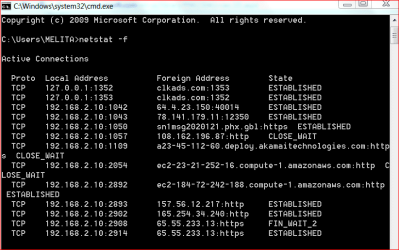
While connected to the internet I did a random 'netstat -f' check using the command window. Please see the attachment. What worries me is the foreign address, clkads.com, against the local address 127.0.0.1 As far as I remember, clkads is a web site that plant cookies, malware, redirect and collect information from the browser. Sometime ago I blocked this web site using 127.0.0.1 in the 'hosts'' file and the blocking has been fully effective since then.
What is the reason this is appearing against 127.0.0.1, in 'netstat' check? Please advice.
Thank you,
While connected to the internet I did a random 'netstat -f' check using the command window. Please see the attachment. What worries me is the foreign address, clkads.com, against the local address 127.0.0.1 As far as I remember, clkads is a web site that plant cookies, malware, redirect and collect information from the browser. Sometime ago I blocked this web site using 127.0.0.1 in the 'hosts'' file and the blocking has been fully effective since then.
What is the reason this is appearing against 127.0.0.1, in 'netstat' check? Please advice.
Thank you,
Attachments
Last edited:
My Computer
At a glance
Windows 7 Home Premium 64bitAMD Dual Core C-502GB DDR3/320GB HDDAMD Radeon HD 6250
- Computer Manufacturer/Model Number
- Laptop - Acer Aspire 5250-BZ479
- OS
- Windows 7 Home Premium 64bit
- CPU
- AMD Dual Core C-50
- Memory
- 2GB DDR3/320GB HDD
- Graphics Card(s)
- AMD Radeon HD 6250
- Monitor(s) Displays
- 15.6" HD LED LCD
- Internet Speed
- ADSL


