
My 'netstat' check is showing strange content

Melita

New member
Power User
VIP
Local time
4:23 PM
Messages
293
Location
Canada
I posted this in the Network and Sharing section two days ago. Senior member 'Pauly' suggested that I post this here for further help. I am copying the contents of that thread below for your perusal and help. I disabled all the plugins and extensions in Firefox but cklads is still showing in the Command Window.

The website clkads.com started opening in my computer, a few months ago, when I clicked on a link in some other web page. It used to burst out in a new window and not as a pop up. I think I was being redirected. I blocked it using the local host 127.0.0.1, in the 'hosts' file. The blocking is completely successful. Whenever cklads tried to open, it opened as a blank window, with a message 'this web page cannot be found'. Now, even the blank page is not appearing. It seems to be perfect block.

Thank you.

My Question

My Operating system is Windows 7 Home Premium with Microsoft Security Essentials installed.

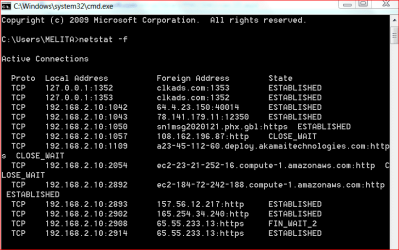
While connected to the internet I did a random 'netstat -f' check using the command window. Please see the attachment. What worries me is the foreign address, clkads.com, against the local address 127.0.0.1 As far as I remember, clkads is a web site that plant cookies, malware, redirect and collect information from the browser. Sometime ago I blocked this web site using 127.0.0.1 in the 'hosts'' file and the blocking has been fully effective since then.

What is the reason this is appearing against 127.0.0.1, in 'netstat' check? Please advice.

Answer 1 from Pauly

try netstat -ano this will give you internal & external ip +PID which you can cross reference to task manager to see the associated program, you may need to go to programs tab>view>select colomns>tick program id>ok

My response

I have done the check. Please see the attachment from Task Manager. The highlighted line is the one with 'cklads' PID from 'netstat -ano' check. This shows only when FireFox is open. 'Cklads' does not show in 'netstat' or Task manager, with IE or Chrome open.

The blocking has been fully successful for many months. In spite of that, this is happening.

Answer 2 from Pauly

Did a bit of research on your problem and it seems its quite commonly downloaded with codec packs and similar items but it seems its only a browser plugin add on have you tried disabling add ons/plugins on your browser. Also this seems to be browser specific, what browser do you use & have you tried other browsers ?

If you still encounter problems you could try posting in the security section where a specialist may be able to help more
System Security - Windows 7 Help Forums
 

Attachments
  • NET STAT F.PNG
    NET STAT F.PNG
    15 KB · Views: 20
  • TM FIREFOX.PNG
    TM FIREFOX.PNG
    5.2 KB · Views: 13
Last edited:

My Computer My Computer

At a glance

Windows 7 Home Premium 64bitAMD Dual Core C-502GB DDR3/320GB HDDAMD Radeon HD 6250
Computer Manufacturer/Model Number
Laptop - Acer Aspire 5250-BZ479
OS
Windows 7 Home Premium 64bit
CPU
AMD Dual Core C-50
Memory
2GB DDR3/320GB HDD
Graphics Card(s)
AMD Radeon HD 6250
Monitor(s) Displays
15.6" HD LED LCD
Internet Speed
ADSL
Download AdWareCleaner AdwCleaner Download to your desktop
1.Right-click on adwcleaner.exe and select Run As Administrator to launch the application.
2.Click on Delete button.
3.Confirm each time with OK.
4.Your computer will be rebooted automatically. A text file will open after the restart. Please post the content of that logfile in your reply.
Note: You can find the logfile at C:\AdwCleaner[Sn].txt as well - n is the order number.
AdwareCleaner.jpg


Did you happen to download a CODEC to watch a video?
 

My Computer My Computer

At a glance

Windows 7 Ultimate 32bit SP1Intel(R) Core(TM)2 Quad CPU @ 2.40GHz, 2400 MHz4 GBATI Radeon HD 2600 Pro
Computer type
PC/Desktop
Computer Manufacturer/Model Number
Bruce ... somewhere in his 40's
OS
Windows 7 Ultimate 32bit SP1
CPU
Intel(R) Core(TM)2 Quad CPU @ 2.40GHz, 2400 MHz
Motherboard
INTEL/D975XBX2
Memory
4 GB
Graphics Card(s)
ATI Radeon HD 2600 Pro
Monitor(s) Displays
Samsung SyncMaster 914v
Screen Resolution
1280 x 1024
Hard Drives
2/500GB each ... ST3500630AS ATA Device.
One is not connected
PSU
Rocketfish 700 W
Case
G.Skill Gigabyte Chassis
Keyboard
Standard PS/2 Keyboard
Mouse
Microsoft PS/2 Mouse
Internet Speed
DSL
Antivirus
Avira Internet Security
Browser
IE 11
Other Info
ATI HDMI Audio
No sir. I have never downloaded a CODEC.

Can I run AdwCleaner from a USB Drive instead of installing it in my computer? I have never run a programme like this before. Just a bit nervous about it! Specially an application that changes the registry entries.

Regards,
 

My Computer My Computer

At a glance

Windows 7 Home Premium 64bitAMD Dual Core C-502GB DDR3/320GB HDDAMD Radeon HD 6250
Computer Manufacturer/Model Number
Laptop - Acer Aspire 5250-BZ479
OS
Windows 7 Home Premium 64bit
CPU
AMD Dual Core C-50
Memory
2GB DDR3/320GB HDD
Graphics Card(s)
AMD Radeon HD 6250
Monitor(s) Displays
15.6" HD LED LCD
Internet Speed
ADSL
AdwCleaner is an executable file not an installation program . You may download it place it into a USB flash drive and run it from there.
 

My Computer My Computer

At a glance

Windows 7 Ultimate 32-Bit & Windows 7 Ultimat...Intel Core i7 CPU 950 @ 3.07GHzOCZ 6GB (3 x 2GB) 240-Pin DDR3 SDRAM DDR3 160...ATI Radeon HD 5700 Series
Computer Manufacturer/Model Number
Custom Built
OS
Windows 7 Ultimate 32-Bit & Windows 7 Ultimate 64-Bit
CPU
Intel Core i7 CPU 950 @ 3.07GHz
Motherboard
ASUS P6T DELUXE V2
Memory
OCZ 6GB (3 x 2GB) 240-Pin DDR3 SDRAM DDR3 1600 OCZ3X1600R2
Graphics Card(s)
ATI Radeon HD 5700 Series
Sound Card
OnBoard
Hard Drives
WD6400AACS-00M3B0 (640GB SATA )
PSU
CORSAIR 850w
Case
NZXT LEXA
Cooling
Intel Stock Heatsink Fan
Keyboard
Microsoft Wireless Laser Keyboard 7000
Mouse
Microsoft Wireless Laser Mouse 7000
When you click on the file to run, click the search button and post the results .... that way we can see what should be deleted.
 

My Computer My Computer

At a glance

Windows 7 Ultimate 32bit SP1Intel(R) Core(TM)2 Quad CPU @ 2.40GHz, 2400 MHz4 GBATI Radeon HD 2600 Pro
Computer type
PC/Desktop
Computer Manufacturer/Model Number
Bruce ... somewhere in his 40's
OS
Windows 7 Ultimate 32bit SP1
CPU
Intel(R) Core(TM)2 Quad CPU @ 2.40GHz, 2400 MHz
Motherboard
INTEL/D975XBX2
Memory
4 GB
Graphics Card(s)
ATI Radeon HD 2600 Pro
Monitor(s) Displays
Samsung SyncMaster 914v
Screen Resolution
1280 x 1024
Hard Drives
2/500GB each ... ST3500630AS ATA Device.
One is not connected
PSU
Rocketfish 700 W
Case
G.Skill Gigabyte Chassis
Keyboard
Standard PS/2 Keyboard
Mouse
Microsoft PS/2 Mouse
Internet Speed
DSL
Antivirus
Avira Internet Security
Browser
IE 11
Other Info
ATI HDMI Audio
Thank you for suggesting a computer scan. I did complete scans using Microsoft Security Essentials, Microsoft Malicious Software Removal Tool and Microsoft Fixit.WinSecurity. All these indicate my computer is clean.

Considering the results of the scans and other information I have received, it seems this problem has something to do with the 'hosts' file entries and is not a security issue.

Best regards,
 
Last edited:

My Computer My Computer

At a glance

Windows 7 Home Premium 64bitAMD Dual Core C-502GB DDR3/320GB HDDAMD Radeon HD 6250
Computer Manufacturer/Model Number
Laptop - Acer Aspire 5250-BZ479
OS
Windows 7 Home Premium 64bit
CPU
AMD Dual Core C-50
Memory
2GB DDR3/320GB HDD
Graphics Card(s)
AMD Radeon HD 6250
Monitor(s) Displays
15.6" HD LED LCD
Internet Speed
ADSL
Melita,

The Hosts file can get hijacked, and so can your DNS settings.

Here are two programs that may help you:

Repair Hosts File

Repair Winsock & DNS Cache


AdwCleaner is a very good and reputable program. The site from which this program is downloaded is knowledgeable and trustworthy.

We do not cater to trashy stuff. However, if you wish not to run this program, it is your decision.
 

My Computer My Computer

At a glance

Windows 7 Home Premium
Computer type
PC/Desktop
Computer Manufacturer/Model Number
An ol' eMachines
OS
Windows 7 Home Premium
Internet Speed
Fine for me...I'm retired!
Hello Cottonball,

Thank you for these links. I didn't believe that you would recommend any trashy programmes, as you mention in your post. All your help is very much appreciated. It is just that I don't want to run too many scans when it doesn't seem to be indicated at the moment. I will keep these options for any future necessity.

Kind regards,
 

My Computer My Computer

At a glance

Windows 7 Home Premium 64bitAMD Dual Core C-502GB DDR3/320GB HDDAMD Radeon HD 6250
Computer Manufacturer/Model Number
Laptop - Acer Aspire 5250-BZ479
OS
Windows 7 Home Premium 64bit
CPU
AMD Dual Core C-50
Memory
2GB DDR3/320GB HDD
Graphics Card(s)
AMD Radeon HD 6250
Monitor(s) Displays
15.6" HD LED LCD
Internet Speed
ADSL
Melita,

We understand your concern.

If you need assistance doing repairs manually, without downloading any programs, we will also be glad to assist you.

Otherwise, cheers!
 

My Computer My Computer

At a glance

Windows 7 Home Premium
Computer type
PC/Desktop
Computer Manufacturer/Model Number
An ol' eMachines
OS
Windows 7 Home Premium
Internet Speed
Fine for me...I'm retired!
Melita,

We understand your concern.

If you need assistance doing repairs manually, without downloading any programs, we will also be glad to assist you.

Otherwise, cheers!

Thank you for your kind offer. If and when the need arises, I shall certainly take you up on it. I have always had great help from your forum :).

It is just that I have this bee in my bonnet about running any programme in my computer. As far as possible I avoid doing it. If it is really necessary of course, I have no choice but to do it.

Best regards,
 

My Computer My Computer

At a glance

Windows 7 Home Premium 64bitAMD Dual Core C-502GB DDR3/320GB HDDAMD Radeon HD 6250
Computer Manufacturer/Model Number
Laptop - Acer Aspire 5250-BZ479
OS
Windows 7 Home Premium 64bit
CPU
AMD Dual Core C-50
Memory
2GB DDR3/320GB HDD
Graphics Card(s)
AMD Radeon HD 6250
Monitor(s) Displays
15.6" HD LED LCD
Internet Speed
ADSL
Hi Melita

If you want to reset your DNS try the steps below

Open Notepad
Copy/paste the bolded text (below) into Notepad:

Code:
[b]@Echo off
pushd\windows\system32\drivers\etc
attrib -h -s -r hosts
echo 127.0.0.1 localhost>HOSTS
attrib +r +h +s hosts
popd
ipconfig /release
ipconfig /renew
ipconfig /flushdns[/b]
[B]netsh winsock reset all
netsh int ip reset all
cls
echo Script finished.
pause
del %0[/B]

On the Notepad Menu, Click File -> Save As
in the "Save as type" Box: Use the pull down menu set the "Save as type" to "All Files (*.*)"
In the File Name box type: reset.bat
Then, save reset.bat to your Desktop

Right-click the reset.bat icon on your desktop and & Select "Run as Administrator"


Added : Didn't see that the thread was Marked as Solved . Ignore the steps above . Thank You.
 

My Computer My Computer

At a glance

Windows 7 Ultimate 32-Bit & Windows 7 Ultimat...Intel Core i7 CPU 950 @ 3.07GHzOCZ 6GB (3 x 2GB) 240-Pin DDR3 SDRAM DDR3 160...ATI Radeon HD 5700 Series
Computer Manufacturer/Model Number
Custom Built
OS
Windows 7 Ultimate 32-Bit & Windows 7 Ultimate 64-Bit
CPU
Intel Core i7 CPU 950 @ 3.07GHz
Motherboard
ASUS P6T DELUXE V2
Memory
OCZ 6GB (3 x 2GB) 240-Pin DDR3 SDRAM DDR3 1600 OCZ3X1600R2
Graphics Card(s)
ATI Radeon HD 5700 Series
Sound Card
OnBoard
Hard Drives
WD6400AACS-00M3B0 (640GB SATA )
PSU
CORSAIR 850w
Case
NZXT LEXA
Cooling
Intel Stock Heatsink Fan
Keyboard
Microsoft Wireless Laser Keyboard 7000
Mouse
Microsoft Wireless Laser Mouse 7000
Thank you very much for this. I just marked the thread as 'unsolved'.

All help is most welcome. In fact I was giving some thought to DNS settings too but I don't know much about it. I have been using Open DNS for some time, after deleting the ISP's DNS settings. Could you please tell me what is achieved by resetting DNS. What happens when DNS is reset.

In future I must wait for a few days before I mark a post as 'solved'.

Kind regards,
 

My Computer My Computer

At a glance

Windows 7 Home Premium 64bitAMD Dual Core C-502GB DDR3/320GB HDDAMD Radeon HD 6250
Computer Manufacturer/Model Number
Laptop - Acer Aspire 5250-BZ479
OS
Windows 7 Home Premium 64bit
CPU
AMD Dual Core C-50
Memory
2GB DDR3/320GB HDD
Graphics Card(s)
AMD Radeon HD 6250
Monitor(s) Displays
15.6" HD LED LCD
Internet Speed
ADSL
Sometimes a bad DNS entry will be cached, so you will need to 'flush' the cache.

Also, if your Hosts file get hijacked or corrupted, you will want to repair it.


clkads.com is a 'search'/browser adware (hijacker)
 

My Computer My Computer

At a glance

Windows 7 Ultimate 32bit SP1Intel(R) Core(TM)2 Quad CPU @ 2.40GHz, 2400 MHz4 GBATI Radeon HD 2600 Pro
Computer type
PC/Desktop
Computer Manufacturer/Model Number
Bruce ... somewhere in his 40's
OS
Windows 7 Ultimate 32bit SP1
CPU
Intel(R) Core(TM)2 Quad CPU @ 2.40GHz, 2400 MHz
Motherboard
INTEL/D975XBX2
Memory
4 GB
Graphics Card(s)
ATI Radeon HD 2600 Pro
Monitor(s) Displays
Samsung SyncMaster 914v
Screen Resolution
1280 x 1024
Hard Drives
2/500GB each ... ST3500630AS ATA Device.
One is not connected
PSU
Rocketfish 700 W
Case
G.Skill Gigabyte Chassis
Keyboard
Standard PS/2 Keyboard
Mouse
Microsoft PS/2 Mouse
Internet Speed
DSL
Antivirus
Avira Internet Security
Browser
IE 11
Other Info
ATI HDMI Audio

My Computer My Computer

At a glance

Windows 7 Ultimate 32-Bit & Windows 7 Ultimat...Intel Core i7 CPU 950 @ 3.07GHzOCZ 6GB (3 x 2GB) 240-Pin DDR3 SDRAM DDR3 160...ATI Radeon HD 5700 Series
Computer Manufacturer/Model Number
Custom Built
OS
Windows 7 Ultimate 32-Bit & Windows 7 Ultimate 64-Bit
CPU
Intel Core i7 CPU 950 @ 3.07GHz
Motherboard
ASUS P6T DELUXE V2
Memory
OCZ 6GB (3 x 2GB) 240-Pin DDR3 SDRAM DDR3 1600 OCZ3X1600R2
Graphics Card(s)
ATI Radeon HD 5700 Series
Sound Card
OnBoard
Hard Drives
WD6400AACS-00M3B0 (640GB SATA )
PSU
CORSAIR 850w
Case
NZXT LEXA
Cooling
Intel Stock Heatsink Fan
Keyboard
Microsoft Wireless Laser Keyboard 7000
Mouse
Microsoft Wireless Laser Mouse 7000
Sometimes a bad DNS entry will be cached, so you will need to 'flush' the cache.

Also, if your Hosts file get hijacked or corrupted, you will want to repair it.


clkads.com is a 'search'/browser adware (hijacker)

In fact the Microsoft Malicious Software Removal Tool reset the hosts file to default status when it did the scan. So I am OK with that. I m going to attend to the DNS cache now.

Thank you,

Regards,
 

My Computer My Computer

At a glance

Windows 7 Home Premium 64bitAMD Dual Core C-502GB DDR3/320GB HDDAMD Radeon HD 6250
Computer Manufacturer/Model Number
Laptop - Acer Aspire 5250-BZ479
OS
Windows 7 Home Premium 64bit
CPU
AMD Dual Core C-50
Memory
2GB DDR3/320GB HDD
Graphics Card(s)
AMD Radeon HD 6250
Monitor(s) Displays
15.6" HD LED LCD
Internet Speed
ADSL

Thank you for this most educational tutorial about DNS.

(1) What is the difference between making the 'reset.bat' file to do this, as shown in your previous post, and doing it the way it is shown in your link, [C:\] ipconfig /flushdns, with the command prompt?

(2) If I am to make the bat.file, what do I do after that to flush the DNS cache? I have never used a bat file before :o

Regards,
 

My Computer My Computer

At a glance

Windows 7 Home Premium 64bitAMD Dual Core C-502GB DDR3/320GB HDDAMD Radeon HD 6250
Computer Manufacturer/Model Number
Laptop - Acer Aspire 5250-BZ479
OS
Windows 7 Home Premium 64bit
CPU
AMD Dual Core C-50
Memory
2GB DDR3/320GB HDD
Graphics Card(s)
AMD Radeon HD 6250
Monitor(s) Displays
15.6" HD LED LCD
Internet Speed
ADSL
Back
Top
