My new computer is running really slow

Gomanman

New member
Local time
5:12 PM
Messages
3
Hey, sorry if this in the wrong section but I just got a new computer here are the specs:
Its an HP
Hewlett-Packard Company
MS225
3.7 Windows Experience Index
AMD Athlon(tm) II X2 250 1.60 GHZ
4.00 GB (3.75 Usble)
64 bit Operateing system
265 free GB

Basicly, its running way to slow.
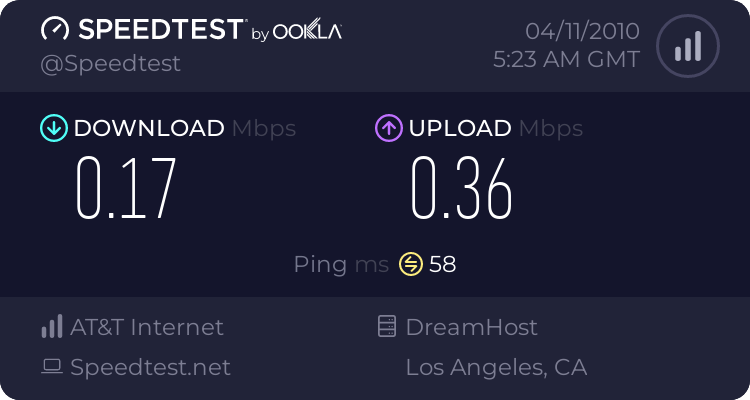
Its downloading at around 24kbps.
I tried closeing programs that I wasn't using to see if it was that was the probelm, it wasn't.
I don't know if its my internet connection.
This computer is waaaay to new for me becasue Im not even sure what im doing half of the time.
Any one know what might be wrong?
 

My Computer My Computer

OS
OS

My Computer My Computer

Computer type
PC/Desktop
Computer Manufacturer/Model Number
Dell XPS 420
OS
Windows 10, Home Clean Install
CPU
Intel Core2 processsor Q8200(2.33Ghz 1333FSB) Quad Core Tech
Motherboard
Dell
Memory
6 gb
Graphics Card(s)
ATI Radeon 256MB HD3650
Sound Card
Intergrated 7.1 Channel Audio
Monitor(s) Displays
Dell SP2009W 20"
Hard Drives
640 GB Serial ATA Hard drive
Cooling
Fan
Keyboard
Dell USB Keyboard
Mouse
Dell Premium Optical USB
Internet Speed
DSL 2.85
Welcome Gomanman :D


Tell us about your type of internet connection
 

My Computer My Computer

Computer type
PC/Desktop
Computer Manufacturer/Model Number
Built them myself, Science Experiments !
OS
Win7 Enterprise, Win7 x86 (Ult 7600), Win7 x64 Ult 7600, TechNet RTM on AMD x64 (2.8Ghz)
CPU
AMD fx8350 4ghz, AMD-32 2400mhz, AMD-64 3200mhz, AMDx64 2.8G
Motherboard
SIS 755, ECS-K8M890M-M (Ult 7600), GigaByte & others
Memory
2gb, 4gb on the Ult 7600, 4gb on Technet RTM, 32gb on FX8350
Graphics Card(s)
Draw my own Graphics, several nVidia cards
Sound Card
on motherboard
Monitor(s) Displays
19" flat scr, 28" I-Inc widescr,22" Emprex Widescr, 23" Acer
Screen Resolution
1280 x 1024, 1440 x 900, 1920 x 1080
Hard Drives
6 pata Ide HD's & 2 Sata HD's
added 80gb external on Ult 7600 computer,
numerous extra 1tb, 2TB, 3Tb SATA HD's
A collection of ext HD Docks w/ HDs
PSU
430w, 550w, 600w, 700, 800, etc
Case
All Generic Full Towers
Cooling
Open Air & a few fans, some w/ colored LEDs
Keyboard
Compaq & Dell recycled from GoodWill
Mouse
Made in China Optical Wired Mouse
Internet Speed
Fast Cable InterNet
Antivirus
AVG Free on 24 different Desktops, NO Problems!
Browser
IE 8 is preferred, but use FireFox sometimes
Other Info
Linksys Routers, switches, & Hubs
Too Many USB Flash Drives to count, Biggest is 64GB !
Eight computers in my home network.
Sixteen computers at my business network.
Linked via TeamViewer !
Lots of old used spare computer parts everywhere!
From your description it sounds that only the downloads are slow. Is that from all sites are just from a specific site (could be their sever). Are other parts of the system also slow (opening explorer pages, opening pictures, problems with videos, etc.).
 

My Computer My Computer

Computer Manufacturer/Model Number
HP, Dell, Gateway, Toshiba - 4 laptops and 2 desktops
OS
Vista, Windows7, Mint Mate, Zorin, Windows 8
CPU
from 1.6GHz Duo to i7
Monitor(s) Displays
2x HP w2207
Hard Drives
5x HDD, 7x SSD, 12x Externals
Keyboard
with trackball - no mices
Mouse
Trackball mice
Internet Speed
DSL 6000
Well, Videos load slowly, sometimes pages take a while to load and like I had said before my downloads are at 24kbps.
As for me internet connection...it says 2WIRE300, Exllecent, Radio Type 802, its AT&T.

As for Local Area Connection Status
IPv4: INternet
IPv6: No network access
Media state: Enabled
Speed: 100.0Mbps

Bytes sent:821k Received 15,16,615,929.
Im going to to try the Clean boot for now and see what happens.
Also I thought this might help find my problem faster
 
Last edited:

My Computer My Computer

OS
OS
Just tryed clean reboot.
While my computer was trying to shut down, it froze completely.
Another thing I might add is that task manager almost always stays at 20-29% Physical memory and CPU usage will randomly jump to 50%+ for like half a second.

EDIT:
i just read another thread that gave me an idea, it said slow internet can be casue by bad fliters.
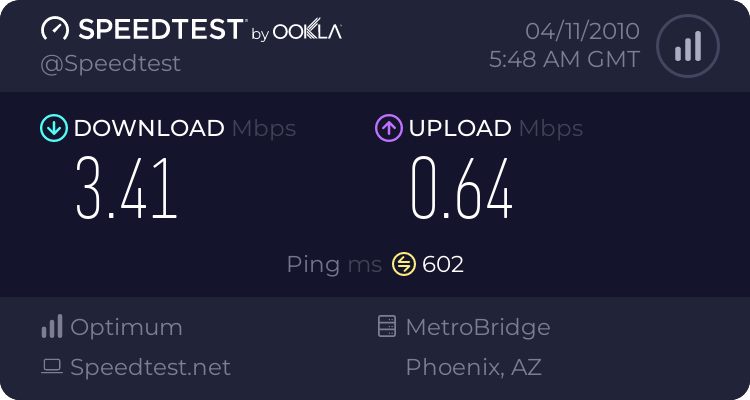
I checked to see it and switched it with another one, my speed in downloads went up to 300kbps.
Here is another speed test

Now what I want to know is, is this an alright speed for my for the specs on my computer? or might there still be something wrong.
Sorry for so many posts.
 

My Computer My Computer

OS
OS
Also try unchecking IPv6 in your connection properties

My recent speed test:


Attachments

  • IPv6_unchecked_snip.JPG
    IPv6_unchecked_snip.JPG
    77.5 KB · Views: 222

My Computer My Computer

Computer type
PC/Desktop
Computer Manufacturer/Model Number
Built them myself, Science Experiments !
OS
Win7 Enterprise, Win7 x86 (Ult 7600), Win7 x64 Ult 7600, TechNet RTM on AMD x64 (2.8Ghz)
CPU
AMD fx8350 4ghz, AMD-32 2400mhz, AMD-64 3200mhz, AMDx64 2.8G
Motherboard
SIS 755, ECS-K8M890M-M (Ult 7600), GigaByte & others
Memory
2gb, 4gb on the Ult 7600, 4gb on Technet RTM, 32gb on FX8350
Graphics Card(s)
Draw my own Graphics, several nVidia cards
Sound Card
on motherboard
Monitor(s) Displays
19" flat scr, 28" I-Inc widescr,22" Emprex Widescr, 23" Acer
Screen Resolution
1280 x 1024, 1440 x 900, 1920 x 1080
Hard Drives
6 pata Ide HD's & 2 Sata HD's
added 80gb external on Ult 7600 computer,
numerous extra 1tb, 2TB, 3Tb SATA HD's
A collection of ext HD Docks w/ HDs
PSU
430w, 550w, 600w, 700, 800, etc
Case
All Generic Full Towers
Cooling
Open Air & a few fans, some w/ colored LEDs
Keyboard
Compaq & Dell recycled from GoodWill
Mouse
Made in China Optical Wired Mouse
Internet Speed
Fast Cable InterNet
Antivirus
AVG Free on 24 different Desktops, NO Problems!
Browser
IE 8 is preferred, but use FireFox sometimes
Other Info
Linksys Routers, switches, & Hubs
Too Many USB Flash Drives to count, Biggest is 64GB !
Eight computers in my home network.
Sixteen computers at my business network.
Linked via TeamViewer !
Lots of old used spare computer parts everywhere!

My Computer My Computer

Computer type
PC/Desktop
Computer Manufacturer/Model Number
Dell XPS 420
OS
Windows 10, Home Clean Install
CPU
Intel Core2 processsor Q8200(2.33Ghz 1333FSB) Quad Core Tech
Motherboard
Dell
Memory
6 gb
Graphics Card(s)
ATI Radeon 256MB HD3650
Sound Card
Intergrated 7.1 Channel Audio
Monitor(s) Displays
Dell SP2009W 20"
Hard Drives
640 GB Serial ATA Hard drive
Cooling
Fan
Keyboard
Dell USB Keyboard
Mouse
Dell Premium Optical USB
Internet Speed
DSL 2.85
Your computers specs have nothing to do with how fast you download stuff. This problem has to do with your network or your ISP. I have had AT&T DSL before and I had a lot of trouble with it. I now have cable internet and couldn't be happier. Your download speeds in your speed test are pretty good and normal for AT&T DSL's 1.5mbps package. The physical memory and CPU spikes are normal. You could use less memory if you disable some of the start up programs and get rid of some of the bloat that HP puts on their computers, but that is a whole new thread.
 

My Computer My Computer

Computer Manufacturer/Model Number
Asus K60IJ
OS
Windows 7 Ultimate x64
CPU
Intel Pentium Dual Core T4200
Motherboard
HP Laptop
Memory
4gb PC-6400
Graphics Card(s)
Integrated Intel GMA 4500
Sound Card
onboard(laptop)
Monitor(s) Displays
16"
Screen Resolution
1300 X 766 with true 720p HD support
Hard Drives
320GB 5400RPM
Mouse
Microsoft 3000 laptop mouse
Internet Speed
15mbit+ down and 768kbit up
Other Info
1TB external Western Digital Essentials HDD
I have had AT&T DSL before and I had a lot of trouble with it. I now have cable internet and couldn't be happier
It's funny how life can be. Friends in the neighborhood had cable and were very unhappy and now have ATT and are happy. Just the opposite to your experience.
 

My Computer My Computer

Computer Manufacturer/Model Number
HP, Dell, Gateway, Toshiba - 4 laptops and 2 desktops
OS
Vista, Windows7, Mint Mate, Zorin, Windows 8
CPU
from 1.6GHz Duo to i7
Monitor(s) Displays
2x HP w2207
Hard Drives
5x HDD, 7x SSD, 12x Externals
Keyboard
with trackball - no mices
Mouse
Trackball mice
Internet Speed
DSL 6000
Mom! Why is my internet so slow! Finally fast.com HAHA!

A lot of ppl end up having to have their ADSL settings tweaked after installation.
I've read lots of forum replies where new subscribers had to call their carrier support
and have their tech guy tweak some settings, with favorable results.

How quickly your call gets thru to them is another matter.
 

My Computer My Computer

OS
Windows 7 Premium
My father was having this problem before we secured his connection. Seems like a few neighbors were leeching his wireless and slowing his already slow connection.
 

My Computer My Computer

Computer Manufacturer/Model Number
Intel
OS
Windows 7 Ulti x64
CPU
QX6700
Motherboard
975XBX2
Memory
6G Corsair DDR2 6400
Graphics Card(s)
Nvidia GTX 470
Monitor(s) Displays
BenQ 24/Princeton 19
Screen Resolution
1920X1200/1280X1024
Hard Drives
4X500G 4X1TB 2x2TB Esata
PSU
Rosewill 950W
Case
Thermaltake
Cooling
Koolance Exos 2.5
Keyboard
MS Natural 4000
Mouse
Kensington Expert Ball
Internet Speed
DSL
My father was having this problem before we secured his connection. Seems like a few neighbors were leeching his wireless and slowing his already slow connection.

Looks like you had a few Jennifers in the neighborhood.
 

My Computer My Computer

Computer Manufacturer/Model Number
HP, Dell, Gateway, Toshiba - 4 laptops and 2 desktops
OS
Vista, Windows7, Mint Mate, Zorin, Windows 8
CPU
from 1.6GHz Duo to i7
Monitor(s) Displays
2x HP w2207
Hard Drives
5x HDD, 7x SSD, 12x Externals
Keyboard
with trackball - no mices
Mouse
Trackball mice
Internet Speed
DSL 6000
Back
Top