My Office Icons are broken

shucanons

New member
Local time
6:53 PM
Messages
6
hey guys... i need ur help
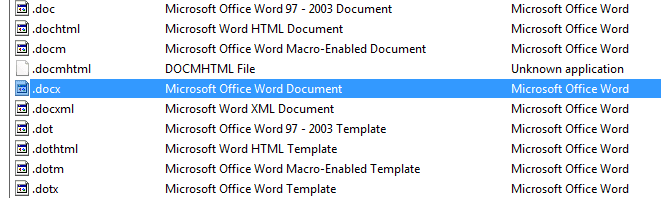
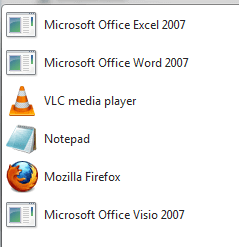
i noticed that some of my icons are broken, i tried to fix it by deleting the icon cache.db and restarting the windows but the icons didn't came back!

here's a ss of the error
bdldg2.png
 

My Computer My Computer

Computer Manufacturer/Model Number
Dell Inspiron 1545
OS
Windows 7 Professional Build 7600 x64
CPU
Intel(R) Core(TM)2 CPU T6400 @ 2.00GHz 2.00GHz
Motherboard
Dell Inspiron 1545
Memory
3 GB dual DDR2 SDRAM @ 800 MHz.
Graphics Card(s)
Intel GMA X4500MHD
Sound Card
IDT 92HD71B7 @ Intel 82801IB ICH9
Monitor(s) Displays
15.6" widescreen
Screen Resolution
1366x768
Hard Drives
250 GB SATA at 5400 RPM.
Keyboard
Standard Notebook Keybord
Mouse
Touchpad or a cheap chinese USB mouse
Internet Speed
1,5mb (T1)
One solution, if it is important to you, is to reinstall the programs. Another possibility, if it is an option with the program, is to do a repair install.
If it were me I would just do a system restore from a point before the problem.
 

My Computer My Computer

Computer type
PC/Desktop
Computer Manufacturer/Model Number
Dell XPS 420
OS
Windows 10, Home Clean Install
CPU
Intel Core2 processsor Q8200(2.33Ghz 1333FSB) Quad Core Tech
Motherboard
Dell
Memory
6 gb
Graphics Card(s)
ATI Radeon 256MB HD3650
Sound Card
Intergrated 7.1 Channel Audio
Monitor(s) Displays
Dell SP2009W 20"
Hard Drives
640 GB Serial ATA Hard drive
Cooling
Fan
Keyboard
Dell USB Keyboard
Mouse
Dell Premium Optical USB
Internet Speed
DSL 2.85
i also recommend a reinstall, or just do this:
right click: properties > shortcut > change icon

icons are located in:
C:\Program Files\Microsoft Office
 

My Computer My Computer

OS
Windows 7 Ultimate 32-bit
One solution, if it is important to you, is to reinstall the programs. Another possibility, if it is an option with the program, is to do a repair install.
If it were me I would just do a system restore from a point before the problem.
office don't uninstall the setup gets an error, didn't tried system restore, thanks for the reply ^^
Check this thread:

http://www.sevenforums.com/general-d...ing-icons.html

I see absolutely no need to re-install an application to fix the icons. :huh:
already saw this thread, deleting the iconcache.db and restarting the pc doesn't resolve the problem.
i also recommend a reinstall, or just do this:
right click: properties > shortcut > change icon

icons are located in:
C:\Program Files\Microsoft Office
there isn't how to change the icons. look:
2u633gm.png

the Change Icon button is disabled.
 

My Computer My Computer

Computer Manufacturer/Model Number
Dell Inspiron 1545
OS
Windows 7 Professional Build 7600 x64
CPU
Intel(R) Core(TM)2 CPU T6400 @ 2.00GHz 2.00GHz
Motherboard
Dell Inspiron 1545
Memory
3 GB dual DDR2 SDRAM @ 800 MHz.
Graphics Card(s)
Intel GMA X4500MHD
Sound Card
IDT 92HD71B7 @ Intel 82801IB ICH9
Monitor(s) Displays
15.6" widescreen
Screen Resolution
1366x768
Hard Drives
250 GB SATA at 5400 RPM.
Keyboard
Standard Notebook Keybord
Mouse
Touchpad or a cheap chinese USB mouse
Internet Speed
1,5mb (T1)
You can't change an icon for any Office program.
 

My Computer My Computer

Computer Manufacturer/Model Number
Cheap $399.00 E-Machine
OS
Windows 7 Pro & Vista Home Premium
CPU
Athlon 64 3800+ (Orleans) 2.40GHz
Motherboard
Winfast
Memory
2GB DDR2 RAM DIMM
Graphics Card(s)
NVIDIA GeForce 8500 GT 512 MB memory HDMI out
Sound Card
creative X-Fi Exteme 7..1 channel
Monitor(s) Displays
Acer V223W 22" widescreen DVI
Screen Resolution
1680x1050
Hard Drives
WDC WD5 500GB
WDC WD25 250GB
PSU
OCZ 550 watt
Case
Gateway
Cooling
2 fans
Keyboard
Dell
Mouse
Sony Vaio
Internet Speed
18MB/s down - .72MB /s up
yeah, i got a clue looking at the C:\Windows\installer folder I figured out that there's no folder or .msi package related to the office there, for some reason they're gone, and i think thats because of this tha the icons are gone =/
 

My Computer My Computer

Computer Manufacturer/Model Number
Dell Inspiron 1545
OS
Windows 7 Professional Build 7600 x64
CPU
Intel(R) Core(TM)2 CPU T6400 @ 2.00GHz 2.00GHz
Motherboard
Dell Inspiron 1545
Memory
3 GB dual DDR2 SDRAM @ 800 MHz.
Graphics Card(s)
Intel GMA X4500MHD
Sound Card
IDT 92HD71B7 @ Intel 82801IB ICH9
Monitor(s) Displays
15.6" widescreen
Screen Resolution
1366x768
Hard Drives
250 GB SATA at 5400 RPM.
Keyboard
Standard Notebook Keybord
Mouse
Touchpad or a cheap chinese USB mouse
Internet Speed
1,5mb (T1)

My Computer My Computer

Computer Manufacturer/Model Number
Acer Aspire 5750
OS
Windows 7 Home Premium 64bit
CPU
Intel Core i3-2310M
Motherboard
Acer OEM
Memory
8GB
Graphics Card(s)
Intel HD3000
Screen Resolution
1366x768
Hard Drives
320GB Toshiba
Hi to all

I have the same issue and more over icons are broken not only for MS Office but for some other applications.

To repair IconCache did not help - icons got standard but not as they should be.
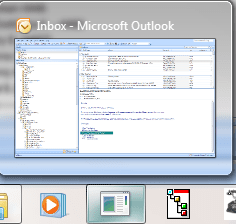
Looking in Program Files - EXE files are OK, when I create shortcut on desktop it looks fine, but when I;ve pinned it to taskbar it has wrong icon.

For some programs it helps to repair it via "programs and features" - but not all.
additional details: it started when I took ownership of C drive and enabled full control for my account

see attached files for info

Thanks to all to help me get out of that annoying problem
 

Attachments

  • 1.png
    1.png
    5.3 KB · Views: 278
  • 2.png
    2.png
    5.3 KB · Views: 14,688
  • 3.png
    3.png
    12.5 KB · Views: 14,680

My Computer My Computer

OS
Windows 7 Enterprise
Locate the iconcache.db file and delete it.

You may need to reboot
 

My Computer My Computer

Computer Manufacturer/Model Number
Cheap $399.00 E-Machine
OS
Windows 7 Pro & Vista Home Premium
CPU
Athlon 64 3800+ (Orleans) 2.40GHz
Motherboard
Winfast
Memory
2GB DDR2 RAM DIMM
Graphics Card(s)
NVIDIA GeForce 8500 GT 512 MB memory HDMI out
Sound Card
creative X-Fi Exteme 7..1 channel
Monitor(s) Displays
Acer V223W 22" widescreen DVI
Screen Resolution
1680x1050
Hard Drives
WDC WD5 500GB
WDC WD25 250GB
PSU
OCZ 550 watt
Case
Gateway
Cooling
2 fans
Keyboard
Dell
Mouse
Sony Vaio
Internet Speed
18MB/s down - .72MB /s up
to reghakr

that action does not help. before deleting iconcache.db icons were corrupted
after reboot they became standard small window with green left part (see above)

This way does not work
 

Attachments

  • 5.png
    5.png
    879 bytes · Views: 3,264

My Computer My Computer

OS
Windows 7 Enterprise
my reply was moved to MS Office forum, but issue is not only with MSOffice but also with other applications

deleting icon cache does not help - we have tried on 2 different PCs
 

My Computer My Computer

OS
Windows 7 Enterprise
Corrupt installer databases are to blame. This appears to appen with Office and Adobe pdf products. The installer database contains your .ICO or icon files. Sometimes the icons also mysteriously disappear from the porgramfiles directory aswell. I have not found a solution as of yet and this continues to happen after fresh reformats. As for reinstall or repair sometimes these fail due to the currupt installer database as is the case for me.
 
actually, yesterday I realized what was wrong...CCleaner was deleting my installer folders, and the icons that were stored on them causing this issue. To fix it you just need to Format/reinstal the program(sometimes its easier to format cause without installer folder, it became hard to uninstall some programs like office), and don't use ccleaner or disable the option that delete de installer folder.

Sorry for my english =/

And thank you all for the help ^^
 
Last edited:

My Computer My Computer

Computer Manufacturer/Model Number
Dell Inspiron 1545
OS
Windows 7 Professional Build 7600 x64
CPU
Intel(R) Core(TM)2 CPU T6400 @ 2.00GHz 2.00GHz
Motherboard
Dell Inspiron 1545
Memory
3 GB dual DDR2 SDRAM @ 800 MHz.
Graphics Card(s)
Intel GMA X4500MHD
Sound Card
IDT 92HD71B7 @ Intel 82801IB ICH9
Monitor(s) Displays
15.6" widescreen
Screen Resolution
1366x768
Hard Drives
250 GB SATA at 5400 RPM.
Keyboard
Standard Notebook Keybord
Mouse
Touchpad or a cheap chinese USB mouse
Internet Speed
1,5mb (T1)
I REGISTERED ONLY TO REPLY THIS......................THANK YOU!!

Corrupt installer databases are to blame. This appears to appen with Office and Adobe pdf products. The installer database contains your .ICO or icon files. Sometimes the icons also mysteriously disappear from the porgramfiles directory aswell. I have not found a solution as of yet and this continues to happen after fresh reformats. As for reinstall or repair sometimes these fail due to the currupt installer database as is the case for me.

TRUE

actually, yesterday I realized what was wrong...CCleaner was deleting my installer folders, and the icons that were stored on them causing this issue. To fix it you just need to Format/reinstal the program(sometimes its easier to format cause without installer folder, it became hard to uninstall some programs like office), and don't use ccleaner or disable the option that delete de installer folder.

Sorry for my english =/

And thank you all for the help ^^

TRUE

This happened to me too.
Actually C:\Windows\Installer contains the databases for installed programs and also contains .ICO files in it.
For MS WORD 2003 my Folder is C:\Windows\Installer\{90110409-60000-11D38CFE-0150048383C9} this folder has the file wordicon.exe for the icon.

The moron software CCleaner which i had too must have deleted this unnoticed.

The Solution only is to somehow repair or reinstall. (But due to missing files uninstall may giv problems, i think).
 

My Computer My Computer

OS
Windows 7 Ultimate 32bit
CPU
Intel Q6600
Motherboard
Asus P5Q
Memory
Corsair XMS2 2GB
Graphics Card(s)
ATI 4850
Back
Top