My PC is running at max CPU usage

fredrok46

New member
Local time
6:18 AM
Messages
33
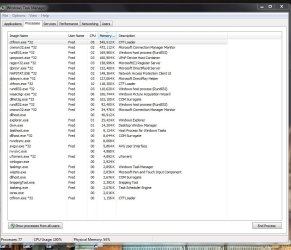
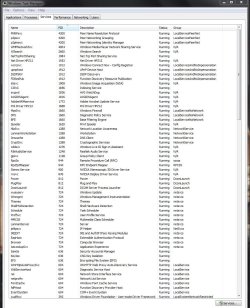
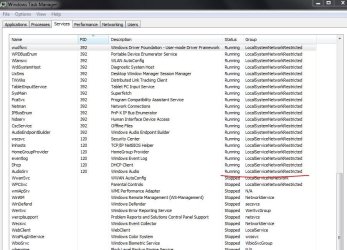
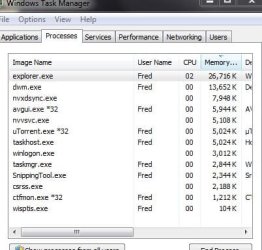
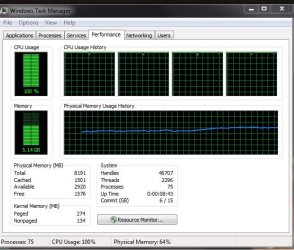
All of a sudden My PC is running at max CPU usage and lots of Services and Processes running that should not be. I can't figure out why. I try and end the processes and they just come back on. AVG and Malwarebytes turn up nothing. Likewise Event Viewer. Services are set correctly. I'll try to explain with screenshots of Task manager.
As you can see from the first one my CPU usage is maxed at idle. The second one shows the Processes running. The third and fourth show the Services running and the last one shows what processes run normally. I was able to capture that last one real quick because when I restart the PC it takes about 30 seconds for the unwanted ones to start up. Appreciate any thoughts

I'm running Windows 7 x64 on an HP-Pavilion m8430f
Intel Core 2 Quad CPU Q6600 @ 2.40GHz.
 

Attachments
  • CPU Usage.JPG
    CPU Usage.JPG
    63.2 KB · Views: 25
  • Process Running.JPG
    Process Running.JPG
    100.8 KB · Views: 2
  • Services Running.JPG
    Services Running.JPG
    162.6 KB · Views: 2
  • Services Running 2.JPG
    Services Running 2.JPG
    104.7 KB · Views: 0
  • At idle normally.JPG
    At idle normally.JPG
    35.9 KB · Views: 24

My Computer

Computer Manufacturer/Model Number
HP Pavilion Media Center m8430f Desktop PC
OS
Windows 7 x64
CPU
Intel(R) Core(TM)2 Quad CPU Q6600
Motherboard
Asus IPIBL-LB
Memory
8.00 GB
Graphics Card(s)
NVIDIA GeForce 9800 GTX/9800 GTX+
Monitor(s) Displays
Samsung SyncMaster T260HD
Screen Resolution
1900X1200
Hard Drives
Hitachi 700GB HDS721075KLA330
PSU
BFG GX5500
have you tried going into the computer management section of the administrative tools in the control panel and setting them to not turn on automatically? Also; i would check for a possible bios update and go to support site for whoever made your system board and look for a possible update for the chipset driver(s) as a update for one or both of those may help to resolve the issue(s)
 

My Computer

Computer type
PC/Desktop
Computer Manufacturer/Model Number
custom built
OS
Windows 7 ultimate 64-bit
CPU
Intel I7 2600K 3.4ghz
Motherboard
Asus Evo P8P67
Memory
Corsair 16gb ddr3 1600mhz
Graphics Card(s)
Nvidia Geforce gt 430
Sound Card
Sound Blaster Titanium x-fi pci express
Monitor(s) Displays
Dell E198WFP
Hard Drives
1 western digital 2TB drive.
PSU
Antec 1200 watt
Case
Inwin Dragon Rider
Cooling
6 case supplied cooling fans
Keyboard
logitech mk700
Mouse
logitech m705
Internet Speed
25-50mbps download; 10mbps upload(i think)
Antivirus
avg free 2014
Browser
mozilla firefox
Other Info
Also have a pretty bad speaker setup which is a klipsch promedia 5.1 surround speaker setup with huge subwoofer and lg blu ray player/writer. Also a hp officejet pro 8600 plus wireless all in one and a logitech s7500 webcam.
1. Do not muck around with the processes. You could make more damage than good.

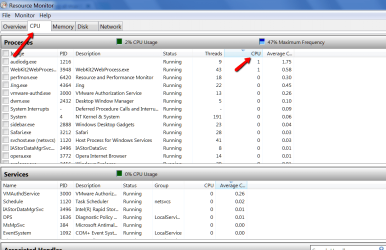
2. Post a picture of Resource Monitor > CPU tab like my sample below. Show the biggest users on top in CPU. That will be a lot more telling than the Task Manager pictures. Post the Resource Monitor snip.
 

Attachments

  • 2014-12-31_2137.png
    2014-12-31_2137.png
    42.1 KB · Views: 0

My Computer

Computer Manufacturer/Model Number
HP, Dell, Gateway, Toshiba - 4 laptops and 2 desktops
OS
Vista, Windows7, Mint Mate, Zorin, Windows 8
CPU
from 1.6GHz Duo to i7
Monitor(s) Displays
2x HP w2207
Hard Drives
5x HDD, 7x SSD, 12x Externals
Keyboard
with trackball - no mices
Mouse
Trackball mice
Internet Speed
DSL 6000
Just wanted to get back to you on this. I was able to fix the problem with system restore. So I never did find out what caused the problem in the first place but that's a small price to pay.
Anyway, thank you for the help.
 

My Computer

Computer Manufacturer/Model Number
HP Pavilion Media Center m8430f Desktop PC
OS
Windows 7 x64
CPU
Intel(R) Core(TM)2 Quad CPU Q6600
Motherboard
Asus IPIBL-LB
Memory
8.00 GB
Graphics Card(s)
NVIDIA GeForce 9800 GTX/9800 GTX+
Monitor(s) Displays
Samsung SyncMaster T260HD
Screen Resolution
1900X1200
Hard Drives
Hitachi 700GB HDS721075KLA330
PSU
BFG GX5500
Technology means trouble and has it's mysteries - fortunately because else we would be out of a job, LOL.
 

My Computer

Computer Manufacturer/Model Number
HP, Dell, Gateway, Toshiba - 4 laptops and 2 desktops
OS
Vista, Windows7, Mint Mate, Zorin, Windows 8
CPU
from 1.6GHz Duo to i7
Monitor(s) Displays
2x HP w2207
Hard Drives
5x HDD, 7x SSD, 12x Externals
Keyboard
with trackball - no mices
Mouse
Trackball mice
Internet Speed
DSL 6000
Back
Top