My photos have disappeared! :(

Dannywhite

Banned
Local time
11:19 AM
Messages
1
Location
Rochester, Kent, UK
Hi all, I wonder if you can help me.

I've just added a load more photos to "My Pictures". I have gone back in to look at them, and the entire library has disappeared! I have tried searching for the folders within it on the "search" function, but they are not coming up. I have checked the hard drive to see if I've accidentally deleted them, but the amount of free space is the same.

This is not the first time this has happened - the "My Videos" folder disappeared last year - never to be seen again. I just made another one then. However, I haven't got the pictures stored anywhere else.

Is there any way I can restore this? I have tried system restore but it doesn't appear to have been set up - I haven't used it.

Thanks for your time.

Kind regards

Danny White
 

My Computer My Computer

At a glance

Windows 7 Home Premium 64 bitIntel Celeron T3000 Dual Core @1.80Ghz2gbOnboard
Computer Manufacturer/Model Number
EMachines E525 notebook
OS
Windows 7 Home Premium 64 bit
CPU
Intel Celeron T3000 Dual Core @1.80Ghz
Memory
2gb
Graphics Card(s)
Onboard
Sound Card
Onboard
Monitor(s) Displays
15.6" Widescreen HD LCD
Hard Drives
230GB SATA
Hi Danny - Welcome to SevenForums.

There are a few things we need to check:

Are the folders Hidden?
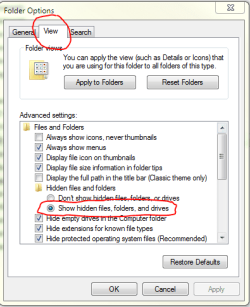
Open Windows Explorer. Click the Tools menu on the top of the menu bar, and then click on Folder Options. Click the View tab. Now place a tick in the Show hidden files, folders and drives option as shown below, and then click the Apply button.

Capture.PNG

Now go back to Explorer and see if you can find your folders.

Check to see that the photo's don't exist in other shell folders?
1. Click :orb: and in the search box type shell:PicturesLibrary and hit enter.
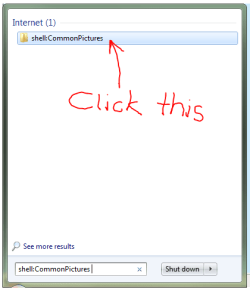
2. The result should look like this:

Capture1.PNG

3. Click the folder, and see if it takes you to your pictures.
4. Also try the same thing with these shell commands:

shell:SamplePictures
shell:SampleVideos
shell:UsersLibrariesFolder
shell:VideosLibrary
shell:My Pictures
shell:My Video
shell:Recent
shell:CommonPictures

(You can copy and paste from the text above directly into your search box to make it easier)

Do you have malware on your system that may be tampering with your folders?
Please tell us what anti-virus/malware software you have running on your PC. Please download, install, update and run Malwarebytes. Do a FULL SCAN and post the results here.

Regards,
Golden
 
Last edited:

My Computer My Computer

At a glance

Windows 10 Pro x64 ; Xubuntu x64Intel i7 860 @ 2.80 GHz O/C'ed to 4.0GHz16GB Corsair Vengance DDR3 @ 661 MHz Dual Cha...EVGA NVidia GTX 560 1024MB
Computer type
PC/Desktop
Computer Manufacturer/Model Number
Golden Mk. I.4
OS
Windows 10 Pro x64 ; Xubuntu x64
CPU
Intel i7 860 @ 2.80 GHz O/C'ed to 4.0GHz
Motherboard
Gigabyte P55A-UD3R Rev.1. Award BIOS F13
Memory
16GB Corsair Vengance DDR3 @ 661 MHz Dual Channel (9-9-9-24)
Graphics Card(s)
EVGA NVidia GTX 560 1024MB
Sound Card
Realtek Integrated
Monitor(s) Displays
Dual Samsung SyncMaster 2494HS
Screen Resolution
1920*1080 and 1920*1080
Hard Drives
1*Samsung 840 EVO 120GB SSD;
1*OCZ Vertex 2 60GB SSD;
2*Samsung F3 SpinPoint 1TB in RAID0;
1*Samsung F1 SpinPoint 1TB;
2*Western Digital 1TB External USB 3.0
1*Western Digital 500GB External USB 3.0
1*Seagate 500GB External USB 2.0
PSU
Thermaltake ToughPower QFan 750W
Case
Thermaltake Element S VK60001W2Z
Cooling
Corsair H60 Water Cooling, 2*230mm and 2*80mm case fans
Keyboard
Logitech G110
Mouse
Logitech MX518
If these were JPG file format try a search for *.jpg.

You may be better off getting and using some other file search program like Agent Ransack. I've been using for about the last week and it finds everything. I just hate the Win 7 search function and as MS would have it the built in search only finds thing MS wants you to find, hiding other things in the guise you, the users, don't need to see those things.
 

My Computer My Computer

At a glance

Windows 7 Pro x64i5 76016GBNvidia GTS450
Computer Manufacturer/Model Number
Built be Me
OS
Windows 7 Pro x64
CPU
i5 760
Motherboard
Asus P7P55D-E Pro
Memory
16GB
Graphics Card(s)
Nvidia GTS450
Sound Card
On board
Monitor(s) Displays
Dell 2007WFP Dell 1800FP
Screen Resolution
1680x1050 1280x1024
Hard Drives
Seagate 250GB & 750GB
WD 1TB
PSU
Antec 750
Case
In Win
Cooling
Cooler Master Hyper 212+
Keyboard
IBM
Mouse
MS
Back
Top