Hey all,
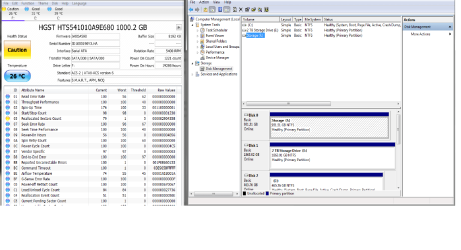
So my issue is ... I had a HDD specific for "extra storage" for games/music/pics.. etc..
it was working fine, but seems to has just disappeared...
CMD - disk part - list disk (only shows 2)
Manage - rescan disks - shows the bus where the HDD is located but (uninitialized and OFFline) but shows other 2
Disk partition from windows - only shows the 2 i have...
aside from, removing my computer cover and actually disconnecting and reconnecting..
does anyone know of another way to scan for the connected SATA HDD?
Thanks;
403Phaze
So my issue is ... I had a HDD specific for "extra storage" for games/music/pics.. etc..
it was working fine, but seems to has just disappeared...
CMD - disk part - list disk (only shows 2)
Manage - rescan disks - shows the bus where the HDD is located but (uninitialized and OFFline) but shows other 2
Disk partition from windows - only shows the 2 i have...
aside from, removing my computer cover and actually disconnecting and reconnecting..
does anyone know of another way to scan for the connected SATA HDD?
Thanks;
403Phaze
My Computer
At a glance
Windows 7 Pro 64Bit
- Computer type
- PC/Desktop
- OS
- Windows 7 Pro 64Bit