
You are using an out of date browser. It may not display this or other websites correctly.
You should upgrade or use an alternative browser.
You should upgrade or use an alternative browser.
My unknown unallocated drive is read only.
- Thread starter 200naveen
- Start date

Hi 200naveen
It's probably better if you start a new thread for your issue.
You can answer jumanji's questions (post# 9) in that new thread.
Don't initialize the drive.
jumanji provided the best course of action to take at the moment. Without information about the drive, there's not much more to suggest.
Bill
.
It's probably better if you start a new thread for your issue.
You can answer jumanji's questions (post# 9) in that new thread.
Don't initialize the drive.
jumanji provided the best course of action to take at the moment. Without information about the drive, there's not much more to suggest.
Bill
.
My Computer
At a glance
x64 (6.3.9600) Win8.1 Pro & soon dual boot x6...AMD A6-3420M APU with Radeon(tm) HD Graphics6.00 GBAMD Radeon(TM) HD 6520G
- Computer type
- Laptop
- Computer Manufacturer/Model Number
- HP Pavilion dv6-6c10us
- OS
- x64 (6.3.9600) Win8.1 Pro & soon dual boot x64 (6.1.7601) Win7_SP1 HomePrem
- CPU
- AMD A6-3420M APU with Radeon(tm) HD Graphics
- Motherboard
- Hewlett-Packard 1805
- Memory
- 6.00 GB
- Graphics Card(s)
- AMD Radeon(TM) HD 6520G
- Sound Card
- (1) AMD High Definition Audio Device (2) IDT High Definiti
- Monitor(s) Displays
- HP W2072a 20" LCD (1600 x 900) @ 60 Hz
- Screen Resolution
- 1366 x 768 x 32 bits (4294967296 colors) @ 60 Hz
- Hard Drives
- ST640LM0 00 HM641JI SATA Disk Device
- Keyboard
- Logitech k520 wireless KB
- Mouse
- Logitech m320 wireless mouse (bundled with KB)
- Internet Speed
- 15/5 | 54 MB Wireless 'n'
- Antivirus
- Realtime: Defender or Avast | On-demand: Malwarebytes, ESET
- Browser
- IE 11 on Win8, IE 10 on win 7
- Other Info
- Media: [Gimp, Audacity, VLC] || Comm: [WEmail 2012, Skype] || Productivity: [OpenOffice,| Textpad] || Utils: [Sysinternals, cCleaner, Speccy, Defraggler]
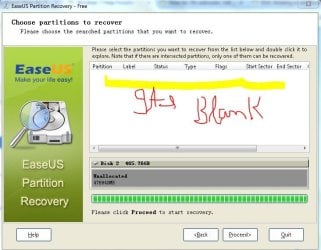
Segate 500 GB HDD unknown, not initialized, Unallocated
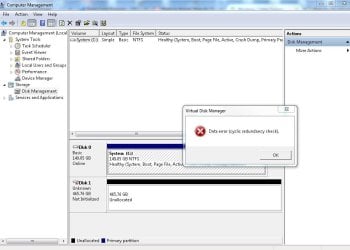
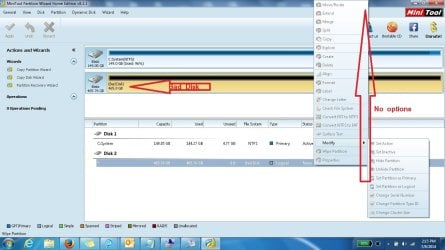
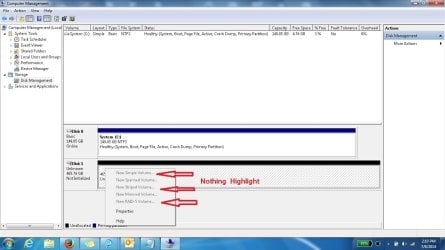
I have a segate 500 GB external HDD, It was working fine. Its have my all family photos and movies, The data is very important for me. I pluged this in a XP desktop and coping some photos, the system was very slow, So i force shutdown the system while the data copy was in progress. After this i never see my HDD in anymore. I connected in different laptops but not worked. I tried a lot of solution , (all Attached) .but not ne worked. I WANT MY DATA BACK, PLEASE HELP
I tried the (post# 9) also, but no solution :-(
I have a segate 500 GB external HDD, It was working fine. Its have my all family photos and movies, The data is very important for me. I pluged this in a XP desktop and coping some photos, the system was very slow, So i force shutdown the system while the data copy was in progress. After this i never see my HDD in anymore. I connected in different laptops but not worked. I tried a lot of solution , (all Attached) .but not ne worked. I WANT MY DATA BACK, PLEASE HELP
I tried the (post# 9) also, but no solution :-(
Attachments
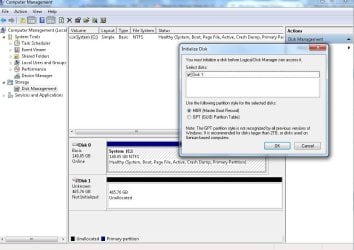
My Computer
At a glance
windows 7
- Computer type
- PC/Desktop
- OS
- windows 7
Ok I guess we can continue in this thread, but some members might not post suggestions since this thread is almost a year old.
I'll ask two members who are very good at drive recovery to take a look. Since PW flagged it as Bad Disk, it might not be possible to recover the drive. I'm also not sure if the data on the drive can be pulled off - but let's see what jumanji and Anshad have to say before calling it hopeless.
jumanji and Anshad (time zone differences - after midnight their time now) know the best tools and the proper way to run them.
Hang in there and do not try any other recovery on your own.
Bill
.
I'll ask two members who are very good at drive recovery to take a look. Since PW flagged it as Bad Disk, it might not be possible to recover the drive. I'm also not sure if the data on the drive can be pulled off - but let's see what jumanji and Anshad have to say before calling it hopeless.
jumanji and Anshad (time zone differences - after midnight their time now) know the best tools and the proper way to run them.
Hang in there and do not try any other recovery on your own.
Bill
.
My Computer
At a glance
x64 (6.3.9600) Win8.1 Pro & soon dual boot x6...AMD A6-3420M APU with Radeon(tm) HD Graphics6.00 GBAMD Radeon(TM) HD 6520G
- Computer type
- Laptop
- Computer Manufacturer/Model Number
- HP Pavilion dv6-6c10us
- OS
- x64 (6.3.9600) Win8.1 Pro & soon dual boot x64 (6.1.7601) Win7_SP1 HomePrem
- CPU
- AMD A6-3420M APU with Radeon(tm) HD Graphics
- Motherboard
- Hewlett-Packard 1805
- Memory
- 6.00 GB
- Graphics Card(s)
- AMD Radeon(TM) HD 6520G
- Sound Card
- (1) AMD High Definition Audio Device (2) IDT High Definiti
- Monitor(s) Displays
- HP W2072a 20" LCD (1600 x 900) @ 60 Hz
- Screen Resolution
- 1366 x 768 x 32 bits (4294967296 colors) @ 60 Hz
- Hard Drives
- ST640LM0 00 HM641JI SATA Disk Device
- Keyboard
- Logitech k520 wireless KB
- Mouse
- Logitech m320 wireless mouse (bundled with KB)
- Internet Speed
- 15/5 | 54 MB Wireless 'n'
- Antivirus
- Realtime: Defender or Avast | On-demand: Malwarebytes, ESET
- Browser
- IE 11 on Win8, IE 10 on win 7
- Other Info
- Media: [Gimp, Audacity, VLC] || Comm: [WEmail 2012, Skype] || Productivity: [OpenOffice,| Textpad] || Utils: [Sysinternals, cCleaner, Speccy, Defraggler]
- Local time
- 5:00 AM
- Messages
- 562
Hi Naveen
The CRC error when creating a new partition indicates severely damaged disk surface ( lots of bad sectors ). I higly recommend not to run any data recovery tools against the disk until we know the extend of surface defect. Please follow the below steps.
1. Download "HDTunePro" trial from HD Tune website
2. Run the tool and select your external HDD for testing (default might be the internal one ).
3. Navigate to the "Health" tab and click the "COpy Information to the clipboard" button.
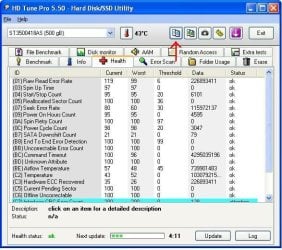
Then open "Notepad" and select "Edit --> Paste" or "Ctrl + V". Save the file in the name SMART and upload it with next reply.
4. Now navigate to the "Error Scan" tab and press "Start" button. Make sure quick is not selected and wait for the scan to finish. When done, press the small camera icon to save a snapshot and post it with next reply.
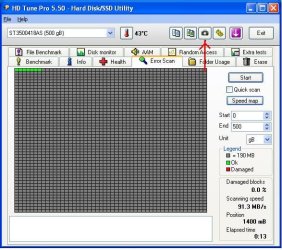
The CRC error when creating a new partition indicates severely damaged disk surface ( lots of bad sectors ). I higly recommend not to run any data recovery tools against the disk until we know the extend of surface defect. Please follow the below steps.
1. Download "HDTunePro" trial from HD Tune website
2. Run the tool and select your external HDD for testing (default might be the internal one ).
3. Navigate to the "Health" tab and click the "COpy Information to the clipboard" button.
Then open "Notepad" and select "Edit --> Paste" or "Ctrl + V". Save the file in the name SMART and upload it with next reply.
4. Now navigate to the "Error Scan" tab and press "Start" button. Make sure quick is not selected and wait for the scan to finish. When done, press the small camera icon to save a snapshot and post it with next reply.
My Computer
At a glance
Windows 7 Ultimate x64
- Computer type
- PC/Desktop
- OS
- Windows 7 Ultimate x64
Anshad, you're up late (02:06 your time)
I wasn't certain if the CRCs were reported against disk 0 or disk 1. HDtune will give a definitive answer on the health of the ext drive.
Thanks for dropping in and taking a look. I'm sure I'll pick up some good information watching this thread.
Bill
.
I wasn't certain if the CRCs were reported against disk 0 or disk 1. HDtune will give a definitive answer on the health of the ext drive.
Thanks for dropping in and taking a look. I'm sure I'll pick up some good information watching this thread.
Bill
.
My Computer
At a glance
x64 (6.3.9600) Win8.1 Pro & soon dual boot x6...AMD A6-3420M APU with Radeon(tm) HD Graphics6.00 GBAMD Radeon(TM) HD 6520G
- Computer type
- Laptop
- Computer Manufacturer/Model Number
- HP Pavilion dv6-6c10us
- OS
- x64 (6.3.9600) Win8.1 Pro & soon dual boot x64 (6.1.7601) Win7_SP1 HomePrem
- CPU
- AMD A6-3420M APU with Radeon(tm) HD Graphics
- Motherboard
- Hewlett-Packard 1805
- Memory
- 6.00 GB
- Graphics Card(s)
- AMD Radeon(TM) HD 6520G
- Sound Card
- (1) AMD High Definition Audio Device (2) IDT High Definiti
- Monitor(s) Displays
- HP W2072a 20" LCD (1600 x 900) @ 60 Hz
- Screen Resolution
- 1366 x 768 x 32 bits (4294967296 colors) @ 60 Hz
- Hard Drives
- ST640LM0 00 HM641JI SATA Disk Device
- Keyboard
- Logitech k520 wireless KB
- Mouse
- Logitech m320 wireless mouse (bundled with KB)
- Internet Speed
- 15/5 | 54 MB Wireless 'n'
- Antivirus
- Realtime: Defender or Avast | On-demand: Malwarebytes, ESET
- Browser
- IE 11 on Win8, IE 10 on win 7
- Other Info
- Media: [Gimp, Audacity, VLC] || Comm: [WEmail 2012, Skype] || Productivity: [OpenOffice,| Textpad] || Utils: [Sysinternals, cCleaner, Speccy, Defraggler]
My Computer
At a glance
windows 7
- Computer type
- PC/Desktop
- OS
- windows 7
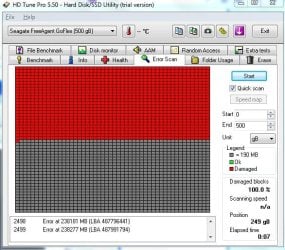
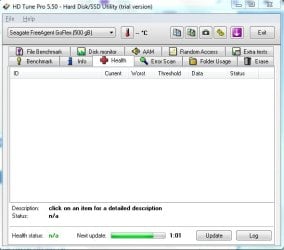
That does not look good, but...
Anshad said
4. Now navigate to the "Error Scan" tab and press "Start" button.
Make sure quick is not selected and wait for the scan to finish.
If that scan is not finished. let it finish
if it is done then
UNtick Quick scan
Press Start
This is a scanning operation and should have no bearing on the health of the drive (i.e. it's not repairing anything, just reading).
When the NOT quick scan is completed (I suspect it might take a while) - post the resulting screen shot.
Thanks,
Bill
.
Anshad said
4. Now navigate to the "Error Scan" tab and press "Start" button.
Make sure quick is not selected and wait for the scan to finish.
If that scan is not finished. let it finish
if it is done then
UNtick Quick scan
Press Start
This is a scanning operation and should have no bearing on the health of the drive (i.e. it's not repairing anything, just reading).
When the NOT quick scan is completed (I suspect it might take a while) - post the resulting screen shot.
Thanks,
Bill
.
My Computer
At a glance
x64 (6.3.9600) Win8.1 Pro & soon dual boot x6...AMD A6-3420M APU with Radeon(tm) HD Graphics6.00 GBAMD Radeon(TM) HD 6520G
- Computer type
- Laptop
- Computer Manufacturer/Model Number
- HP Pavilion dv6-6c10us
- OS
- x64 (6.3.9600) Win8.1 Pro & soon dual boot x64 (6.1.7601) Win7_SP1 HomePrem
- CPU
- AMD A6-3420M APU with Radeon(tm) HD Graphics
- Motherboard
- Hewlett-Packard 1805
- Memory
- 6.00 GB
- Graphics Card(s)
- AMD Radeon(TM) HD 6520G
- Sound Card
- (1) AMD High Definition Audio Device (2) IDT High Definiti
- Monitor(s) Displays
- HP W2072a 20" LCD (1600 x 900) @ 60 Hz
- Screen Resolution
- 1366 x 768 x 32 bits (4294967296 colors) @ 60 Hz
- Hard Drives
- ST640LM0 00 HM641JI SATA Disk Device
- Keyboard
- Logitech k520 wireless KB
- Mouse
- Logitech m320 wireless mouse (bundled with KB)
- Internet Speed
- 15/5 | 54 MB Wireless 'n'
- Antivirus
- Realtime: Defender or Avast | On-demand: Malwarebytes, ESET
- Browser
- IE 11 on Win8, IE 10 on win 7
- Other Info
- Media: [Gimp, Audacity, VLC] || Comm: [WEmail 2012, Skype] || Productivity: [OpenOffice,| Textpad] || Utils: [Sysinternals, cCleaner, Speccy, Defraggler]
- Local time
- 5:00 AM
- Messages
- 562
Definitely doesn't look good :shock:. If a full scan also shows complete bad sectors, it probably means surface defect caused by a head crash. In that case, only a professional data recovery lab can help you. But i would recommend opening the disk enclosure and connecting the disk to a direct SATA port for an accurate diagnostic. Removing the USB-SATA bridge will also let the disk controller to access SMART logs.
My Computer
At a glance
Windows 7 Ultimate x64
- Computer type
- PC/Desktop
- OS
- Windows 7 Ultimate x64
Similar threads
- Replies
- 2
- Views
- 8K
- Replies
- 5
- Views
- 4K


- Replies
- 31
- Views
- 7K
- Replies
- 3
- Views
- 4K
