renarde
New member
- Local time
- 10:51 AM
- Messages
- 17
Greetings! Thanks in advance for your help. I'm stumped. Jumanji or Brink, I'm hoping you can help.
I'm an IT professional, and am usually pretty good at resolving my computer issues, but I haven't been able to fix this one. I use Centos 5 at work, Centos 6 on a home server and am comfortable using command prompts in Windows. I use Windows 7 Ultimate x64 on most of my home machines.
I have a 3Tb external Hitachi drive, which was formatted as GPT. It contains a lot of hard to replace media files.
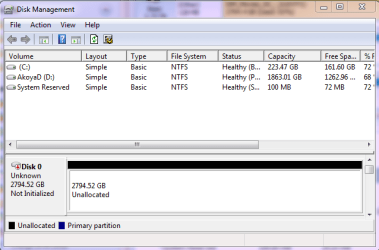
My system lost power while Windows was booting and the drives in the external cases were spinning up. Now when I open Disk Management, I get the dreaded "You must initialize a disk before Logical Disk Manager can access it" message. I know better than to let it initialize and format my drive! I hit "Cancel", and the drive shows as "Not Initialized" "Unallocated".
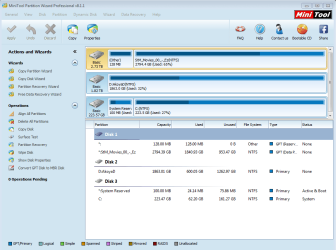
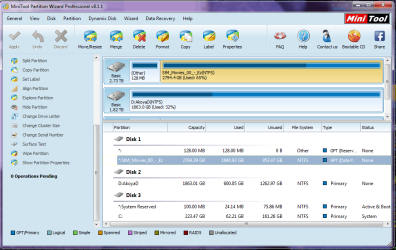
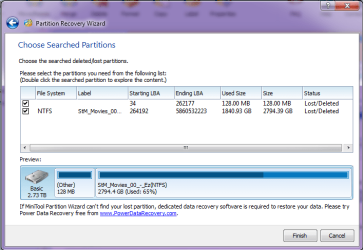
Following Jumanji's excellent instructions, I am using Partition Wizard Pro v8.1.1 and have tried 3 times to recover the partition and assign a drive letter. Partition Wizard sees the full partition, and when I explore it, the files appear to be intact and readable. So it looks like I'll be able to recover the partition.
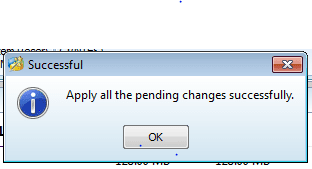
Next I choose both partitions on the 3Tb drive (the main one and the 128Mb stub that Windows requires) assign a drive letter to the main partition and click "Apply". Then Partition Wizard says "Updating partition information" and "Apply all the pending changes successfully".
It looks like the partition was recovered.
But when I go back into Disk Management and rescan the disks, the drive still shows as "Not Initialized" "Unallocated". I've tried rebooting my system.... the drive still shows as "Not Initialized" "Unallocated".
If I must, I will use a data recovery program to try to pull off the data. But since Partition Wizard can see the partition, it seems to me that it must be possible to fix whatever got corrupted and is making the disk unreadable to Windows.
Many thanks for your time and expertise,
April
I'm an IT professional, and am usually pretty good at resolving my computer issues, but I haven't been able to fix this one. I use Centos 5 at work, Centos 6 on a home server and am comfortable using command prompts in Windows. I use Windows 7 Ultimate x64 on most of my home machines.
I have a 3Tb external Hitachi drive, which was formatted as GPT. It contains a lot of hard to replace media files.
My system lost power while Windows was booting and the drives in the external cases were spinning up. Now when I open Disk Management, I get the dreaded "You must initialize a disk before Logical Disk Manager can access it" message. I know better than to let it initialize and format my drive! I hit "Cancel", and the drive shows as "Not Initialized" "Unallocated".
Following Jumanji's excellent instructions, I am using Partition Wizard Pro v8.1.1 and have tried 3 times to recover the partition and assign a drive letter. Partition Wizard sees the full partition, and when I explore it, the files appear to be intact and readable. So it looks like I'll be able to recover the partition.
Next I choose both partitions on the 3Tb drive (the main one and the 128Mb stub that Windows requires) assign a drive letter to the main partition and click "Apply". Then Partition Wizard says "Updating partition information" and "Apply all the pending changes successfully".
It looks like the partition was recovered.
But when I go back into Disk Management and rescan the disks, the drive still shows as "Not Initialized" "Unallocated". I've tried rebooting my system.... the drive still shows as "Not Initialized" "Unallocated".
If I must, I will use a data recovery program to try to pull off the data. But since Partition Wizard can see the partition, it seems to me that it must be possible to fix whatever got corrupted and is making the disk unreadable to Windows.
Many thanks for your time and expertise,
April
Attachments
My Computer
At a glance
Win 7 Ultimate x64Intel Core i3-4150Kingston HyperX DDR3 240 Pin UDIMM 16 GbOnboard Intel
- Computer type
- PC/Desktop
- Computer Manufacturer/Model Number
- custom
- OS
- Win 7 Ultimate x64
- CPU
- Intel Core i3-4150
- Motherboard
- GIGABYTE GA-Z97X-UD5H mobo
- Memory
- Kingston HyperX DDR3 240 Pin UDIMM 16 Gb
- Graphics Card(s)
- Onboard Intel
- Hard Drives
- 2 internal
10 in JBOD cases
- Antivirus
- Malwarebytes & MSSE
- Browser
- Current Firefox