
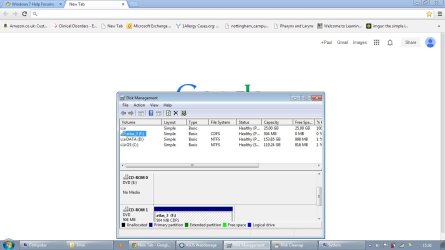
Disk Management - 25gb primary partition, unallocated drive letter.

gravymister

New member
Local time
12:20 PM
Messages
5
Hi,
So I inadvertently stumbled onto the disk management program, whilst looking for disk cleanup... and was a little confused to find a 25gb primary partition which was totally unassigned. It won't let me do anything to it other than delete it. So I guess the question I'm asking is, can I delete this partition and assign the 25gb to another drive... or, is this important? I've heard manufacturers often include an inaccessible recovery partition... but 25gb is space I could use...

I've included a screenshot in case my description was a bit rubbish.

Thanks,
Paul
 

Attachments
  • disk management.jpg
    disk management.jpg
    75.8 KB · Views: 11

My Computer My Computer

At a glance

Windows Home Premium 64 bitIntel Core i5 2.3Ghz3GB
Computer type
Laptop
Computer Manufacturer/Model Number
Asus K53e
OS
Windows Home Premium 64 bit
CPU
Intel Core i5 2.3Ghz
Memory
3GB
Browser
Chrome

My Computer My Computer

At a glance

Win 10 Pro x64Intel I5-2500K @3.3GHz16GB G.Skill Ripjaws X (4x4GB)EVGA GeForce 750 Ti SC 2GB
Computer type
PC/Desktop
Computer Manufacturer/Model Number
Self Built
OS
Win 10 Pro x64
CPU
Intel I5-2500K @3.3GHz
Motherboard
Asrock P67 Extreme4
Memory
16GB G.Skill Ripjaws X (4x4GB)
Graphics Card(s)
EVGA GeForce 750 Ti SC 2GB
Sound Card
ASUS Xonar DG 5.1 Channels 24-bit 96KHz PCI Interface Sound
Monitor(s) Displays
auria eq2367
Screen Resolution
1920 x 1080
Hard Drives
250GB Samsung 850 EVO SSD
1TB WD Blue
1TB Hitachi
PSU
SeaSonic X 650W 80 Plus Gold
Case
Corsair Obsidian 750D
Cooling
Corsair H60, Three 140mm case fans
Keyboard
Logitech Wireless Keyboard K520
Mouse
Logitech Wireless Mouse M310
Internet Speed
Wave Broadband ~ 100 dn 5 up
Antivirus
Windows Defender, Malwarebytes Premium
Browser
Edge, IE11, Chrome
Other Info
Laptop specs: HP g7-1365dx /
CPU: AMD A6-3420M APU with Radeon(tm) HD Graphics /
RAM: Crucial 8Gb (2x4Gb) /
SSD: Crucial M4-CT128M4SSD2 ATA Device/ FW 000F /
GFX: AMD Radeon HD 6520G /
OS: Windows 10 Pro x64
Thanks for the reply,
Sure thing, I've attached one.
 

Attachments

  • disk management.jpg
    disk management.jpg
    96.7 KB · Views: 9

My Computer My Computer

At a glance

Windows Home Premium 64 bitIntel Core i5 2.3Ghz3GB
Computer type
Laptop
Computer Manufacturer/Model Number
Asus K53e
OS
Windows Home Premium 64 bit
CPU
Intel Core i5 2.3Ghz
Memory
3GB
Browser
Chrome
It looks like it might be a recovery partition put there by ASUS.
Although, it seems a bit large.
 

My Computer My Computer

At a glance

Windows 10 Pro x64, Windows 8.1 Pro x64, Wind...INTEL i9-7920X LGA 206664 GB (4 X 16 GB) G-Skill V Series DDR4 3200 ...EVGA GTX 1060 SC 3 GB
Computer type
PC/Desktop
Computer Manufacturer/Model Number
Custom Built
OS
Windows 10 Pro x64, Windows 8.1 Pro x64, Windows 7 Ultimate x64 SP1,
CPU
INTEL i9-7920X LGA 2066
Motherboard
Gigabyte X299-WU8 F3
Memory
64 GB (4 X 16 GB) G-Skill V Series DDR4 3200 Quad Channel
Graphics Card(s)
EVGA GTX 1060 SC 3 GB
Sound Card
Realtek Onboard ALC1220
Monitor(s) Displays
2 x Samsung S27E310
Screen Resolution
1920x1080
Hard Drives
Samsung 2 x 970 EVO Plus 500 GB NVMe
1 x 6TB WD 6003FZBX SATA
1 x 6TB WD 60EFRX SATA
12 x 3TB WD 30EFRX SATA
PSU
Seasonic X-1050
Case
Thermaltake Armor+
Cooling
Corsair H80i V2 Liquid AOI Cooler
Keyboard
Logitech G510s
Mouse
Logitech MX Master 2S
Internet Speed
200 Mb/s
Antivirus
ESET NOD32 13.1
Browser
EDGE (Dev, Canary, Beta), Chrome
Other Info
ASUS RT-AC68U router
Malwarebytes 4.0.4
Can I remove it? Or would that not be a good idea? Or could I make it smaller?
 

My Computer My Computer

At a glance

Windows Home Premium 64 bitIntel Core i5 2.3Ghz3GB
Computer type
Laptop
Computer Manufacturer/Model Number
Asus K53e
OS
Windows Home Premium 64 bit
CPU
Intel Core i5 2.3Ghz
Memory
3GB
Browser
Chrome

My Computer My Computer

At a glance

Win 10 Pro x64Intel I5-2500K @3.3GHz16GB G.Skill Ripjaws X (4x4GB)EVGA GeForce 750 Ti SC 2GB
Computer type
PC/Desktop
Computer Manufacturer/Model Number
Self Built
OS
Win 10 Pro x64
CPU
Intel I5-2500K @3.3GHz
Motherboard
Asrock P67 Extreme4
Memory
16GB G.Skill Ripjaws X (4x4GB)
Graphics Card(s)
EVGA GeForce 750 Ti SC 2GB
Sound Card
ASUS Xonar DG 5.1 Channels 24-bit 96KHz PCI Interface Sound
Monitor(s) Displays
auria eq2367
Screen Resolution
1920 x 1080
Hard Drives
250GB Samsung 850 EVO SSD
1TB WD Blue
1TB Hitachi
PSU
SeaSonic X 650W 80 Plus Gold
Case
Corsair Obsidian 750D
Cooling
Corsair H60, Three 140mm case fans
Keyboard
Logitech Wireless Keyboard K520
Mouse
Logitech Wireless Mouse M310
Internet Speed
Wave Broadband ~ 100 dn 5 up
Antivirus
Windows Defender, Malwarebytes Premium
Browser
Edge, IE11, Chrome
Other Info
Laptop specs: HP g7-1365dx /
CPU: AMD A6-3420M APU with Radeon(tm) HD Graphics /
RAM: Crucial 8Gb (2x4Gb) /
SSD: Crucial M4-CT128M4SSD2 ATA Device/ FW 000F /
GFX: AMD Radeon HD 6520G /
OS: Windows 10 Pro x64
I don't think it'll let me do that, I don't know why.
 

Attachments

  • disk management.jpg
    disk management.jpg
    93.6 KB · Views: 3
Last edited:

My Computer My Computer

At a glance

Windows Home Premium 64 bitIntel Core i5 2.3Ghz3GB
Computer type
Laptop
Computer Manufacturer/Model Number
Asus K53e
OS
Windows Home Premium 64 bit
CPU
Intel Core i5 2.3Ghz
Memory
3GB
Browser
Chrome
Yeah, looks like it.

Just searching around the internet reveals it is a recovery partition common for Asus.

I guess you need to decide if you want that feature left intact.
 

My Computer My Computer

At a glance

Win 10 Pro x64Intel I5-2500K @3.3GHz16GB G.Skill Ripjaws X (4x4GB)EVGA GeForce 750 Ti SC 2GB
Computer type
PC/Desktop
Computer Manufacturer/Model Number
Self Built
OS
Win 10 Pro x64
CPU
Intel I5-2500K @3.3GHz
Motherboard
Asrock P67 Extreme4
Memory
16GB G.Skill Ripjaws X (4x4GB)
Graphics Card(s)
EVGA GeForce 750 Ti SC 2GB
Sound Card
ASUS Xonar DG 5.1 Channels 24-bit 96KHz PCI Interface Sound
Monitor(s) Displays
auria eq2367
Screen Resolution
1920 x 1080
Hard Drives
250GB Samsung 850 EVO SSD
1TB WD Blue
1TB Hitachi
PSU
SeaSonic X 650W 80 Plus Gold
Case
Corsair Obsidian 750D
Cooling
Corsair H60, Three 140mm case fans
Keyboard
Logitech Wireless Keyboard K520
Mouse
Logitech Wireless Mouse M310
Internet Speed
Wave Broadband ~ 100 dn 5 up
Antivirus
Windows Defender, Malwarebytes Premium
Browser
Edge, IE11, Chrome
Other Info
Laptop specs: HP g7-1365dx /
CPU: AMD A6-3420M APU with Radeon(tm) HD Graphics /
RAM: Crucial 8Gb (2x4Gb) /
SSD: Crucial M4-CT128M4SSD2 ATA Device/ FW 000F /
GFX: AMD Radeon HD 6520G /
OS: Windows 10 Pro x64
Have you made the ASUS OEM manufacturer's Recovery Disks?
 

My Computer My Computer

At a glance

ME/XP/Vista/Win7
OS
ME/XP/Vista/Win7
Useful info in this thread (partition showing 100% free but is not free).
 

My Computer My Computer

At a glance

W7, W8.1
Computer type
Laptop
Computer Manufacturer/Model Number
Dell \ Lenovo\ HP \ Toshiba
OS
W7, W8.1
Antivirus
MSE, Malwarebytes
Browser
FF
Ah thanks guys, so it seems to me, having read the post that 4wd linked too, that perhaps its best just to leave it alone and not mess around it with it.

I've not created the recovery discs no, perhaps I should do that!
 

My Computer My Computer

At a glance

Windows Home Premium 64 bitIntel Core i5 2.3Ghz3GB
Computer type
Laptop
Computer Manufacturer/Model Number
Asus K53e
OS
Windows Home Premium 64 bit
CPU
Intel Core i5 2.3Ghz
Memory
3GB
Browser
Chrome
Back
Top