My webcam quality sucks

ColdIce

Banned
Local time
2:49 PM
Messages
158
Location
Iceland
Hello, I got Toshiba C650 with 0.3mpx webcam. The quality sucks ass! My mom has a Toshiba 100 or something like that, but when we talk on Skype, I can see her like Im watching tv, but I am lagging and fluffy :s Its terrible!!!


I cant believe that my cam sucks ass while the cam in T100 is great!

Anyone have any ideas how to improve the quality? Ive tried all the settings in Skype and the Cam settings :s
 

My Computer My Computer

Computer Manufacturer/Model Number
Self built
OS
Windows 7 Ultimate 64bit
CPU
AMD Phenom II x4 965BE
Motherboard
MSI 785GT-E63
Memory
8gb Corsair XMS2 800mhz
Graphics Card(s)
NX8800GTS-OC 512
Sound Card
SB750
Monitor(s) Displays
Acer H243H
Screen Resolution
1920x1080
Hard Drives
Seagate 2TB
PSU
520w Raw Deal+
Case
Raidmax ATX-238WU Tornado
Cooling
Extra cooling
Keyboard
Logitech G501
Mouse
Logitech G501
Internet Speed
ADSL 12mb
Generaly the quality is as gooas the upstream speed of your internet connection. If your mother has a better net connection than you then her video stream will come down to you faster than your will go back up to her. That can account for a lot of it.

Also if you are trying to send full size 720x480 30 fps out over the internet that likey wont fly and will end up being a series of still frames because it's WAY too much data. Whereas if you set your settings to like 200x300 15 fps or whatever the software will allow, then you may be able to get full motion video though your net provider. It's all bout the limits on the upstream bandwidth.

Some driver software comes with a tuning application that automatically tunes the framerate and compresion to your internet connection. Skype itself may also be auto tuning that setting. Try looking at the video settings for both and try retuning or calibrating or whatever they call it. It may make the stream behave better.
 

My Computer My Computer

Computer Manufacturer/Model Number
Scratch built
OS
Windows 7 x64 Ultimate
CPU
i7 960
Motherboard
Asus P6X58D
Memory
12 Gig Corsair Dominator
Graphics Card(s)
Nvidia 480
Sound Card
Maudio Delta 44 + breakout box
Monitor(s) Displays
Dell UltraSharp U2410 24in and Samsung 21 dual monitors
Screen Resolution
1920x1200 and 1280x1024
Hard Drives
Primary: Intel X-25M G2 160G SSD
Secondary: Segate baracuda 1.0 TB
HDs in AHCI mode.
PSU
Corasair TX850
Case
Cooler Master HAF
Cooling
Corsair H50
Keyboard
Logitech G15 + N52 game pad
Mouse
Logitech MX518
Internet Speed
15kbs down 4.5kbps up
Other Info
WEI 7.6
CPU & RAM 7.6
Graphics 7.9
Hard disk 7.7
Generaly the quality is as gooas the upstream speed of your internet connection. If your mother has a better net connection than you then her video stream will come down to you faster than your will go back up to her. That can account for a lot of it.

Also if you are trying to send full size 720x480 30 fps out over the internet that likey wont fly and will end up being a series of still frames because it's WAY too much data. Whereas if you set your settings to like 200x300 15 fps or whatever the software will allow, then you may be able to get full motion video though your net provider. It's all bout the limits on the upstream bandwidth.

Some driver software comes with a tuning application that automatically tunes the framerate and compresion to your internet connection. Skype itself may also be auto tuning that setting. Try looking at the video settings for both and try retuning or calibrating or whatever they call it. It may make the stream behave better.
She has 2mb and I got 16mb :/ How do I change that 720x480 blablabla thingy?
 

My Computer My Computer

Computer Manufacturer/Model Number
Self built
OS
Windows 7 Ultimate 64bit
CPU
AMD Phenom II x4 965BE
Motherboard
MSI 785GT-E63
Memory
8gb Corsair XMS2 800mhz
Graphics Card(s)
NX8800GTS-OC 512
Sound Card
SB750
Monitor(s) Displays
Acer H243H
Screen Resolution
1920x1080
Hard Drives
Seagate 2TB
PSU
520w Raw Deal+
Case
Raidmax ATX-238WU Tornado
Cooling
Extra cooling
Keyboard
Logitech G501
Mouse
Logitech G501
Internet Speed
ADSL 12mb
Heh not sure how to change the settings it would be part of the video cam driver package, maybe a control panel icon or a tray icon installed by your camera software....

And unfortuantely those internet provider speed numbers are always for download. What may be affecting you is the upload speed. Video is very high bandwidth and nearly all internet servivces have terrible upload speed performance. It's also entirely possible that a "slow" DSL line might have a better upload capacity than a hotrod cablemodem line :)

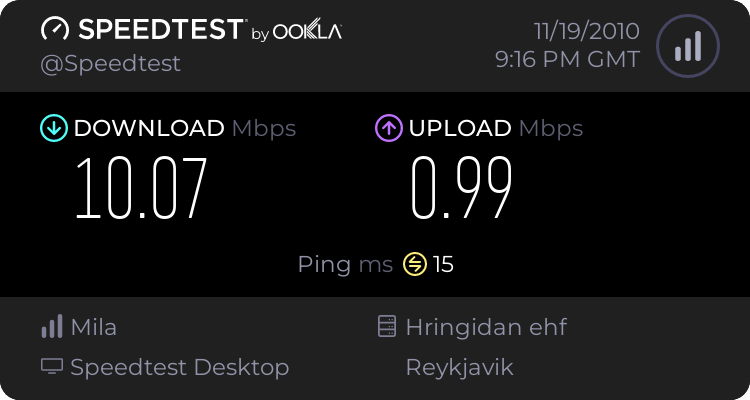
You can test yours and hers using one of those internet speed test web sites (again ignore the downlod speed, just the upload speed) That way you could at least positively tell if that is or is not a liimting factor.
 

My Computer My Computer

Computer Manufacturer/Model Number
Scratch built
OS
Windows 7 x64 Ultimate
CPU
i7 960
Motherboard
Asus P6X58D
Memory
12 Gig Corsair Dominator
Graphics Card(s)
Nvidia 480
Sound Card
Maudio Delta 44 + breakout box
Monitor(s) Displays
Dell UltraSharp U2410 24in and Samsung 21 dual monitors
Screen Resolution
1920x1200 and 1280x1024
Hard Drives
Primary: Intel X-25M G2 160G SSD
Secondary: Segate baracuda 1.0 TB
HDs in AHCI mode.
PSU
Corasair TX850
Case
Cooler Master HAF
Cooling
Corsair H50
Keyboard
Logitech G15 + N52 game pad
Mouse
Logitech MX518
Internet Speed
15kbs down 4.5kbps up
Other Info
WEI 7.6
CPU & RAM 7.6
Graphics 7.9
Hard disk 7.7
Heh not sure how to change the settings it would be part of the video cam driver package, maybe a control panel icon or a tray icon installed by your camera software....

And unfortuantely those internet provider speed numbers are always for download. What may be affecting you is the upload speed. Video is very high bandwidth and nearly all internet servivces have terrible upload speed performance. It's also entirely possible that a "slow" DSL line might have a better upload capacity than a hotrod cablemodem line :)

You can test yours and hers using one of those internet speed test web sites (again ignore the downlod speed, just the upload speed) That way you could at least positively tell if that is or is not a liimting factor.


My Computer My Computer

Computer Manufacturer/Model Number
Self built
OS
Windows 7 Ultimate 64bit
CPU
AMD Phenom II x4 965BE
Motherboard
MSI 785GT-E63
Memory
8gb Corsair XMS2 800mhz
Graphics Card(s)
NX8800GTS-OC 512
Sound Card
SB750
Monitor(s) Displays
Acer H243H
Screen Resolution
1920x1080
Hard Drives
Seagate 2TB
PSU
520w Raw Deal+
Case
Raidmax ATX-238WU Tornado
Cooling
Extra cooling
Keyboard
Logitech G501
Mouse
Logitech G501
Internet Speed
ADSL 12mb
Back
Top