Solved moving the partition containing "my documents"

DocDJ

New member
Member
Local time
5:17 AM
Messages
42
Location
upstate NY
I currently have the "my documents" folder (and other folders) on a separate partition (E:) on a 2nd drive (drive 2). Drive 2 is failing (slowly) and I want to move E: off it, back to drive 1 with C:, but keeping it as a separate partition.

I plan to use Partition Wizard to copy the old E: to drive 1 and label it M:. Next I need to switch the drive letters for both partitions and reboot. When all is good, I can delete the old E: and hopefully be on my merry way.

It's been a LONG time since I created the E: partition, so I just wanted a sanity check. My eventual goal is to have my system partition on an SSD and everything else rotational. That way, system restores/etc. are independent of my data. I'll be replacing Drive 2 VERY soon and will move E: to it. I have another partition on Drive 2 and will do the same with it, but it is independent of the system pointers that "my documents" has built into it.

Can you tell me if my plan is OK?? Did I forget anything?
 

My Computer

Computer type
PC/Desktop
Computer Manufacturer/Model Number
Home built
OS
Windows 7 Pro 64-bit
CPU
Core I7-940 at 3.25 GHz
Motherboard
MSI Eclipse
Memory
12GB
Graphics Card(s)
ATI 6700
Sound Card
SB
Monitor(s) Displays
LG E2241
Screen Resolution
1920x1080
Hard Drives
Apricorn SOLO X2 PCIE2 adapter + Samsung 840 PRO 256GB drive
Seagate External (firewire)
WD 750GB external
WD 500 GB internal(7200 RPM)
WD 80GB internal (pagefile) (7200 RPM)
Case
Antec Sonata III
Antivirus
McAfee
You`re overthinking it, there`s no reason to go moving folders around. Just keep the data you don`t want to loose on another partition or hard drive.

Make an image of 7 and put it on another drive and leave it at that.
 

My Computer

Computer type
PC/Desktop
Computer Manufacturer/Model Number
Skylake Special #666
OS
Windows 10 Pro x64
CPU
Intel Core i7 6700K
Motherboard
Asus Sabertooth Z170 Mark 1
Memory
GSkill TridentZ RGB 16GB 3600 16-16-16-36
Graphics Card(s)
EVGA GTX 980 Ti SC x2
Sound Card
Realtek High Definition
Monitor(s) Displays
AOC G2460PG
Screen Resolution
1920 x 1080 144Hz
Hard Drives
Samsung 860 Pro 256GB, Seagate Barracuda 4TB x2
PSU
EVGA 1000 P2, EVGA White Custom Braided Cables
Case
Corsair Vengeance C70 Gunmetal Black
Cooling
Corsair H100i v2, Corsair ML120 x2, Thermal Grizzly Kryonaut
Keyboard
Logitech G910 Orion Spectrum
Mouse
Logitech G700s
Internet Speed
Verizon Fios Quantum Gateway 75/75
Antivirus
Windows Defender, Malwarebytes Free 3.8.3
Browser
Chrome
Other Info
Corsair SP120 x4, LG Blu-ray Drive, Durabrand HT-395 100 Watt Dolby Digital Amp, Corsair H2100 Wireless 7.1 Headset
You'll probably need a 3rd party disk management program to partition the boot drive as I don't think Windows Disk Management will allow it. But I'm not totally sure as I've always used Acronis Disk Director for this type of thing. Once you create that other partition you can copy all the files from the E drive to that newly created partition and then use Win Disk Management to reassign drive letters so it shows up as E. Once all the is don't and you reboot the My Doc folder should be accessible just like it was before.
 

My Computer

OS
7 x64
DocDJ,


If you like, you might consider this below to be able to access the files from your libraries with the files actually located where you like instead. This way you will not have to worry about any potential issues that come with moving user folder locations.
Hope this helps, :)
Shawn
 

My Computer

Computer type
PC/Desktop
Computer Manufacturer/Model Number
Self built custom
OS
64-bit Windows 11 Pro for Workstations
CPU
Intel i7-8700K OC'd to 5 GHz
Motherboard
ASUS ROG Maximus XI Formula Z390
Memory
64 GB (4x16GB) G.SKILL TridentZ RGB DDR4 3600 MHz
Graphics Card(s)
ASUS ROG-STRIX-GTX1080TI-O11G-GAMING
Sound Card
Integrated
Monitor(s) Displays
2 x Samsung Odyssey G7 27"
Screen Resolution
2560x1440
Hard Drives
1TB Samsung 990 PRO M.2,
4TB Samsung 990 PRO PRO M.2,
TerraMaster F8 SSD Plus NAS
PSU
Seasonic Prime Titanium 850W
Case
Thermaltake Core P3
Cooling
Corsair Hydro H115i
Keyboard
Logitech wireless K800
Mouse
Logitech MX Master 4
Internet Speed
2 Gb/s Download and 100 Mb/s Upload
Antivirus
Malwarebyte Anti-Malware Premium
Browser
Google Chrome
Other Info
Logitech Z625 speaker system,
Logitech BRIO 4K Pro webcam,
HP Color LaserJet Pro MFP M477fdn,
APC SMART-UPS RT 1000 XL - SURT1000XLI,
Galaxy S23 Plus phone
The My Documents folder and several others were moved to a new partition on another drive a long time ago. Now that drive is failing and I wanted to move THAT partition to a different drive. I just wanted a check on my process for doing that. I DO want to keep these folders on a SEPARATE partition from my system partition.

So I tried to copy the partition using Partition Wizard, but it failed (I suspect it's because of the reason the drive itself is failing), so I just copied (using Windows Explorer) all those folders to a newly created partition, swapped drive letters on the old/new partitions and re-booted. All is well.
Yes, I am already using Libraries for access to specific folders in that partition. It is a nice mechanism.
 

My Computer

Computer type
PC/Desktop
Computer Manufacturer/Model Number
Home built
OS
Windows 7 Pro 64-bit
CPU
Core I7-940 at 3.25 GHz
Motherboard
MSI Eclipse
Memory
12GB
Graphics Card(s)
ATI 6700
Sound Card
SB
Monitor(s) Displays
LG E2241
Screen Resolution
1920x1080
Hard Drives
Apricorn SOLO X2 PCIE2 adapter + Samsung 840 PRO 256GB drive
Seagate External (firewire)
WD 750GB external
WD 500 GB internal(7200 RPM)
WD 80GB internal (pagefile) (7200 RPM)
Case
Antec Sonata III
Antivirus
McAfee

My Computer

Computer type
PC/Desktop
Computer Manufacturer/Model Number
Self built custom
OS
64-bit Windows 11 Pro for Workstations
CPU
Intel i7-8700K OC'd to 5 GHz
Motherboard
ASUS ROG Maximus XI Formula Z390
Memory
64 GB (4x16GB) G.SKILL TridentZ RGB DDR4 3600 MHz
Graphics Card(s)
ASUS ROG-STRIX-GTX1080TI-O11G-GAMING
Sound Card
Integrated
Monitor(s) Displays
2 x Samsung Odyssey G7 27"
Screen Resolution
2560x1440
Hard Drives
1TB Samsung 990 PRO M.2,
4TB Samsung 990 PRO PRO M.2,
TerraMaster F8 SSD Plus NAS
PSU
Seasonic Prime Titanium 850W
Case
Thermaltake Core P3
Cooling
Corsair Hydro H115i
Keyboard
Logitech wireless K800
Mouse
Logitech MX Master 4
Internet Speed
2 Gb/s Download and 100 Mb/s Upload
Antivirus
Malwarebyte Anti-Malware Premium
Browser
Google Chrome
Other Info
Logitech Z625 speaker system,
Logitech BRIO 4K Pro webcam,
HP Color LaserJet Pro MFP M477fdn,
APC SMART-UPS RT 1000 XL - SURT1000XLI,
Galaxy S23 Plus phone
Prudence would suggest that you first post a picture of your disk management before you create more partitions on your drive with the OS. I would hate for you to have to deal with dynamic partitions.
 

My Computer

Computer Manufacturer/Model Number
HP, Dell, Gateway, Toshiba - 4 laptops and 2 desktops
OS
Vista, Windows7, Mint Mate, Zorin, Windows 8
CPU
from 1.6GHz Duo to i7
Monitor(s) Displays
2x HP w2207
Hard Drives
5x HDD, 7x SSD, 12x Externals
Keyboard
with trackball - no mices
Mouse
Trackball mice
Internet Speed
DSL 6000

My Computer

Computer type
PC/Desktop
Computer Manufacturer/Model Number
Home built
OS
Windows 7 Pro 64-bit
CPU
Core I7-940 at 3.25 GHz
Motherboard
MSI Eclipse
Memory
12GB
Graphics Card(s)
ATI 6700
Sound Card
SB
Monitor(s) Displays
LG E2241
Screen Resolution
1920x1080
Hard Drives
Apricorn SOLO X2 PCIE2 adapter + Samsung 840 PRO 256GB drive
Seagate External (firewire)
WD 750GB external
WD 500 GB internal(7200 RPM)
WD 80GB internal (pagefile) (7200 RPM)
Case
Antec Sonata III
Antivirus
McAfee
Yes, post up a screenshot first of http://www.sevenforums.com/tutorials/274797-disk-management-post-screen-capture-image.html along with preference for how you want partitions laid out, and we will give you the steps.

Do you want a new data partition on the OS HD?

Thanks Gregrocker and WHS for your tips. I had the old partition as a primary partition on the old drive. So I created a new primary ptn on another drive and just copied all the files (which, I think, ends up de-fragging them in the process because the copy will be sequential within each file), chaned drive letters and re-booted. It's all doner and working fine.

You're right that I didn't want to play with logical or dynamic ptns. The limit of 4 primaries on a drive is OK for me.
 

My Computer

Computer type
PC/Desktop
Computer Manufacturer/Model Number
Home built
OS
Windows 7 Pro 64-bit
CPU
Core I7-940 at 3.25 GHz
Motherboard
MSI Eclipse
Memory
12GB
Graphics Card(s)
ATI 6700
Sound Card
SB
Monitor(s) Displays
LG E2241
Screen Resolution
1920x1080
Hard Drives
Apricorn SOLO X2 PCIE2 adapter + Samsung 840 PRO 256GB drive
Seagate External (firewire)
WD 750GB external
WD 500 GB internal(7200 RPM)
WD 80GB internal (pagefile) (7200 RPM)
Case
Antec Sonata III
Antivirus
McAfee
You're right that I didn't want to play with logical or dynamic ptns. The limit of 4 primaries on a drive is OK for me.
There is a trap though of which you have to be aware - if you want to create an additional extended (logical) partition, the limit on the primaries is 3 and NOT 4.

If you try to create an extended partition on a disk with 4 primaries, you end up with dynamics.
 

My Computer

Computer Manufacturer/Model Number
HP, Dell, Gateway, Toshiba - 4 laptops and 2 desktops
OS
Vista, Windows7, Mint Mate, Zorin, Windows 8
CPU
from 1.6GHz Duo to i7
Monitor(s) Displays
2x HP w2207
Hard Drives
5x HDD, 7x SSD, 12x Externals
Keyboard
with trackball - no mices
Mouse
Trackball mice
Internet Speed
DSL 6000
Thanks. I'll keep that in mind. I am expecting a replacement drive soon so I will be able to move my data to it and delete the ptn. Then I can start on my plan to move my OS ptn to an SSD (using the Apricorn PCIE adapter+SSD).
 

My Computer

Computer type
PC/Desktop
Computer Manufacturer/Model Number
Home built
OS
Windows 7 Pro 64-bit
CPU
Core I7-940 at 3.25 GHz
Motherboard
MSI Eclipse
Memory
12GB
Graphics Card(s)
ATI 6700
Sound Card
SB
Monitor(s) Displays
LG E2241
Screen Resolution
1920x1080
Hard Drives
Apricorn SOLO X2 PCIE2 adapter + Samsung 840 PRO 256GB drive
Seagate External (firewire)
WD 750GB external
WD 500 GB internal(7200 RPM)
WD 80GB internal (pagefile) (7200 RPM)
Case
Antec Sonata III
Antivirus
McAfee
You should post up the requested screenshot so we can advise you how to convert one Primary to Logical so you can add as many other adjacent logicals as you want.

You'd want to keep the SYstem and any bootable OEM partitions (Recovery, Diagnostics) Primary, so for example on HP's it is C that should be converted.
 
You should post up the requested screenshot so we can advise you how to convert one Primary to Logical so you can add as many other adjacent logicals as you want.

You'd want to keep the SYstem and any bootable OEM partitions (Recovery, Diagnostics) Primary, so for example on HP's it is C that should be converted.
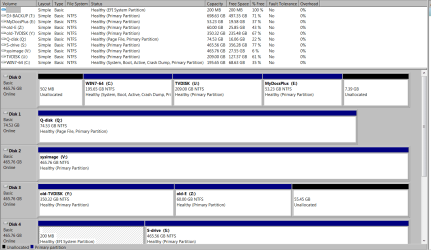
Here's my whole setup.
 

Attachments

My Computer

Computer type
PC/Desktop
Computer Manufacturer/Model Number
Home built
OS
Windows 7 Pro 64-bit
CPU
Core I7-940 at 3.25 GHz
Motherboard
MSI Eclipse
Memory
12GB
Graphics Card(s)
ATI 6700
Sound Card
SB
Monitor(s) Displays
LG E2241
Screen Resolution
1920x1080
Hard Drives
Apricorn SOLO X2 PCIE2 adapter + Samsung 840 PRO 256GB drive
Seagate External (firewire)
WD 750GB external
WD 500 GB internal(7200 RPM)
WD 80GB internal (pagefile) (7200 RPM)
Case
Antec Sonata III
Antivirus
McAfee
Here is the snipped file as a PNG.
 

Attachments

  • Disk partitions.PNG
    Disk partitions.PNG
    40.1 KB · Views: 2

My Computer

Computer type
PC/Desktop
Computer Manufacturer/Model Number
Home built
OS
Windows 7 Pro 64-bit
CPU
Core I7-940 at 3.25 GHz
Motherboard
MSI Eclipse
Memory
12GB
Graphics Card(s)
ATI 6700
Sound Card
SB
Monitor(s) Displays
LG E2241
Screen Resolution
1920x1080
Hard Drives
Apricorn SOLO X2 PCIE2 adapter + Samsung 840 PRO 256GB drive
Seagate External (firewire)
WD 750GB external
WD 500 GB internal(7200 RPM)
WD 80GB internal (pagefile) (7200 RPM)
Case
Antec Sonata III
Antivirus
McAfee
Make the space on C drive to copy the old Documents partition onto using How to Copy Partition with partition manager? Partition Wizard Copy Partition Video Help.. If moving the partition causes any problems then create a new Partition there and copy the files into it.

Be aware you can only have four Primary partitions on a HD or you must convert one to Logical to add as many adjacent Logical Partitions as you want. How to set partition as Primary or Logical.
Partition Wizard Create Partition Video Help

The correct way to link your Documents or any other User folders from Win7 to a data partition is to either move the User folder to the folder you've made on the data partition for it: User Folders - Change Default Location

or rightclick the folder to add to the related Library - Include a Folder - Windows 7 Forums setting the data drive location as the default for that User folder.

Finally, why are you using the hideous Win2000 government-file-cabinet-grey graphics instead of Win7's elegant aero theme? You can go to Control Panel>Personalize to set an Aero theme, with a nice background slide show of all Win7 national editions - the most spectacular pictures ever taken: 120 Original Windows 7 High Resolution Scenery Regional Wallpapers Free Download
 
Back
Top