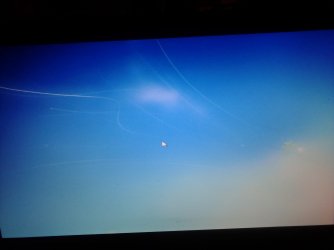
my Window 7 was not genuine.

Shana

New member
Local time
9:00 PM
Messages
7
a friend helped me by downloading Windows 7. I started getting Windows not genuine messages. and a week later I got this screen and I can't get out of it. help!
 

My Computer My Computer

Computer type
Laptop
Computer Manufacturer/Model Number
Toshiba L875-S7208
OS
Windows 7 home premium 64 bit

My Computer My Computer

Computer type
PC/Desktop
Computer Manufacturer/Model Number
Self built using existing case
OS
Windows 7 Home Premium 64 bit sp1
CPU
Intel i5 3570 3.4Ghz Ivy Bridge SKT 1155 quad core
Motherboard
Gigabyte Z77-HD3 SKT 1155 2xSata 3, 4x USB 3.0
Memory
G-Skill Rip Jaws 16Gb (8x2) DDR3 -1600 PC3 12800 CL 10 red
Graphics Card(s)
Gigabyte NVIDIA GT610 1Gb DDR3 810/1200 PCI-E 2.0 Silent
Sound Card
NVIDIA High Definition & Realtech High Definition Audio
Monitor(s) Displays
2 x Philips 226V4L 16:9 aspect ratio
Screen Resolution
1920 x 1080 HD
Hard Drives
Samsung 840 Pro 256gb SSD, SATA 3.
Hitachi Touro Portable 1tb, USB 3.0 HDD used for image b/ups.
PSU
Corsair VS450
Case
Codeng
Cooling
PSU fan & CPU fan
Keyboard
Logitech
Mouse
Logitech Wireless trackball M570
Internet Speed
Wireless 3G. 3mg down & 550kb up.
Antivirus
Bitdefender Internet Security 2020
Browser
Opera (Current Version) & Firefox
Other Info
MS Office 2013 Pro. Davis weather station software. MGE Nova 600 avr UPS.
I cannot use the computer. I get a blue screen / with a bird in the right hand corner and another graphic that might bide a branch. Sorry, I am very illiterate when it comes to compilers. Using my tiny phone to get this message to you
 

Attachments

  • 1469088834778.jpg
    1469088834778.jpg
    113.2 KB · Views: 1

My Computer My Computer

Computer type
Laptop
Computer Manufacturer/Model Number
Toshiba L875-S7208
OS
Windows 7 home premium 64 bit

My Computer My Computer

Computer type
PC/Desktop
Computer Manufacturer/Model Number
medionl/Aspire 6930G/acer x55a
OS
W7 home premium 32bit/W7HP 64bit/w10 tp insider ring
CPU
E5300 dual core
Motherboard
medion MS7366
Memory
3gb
Graphics Card(s)
Nvidia Geforce 7100 Nforce 630i
Monitor(s) Displays
avixc
Internet Speed
n (isp resticted to 72)
Antivirus
mse/pands
Browser
palemoon
Other Info
Belkin Fd7050 n USB using Railink RT2870 drivers, more upto date
If you are using Toshiba laptop &or PC, there are 3 partitions.

The 1st partition is for Booting, hence it is locked & hidden, a very small size.

The 2nd partition is for Windows OS.

The 3rd partition is for all recovery purpose, which is also locked & hidden, about 12 GB.

I did bought both Toshiba laptops Recovery disks from Toshiba Service center.
On using the recovery disk, it will also create an exact partitions.

You can also do an backup to another HDD &or DVD.

As for Windows 7 key, it is stated under the laptop &or for PC either on top or behind.

After installing and doing windows updates up-to-date, and add an Restore point.
It is best to make a backup to DVD(s) as you do not need to do all over again, ie windows update.
After backup is done, there will not be any problem, if encountered.

The MS Offices will also installed, as it only required an activation key.
 

My Computer My Computer

Computer type
Laptop
Computer Manufacturer/Model Number
Toshiba L630 and L735
OS
Windows 7 x64
Hard Drives
240 GB SSD
Oh awesome. I will try that. Will I lose all my files?
 

My Computer My Computer

Computer type
Laptop
Computer Manufacturer/Model Number
Toshiba L875-S7208
OS
Windows 7 home premium 64 bit
I tried Roy's suggestion. Nothing happened. The same screens.came on and nothing was different.
As far as Eric's solution goes, I have a boot recovery disc I burned from the Toshiba website a few months back. Do I in the DVD and go for it? Never had to do this before so I'm checking with you pros so I don't mess up! I really appreciate your help....
 

My Computer My Computer

Computer type
Laptop
Computer Manufacturer/Model Number
Toshiba L875-S7208
OS
Windows 7 home premium 64 bit
Oh awesome. I will try that. Will I lose all my files?

Yes.

Using system recovery will return the computer to the state it was in when it left the factory. All user files will be lost.
 

My Computer My Computer

Computer type
PC/Desktop
Computer Manufacturer/Model Number
HP
OS
Windows 7 Pro 64 bit
CPU
Xeon W3520
Memory
8 GB
Graphics Card(s)
Nvidia Geforce 210
I put in the recovery disc. Computer recognized it but then it goes to a blank black screen. After about 2-3 minutes it goes to the blue screen I the picture above AAAAHHHHHHHHH!!...!...
 

My Computer My Computer

Computer type
Laptop
Computer Manufacturer/Model Number
Toshiba L875-S7208
OS
Windows 7 home premium 64 bit
Ok this morning I was able to get the advanced options on the boot menu. I had an option to repair my computer. I hit enter. I got a black screen for about 4 minutes. Then back to that blue screen with a bird.
 

My Computer My Computer

Computer type
Laptop
Computer Manufacturer/Model Number
Toshiba L875-S7208
OS
Windows 7 home premium 64 bit
Ok this morning I was able to get the advanced options on the boot menu. I had an option to repair my computer. I hit enter. I got a black screen for about 4 minutes. Then back to that blue screen with a bird.

The laptop model: Toshiba L735 Win 7 Home Premium.

This is the 2nd time failure to start, and 2nd HDD failure.
Remove HDD and slot in the Recovery disc.
Boot on DVD-Drive, and it show this error code: F3-F100-0003
Did a google search: Select 2 results. Link

How to fix startup error message code F3-F100-0003 - Microsoft Community

satellite L635S3030-error F3-F100-0003 - TOSHIBA FORUMS

Both mentioned as HDD failure.


Remove the HDD, and use as external casing HDD.
My another Toshiba model: Satellite L630 Windows 7 Pro
It have problem to detect and finally show as HDD not format??
I may need to do FULL format later.

I did FULL format on another External HDD (built-in) which also do have failure.
After Full format, it can access.


So in your case, try to remove the HDD.
Then slot in the Recovery disk, select DVD-Drive to boot 1st.
And no "blue screen with a bird", this may confirmed as HDD.

In this way, with error code, then it is better to know what the problem.
If without HDD & Disc, the laptop will keep restarting (loop).

I may suspect it is at the very 1st partition issue, as you will unable to beyond, as it is Blue Windows screen display.
If have the solution, may update.

 

My Computer My Computer

Computer type
Laptop
Computer Manufacturer/Model Number
Toshiba L630 and L735
OS
Windows 7 x64
Hard Drives
240 GB SSD
To Add:

Now, it stay at the Error screen.

Not Blue screen.
 

My Computer My Computer

Computer type
Laptop
Computer Manufacturer/Model Number
Toshiba L630 and L735
OS
Windows 7 x64
Hard Drives
240 GB SSD
Still same problem. Not able to fix. Can't get past boot. Bummer.
 

My Computer My Computer

Computer type
Laptop
Computer Manufacturer/Model Number
Toshiba L875-S7208
OS
Windows 7 home premium 64 bit
Back
Top