My windows 7 RC is about to expire and I need advice

i think the OEM practice of allowing it to be switched over after a bit of hasseling will soon change. MS is starting to take a firmer stand on the fact that OEM is for system manufacturers and not home PC builders, and they have the right to refuse the key once tied to particular hardware.

the way i got microsoft to give in was simply to remind rather i am selling, giving away, or keeping the computer i built with or without a business license by the definition of manufacturing i am a manufacture. i may not have built the parts from scratch, however i did use the parts to build the end product.

and this is why MS is starting to make a stand against it and has made an official statement that home builders will not be considered OEM manufacturers. it's an abuse of their software and they have the right to enforce this.

the abuse is on microsofts end. not our end. easy work around though.
 

My Computer My Computer

At a glance

7 ult
OS
7 ult
Ok so it finally finished downloading, but now it gives me an option which says "Launch Install". The problem is I don't want to install it until after I get an external HDD to back-up my data onto. I'm just wondering if it will be ok to close the window that says "Launch Install" for now. I'm just worried that I won't be able to launch the install later on if I close this page.

Also, do I need to burn the iso to a disc or can I? I'm wondering because I thought you needed a disc for the full version to do a clean install.

I would greatly appreciate help from anyone who is experienced with MSDNAA.
 

My Computer My Computer

At a glance

Windows 7 Release CandidatePhenom II x4 9404GB Gskill 1066Sapphire HD Radeon 4890
OS
Windows 7 Release Candidate
CPU
Phenom II x4 940
Motherboard
Gigabyte
Memory
4GB Gskill 1066
Graphics Card(s)
Sapphire HD Radeon 4890
Monitor(s) Displays
Acer P235H
Hard Drives
Western Digital 640GB
PSU
OCZ 700Watts
Case
Smilodon
Cooling
Stock
ImgBurn at 4x is, as already said, a sure bet.

If you've still got a working Win 7 system around, then just clickk on the .iso file and you will be prompted to burn to DVD. Win 7 sure has made life easy.
 

My Computer My Computer

At a glance

MS Windows 7 Ultimate SP1 64-bitAMD A10-4600M6.00 GB Dual-Channel DDR3 @ 798MHz (11-11-12-28)AMD Radeon HD 7660G
Computer Manufacturer/Model Number
Toshiba Satellite S875D-S7239 laptop
OS
MS Windows 7 Ultimate SP1 64-bit
CPU
AMD A10-4600M
Motherboard
AMD Pumori (Socket FT1)
Memory
6.00 GB Dual-Channel DDR3 @ 798MHz (11-11-12-28)
Graphics Card(s)
AMD Radeon HD 7660G
Sound Card
High Definition Audio Device
Monitor(s) Displays
Generic PnP Monitor (1600x900@60Hz)
Screen Resolution
1600x900@60Hz
Hard Drives
SSD 119GB Corsair CSSD-V128GB2 ATA Device
Keyboard
Standard PS/2 Keyboard
Mouse
HP Wireless Optical Mobile Mouse Model FHA-3410
Internet Speed
What the local pub, local coffee shop offers.
Other Info
Optical Drive:MATSHITA BD-CMB UJ160B ATA Device


Also have an Asus ha1002xp netbook with Win 7 Ultimate installed.
Thanks. I believe it's correctly burned to the DVD. It shows this image when I insert the disc:
thumb_thumb_Windows_Setup.png

I'm still not 100% sure if it's the full version or the upgrade. When I look at the files on the disc it says:

32380d1256188468-make-bootable-iso-student-d-l-expandedsetupcontents-2009-10-22_061340.jpg

I noticed there is a folder that says upgrade. Do the full retail releases have that folder? Since I'm running the RC it needs to be the full version (without a work around) so I don't want to wipe my HDD just to find out that I can't install my copy of Windows.

Sorry for all the in-depth questions. I just want to get this right. I've had too many bad experiences in the past with PC's lol.
 

My Computer My Computer

At a glance

Windows 7 Release CandidatePhenom II x4 9404GB Gskill 1066Sapphire HD Radeon 4890
OS
Windows 7 Release Candidate
CPU
Phenom II x4 940
Motherboard
Gigabyte
Memory
4GB Gskill 1066
Graphics Card(s)
Sapphire HD Radeon 4890
Monitor(s) Displays
Acer P235H
Hard Drives
Western Digital 640GB
PSU
OCZ 700Watts
Case
Smilodon
Cooling
Stock
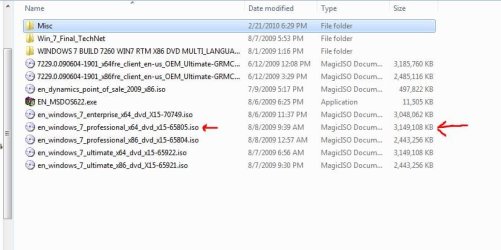
What is the size of the .iso file ? 3,149,108 KB ?


I have these 9 files & folders on my TechNet download.
 

My Computer My Computer

At a glance

Win7 Enterprise, Win7 x86 (Ult 7600), Win7 x6...AMD fx8350 4ghz, AMD-32 2400mhz, AMD-64 3200m...2gb, 4gb on the Ult 7600, 4gb on Technet RTM,...Draw my own Graphics, several nVidia cards
Computer type
PC/Desktop
Computer Manufacturer/Model Number
Built them myself, Science Experiments !
OS
Win7 Enterprise, Win7 x86 (Ult 7600), Win7 x64 Ult 7600, TechNet RTM on AMD x64 (2.8Ghz)
CPU
AMD fx8350 4ghz, AMD-32 2400mhz, AMD-64 3200mhz, AMDx64 2.8G
Motherboard
SIS 755, ECS-K8M890M-M (Ult 7600), GigaByte & others
Memory
2gb, 4gb on the Ult 7600, 4gb on Technet RTM, 32gb on FX8350
Graphics Card(s)
Draw my own Graphics, several nVidia cards
Sound Card
on motherboard
Monitor(s) Displays
19" flat scr, 28" I-Inc widescr,22" Emprex Widescr, 23" Acer
Screen Resolution
1280 x 1024, 1440 x 900, 1920 x 1080
Hard Drives
6 pata Ide HD's & 2 Sata HD's
added 80gb external on Ult 7600 computer,
numerous extra 1tb, 2TB, 3Tb SATA HD's
A collection of ext HD Docks w/ HDs
PSU
430w, 550w, 600w, 700, 800, etc
Case
All Generic Full Towers
Cooling
Open Air & a few fans, some w/ colored LEDs
Keyboard
Compaq & Dell recycled from GoodWill
Mouse
Made in China Optical Wired Mouse
Internet Speed
Fast Cable InterNet
Antivirus
AVG Free on 24 different Desktops, NO Problems!
Browser
IE 8 is preferred, but use FireFox sometimes
Other Info
Linksys Routers, switches, & Hubs
Too Many USB Flash Drives to count, Biggest is 64GB !
Eight computers in my home network.
Sixteen computers at my business network.
Linked via TeamViewer !
Lots of old used spare computer parts everywhere!
What is the size of the .iso file ? 3,149,108 KB ?


I have these 9 files & folders on my TechNet download.

I'm not sure. It was always showing a different number. When it was downloading it stopped at around 2.1GB, but then when I looked at the file it was only 1.03 GB and then when I burned it to a disc I think it was a little over 3GB like yours
 

My Computer My Computer

At a glance

Windows 7 Release CandidatePhenom II x4 9404GB Gskill 1066Sapphire HD Radeon 4890
OS
Windows 7 Release Candidate
CPU
Phenom II x4 940
Motherboard
Gigabyte
Memory
4GB Gskill 1066
Graphics Card(s)
Sapphire HD Radeon 4890
Monitor(s) Displays
Acer P235H
Hard Drives
Western Digital 640GB
PSU
OCZ 700Watts
Case
Smilodon
Cooling
Stock
What is the size of the .iso file ? 3,149,108 KB ?


I have these 9 files & folders on my TechNet download.

I'm not sure. It was always showing a different number. When it was downloading it stopped at around 2.1GB, but then when I looked at the file it was only 1.03 GB and then when I burned it to a disc I think it was a little over 3GB like yours

To be on the safe side redownload the ISO.
 

My Computer My Computer

At a glance

ME/XP/Vista/Win7
OS
ME/XP/Vista/Win7
What is the size of the .iso file ? 3,149,108 KB ?


I have these 9 files & folders on my TechNet download.

I'm not sure. It was always showing a different number. When it was downloading it stopped at around 2.1GB, but then when I looked at the file it was only 1.03 GB and then when I burned it to a disc I think it was a little over 3GB like yours

To be on the safe side redownload the ISO.
Why would I need to do that? It seems to have burnt the iso onto the disc just fine. I mean, it has all those files on the disc. On the site it said the download was 2.1GB and it did download 2.1 gigs. It was just afterwards when looking at the downloaded file it showed it as 1.03, but I know the full 2 GB was downloaded.

I just assumed it had to do with the way the files were compressed or unpacked at certain stages because after it was on the CD it was 3 GB.

Would it be ok to insert the disc and then double click the disc icon without it automatically installing it? I'm just worried that it will install now when I dont want it to. I just want to make sure the Windows 7 is on the disc completely and I assume that if a menu pops up telling me to install it then it was correctly burned onto the disc.
 

My Computer My Computer

At a glance

Windows 7 Release CandidatePhenom II x4 9404GB Gskill 1066Sapphire HD Radeon 4890
OS
Windows 7 Release Candidate
CPU
Phenom II x4 940
Motherboard
Gigabyte
Memory
4GB Gskill 1066
Graphics Card(s)
Sapphire HD Radeon 4890
Monitor(s) Displays
Acer P235H
Hard Drives
Western Digital 640GB
PSU
OCZ 700Watts
Case
Smilodon
Cooling
Stock
Verify the DVD against ISO using ImgBurn to make sure.

Load ISO to make sure it says "bootable" in text at left, then insert DVD to verify against ISO.

Burn again if necessary using ImgBurn at 4x with Verify.
 
Verify the DVD against ISO using ImgBurn to make sure.

Load ISO to make sure it says "bootable" in text at left, then insert DVD to verify against ISO.

Burn again if necessary using ImgBurn at 4x with Verify.
I used Active ISO burner to burn it and I did it at 4x with verify and it was fine.
 

My Computer My Computer

At a glance

Windows 7 Release CandidatePhenom II x4 9404GB Gskill 1066Sapphire HD Radeon 4890
OS
Windows 7 Release Candidate
CPU
Phenom II x4 940
Motherboard
Gigabyte
Memory
4GB Gskill 1066
Graphics Card(s)
Sapphire HD Radeon 4890
Monitor(s) Displays
Acer P235H
Hard Drives
Western Digital 640GB
PSU
OCZ 700Watts
Case
Smilodon
Cooling
Stock
Do the full retail releases have that folder? Since I'm running the RC it needs to be the full version (without a work around) so I don't want to wipe my HDD just to find out that I can't install my copy of Windows.

Sorry for all the in-depth questions. I just want to get this right. I've had too many bad experiences in the past with PC's lol.

You don't have to wipe the hard drive you know...

A clean install of windows 7 with data still on the drive simply moves it to a Windows.Old folder at the root of C:

Some may think this is a dirty install...But nothing can run while it is named Windows.Old. Check the registry and you'll see what I mean.

Point is, you don't need to do a full clean install...When it asks you to select the partition, it will tell you that an older version of windows is installed and any and all files will be moved to a "Windows.Old" folder.

I've done this numerous times, of course with people thinking i'm an idiot. >.<

Personal preference, I suppose. If someone can give me a VALID reason for not doing this, please. Inform me.

VIRUS INFECTED PREVIOUS INSTALLS DON"T COUNT! Anyone with a sane mind can figure that out for themselves.

Matt~
 

My Computer My Computer

At a glance

Windows 7 Ultimate x64Intel Core i7 920 at 2.886 Ghrz3 Gb DDR3 Patriot KitNVidia GeForce BFG 9600 GT
Computer Manufacturer/Model Number
Myself
OS
Windows 7 Ultimate x64
CPU
Intel Core i7 920 at 2.886 Ghrz
Motherboard
Asus P6T
Memory
3 Gb DDR3 Patriot Kit
Graphics Card(s)
NVidia GeForce BFG 9600 GT
Sound Card
Creative X-Fi Xtreme Music
Monitor(s) Displays
Twin LG 19" Flatpanels (DVI)
Hard Drives
750 GB Western Digital Caviar Black
PSU
Cooler Master 550W
Case
Antec 300
Cooling
Passive (I like it quite)

Attachments

  • Technet_Isos.JPG
    Technet_Isos.JPG
    52.2 KB · Views: 11

My Computer My Computer

At a glance

Win7 Enterprise, Win7 x86 (Ult 7600), Win7 x6...AMD fx8350 4ghz, AMD-32 2400mhz, AMD-64 3200m...2gb, 4gb on the Ult 7600, 4gb on Technet RTM,...Draw my own Graphics, several nVidia cards
Computer type
PC/Desktop
Computer Manufacturer/Model Number
Built them myself, Science Experiments !
OS
Win7 Enterprise, Win7 x86 (Ult 7600), Win7 x64 Ult 7600, TechNet RTM on AMD x64 (2.8Ghz)
CPU
AMD fx8350 4ghz, AMD-32 2400mhz, AMD-64 3200mhz, AMDx64 2.8G
Motherboard
SIS 755, ECS-K8M890M-M (Ult 7600), GigaByte & others
Memory
2gb, 4gb on the Ult 7600, 4gb on Technet RTM, 32gb on FX8350
Graphics Card(s)
Draw my own Graphics, several nVidia cards
Sound Card
on motherboard
Monitor(s) Displays
19" flat scr, 28" I-Inc widescr,22" Emprex Widescr, 23" Acer
Screen Resolution
1280 x 1024, 1440 x 900, 1920 x 1080
Hard Drives
6 pata Ide HD's & 2 Sata HD's
added 80gb external on Ult 7600 computer,
numerous extra 1tb, 2TB, 3Tb SATA HD's
A collection of ext HD Docks w/ HDs
PSU
430w, 550w, 600w, 700, 800, etc
Case
All Generic Full Towers
Cooling
Open Air & a few fans, some w/ colored LEDs
Keyboard
Compaq & Dell recycled from GoodWill
Mouse
Made in China Optical Wired Mouse
Internet Speed
Fast Cable InterNet
Antivirus
AVG Free on 24 different Desktops, NO Problems!
Browser
IE 8 is preferred, but use FireFox sometimes
Other Info
Linksys Routers, switches, & Hubs
Too Many USB Flash Drives to count, Biggest is 64GB !
Eight computers in my home network.
Sixteen computers at my business network.
Linked via TeamViewer !
Lots of old used spare computer parts everywhere!
LobsterEar,

The size of you iso does not sound right. MSDNAA files should probably be the same as the Files on MS TechNet. My x64 prof is 3,149,108 kb.

Also have you considered doing a Windows Easy Transfer as precaution backup of settings, files, etc.


http://www.sevenforums.com/tutorials/11470-windows-easy-transfer-transfer-computers.html
It is weird. I just checked my disc properties again and it says 3,224,686,592 bytes which converted to kilobytes is 3,149,108, and next to it says 3GB.

Is there a way to test if it is all there? Is it safe to run the DVD now to see if it operates, but not install it?
 

My Computer My Computer

At a glance

Windows 7 Release CandidatePhenom II x4 9404GB Gskill 1066Sapphire HD Radeon 4890
OS
Windows 7 Release Candidate
CPU
Phenom II x4 940
Motherboard
Gigabyte
Memory
4GB Gskill 1066
Graphics Card(s)
Sapphire HD Radeon 4890
Monitor(s) Displays
Acer P235H
Hard Drives
Western Digital 640GB
PSU
OCZ 700Watts
Case
Smilodon
Cooling
Stock
Hello LobsterEar;

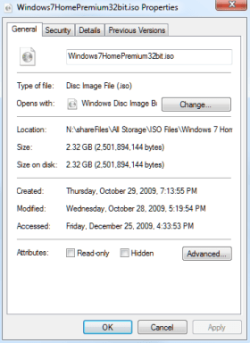
Here are the Properties of both my 32 bit 7 iso and 64 bit iso:

iso_32_01.png iso_64_01.png

You can compare to yours, mine (64 bit) is 3.00 GB (3,224,686,592 bytes)

I would say you can see if it will boot up?

Cheers!
Robert
 

My Computer My Computer

At a glance

...
OS
...
Hello LobsterEar;

Here are the Properties of both my 32 bit 7 iso and 64 bit iso:

View attachment 55756 View attachment 55757

You can compare to yours, mine (64 bit) is 3.00 GB (3,224,686,592 bytes)

I would say you can see if it will boot up?

Cheers!
Robert
Mine is the 64-bit version and on the actual file on my computer it says it's only 1.03GB, but the amount of time it took to download was definitely longer than it takes me to download 1GB.

The file on my burned DVD is the same as your 64-bit version, which is what confuses me. I know I at least downloaded 2+gigs because I was watching the file as it downloaded, but when it finished it showed it as 1GB and then I burned it to a disc and it was 3GB.

I want to run the DVD to see if it works, BUT I don't want to install it and I don't know if it will automatically start installing if I run it or if I can even run it without first booting my PC from the disc. No one has confirmed or denied this yet.

Does some kind of menu come up when you run the disc to ask you to install or does it just start?
 

My Computer My Computer

At a glance

Windows 7 Release CandidatePhenom II x4 9404GB Gskill 1066Sapphire HD Radeon 4890
OS
Windows 7 Release Candidate
CPU
Phenom II x4 940
Motherboard
Gigabyte
Memory
4GB Gskill 1066
Graphics Card(s)
Sapphire HD Radeon 4890
Monitor(s) Displays
Acer P235H
Hard Drives
Western Digital 640GB
PSU
OCZ 700Watts
Case
Smilodon
Cooling
Stock
Hello LobsterEar;

Here are the Properties of both my 32 bit 7 iso and 64 bit iso:

View attachment 55756 View attachment 55757

You can compare to yours, mine (64 bit) is 3.00 GB (3,224,686,592 bytes)

I would say you can see if it will boot up?

Cheers!
Robert
Mine is the 64-bit version and on the actual file on my computer it says it's only 1.03GB, but the amount of time it took to download was definitely longer than it takes me to download 1GB.

The file on my burned DVD is the same as your 64-bit version, which is what confuses me. I know I at least downloaded 2+gigs because I was watching the file as it downloaded, but when it finished it showed it as 1GB and then I burned it to a disc and it was 3GB.

I want to run the DVD to see if it works, BUT I don't want to install it and I don't know if it will automatically start installing if I run it or if I can even run it without first booting my PC from the disc. No one has confirmed or denied this yet.

Does some kind of menu come up when you run the disc to ask you to install or does it just start?


Something fishy here. one way you can tell if it is identical to MS. download hastabs and compare the hash of the file you have with the hash of the same file on MS. If they match it is identical

let us know if you need help

Ken
 

My Computer My Computer

At a glance

Win 8 Release candidate 8400[email protected]4 gigsNvidia 9600M
Computer Manufacturer/Model Number
HP Pavillion dv-7 1005 Tx
OS
Win 8 Release candidate 8400
CPU
[email protected]
Memory
4 gigs
Graphics Card(s)
Nvidia 9600M
Sound Card
HD built-in
Monitor(s) Displays
17" Wxga
Screen Resolution
1440x900
Cooling
none
Internet Speed
45Mb down 5Mb up
Hello LobsterEar;

Here are the Properties of both my 32 bit 7 iso and 64 bit iso:

View attachment 55756 View attachment 55757

You can compare to yours, mine (64 bit) is 3.00 GB (3,224,686,592 bytes)

I would say you can see if it will boot up?

Cheers!
Robert
Mine is the 64-bit version and on the actual file on my computer it says it's only 1.03GB, but the amount of time it took to download was definitely longer than it takes me to download 1GB.

The file on my burned DVD is the same as your 64-bit version, which is what confuses me. I know I at least downloaded 2+gigs because I was watching the file as it downloaded, but when it finished it showed it as 1GB and then I burned it to a disc and it was 3GB.

I want to run the DVD to see if it works, BUT I don't want to install it and I don't know if it will automatically start installing if I run it or if I can even run it without first booting my PC from the disc. No one has confirmed or denied this yet.

Does some kind of menu come up when you run the disc to ask you to install or does it just start?


Something fishy here. one way you can tell if it is identical to MS. download hastabs and compare the hash of the file you have with the hash of the same file on MS. If they match it is identical

let us know if you need help

Ken
Alright I downloaded it, but what do you mean by MS? I don't know what to compare it to.
 

My Computer My Computer

At a glance

Windows 7 Release CandidatePhenom II x4 9404GB Gskill 1066Sapphire HD Radeon 4890
OS
Windows 7 Release Candidate
CPU
Phenom II x4 940
Motherboard
Gigabyte
Memory
4GB Gskill 1066
Graphics Card(s)
Sapphire HD Radeon 4890
Monitor(s) Displays
Acer P235H
Hard Drives
Western Digital 640GB
PSU
OCZ 700Watts
Case
Smilodon
Cooling
Stock
Mine aren't the same.
Mine:
SHA-1: 3FEFF071E806397BA194077EB10E7F5C19DF4C8B
CRC32: 169CEF8B

Theirs:
SHA-1: 50127304441A793EE51B3F501289F6599A559E9F
CRC: 502C42C1

But there is definitely 3GB worth of data on the burned DVD because when I looked in the files on the DVD there was one that was 2.5GB alone and then multiple other files that I'm sure would add up to another .5 gigs or so.
 

My Computer My Computer

At a glance

Windows 7 Release CandidatePhenom II x4 9404GB Gskill 1066Sapphire HD Radeon 4890
OS
Windows 7 Release Candidate
CPU
Phenom II x4 940
Motherboard
Gigabyte
Memory
4GB Gskill 1066
Graphics Card(s)
Sapphire HD Radeon 4890
Monitor(s) Displays
Acer P235H
Hard Drives
Western Digital 640GB
PSU
OCZ 700Watts
Case
Smilodon
Cooling
Stock
Back
Top