My Windows DVD Burner DVDs are not working

Majicmanmaj

New member
Local time
5:20 PM
Messages
13
I have taken some footage of a recent trip and want to send a copy of the footage to family. I took the footage on my Panasonic Lumix TZ8 and then transfered the footage onto my laptop. I then edited the footage which is in Quick Time Movie format using Windows live Movie maker. I then saved the movie files as WMV files and burnt them to a DVD using Windows DVD Maker. When the DVD was complete, it said the burn had been successful but the DVD won't play on anything. It is not being recognised on any of my laptops or PC but something has happened to the DVD as it won't let me use the disc again. The laptop is less than 12 months old (it is an Acer Aspire 5551). I don't know what the problem could be. Please can you help! :confused:
 

My Computer My Computer

At a glance

Windows 7 64 bit
OS
Windows 7 64 bit
You have to determine whether this is a software or a hardware issue.

In creating a DVD to be played on DVD players, software creates an ISO image (which has vob files, et.al.) It is this iso image that gets burned to the DVD.

Any DVD-R or DVD=R that is burned, cannot be un-erased or used again. (DVD-RW or DVD+RW may be reusable).

I hope you still have those original wmv files on your laptop. Make sure they are wmv or avi files and NOT qt file format. You need to create an ISO image from the wmv or avi files first. ImgBurn, Nero, or Moviemaker will create (and edit) an image from files. Save that ISO image. Burn that to the disk.

If it still does not work, then you may have to invest in either a new internal or external DVD burner to burn the iso image to a DVD.
 
Last edited:

My Computer My Computer

At a glance

Windows 7 Home Premium 64 bitIntel Pentium E5700640GB HDDIntegrated Graphics
Computer Manufacturer/Model Number
Acer Aspire AX3910-U3012 PT
OS
Windows 7 Home Premium 64 bit
CPU
Intel Pentium E5700
Memory
640GB HDD
Graphics Card(s)
Integrated Graphics
Sound Card
Integrated Audio
Monitor(s) Displays
Acer
Forgive my stupidity but how do I create an ISO image?
 

My Computer My Computer

At a glance

Windows 7 64 bit
OS
Windows 7 64 bit
That is the image created by "movie-making" software. I don't use windows movie maker, however.

Why not try to burn with either Nero or ImgBurn. It might be less frustrating.

Just drag and drop those wmv files to create an iso image and then burn the dvd. I'm no expert, but I've burned lots of videos.

Maybe someone else here has more experience using windows movie maker.
 

My Computer My Computer

At a glance

Windows 7 Home Premium 64 bitIntel Pentium E5700640GB HDDIntegrated Graphics
Computer Manufacturer/Model Number
Acer Aspire AX3910-U3012 PT
OS
Windows 7 Home Premium 64 bit
CPU
Intel Pentium E5700
Memory
640GB HDD
Graphics Card(s)
Integrated Graphics
Sound Card
Integrated Audio
Monitor(s) Displays
Acer
I have taken some footage of a recent trip and want to send a copy of the footage to family. I took the footage on my Panasonic Lumix TZ8 and then transfered the footage onto my laptop. I then edited the footage which is in Quick Time Movie format using Windows live Movie maker. I then saved the movie files as WMV files and burnt them to a DVD using Windows DVD Maker. When the DVD was complete, it said the burn had been successful but the DVD won't play on anything. It is not being recognised on any of my laptops or PC but something has happened to the DVD as it won't let me use the disc again. The laptop is less than 12 months old (it is an Acer Aspire 5551). I don't know what the problem could be. Please can you help! :confused:

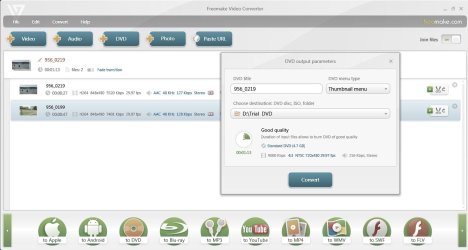
Easy way to convert your Quicktime video clips to DVD:

Download and install Freemake Video Converter from Freemake Downloads - Download Free Video Converter - Download Free Video Downloader

mov2DVD.jpg

Click on the Video tab and add your .mov files.

Click on join tab at top right and select on to join the video clips. You can add transitions too.

Click on "to DVD" in the bottom ribbon.

In the convert dialog box, you can burn it straight to DVD, or a folder or an ISO image.

Enjoy. (Lemme know how it worked. I just made a quick trial with short .mov files shot with my Kodak HD pocket camcorder and saved the DVD to a folder. Played it in WMP. Couldn't run a fullfledged trial for want of time.)

And ya, you need to install .netframework4 - if your comp does not have it already - for the converter to work.
 

My Computer My Computer

At a glance

Windows 7 Ultimate 32bitAMD Phenom II X3 720 ProcessorTranscend DDR2 (PC2 6400) 4 X 1GBIntegrated + ATI Radeon 4550
Computer Manufacturer/Model Number
self-assembled
OS
Windows 7 Ultimate 32bit
CPU
AMD Phenom II X3 720 Processor
Motherboard
Gigabyte GA-MA78GM-S2H Revision 1.0
Memory
Transcend DDR2 (PC2 6400) 4 X 1GB
Graphics Card(s)
Integrated + ATI Radeon 4550
Sound Card
Integrated Realtek ALC 889A
Monitor(s) Displays
DELL 1704 FPT
Screen Resolution
1280 x 1024
Hard Drives
Western Digital Caviar SE16 250 GB x2 in RAID 0
PSU
Coolermaster 400 W
Case
Zebronics Cube
Cooling
stock
Keyboard
Microsoft - wired
Mouse
Microsoft - wired
Internet Speed
ADSL 256-512Kbps
Recommend you look at imgburn (free).
The Official ImgBurn Website
It has a build mode and can change book type to DVD-ROM (readable by most home entertainment DVD players) from DVD+R and DVD+R/DL
 

My Computer My Computer

At a glance

Windows 7x64 Home Premium SP1Intel i7 2600kG.Skill Ripjaws (DDR3-1600) 2x4GBNvidia GeForce GTS 450; Intel HD Graphics 300...
Computer type
PC/Desktop
Computer Manufacturer/Model Number
Own build
OS
Windows 7x64 Home Premium SP1
CPU
Intel i7 2600k
Motherboard
ASUS P8Z68 Deluxe
Memory
G.Skill Ripjaws (DDR3-1600) 2x4GB
Graphics Card(s)
Nvidia GeForce GTS 450; Intel HD Graphics 3000(GT2+)
Monitor(s) Displays
Dell Ultrasharp IPS panel U2311H, Samsung SyncMaster P2350
Screen Resolution
1920x1080
Hard Drives
Samsung 850 Pro SSD 256GB, Samsung SSD 840 120GB, Seagates 1TB Barracuda ST31000528AS x2
PSU
Seasonic M12II 520W
Case
Lian Li Lancool PC-K60
Cooling
Case: 1x120mm, 3x140mm CPU: Hyper 212+
Keyboard
Logitech MK520 (wireless)
Mouse
Logitech MK520
Internet Speed
6-7 Mbps
Antivirus
Norton Security Premium, Malwarebytes on 2 (MSE on 3rd PC)
Browser
FireFox
Other Info
Audio: Logitech Z523 2.1
Cheers guys. Will try and have a go this evening (if I have time) and will let you know how I get on. :)
 

My Computer My Computer

At a glance

Windows 7 64 bit
OS
Windows 7 64 bit
Right, this is where I'm up to.

I created an ISO image using Freemake Video Converter and burnt it to DVD using Nero. Burn was created successfully but DVD is empty according to my laptop.

Tried to burn files directly to DVD using Freemake but encountered the same problem.

Tried burning a CD and a data disc DVD to see if the burner was working. These burnt fine, however, I tried copying an existing DVD to see if this worked but it didn't. It says the DVD is empty.

I know something has been burnt onto the disc because I can see it on the disc.

It's really frustrating! :(
 

My Computer My Computer

At a glance

Windows 7 64 bit
OS
Windows 7 64 bit
Download and install Elaborate Bytes Virtual CloneDrive. elby Free Software ( You may also download any other utilty to mount the ISO images ) Mount the ISO and run. Can you play it?

Then your ISO is alright and you may have a problem with your DVD writer.
 

My Computer My Computer

At a glance

Windows 7 Ultimate 32bitAMD Phenom II X3 720 ProcessorTranscend DDR2 (PC2 6400) 4 X 1GBIntegrated + ATI Radeon 4550
Computer Manufacturer/Model Number
self-assembled
OS
Windows 7 Ultimate 32bit
CPU
AMD Phenom II X3 720 Processor
Motherboard
Gigabyte GA-MA78GM-S2H Revision 1.0
Memory
Transcend DDR2 (PC2 6400) 4 X 1GB
Graphics Card(s)
Integrated + ATI Radeon 4550
Sound Card
Integrated Realtek ALC 889A
Monitor(s) Displays
DELL 1704 FPT
Screen Resolution
1280 x 1024
Hard Drives
Western Digital Caviar SE16 250 GB x2 in RAID 0
PSU
Coolermaster 400 W
Case
Zebronics Cube
Cooling
stock
Keyboard
Microsoft - wired
Mouse
Microsoft - wired
Internet Speed
ADSL 256-512Kbps
Download and install Elaborate Bytes Virtual CloneDrive. elby Free Software ( You may also download any other utilty to mount the ISO images ) Mount the ISO and run. Can you play it?

Then your ISO is alright and you may have a problem with your DVD writer.

It plays fine using that. What should I do now?
 

My Computer My Computer

At a glance

Windows 7 64 bit
OS
Windows 7 64 bit
If your DVD writer in your laptop has given up the ghost, there is nothing much you could do except replacing it with a new one or use an external optical drive as suggested by mate Ambimom in an earlier post.

Before doing that anyway, you may try cleaning the lense with a lense Cleaner CD and then check whether it reads and writes. (Use a CD-RW or DVD-RW for writing tests so that you may not end up with coasters.:))

If that fails you may get more aggressive and give the lense a gentle rub with a microfiber cloth. If your DVD writer still fails to breath life, say your prayers and discard it.

Anyway, now that you know how to convert and create your DVD, transfer the ISO to anyother working PC/laptop using a pendrive and write it to DVD. You can use the Windows7 native Image burner to burn the ISO to a DVD. No need for Nero or ImgBurner. Sing, sing a song, make it simple.:) (Not my words: so sang Carpenters)
 

My Computer My Computer

At a glance

Windows 7 Ultimate 32bitAMD Phenom II X3 720 ProcessorTranscend DDR2 (PC2 6400) 4 X 1GBIntegrated + ATI Radeon 4550
Computer Manufacturer/Model Number
self-assembled
OS
Windows 7 Ultimate 32bit
CPU
AMD Phenom II X3 720 Processor
Motherboard
Gigabyte GA-MA78GM-S2H Revision 1.0
Memory
Transcend DDR2 (PC2 6400) 4 X 1GB
Graphics Card(s)
Integrated + ATI Radeon 4550
Sound Card
Integrated Realtek ALC 889A
Monitor(s) Displays
DELL 1704 FPT
Screen Resolution
1280 x 1024
Hard Drives
Western Digital Caviar SE16 250 GB x2 in RAID 0
PSU
Coolermaster 400 W
Case
Zebronics Cube
Cooling
stock
Keyboard
Microsoft - wired
Mouse
Microsoft - wired
Internet Speed
ADSL 256-512Kbps
The thing I don't understand is that this is the first time I've used the DVD writer and the laptop is less than 12 months old. When I burnt a data disc to DVD and burnt an audio CD and data CD it works fine. :mad:
 

My Computer My Computer

At a glance

Windows 7 64 bit
OS
Windows 7 64 bit
What about burning a Data DVD and playing a commercial DVD movie?

If it is that new and not used heavily before, may be you should contact Acer Support who will know better. A distant diagnosis may not always be correct.

It could be that the lense head assembly could have gone out of alignment. Years back I had this reading problem and had an expert realign the lense head, but it did not last long. Fed up, I just replaced my desktop optical drive with another brand. At that point of time Samsungs were known to be susceptible to this kind of problem.

I also suggest you put your problem with all details in the Hardware and Devices section and hope that some expert gives a solution. Plausible.
 

My Computer My Computer

At a glance

Windows 7 Ultimate 32bitAMD Phenom II X3 720 ProcessorTranscend DDR2 (PC2 6400) 4 X 1GBIntegrated + ATI Radeon 4550
Computer Manufacturer/Model Number
self-assembled
OS
Windows 7 Ultimate 32bit
CPU
AMD Phenom II X3 720 Processor
Motherboard
Gigabyte GA-MA78GM-S2H Revision 1.0
Memory
Transcend DDR2 (PC2 6400) 4 X 1GB
Graphics Card(s)
Integrated + ATI Radeon 4550
Sound Card
Integrated Realtek ALC 889A
Monitor(s) Displays
DELL 1704 FPT
Screen Resolution
1280 x 1024
Hard Drives
Western Digital Caviar SE16 250 GB x2 in RAID 0
PSU
Coolermaster 400 W
Case
Zebronics Cube
Cooling
stock
Keyboard
Microsoft - wired
Mouse
Microsoft - wired
Internet Speed
ADSL 256-512Kbps
Just tried the burnt DVDs in another laptop - HP Compaq 2510p and they are opening fine and playing in Windows media player but with no sound. Can anyone help please? :confused:
 

My Computer My Computer

At a glance

Windows 7 64 bit
OS
Windows 7 64 bit

My Computer My Computer

At a glance

Windows 7 Home Premium 64 bitIntel Core i7-4790G.SKILL 8GB (2 x 4GB) DDR3 F3-10666CL9D-8GBNTAMD Radeon R7 250
Computer type
PC/Desktop
Computer Manufacturer/Model Number
Custom Build
OS
Windows 7 Home Premium 64 bit
CPU
Intel Core i7-4790
Motherboard
GA-Z87X-D3H
Memory
G.SKILL 8GB (2 x 4GB) DDR3 F3-10666CL9D-8GBNT
Graphics Card(s)
AMD Radeon R7 250
Sound Card
Realtek ALC892
Monitor(s) Displays
Samsung UN32EH5000, Dell 1703FPT
Screen Resolution
1920 x 1080, 1280 x 1024
Hard Drives
WD5003AZEX
WD10EZEX
Samsung HD103SJ
Samsung 128 GB 840 PRO
PSU
SeaSonic M12II SS-500GM
Case
Fractal Design Define R4
Cooling
Zalman CNPS9900ALED
Keyboard
Logitech K800
Mouse
Logitech M705
Internet Speed
16 Mbps
Antivirus
Avast
Browser
Firefox
Other Info
Bose Companion 2 Multimedia Speakers
Thanks for your reply p5bdkw but that still doesn't solve the problem of burning the DVDs to send to people. :cry:
 

My Computer My Computer

At a glance

Windows 7 64 bit
OS
Windows 7 64 bit
i peeps

I am having real probs with my Windows DVD maker once I've burnt my dvd 75% I don't get sound on the movie even though there is sound on the download and I am stumped, can anyone tell me either some advice or can anyone tell me a decent burning software now ive tried a lot of different ones and a lot of them you have to pay and I don't have the money but I do have a download site lol plz help :D
 
Last edited:

My Computer My Computer

At a glance

Windows 7 Home Premium 64bitRealtek PCIE CardReader
Computer type
Laptop
Computer Manufacturer/Model Number
CompaQ
OS
Windows 7 Home Premium 64bit
Motherboard
Intel Processor
Memory
Realtek PCIE CardReader
Antivirus
norton
Browser
IE8
Back
Top