
My Windows Live Mail has Stopped Working/Workaround....

scottls59901

New member
Member
VIP
Local time
12:36 PM
Messages
114
After Much experimenting I finally got WLM 2009 working Slowly again (I like WLM2009's GUI Much better, and downloaded it from FileHippo.com/temp disable your AV for All install/uninstalls)......

There isn't a bug, WLM is just VERY slow bloatware &...

After trying Auslogics/Puran I find that free Defraggler is the best defrag for system performance (replace windows defrag on install, and be sure to temp disable your AV during installation/defrag or it won't allow Hosts file changes...!).

There are 2 things you need to pre-do Before opening WLM (I have a pretty fast i7-2600 computer Win 7 Pro 32/4gig memory, with a 10k rpm WD Raptor sata6 HD so you may have to adjust your wait times accordingly.....?)-

1. Temp disable your AV's webguard (wait 1min).
2. If your browser is open, minimize it for 1min (I set IE to default, but browse with latest FF).
You will need a timer/second clock..., and if WLM stops working wait 2min to close or it will be corrupted (watch your HD light, WLM is still closing in background & I wait 5min before re-opening WLM).

1. Open WLM & let it load for 3min before doing Anything.
2. Now for the 30sec rule before final clicking ALL!- Pre-Put your cursor on what you want to click & Always wait 30sec after the bubble closes BEFORE/After clicking ANYTHING!
3. Go to Tools/Options/... & disable Send messages immediately (messages take 1min+ to final queue).
4. NEVER delete A message after viewing!- Close & wait 2min After all messages have been Viewed/Sent... to cleanup..., & then wait 3min before closing WLM (30sec rule on Xing out too!).

I know this is a time-consuming Hassle, but better than WLM constantly crashing!:rolleyes:
 

My Computer My Computer

At a glance

Windows 7 Pro (32)i7/26004gb512mg (add on card was less buggy than Intel ...
Computer Manufacturer/Model Number
ZT Desktop
OS
Windows 7 Pro (32)
CPU
i7/2600
Motherboard
Intel
Memory
4gb
Graphics Card(s)
512mg (add on card was less buggy than Intel direct driver)
Sound Card
Internal
Monitor(s) Displays
19" DELL Ultra Sharp
Hard Drives
C:= WD Raptor Sata6 10k rpm
D:/E:= WD Black Sata 3.0
Case
ZT Full
Cooling
ZT
Internet Speed
8000kbps cable
Other Info
Free Outpost Pro Internet Security, and no other active anti-malware.
Free On-Demand- SpyWareBlaster, MBAM, Emsisoft-Kit, and Kaspersky Anti-rootkit utility TDSSKiller.
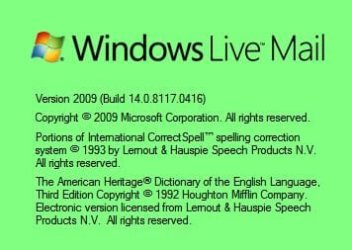
What version of WLM are you using ?. I am using this one hassle free.

GB.JPG
 

My Computer My Computer

At a glance

Win7 H.Prem. 32bit+SP1
Computer Manufacturer/Model Number
Look in my Signature.
OS
Win7 H.Prem. 32bit+SP1

My Computer My Computer

At a glance

Windows 8 Pro w/MC 32-bitIntel Atom 1.86 GHz2 GBIntel GMA 500
Computer type
PC/Desktop
Computer Manufacturer/Model Number
OQO 2+
OS
Windows 8 Pro w/MC 32-bit
CPU
Intel Atom 1.86 GHz
Motherboard
OQO 2+
Memory
2 GB
Graphics Card(s)
Intel GMA 500
Sound Card
IDT
Monitor(s) Displays
LCD
Screen Resolution
800 x 480 (portable) 1280 x 1024 (docked)
Hard Drives
64 GB SSD
PSU
9 Ah Battery (portable) or OQO Brick (docked)
Case
Shirt Pocket Sized
Cooling
Tiny Fan
Keyboard
Slide out (portable) DiNovo Edge (docked)
Mouse
Eraser head (portable) Logitech Bluetooth (docked)
Internet Speed
WWAN or 802.11G (portable) T1 (docked)
Browser
IE 10
Other Info
DVD-RW OQO Docking Station
What version of WLM are you using ?. I am using this one hassle free.

View attachment 182322
I'm using the same ...0416 version. What AV are you using/setup...?

Re: MSE AV- It could be that my Avira AV is slowing WLM down, as there is No slow down with No realtime AV's installed-
I would try MSE 2.1, but they have a Very Low 92.1% detection rate on Av-comparatives (Avira is 99.5%)....
AV-Comparatives - Independent Tests of Anti-Virus Software - Detection Tests
I could do on-demand scans (i.e. closing the barn door After the horses have escaped!), but my goal is to keep my computer full-time safe-as-possible.
Removing malware after they have changed/corrupted system files/uploaded data..., is often Very iffy as the original files are gone.

I tried free Outpost IS AV, but it was also slow with WLM & I didn't like their no-control/ allow-everything Mom&Pop firewall (VERY hard to "Completely" uninstall (Safe Mode using their recommended tool/procedure)), and it left Lots of folders/registry junk...- It was still in Add-Remove too.

Avast AV crashed on install, and their clueless outsourced iYogi tech support logged on & corrupted my computer (Acronis Emergency boot CD to the rescue).

I guess I'll live with Avira, as I only open WLM once a day (POP3). I also log onto my ISP email account to see if anything important?
 

My Computer My Computer

At a glance

Windows 7 Pro (32)i7/26004gb512mg (add on card was less buggy than Intel ...
Computer Manufacturer/Model Number
ZT Desktop
OS
Windows 7 Pro (32)
CPU
i7/2600
Motherboard
Intel
Memory
4gb
Graphics Card(s)
512mg (add on card was less buggy than Intel direct driver)
Sound Card
Internal
Monitor(s) Displays
19" DELL Ultra Sharp
Hard Drives
C:= WD Raptor Sata6 10k rpm
D:/E:= WD Black Sata 3.0
Case
ZT Full
Cooling
ZT
Internet Speed
8000kbps cable
Other Info
Free Outpost Pro Internet Security, and no other active anti-malware.
Free On-Demand- SpyWareBlaster, MBAM, Emsisoft-Kit, and Kaspersky Anti-rootkit utility TDSSKiller.
I used to have Avira on both pc's but changed them to Avast due to Avira's bl***y pop ups. Avast stilll on Laptop but due to a recent experiment, my Desktop now has MSE. Both pc's have Outpost FW Pro. + Winpatrol.
 

My Computer My Computer

At a glance

Win7 H.Prem. 32bit+SP1
Computer Manufacturer/Model Number
Look in my Signature.
OS
Win7 H.Prem. 32bit+SP1
I finally found out what's causing WLM to Stop Working/solution!-
If Any AV I've used does an auto-definition update while WLM is open, & I continue working, it will crash. I stop working in WLM for 10min, and then proceed slowly (I also set auto-update to 3hrs)...
I Don't close "Stopped Working" pop-up for 2min, or the message I was working on will be orphaned (can Only Shift/Delete to get rid of it).

TIPS-
-Don't send Immediately (when done composing..., wait 2min & send all at once).
-Disable spell check before sending.

-Don't delete messages immediately- wait 2min after everything is closed, then Shift/Delete to Permanently delete messages All at once (Recycle Bin set to Remove Files Immediately (In Properties..., and did the same for all HD's/Partitions).
~~~~~~~~~
BTW?- MS has a new Windows Live Essentials 2009 beta for Win 7, that I'm going to try (after sys backup)?
Windows Live Essentials - Download Windows Live Essentials
 

My Computer My Computer

At a glance

Windows 7 Pro (32)i7/26004gb512mg (add on card was less buggy than Intel ...
Computer Manufacturer/Model Number
ZT Desktop
OS
Windows 7 Pro (32)
CPU
i7/2600
Motherboard
Intel
Memory
4gb
Graphics Card(s)
512mg (add on card was less buggy than Intel direct driver)
Sound Card
Internal
Monitor(s) Displays
19" DELL Ultra Sharp
Hard Drives
C:= WD Raptor Sata6 10k rpm
D:/E:= WD Black Sata 3.0
Case
ZT Full
Cooling
ZT
Internet Speed
8000kbps cable
Other Info
Free Outpost Pro Internet Security, and no other active anti-malware.
Free On-Demand- SpyWareBlaster, MBAM, Emsisoft-Kit, and Kaspersky Anti-rootkit utility TDSSKiller.
I finally found out what's causing WLM to Stop Working/solution!-
If Any AV I've used does an auto-definition update while WLM is open, & I continue working, it will crash. I stop working in WLM for 10min, and then proceed slowly (I also set auto-update to 3hrs)...
I Don't close "Stopped Working" pop-up for 2min, or the message I was working on will be orphaned (can Only Shift/Delete to get rid of it).

TIPS-
-Don't send Immediately (when done composing..., wait 2min & send all at once).
-Disable spell check before sending.

-Don't delete messages immediately- wait 2min after everything is closed, then Shift/Delete to Permanently delete messages All at once (Recycle Bin set to Remove Files Immediately (In Properties..., and did the same for all HD's/Partitions).
~~~~~~~~~
BTW?- MS has a new Windows Live Essentials 2009 beta for Win 7, that I'm going to try (after sys backup)?
Windows Live Essentials - Download Windows Live Essentials
 

My Computer My Computer

At a glance

Windows 7 Pro (32)i7/26004gb512mg (add on card was less buggy than Intel ...
Computer Manufacturer/Model Number
ZT Desktop
OS
Windows 7 Pro (32)
CPU
i7/2600
Motherboard
Intel
Memory
4gb
Graphics Card(s)
512mg (add on card was less buggy than Intel direct driver)
Sound Card
Internal
Monitor(s) Displays
19" DELL Ultra Sharp
Hard Drives
C:= WD Raptor Sata6 10k rpm
D:/E:= WD Black Sata 3.0
Case
ZT Full
Cooling
ZT
Internet Speed
8000kbps cable
Other Info
Free Outpost Pro Internet Security, and no other active anti-malware.
Free On-Demand- SpyWareBlaster, MBAM, Emsisoft-Kit, and Kaspersky Anti-rootkit utility TDSSKiller.
As this thread is almost a year old, presumably you have now updated your Live Mail version. But, fwiw, using the version which you have discussed, and the latest, I have never experienced any of those problems. I have experimented with different (free) avs, during this time. ( I also use a spell checker)
 

My Computer My Computer

At a glance

Vista and now 7 in 32 and 64 bit.
Computer Manufacturer/Model Number
Three desktops and one laptop with good specs..
OS
Vista and now 7 in 32 and 64 bit.
Back
Top