Mysterious SD card behaviour

perfection

New member
Local time
6:39 AM
Messages
22
When I insert an SD card into the built in card reader of my Toshiba laptop (with OS win 7 *32 bit) the SD card drive continuously appears as a drive (and shows its autoplay menu) and then seconds later dissappears. This keeps on happening and never settles down. Also it shows and unshows as a fixed drive which it is not.

One thing is that this behaviour happens if the card is in the slot when the laptop is shut down and then removed (and reinserted) sometime after next boot. If the card slot is empty when I shut off and then after next boot if i insert the card all is fine

Any explanations for this mysterious behaviour and any workarounds?
 

My Computer

OS
Windows 7 Ultimate 32 bit
hi there :)
two things to check for you.

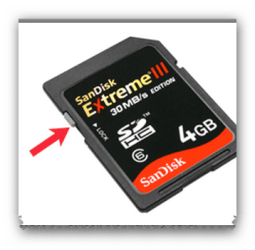
1, is the sd card locked? there should be a little catch on the sd card which you can protect the files when this is in the locked position.
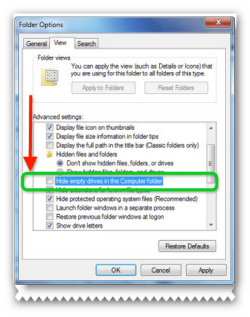
2, have you show all drives enabled in the Explorer settings?
Open Explorer > Folder & Search options > View > Advanced settings > Uncheck Hide empty drives in the Computer folder > Apply > OK.
 

Attachments

  • brys snap ?06 ?March ?2011 16h59m55s.png
    brys snap ?06 ?March ?2011 16h59m55s.png
    87 KB · Views: 12
  • brys snap ?06 ?March ?2011 17h03m59s.png
    brys snap ?06 ?March ?2011 17h03m59s.png
    22.2 KB · Views: 7
Last edited:

My Computer

Computer Manufacturer/Model Number
packard bell IXTREME M5722
OS
Operating System : Windows 7 Home Premium Edition 6.01.7600 SP1 (x64)
CPU
Processor : Intel Core 2 Quad Q8300 @ 2500 MHz
Motherboard
Mainboard : Packard Bell (Acer EG43M )
Memory
Physical Memory :8GB Corsair4x 2GB 800MHz C5 DDR2
Graphics Card(s)
Video Card : XFX 6700 AMD
Monitor(s) Displays
Maestro 234DL - BenQ V2220 - BenQ VW2420H
Screen Resolution
Current Display :1920x1080p pixels at 60 Hz in HD LED
Hard Drives
Hard Disks : WDC (1000 GB)
Drive C: (Hard Disk) : 428 GB available on 491 GB
Drive D: (Hard Disk) : 426 GB available on 492 GB
SAMSUNG spinpoint HD103SJ 1000.2 GB
(X 2) KINGSTON SSD NOW V 30GB
PSU
XFX ProSeries 550W PSU
Case
PACKARD BELL IXTREME
Cooling
System Blower Current: 150mA Air Flow16CFM ;Akasa 90mm rear
Keyboard
Gigabyte Aivia K8100
Mouse
TRUST-Wireless Laser Mouse - Carbon edition MI-7770C
Internet Speed
TP-LINK > TL-WN951N / AV500 Gigabit Powerline Adapters
Browser
chrome dev
Other Info
EXTRA COOLING>(FAN CONTROLLER) PC Bay Cooler 3 x 40mm fans; Akasa AK-HD-BL Blue hard drive cooler 2 x 40 mm fan 4500 rpm 29.7 dBA
Bios> American Megatrends Inc.
Version : P01-A1
Date : 08/31/2009
checked the lock of the sd card - it is in unlock position ready for read and write.
I ahve unchecked the option above , rebooted but i have the same problem.
Removing the card before a shutdown seems to be the only option but i don't understand this behaviour one bit.
 

My Computer

OS
Windows 7 Ultimate 32 bit
when the sd card is in the slot look in device manager and see if there is a red cross next to the sd card and (click the view tab and click show hidden devices) look for yellow alerts. your card reader or motherboard controler drivers my need reinstall.
 

My Computer

Computer Manufacturer/Model Number
packard bell IXTREME M5722
OS
Operating System : Windows 7 Home Premium Edition 6.01.7600 SP1 (x64)
CPU
Processor : Intel Core 2 Quad Q8300 @ 2500 MHz
Motherboard
Mainboard : Packard Bell (Acer EG43M )
Memory
Physical Memory :8GB Corsair4x 2GB 800MHz C5 DDR2
Graphics Card(s)
Video Card : XFX 6700 AMD
Monitor(s) Displays
Maestro 234DL - BenQ V2220 - BenQ VW2420H
Screen Resolution
Current Display :1920x1080p pixels at 60 Hz in HD LED
Hard Drives
Hard Disks : WDC (1000 GB)
Drive C: (Hard Disk) : 428 GB available on 491 GB
Drive D: (Hard Disk) : 426 GB available on 492 GB
SAMSUNG spinpoint HD103SJ 1000.2 GB
(X 2) KINGSTON SSD NOW V 30GB
PSU
XFX ProSeries 550W PSU
Case
PACKARD BELL IXTREME
Cooling
System Blower Current: 150mA Air Flow16CFM ;Akasa 90mm rear
Keyboard
Gigabyte Aivia K8100
Mouse
TRUST-Wireless Laser Mouse - Carbon edition MI-7770C
Internet Speed
TP-LINK > TL-WN951N / AV500 Gigabit Powerline Adapters
Browser
chrome dev
Other Info
EXTRA COOLING>(FAN CONTROLLER) PC Bay Cooler 3 x 40mm fans; Akasa AK-HD-BL Blue hard drive cooler 2 x 40 mm fan 4500 rpm 29.7 dBA
Bios> American Megatrends Inc.
Version : P01-A1
Date : 08/31/2009
No red crosses not yellow alerts - drivers of Mb and card controllers are perfect
A little more observation tells me this about the nysterious behvaiour.
When i pull ou the sd card after a reboot the memory trechnology driver section gets plugged out of device manager(i think this is by design - power saving). During these minutes (the time it takes to make itself invisible from device manager as there is not card in the slot) is when my mysterious behaviour (of repeated appearing and dissappearing occurs). After it plugs out of device maanger, if i insert a card - all is fine and it shows steady and as a removeable drive whcih it is!

Any way to keep the Memory technology Driver section of device manager constantly plugged in rather that allowing it to get plugged out when not being used?
 

My Computer

OS
Windows 7 Ultimate 32 bit
Back
Top