Solved Mysterious SVCHOST activity since 25-5-2012

yovaraj

New member
Local time
10:48 PM
Messages
2
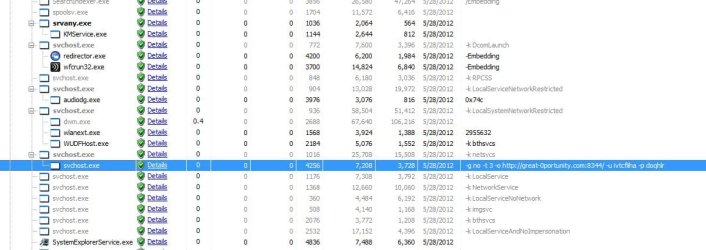
Phenomenon than meets the other day, and to launch the PC, higher CPU load. From Task Manager, we are using the CPU in the svchost * 32,
If you look at the process Exploer
"C:\Windows\System32\svchost.exe" -g no -t 3 -o http://great-0portunity.com:8344/ -u ivtcfliha -p doqhlr"
It seems that the command is executed, the service could not be identified.
Dropping this process, the load will fall, it will stand up to hand on a regular basis.
Did not catch the virus even if the search.
Please tell me if there is a workaround.:cry::cry:
 

Attachments

  • Snapped under System Explorer.jpg
    Snapped under System Explorer.jpg
    66.1 KB · Views: 31

My Computer My Computer

At a glance

Win 7
OS
Win 7

My Computer My Computer

At a glance

x64 (6.3.9600) Win8.1 Pro & soon dual boot x6...AMD A6-3420M APU with Radeon(tm) HD Graphics6.00 GBAMD Radeon(TM) HD 6520G
Computer type
Laptop
Computer Manufacturer/Model Number
HP Pavilion dv6-6c10us
OS
x64 (6.3.9600) Win8.1 Pro & soon dual boot x64 (6.1.7601) Win7_SP1 HomePrem
CPU
AMD A6-3420M APU with Radeon(tm) HD Graphics
Motherboard
Hewlett-Packard 1805
Memory
6.00 GB
Graphics Card(s)
AMD Radeon(TM) HD 6520G
Sound Card
(1) AMD High Definition Audio Device (2) IDT High Definiti
Monitor(s) Displays
HP W2072a 20" LCD (1600 x 900) @ 60 Hz
Screen Resolution
1366 x 768 x 32 bits (4294967296 colors) @ 60 Hz
Hard Drives
ST640LM0 00 HM641JI SATA Disk Device
Keyboard
Logitech k520 wireless KB
Mouse
Logitech m320 wireless mouse (bundled with KB)
Internet Speed
15/5 | 54 MB Wireless 'n'
Antivirus
Realtime: Defender or Avast | On-demand: Malwarebytes, ESET
Browser
IE 11 on Win8, IE 10 on win 7
Other Info
Media: [Gimp, Audacity, VLC] || Comm: [WEmail 2012, Skype] || Productivity: [OpenOffice,| Textpad] || Utils: [Sysinternals, cCleaner, Speccy, Defraggler]
Solved

I found the way myself after doing some readings online. Thanks for the one would introduced me Combo Fix. I does fix my prob. It seems it is a rootkit. Now there is no high CPU load. I think the Combo Fix does repairs other types or vernurability as well. Please dont panic during the Combo Fix repairing session. It looks like old DOS GUI appears and command line running in it. BE PATIENT until it repairs and restarts your PC. You can trust this Application. Here is the link
 
Last edited by a moderator:

My Computer My Computer

At a glance

Win 7
OS
Win 7

My Computer My Computer

At a glance

Windows 10 Home x64INTEL Core i5-750 Quad-Core 3.37GHzHyperX Fury Black Series 8GB (2 x 4GB) 1866MhzEVGA GeForce GTX 750 Superclocked 1GB 128-Bit...
Computer type
PC/Desktop
OS
Windows 10 Home x64
CPU
INTEL Core i5-750 Quad-Core 3.37GHz
Motherboard
ASUS P7P55D
Memory
HyperX Fury Black Series 8GB (2 x 4GB) 1866Mhz
Graphics Card(s)
EVGA GeForce GTX 750 Superclocked 1GB 128-Bit GDDR5
Monitor(s) Displays
LG 32MA68HY 32" IPS
Screen Resolution
1920 x 1080
Hard Drives
Samsung 840 Evo 120GB, SEAGATE 500GB Barracuda® 7200.12, SATA 3 Gb/s, 7200 RPM, 16MB cache
PSU
ANTEC TruePower New TP-550, 80 PLUS, 550W
Case
ANTEC Three Hundred Illusion
Cooling
COOLER MASTER Hyper 212 Plus, 4 x 120mm 1 x 140mm Noctua's
Internet Speed
85 + Mbps
Antivirus
Avast
Browser
Vivaldi
Back
Top