Mysterious Win 7 Pro 64 Slowdown - Maybe Underclocking Itself?

It's about a detective and a case about helping a cop that is being set up and accused of stealing.

I have no idea on how one gets a book published. I will work on that later.
I bought a book on how to wright a book and all it did was confuse me.
I knew what I wanted to wright about so I just sat in front of the keyboard and typed like I talk and think.
I don't want it to read like a owners manual but more like real people talking and their thoughts. I want the reader to know the detectives thought. Why something is done. More detail of things, places and ideas that steer the detective to the solutions. Every time I proof read I change things a little. If I just let my thought come out using the keyboard it is not hard for me. I do get times I have to stop for a couple of days and just think where the book should go next. Two day later I'm typing and there are the things I was thinking on for the last 2 days. It's not hard for me for whatever reason. I have a lady friend reading my book but she is well behind now so I haven't got a updated opinion. Her last comments were very nice. She likes the book and it is easy to read. Easy to read is what I want. I don't want my book to be work for someone to read it.

I'm on page 373 at the present time.
The case is about solved.

Jack
 
Last edited:

My Computer My Computer

At a glance

Windows 10 Pro. 64/ version 1709 Windows 7 Pr...Intel i7-6800K @ 4.3Corsair Platinum 16 gig @2400EVGA GTX 1070 OC
Computer type
PC/Desktop
Computer Manufacturer/Model Number
Home made Desktop
OS
Windows 10 Pro. 64/ version 1709 Windows 7 Pro/64
CPU
Intel i7-6800K @ 4.3
Motherboard
ASUS X-99 Deluxe II
Memory
Corsair Platinum 16 gig @2400
Graphics Card(s)
EVGA GTX 1070 OC
Monitor(s) Displays
Asus 27" LED LCD/VE278Q
Screen Resolution
1920-1080 or 1280-720 HDMI
Hard Drives
INTEL SSD 730-240 Gb Sata 3.0/
PSU
EVGA Platium 1200W
Case
Phanteks Luxe Tempered Glass 8 fans/ one radiator
Cooling
XSPC/ Water Cooled CPU
Keyboard
Das 4 Professional
Mouse
Logitech M705/MX Anywhere 2-S
Internet Speed
100 mbits
Antivirus
Microsoft Security Essentials/ Malwarebytes Premium 3.0/ SAS
Browser
I.E. 11 default/Firefox/ ISP Time Warner Cable/Spectrum
Other Info
LG BluRay Burner/
Sound system-KLipsch-THX/
Icy Dock ssd Hot Swap bays.
Hi Folks. Here’s a minor update. MSI does have a Customer Support phone #, but I have to wait till Monday to call as they’re closed weekends. We’ll see what happens; I’ll keep you posted. Just in case, I also Googled the motherboard and they are still available, so I’m good there if I have to buy another.

I’ve lost count but it’s been around 3 days now it’s been running at 800 MHz. Now knowing what EIST is, yesterday I set it to 100%, but it didn’t make a difference.

Just a short while ago I figured I’d switch the Slow switch back to its original position since the middle position wasn’t working, with the hopes that I’d at least get my On button light back on. And that’s when things got scary. It wouldn’t start!! Oh great, now it died I thought.

Turns out that the front panel header is so insecure that just very lightly brushing against it (I didn’t even realized I did and I was being super careful) that it comes loose enough to not be connected. It uses, for lack of a better term, a header plug where you hook up all your front panel connections to it, then the plug onto the motherboard.

Now the good news! It fired up at 4.2 GHz! It sure was nice loading this Web page almost instantly instead of having time to go get a cup of coffee and hope it’s loaded by the time I get back, LOL.

So, other than the monitor, or course, I’m not turning this thing off, and hope that keeps me running ‘fast’ until I get this fixed for real.

Thanks for that idea, Jack.

I downloaded your link on the Extreme Tuning Utility, johnhoh. If this box messes up again, I’ll give it a shot. I’m just real shy right now to try anything… while it’s running fast, I don’t want to touch it, LOL.
.
 

My Computer My Computer

At a glance

Win 7 Pro 64 SP1i7 6700K SkyLake32 GBnVidia GTX 970
Computer type
PC/Desktop
Computer Manufacturer/Model Number
home built
OS
Win 7 Pro 64 SP1
CPU
i7 6700K SkyLake
Motherboard
MSI Gaming M7
Memory
32 GB
Graphics Card(s)
nVidia GTX 970
Sound Card
onboard
Monitor(s) Displays
DELL U2711
Screen Resolution
2560x1440
Hard Drives
1 SSD OS, 2 WD Black Caviar data harddrives
PSU
EVGA Super Nova 850W G2 'Gold'
Case
Thermaltake Soprano Snow Edition
Cooling
Cooler Master Hyper 212 evo
Keyboard
Logitech K350
Mouse
Mad Kats RATT
Antivirus
Avast
Browser
Firefox
Well your gaining on it. Sometimes it is the simple things that count.
Proper connections is surly one of the simple things.

My rules of the thumb.
1. Make sure the basics are correct first.
2. Don't assume their is only one problem.


Keep us informed.

Jack
 

My Computer My Computer

At a glance

Windows 10 Pro. 64/ version 1709 Windows 7 Pr...Intel i7-6800K @ 4.3Corsair Platinum 16 gig @2400EVGA GTX 1070 OC
Computer type
PC/Desktop
Computer Manufacturer/Model Number
Home made Desktop
OS
Windows 10 Pro. 64/ version 1709 Windows 7 Pro/64
CPU
Intel i7-6800K @ 4.3
Motherboard
ASUS X-99 Deluxe II
Memory
Corsair Platinum 16 gig @2400
Graphics Card(s)
EVGA GTX 1070 OC
Monitor(s) Displays
Asus 27" LED LCD/VE278Q
Screen Resolution
1920-1080 or 1280-720 HDMI
Hard Drives
INTEL SSD 730-240 Gb Sata 3.0/
PSU
EVGA Platium 1200W
Case
Phanteks Luxe Tempered Glass 8 fans/ one radiator
Cooling
XSPC/ Water Cooled CPU
Keyboard
Das 4 Professional
Mouse
Logitech M705/MX Anywhere 2-S
Internet Speed
100 mbits
Antivirus
Microsoft Security Essentials/ Malwarebytes Premium 3.0/ SAS
Browser
I.E. 11 default/Firefox/ ISP Time Warner Cable/Spectrum
Other Info
LG BluRay Burner/
Sound system-KLipsch-THX/
Icy Dock ssd Hot Swap bays.
The ‘fast’ mode was short lived. It started fluctuating last night, and it was a steady 800 MHz this morning without turning off the system last night.

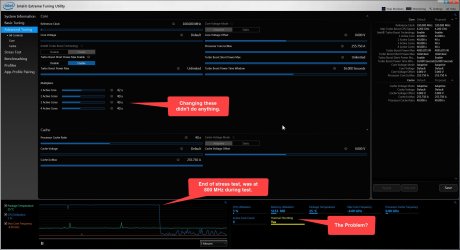
Short version: I finally got ETU to start and no joy, even while running the stress test it stayed at 800 MHz. But I think I discovered a huge clue.

As you know, sometimes it will bounce between fast/slow. I noticed in ETU, near the bottom, “Thermal Throttling” was Yellow, and said ‘Yes’ (see screenshot) even at idle. I figured that meant it was just turned on. But then, the system when into ‘fast’ mode per HWiNFO64! (at 4 GHz, not 4.2 GHz). I looked back at ETU and “Thermal Throttling” was now blue, and said ‘No.’

As a test, I loaded a Web page and it loaded just about instantaneous instead of taking 15-20 seconds. But while typing this and the above paragraphs, HWiNFO64 dropped back to 800 GHz, and ETU’s “Thermal Throttling” was Yellow, and said ‘Yes’ again.

So for whatever reason, this system does appear to be Thermal Throttling down. Since I haven’t touched the Slow switch, I’m thinking it may be its related circuitry, or maybe something else wrong with the motherboard; a cracked trace somewhere?

Any ideas on this?

~~~~~~~~~~~~~~~~~~~~~~~~~~~~~~~
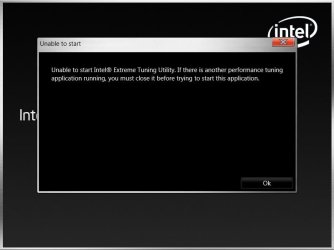
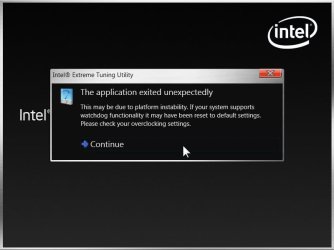
Long version (this may help others): I installed Intel ETU but things aren’t going well. I rebooted as requested, tried to fire it up, and got the error:

"Unable to start Intel Extreme Tuning Utility. If there is another performance tuning application running, you must close it before trying to start this application." (See Screenshot)

It took so long to load (a real couple of minutes) that I did start Task Manager to see what’s going on. ETU was not even showing as running, yet it’s right there on my screen. So I logged off, thinking maybe TM goofed things up. No change. Full reboot, also no change.

Did some Googling on the issue and tried the un/reinstall trick. I ran CCleaner in between and nothing related found.

Same error after un/reinstall. So this time I rebooted and reset the BIOS yet again. Note that a BIOS reset turns off XMP. This time ETU got a little further, but I still got an error:

“The application exited unexpectedly” (See screenshot for addition error details.)

I clicked on “Continue” and got in, finally… So I can only guess that having XMP turned on throws off ETU.

.
 

Attachments

  • ETU 4-9-17.jpg
    ETU 4-9-17.jpg
    227.2 KB · Views: 3
  • ETU Error 1.jpg
    ETU Error 1.jpg
    21.9 KB · Views: 1
  • ETU Error 2.jpg
    ETU Error 2.jpg
    28 KB · Views: 1

My Computer My Computer

At a glance

Win 7 Pro 64 SP1i7 6700K SkyLake32 GBnVidia GTX 970
Computer type
PC/Desktop
Computer Manufacturer/Model Number
home built
OS
Win 7 Pro 64 SP1
CPU
i7 6700K SkyLake
Motherboard
MSI Gaming M7
Memory
32 GB
Graphics Card(s)
nVidia GTX 970
Sound Card
onboard
Monitor(s) Displays
DELL U2711
Screen Resolution
2560x1440
Hard Drives
1 SSD OS, 2 WD Black Caviar data harddrives
PSU
EVGA Super Nova 850W G2 'Gold'
Case
Thermaltake Soprano Snow Edition
Cooling
Cooler Master Hyper 212 evo
Keyboard
Logitech K350
Mouse
Mad Kats RATT
Antivirus
Avast
Browser
Firefox
Well your gaining on it. Sometimes it is the simple things that count.
Proper connections is surly one of the simple things.

My rules of the thumb.
1. Make sure the basics are correct first.
2. Don't assume their is only one problem.


Keep us informed.

Jack
Oh yeah, I fully agree. I can't count the times over the years on how many things I've "fixed" for people by simply making sure the device was plugged in! Or things like switching the remote from DVD back to TV. LOL
 

My Computer My Computer

At a glance

Win 7 Pro 64 SP1i7 6700K SkyLake32 GBnVidia GTX 970
Computer type
PC/Desktop
Computer Manufacturer/Model Number
home built
OS
Win 7 Pro 64 SP1
CPU
i7 6700K SkyLake
Motherboard
MSI Gaming M7
Memory
32 GB
Graphics Card(s)
nVidia GTX 970
Sound Card
onboard
Monitor(s) Displays
DELL U2711
Screen Resolution
2560x1440
Hard Drives
1 SSD OS, 2 WD Black Caviar data harddrives
PSU
EVGA Super Nova 850W G2 'Gold'
Case
Thermaltake Soprano Snow Edition
Cooling
Cooler Master Hyper 212 evo
Keyboard
Logitech K350
Mouse
Mad Kats RATT
Antivirus
Avast
Browser
Firefox
It's about a detective and a case about helping a cop that is being set up and accused of stealing.

I have no idea on how one gets a book published. I will work on that later.
I bought a book on how to wright a book and all it did was confuse me.
I knew what I wanted to wright about so I just sat in front of the keyboard and typed like I talk and think.
I don't want it to read like a owners manual but more like real people talking and their thoughts. I want the reader to know the detectives thought. Why something is done. More detail of things, places and ideas that steer the detective to the solutions. Every time I proof read I change things a little. If I just let my thought come out using the keyboard it is not hard for me. I do get times I have to stop for a couple of days and just think where the book should go next. Two day later I'm typing and there are the things I was thinking on for the last 2 days. It's not hard for me for whatever reason. I have a lady friend reading my book but she is well behind now so I haven't got a updated opinion. Her last comments were very nice. She likes the book and it is easy to read. Easy to read is what I want. I don't want my book to be work for someone to read it.

I'm on page 373 at the present time.
The case is about solved.

Jack
Sounds intriguing and captivating, Jack. I’m not a writer but it sure seems like you’re on the right track! I like the ‘easy to read’ concept, too.

Let us know when it’s published. I’m very interested in it. (Warning: it takes me ‘forever’ to read a book as I do all my physical reading while on the ‘head’, so it’s just a few minutes at a time here and there…)
 

My Computer My Computer

At a glance

Win 7 Pro 64 SP1i7 6700K SkyLake32 GBnVidia GTX 970
Computer type
PC/Desktop
Computer Manufacturer/Model Number
home built
OS
Win 7 Pro 64 SP1
CPU
i7 6700K SkyLake
Motherboard
MSI Gaming M7
Memory
32 GB
Graphics Card(s)
nVidia GTX 970
Sound Card
onboard
Monitor(s) Displays
DELL U2711
Screen Resolution
2560x1440
Hard Drives
1 SSD OS, 2 WD Black Caviar data harddrives
PSU
EVGA Super Nova 850W G2 'Gold'
Case
Thermaltake Soprano Snow Edition
Cooling
Cooler Master Hyper 212 evo
Keyboard
Logitech K350
Mouse
Mad Kats RATT
Antivirus
Avast
Browser
Firefox
"Since I haven’t touched the Slow switch, I’m thinking it may be its related circuitry, or maybe something else wrong with the motherboard; a cracked trace somewhere?"

Slow mode works by forcing thermal throttling to an ON state and making the system believe its overheating, so this new information reinforces that you are somehow being forced into slow mode no matter what you do with bios settings. But how is that happening? The fact that this happens even when you don't touch the switch, plus the fact that the switch sometimes does indeed have an impact, is exactly why I think the switch is the nexus of the problem and must be faulty. Now the issue might have nothing to do with the switch because its really due to a bad trace on the board, but in that case you would expect the slow mode switch to have no impact at all. Did you learn anything from the MSI forum posts?
 

My Computer My Computer

At a glance

Win7 pro x64stock i7 7700kCorsair Vengeance LPX 16GB (2x8GB) DDR4 @ 320...integrated Intel HD 630
Computer type
PC/Desktop
Computer Manufacturer/Model Number
diy
OS
Win7 pro x64
CPU
stock i7 7700k
Motherboard
Gigabyte Z270N-WIFI mini-ITX
Memory
Corsair Vengeance LPX 16GB (2x8GB) DDR4 @ 3200MHz
Graphics Card(s)
integrated Intel HD 630
Sound Card
onboard Realtek ALC1220
Monitor(s) Displays
two vertically mounted samsung 55" 4k un55mu8000
Screen Resolution
1920x1280
Hard Drives
256GB Samsung EVO 960 M.2 pci-e NVMe SSD
PSU
SilverStone Nightjar ST45NF 450Watt Fanless
Case
No case. Motherboard is mounted directly onto power supply
Cooling
Evercool low profile 815EP with Panaflow 12L fan at 7v
Keyboard
Ortek MCK-86 mini
Mouse
Belkin 5-button USB
Internet Speed
spectrum 400mbps
A few pages back you tried disabling thermal throttling in bios but it had no effect. However there is a program called throttlestop, which might be something to check out. Caveat - using this program eliminates thermal throttling, which is something that protects your system from overheating. Probably not an issue, but have to point it out.

Download ThrottleStop | techPowerUp
 

My Computer My Computer

At a glance

Win7 pro x64stock i7 7700kCorsair Vengeance LPX 16GB (2x8GB) DDR4 @ 320...integrated Intel HD 630
Computer type
PC/Desktop
Computer Manufacturer/Model Number
diy
OS
Win7 pro x64
CPU
stock i7 7700k
Motherboard
Gigabyte Z270N-WIFI mini-ITX
Memory
Corsair Vengeance LPX 16GB (2x8GB) DDR4 @ 3200MHz
Graphics Card(s)
integrated Intel HD 630
Sound Card
onboard Realtek ALC1220
Monitor(s) Displays
two vertically mounted samsung 55" 4k un55mu8000
Screen Resolution
1920x1280
Hard Drives
256GB Samsung EVO 960 M.2 pci-e NVMe SSD
PSU
SilverStone Nightjar ST45NF 450Watt Fanless
Case
No case. Motherboard is mounted directly onto power supply
Cooling
Evercool low profile 815EP with Panaflow 12L fan at 7v
Keyboard
Ortek MCK-86 mini
Mouse
Belkin 5-button USB
Internet Speed
spectrum 400mbps
you know, what if that funky power led light is a cause of problems instead of an effect? Probably a good idea to try unplugging it from your motherboard and rebooting. We're assuming it went out because of the motherboard, but its also possible it is shorting out on its own and that short is affecting the motherboard.
 

My Computer My Computer

At a glance

Win7 pro x64stock i7 7700kCorsair Vengeance LPX 16GB (2x8GB) DDR4 @ 320...integrated Intel HD 630
Computer type
PC/Desktop
Computer Manufacturer/Model Number
diy
OS
Win7 pro x64
CPU
stock i7 7700k
Motherboard
Gigabyte Z270N-WIFI mini-ITX
Memory
Corsair Vengeance LPX 16GB (2x8GB) DDR4 @ 3200MHz
Graphics Card(s)
integrated Intel HD 630
Sound Card
onboard Realtek ALC1220
Monitor(s) Displays
two vertically mounted samsung 55" 4k un55mu8000
Screen Resolution
1920x1280
Hard Drives
256GB Samsung EVO 960 M.2 pci-e NVMe SSD
PSU
SilverStone Nightjar ST45NF 450Watt Fanless
Case
No case. Motherboard is mounted directly onto power supply
Cooling
Evercool low profile 815EP with Panaflow 12L fan at 7v
Keyboard
Ortek MCK-86 mini
Mouse
Belkin 5-button USB
Internet Speed
spectrum 400mbps
johnhoh I like that line of thought. You could of hit on something.

TDKMate exactly what case/tower are you using.

Jack
 

My Computer My Computer

At a glance

Windows 10 Pro. 64/ version 1709 Windows 7 Pr...Intel i7-6800K @ 4.3Corsair Platinum 16 gig @2400EVGA GTX 1070 OC
Computer type
PC/Desktop
Computer Manufacturer/Model Number
Home made Desktop
OS
Windows 10 Pro. 64/ version 1709 Windows 7 Pro/64
CPU
Intel i7-6800K @ 4.3
Motherboard
ASUS X-99 Deluxe II
Memory
Corsair Platinum 16 gig @2400
Graphics Card(s)
EVGA GTX 1070 OC
Monitor(s) Displays
Asus 27" LED LCD/VE278Q
Screen Resolution
1920-1080 or 1280-720 HDMI
Hard Drives
INTEL SSD 730-240 Gb Sata 3.0/
PSU
EVGA Platium 1200W
Case
Phanteks Luxe Tempered Glass 8 fans/ one radiator
Cooling
XSPC/ Water Cooled CPU
Keyboard
Das 4 Professional
Mouse
Logitech M705/MX Anywhere 2-S
Internet Speed
100 mbits
Antivirus
Microsoft Security Essentials/ Malwarebytes Premium 3.0/ SAS
Browser
I.E. 11 default/Firefox/ ISP Time Warner Cable/Spectrum
Other Info
LG BluRay Burner/
Sound system-KLipsch-THX/
Icy Dock ssd Hot Swap bays.
Hi Folks. I contact MSI RMA this afternoon and amazingly I got right in. I spoke with ‘Henry,’ who was very pleasant and seemed willing to help. In short he said it was most likely the motherboard but could also be the CPU. After discussing what has already been done, he wants me to try 1) remove: all power leads to the motherboard; all RAM; the battery, and then wait at least 1/2 hour before putting it back together to see if it works. 2) and if it doesn’t, remove and reseat the CPU.

I doubt 100% the CPU is the fault. I’m 99.9% sure, as everything above points to, it’s the motherboard. I will try as they ask so I can say I did, but I don’t have much faith that’ll work. My problem here is even if they RMA the motherboard, I’ll be without my computer for probably 3-4 weeks. Not acceptable; I can’t be without it that long. So I asked if I could simply buy another from them and get a refund after this one is RMA’ed, and he said no. I can only assume that is as it might just be a simple repair for them.

So now (if the remaining tips above and from MSI don’t work) I’m facing buying a motherboard from Newegg or somewhere, then RMAing this one. Decisions, decisions…
.
 

My Computer My Computer

At a glance

Win 7 Pro 64 SP1i7 6700K SkyLake32 GBnVidia GTX 970
Computer type
PC/Desktop
Computer Manufacturer/Model Number
home built
OS
Win 7 Pro 64 SP1
CPU
i7 6700K SkyLake
Motherboard
MSI Gaming M7
Memory
32 GB
Graphics Card(s)
nVidia GTX 970
Sound Card
onboard
Monitor(s) Displays
DELL U2711
Screen Resolution
2560x1440
Hard Drives
1 SSD OS, 2 WD Black Caviar data harddrives
PSU
EVGA Super Nova 850W G2 'Gold'
Case
Thermaltake Soprano Snow Edition
Cooling
Cooler Master Hyper 212 evo
Keyboard
Logitech K350
Mouse
Mad Kats RATT
Antivirus
Avast
Browser
Firefox
"Since I haven’t touched the Slow switch, I’m thinking it may be its related circuitry, or maybe something else wrong with the motherboard; a cracked trace somewhere?"

Slow mode works by forcing thermal throttling to an ON state and making the system believe its overheating, so this new information reinforces that you are somehow being forced into slow mode no matter what you do with bios settings. But how is that happening? The fact that this happens even when you don't touch the switch, plus the fact that the switch sometimes does indeed have an impact, is exactly why I think the switch is the nexus of the problem and must be faulty. Now the issue might have nothing to do with the switch because its really due to a bad trace on the board, but in that case you would expect the slow mode switch to have no impact at all. Did you learn anything from the MSI forum posts?
Hi johnhoh. Yes, I read thru the links, thanks. The first one is the same problem, but refers to different motherboards. I also don’t have an LED that lights up when the Slow switch is in Slow mode. In the second one, the OP asks, “Try both and post your results. Should be interesting to get a trend.” I might just do that.

The 3rd link did have something to try that I haven’t yet (I sure hope I didn’t miss it if it was above!) and that is to start in Safe Mode. Like that poster, yes it runs full speed in Safe Mode. That poster’s problem was only solved with a new motherboard, though.

No new tips in link 4. Link 5 was interesting in that, besides having the same problem, but also the OP’s system specs are very close to mine. I noted what the ‘Global Moderator’ said:

“It's a somewhat known issue.....
…snip...”

What I find interesting with that is the Customer Support tech I spoke with today, while not directly said, seemed to be unaware of the Slow problem with this particular motherboard. I told him it was mentioned by a moderator that it’s a known issue.

And in the last link, I can’t try the tip, “Maybe try to manually overclock it like this: Put CPU Ratio to 45” as all I have is ‘Auto’ for the CPU ratio. Any ideas on how to allow me to set it to manual? I wouldn’t try more than 42.
.
 

My Computer My Computer

At a glance

Win 7 Pro 64 SP1i7 6700K SkyLake32 GBnVidia GTX 970
Computer type
PC/Desktop
Computer Manufacturer/Model Number
home built
OS
Win 7 Pro 64 SP1
CPU
i7 6700K SkyLake
Motherboard
MSI Gaming M7
Memory
32 GB
Graphics Card(s)
nVidia GTX 970
Sound Card
onboard
Monitor(s) Displays
DELL U2711
Screen Resolution
2560x1440
Hard Drives
1 SSD OS, 2 WD Black Caviar data harddrives
PSU
EVGA Super Nova 850W G2 'Gold'
Case
Thermaltake Soprano Snow Edition
Cooling
Cooler Master Hyper 212 evo
Keyboard
Logitech K350
Mouse
Mad Kats RATT
Antivirus
Avast
Browser
Firefox
A few pages back you tried disabling thermal throttling in bios but it had no effect. However there is a program called throttlestop, which might be something to check out. Caveat - using this program eliminates thermal throttling, which is something that protects your system from overheating. Probably not an issue, but have to point it out.

Download ThrottleStop | techPowerUp
Thanks for the link, johnhoh. I D/Led last night and looked at the HTML help file. I was so dang tired I didn’t understand anything in it… Sorry, today was also a long and hectic day, but I do want to give it a go after I try again to figure out how to use it.
.
 

My Computer My Computer

At a glance

Win 7 Pro 64 SP1i7 6700K SkyLake32 GBnVidia GTX 970
Computer type
PC/Desktop
Computer Manufacturer/Model Number
home built
OS
Win 7 Pro 64 SP1
CPU
i7 6700K SkyLake
Motherboard
MSI Gaming M7
Memory
32 GB
Graphics Card(s)
nVidia GTX 970
Sound Card
onboard
Monitor(s) Displays
DELL U2711
Screen Resolution
2560x1440
Hard Drives
1 SSD OS, 2 WD Black Caviar data harddrives
PSU
EVGA Super Nova 850W G2 'Gold'
Case
Thermaltake Soprano Snow Edition
Cooling
Cooler Master Hyper 212 evo
Keyboard
Logitech K350
Mouse
Mad Kats RATT
Antivirus
Avast
Browser
Firefox
you know, what if that funky power led light is a cause of problems instead of an effect? Probably a good idea to try unplugging it from your motherboard and rebooting. We're assuming it went out because of the motherboard, but its also possible it is shorting out on its own and that short is affecting the motherboard.

johnhoh I like that line of thought. You could of hit on something.

TDKMate exactly what case/tower are you using.

Jack
Very interesting. And yes, I’ll give it a shot tomorrow and see what happens.

The case is a Thermaltake Soprano ‘Snow Edition.’ I love it.
http://www.thermaltake.com/products-model.aspx?id=C_00001919
.
 

My Computer My Computer

At a glance

Win 7 Pro 64 SP1i7 6700K SkyLake32 GBnVidia GTX 970
Computer type
PC/Desktop
Computer Manufacturer/Model Number
home built
OS
Win 7 Pro 64 SP1
CPU
i7 6700K SkyLake
Motherboard
MSI Gaming M7
Memory
32 GB
Graphics Card(s)
nVidia GTX 970
Sound Card
onboard
Monitor(s) Displays
DELL U2711
Screen Resolution
2560x1440
Hard Drives
1 SSD OS, 2 WD Black Caviar data harddrives
PSU
EVGA Super Nova 850W G2 'Gold'
Case
Thermaltake Soprano Snow Edition
Cooling
Cooler Master Hyper 212 evo
Keyboard
Logitech K350
Mouse
Mad Kats RATT
Antivirus
Avast
Browser
Firefox
three things that may have you stuck in auto mode for overclocking and unable to change it

- slow mode may just disable overclocking altogether, or

- you may not be physically navigating bios correctly. I had an MSI uefi bios board once and iirc you had to first click the field, and then after that type on the keyboard, in order to change some bios entries. Or maybe some fields were adjustable with the mouse but on others the mouse did nothing, you needed the keyboard for those. It was not real intuitive. So try the mouse, the enter key, the arrow keys and the letters and numbers before concluding a field is not adjustable. or,

- you may need to be in expert mode to make manual clock changes. Your user manual should have an OC section that describes this.
 

My Computer My Computer

At a glance

Win7 pro x64stock i7 7700kCorsair Vengeance LPX 16GB (2x8GB) DDR4 @ 320...integrated Intel HD 630
Computer type
PC/Desktop
Computer Manufacturer/Model Number
diy
OS
Win7 pro x64
CPU
stock i7 7700k
Motherboard
Gigabyte Z270N-WIFI mini-ITX
Memory
Corsair Vengeance LPX 16GB (2x8GB) DDR4 @ 3200MHz
Graphics Card(s)
integrated Intel HD 630
Sound Card
onboard Realtek ALC1220
Monitor(s) Displays
two vertically mounted samsung 55" 4k un55mu8000
Screen Resolution
1920x1280
Hard Drives
256GB Samsung EVO 960 M.2 pci-e NVMe SSD
PSU
SilverStone Nightjar ST45NF 450Watt Fanless
Case
No case. Motherboard is mounted directly onto power supply
Cooling
Evercool low profile 815EP with Panaflow 12L fan at 7v
Keyboard
Ortek MCK-86 mini
Mouse
Belkin 5-button USB
Internet Speed
spectrum 400mbps
three things that may have you stuck in auto mode for overclocking and unable to change it

- slow mode may just disable overclocking altogether, or

- you may not be physically navigating bios correctly. I had an MSI uefi bios board once and iirc you had to first click the field, and then after that type on the keyboard, in order to change some bios entries. Or maybe some fields were adjustable with the mouse but on others the mouse did nothing, you needed the keyboard for those. It was not real intuitive. So try the mouse, the enter key, the arrow keys and the letters and numbers before concluding a field is not adjustable. or,

- you may need to be in expert mode to make manual clock changes. Your user manual should have an OC section that describes this.
Hi johnhoh. I went right into Expert mode and the Enter key trick worked. I set the CPU ratio to 42, rebooted, no difference.

I went back into BIOS and set the CPU Ratio Mode from Dynamic to Fixed. Rebooted, and again no change: it was still running at 800 MHz across the board in HWiNFO64.

I kind of had hopes this would work…

A few pages back you tried disabling thermal throttling in bios but it had no effect. However there is a program called throttlestop, which might be something to check out. Caveat - using this program eliminates thermal throttling, which is something that protects your system from overheating. Probably not an issue, but have to point it out.

Download ThrottleStop | techPowerUp
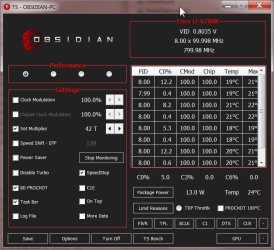
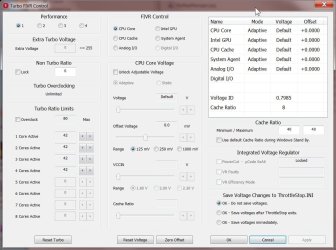
I’m glad I admit I’m not too bright on this stuff, LOL. I went thru the HTML help file and still didn’t get it, so I watched a couple of YouTube videos on it. Still pretty clueless, but I fired it up anyway. I might be missing something but I still couldn’t get this box off of 800 MHz. I played with only a couple of settings but nothing changed.

Screenshots below.


I should have time today to experiment with the front panel header and other things...

.
 

Attachments

  • Throttle Stop 1.jpg
    Throttle Stop 1.jpg
    81.7 KB · Views: 1
  • Throttle Stop 2.jpg
    Throttle Stop 2.jpg
    110.3 KB · Views: 1

My Computer My Computer

At a glance

Win 7 Pro 64 SP1i7 6700K SkyLake32 GBnVidia GTX 970
Computer type
PC/Desktop
Computer Manufacturer/Model Number
home built
OS
Win 7 Pro 64 SP1
CPU
i7 6700K SkyLake
Motherboard
MSI Gaming M7
Memory
32 GB
Graphics Card(s)
nVidia GTX 970
Sound Card
onboard
Monitor(s) Displays
DELL U2711
Screen Resolution
2560x1440
Hard Drives
1 SSD OS, 2 WD Black Caviar data harddrives
PSU
EVGA Super Nova 850W G2 'Gold'
Case
Thermaltake Soprano Snow Edition
Cooling
Cooler Master Hyper 212 evo
Keyboard
Logitech K350
Mouse
Mad Kats RATT
Antivirus
Avast
Browser
Firefox
I would try unchecking bd prochot, then save. If that does not work, then uncheck both bd prochot and intel speedstep, then save.

If this works, and you want it to run automatically at startup, here's how to do so:

The ThrottleStop Guide | Page 514 | NotebookReview

I saw in the bios mod forum at MSI that someone has a modified bios where you can disable throttling in bios and it seems to work for people with your problem. Would not recommend that though, as flashing with a hacked bios is a pretty extreme area, probably a little too "out there" for your situation.
 
Last edited:

My Computer My Computer

At a glance

Win7 pro x64stock i7 7700kCorsair Vengeance LPX 16GB (2x8GB) DDR4 @ 320...integrated Intel HD 630
Computer type
PC/Desktop
Computer Manufacturer/Model Number
diy
OS
Win7 pro x64
CPU
stock i7 7700k
Motherboard
Gigabyte Z270N-WIFI mini-ITX
Memory
Corsair Vengeance LPX 16GB (2x8GB) DDR4 @ 3200MHz
Graphics Card(s)
integrated Intel HD 630
Sound Card
onboard Realtek ALC1220
Monitor(s) Displays
two vertically mounted samsung 55" 4k un55mu8000
Screen Resolution
1920x1280
Hard Drives
256GB Samsung EVO 960 M.2 pci-e NVMe SSD
PSU
SilverStone Nightjar ST45NF 450Watt Fanless
Case
No case. Motherboard is mounted directly onto power supply
Cooling
Evercool low profile 815EP with Panaflow 12L fan at 7v
Keyboard
Ortek MCK-86 mini
Mouse
Belkin 5-button USB
Internet Speed
spectrum 400mbps
I would try unchecking bd prochot, then save. If that does not work, then uncheck both bd prochot and intel speedstep, then save.

If this works, and you want it to run automatically at startup, here's how to do so:

The ThrottleStop Guide | Page 514 | NotebookReview

I saw in the bios mod forum at MSI that someone has a modified bios where you can disable throttling in bios and it seems to work for people with your problem. Would not recommend that though, as flashing with a hacked bios is a pretty extreme area, probably a little too "out there" for your situation.
What a nice little work-around, johnhoh, thanks! Unchecking bd prochot did the trick; no need to mess with the speed step setting.

I rebooted a couple of times and would indeed have to run Throttle Stop each time. So I followed the tip in your link and added a Task as described there. I’ve never set up a Task before but things went smoothly, as confirmed by a couple more reboots.

All I can say is, oh-what-a-joy it is to be running at full speed again. Thanks again.

On an aside, now that I know what EIST and ‘power saving’ is, is there any way to get that back/enabled and still use Throttle Stop? Currently that option in Power Options is not available.
.
 

My Computer My Computer

At a glance

Win 7 Pro 64 SP1i7 6700K SkyLake32 GBnVidia GTX 970
Computer type
PC/Desktop
Computer Manufacturer/Model Number
home built
OS
Win 7 Pro 64 SP1
CPU
i7 6700K SkyLake
Motherboard
MSI Gaming M7
Memory
32 GB
Graphics Card(s)
nVidia GTX 970
Sound Card
onboard
Monitor(s) Displays
DELL U2711
Screen Resolution
2560x1440
Hard Drives
1 SSD OS, 2 WD Black Caviar data harddrives
PSU
EVGA Super Nova 850W G2 'Gold'
Case
Thermaltake Soprano Snow Edition
Cooling
Cooler Master Hyper 212 evo
Keyboard
Logitech K350
Mouse
Mad Kats RATT
Antivirus
Avast
Browser
Firefox
I can’t express what a pleasure it is to be running ‘fast’ again. This is definitely a success. And I give a big thank you to All that helped. It is definitely well appreciated.

I’m not sure what the next step is, though. Any opinions and or guidance would be helpful.

Do I just run it ‘as is’ now that I’m running at 4.2 GHz and happy? (But then summer is coming and having this thing throttle down at idle now seems like a good idea, heat wise.)

Do I buy a replacement motherboard and hope it fixes the problem, then RMA this one, winding up with two motherboards? This is not really in the budget, but I could pull it off. My thinking here is that, at least in theory, it would be a proper fix… or, if it’s still a rev 1.0 motherboard, do I get the problem back again? (at least I’d have a spare board, LOL)

And I wonder if I’d have to go thru the hoop of re-registering Windows and any other software that is hardware based…

Any ideas or options…?
.
 

My Computer My Computer

At a glance

Win 7 Pro 64 SP1i7 6700K SkyLake32 GBnVidia GTX 970
Computer type
PC/Desktop
Computer Manufacturer/Model Number
home built
OS
Win 7 Pro 64 SP1
CPU
i7 6700K SkyLake
Motherboard
MSI Gaming M7
Memory
32 GB
Graphics Card(s)
nVidia GTX 970
Sound Card
onboard
Monitor(s) Displays
DELL U2711
Screen Resolution
2560x1440
Hard Drives
1 SSD OS, 2 WD Black Caviar data harddrives
PSU
EVGA Super Nova 850W G2 'Gold'
Case
Thermaltake Soprano Snow Edition
Cooling
Cooler Master Hyper 212 evo
Keyboard
Logitech K350
Mouse
Mad Kats RATT
Antivirus
Avast
Browser
Firefox
I suggest monitoring your temps closely.

Jack
 

My Computer My Computer

At a glance

Windows 10 Pro. 64/ version 1709 Windows 7 Pr...Intel i7-6800K @ 4.3Corsair Platinum 16 gig @2400EVGA GTX 1070 OC
Computer type
PC/Desktop
Computer Manufacturer/Model Number
Home made Desktop
OS
Windows 10 Pro. 64/ version 1709 Windows 7 Pro/64
CPU
Intel i7-6800K @ 4.3
Motherboard
ASUS X-99 Deluxe II
Memory
Corsair Platinum 16 gig @2400
Graphics Card(s)
EVGA GTX 1070 OC
Monitor(s) Displays
Asus 27" LED LCD/VE278Q
Screen Resolution
1920-1080 or 1280-720 HDMI
Hard Drives
INTEL SSD 730-240 Gb Sata 3.0/
PSU
EVGA Platium 1200W
Case
Phanteks Luxe Tempered Glass 8 fans/ one radiator
Cooling
XSPC/ Water Cooled CPU
Keyboard
Das 4 Professional
Mouse
Logitech M705/MX Anywhere 2-S
Internet Speed
100 mbits
Antivirus
Microsoft Security Essentials/ Malwarebytes Premium 3.0/ SAS
Browser
I.E. 11 default/Firefox/ ISP Time Warner Cable/Spectrum
Other Info
LG BluRay Burner/
Sound system-KLipsch-THX/
Icy Dock ssd Hot Swap bays.
Back
Top