
Mysterious Windows tasks

ubose

New member
Local time
2:17 AM
Messages
26
I see a few Windows tasks in the Task Scheduler that appear strange. I shall appreciate demystifying these? If they are non-essential, then I can delete them I guess. The tasks are the first three in the Task Scheduler Library - see screenshot. They are:

{E1ABAF3E-EFCC-49E8-84A2-7B453B323762}
0
4828
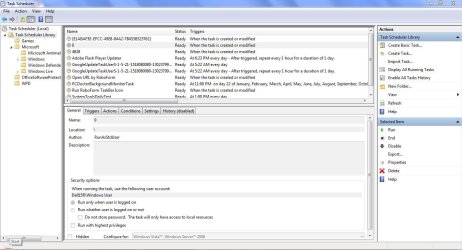
Task Scheduler Capture.JPG
 

My Computer

OS
Windows 7 Home Premium 64bit
What are the Trigger and Action settings? That should help define what they do.
 

My Computer

Computer type
PC/Desktop
Computer Manufacturer/Model Number
Lenovo IdeaCenter 450
OS
Windows 10 Pro X64
CPU
Intel Quad Core i7-4770 @ 3.4Ghz
Memory
16.0GB PC3-12800 DDR3 SDRAM 1600 MHz
Graphics Card(s)
Intel Integrated HD Graphics
Sound Card
Realtek HD Audio
Monitor(s) Displays
HP 22" LCD
Screen Resolution
1680 x 1050
Hard Drives
250GB Samsung EVO SATA-3 SSD
2TB Seagate ST2000DM001 SATA-2
1.5TB Seagate ST3150041AS SATA
Keyboard
Dell USB
Mouse
Lenovo USB
Internet Speed
Cable via Road Runner 3MB Upload, 30MB Download
Antivirus
Windows Defender, MBAM Pro, MBAE
Browser
Seamonkey
Other Info
UEFI/GPT
PLDS DVD-RW DH16AERSH
I wouldn't want any of that running except flash updater. Any installed Google is pernicious spyware freeloading on your resources. The rest look like dodgy software. I would turn them all off except flash.

Then I'd immediately establish a Clean Boot so only the AV is starting with Windows, since a PC with all that scheduled likely as freeloaders on Win7 startup: Clean Up Bloatware

We don't accept mysteries with Win7 but instead look to be the masters of our system who don't allow anything to run that we're not absolutely confident in.

For that reason I'd look over Clean Reinstall - Factory OEM Windows 7 which reflect the collected best practices based on helping with thousands of installs since before WIn7 was even released here at the top tech forums on the net.
 
Back
Top