Solved Mystery Partition In My Computer Doesn ' t Show Up In Disk Management

rawmess

New member
Local time
1:39 AM
Messages
5
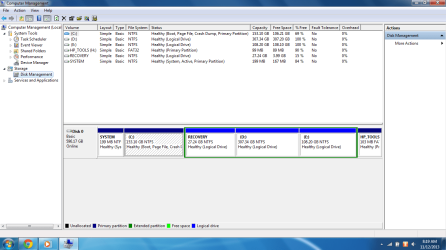
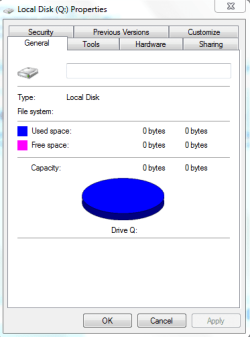
i recently got an used hp envy 14 currently running x64 home premium . since it ' s limiited edition , i dont know the full specs . i was told the HDD was over 700 GB [ 720 or 750 ? ] . when i added up the total space , it was not over 600 GB usable . now i ' m seeing a partition in computer with label Q: which i cannot open displaying " Q: is not accessible access is denied " .

- the " hide empty drives " option is checked in folder options .
- the disk management doesn ' t show the drive
- when i try to change the letter of any drive , Q : is not available .

is it possible that this drive is eating up some space ? or is 600 / 610 [ unsure :confused:] GB max usable in the hard drive ? need to perform a clean install of win 7 ultimate . so i dont want the space to be waste or perform a format again to just get the space back . dont want to see the same problem in ultimate . so , please help me out here . thanks in advance :)
 

Attachments

  • Capture.PNG
    Capture.PNG
    5.5 KB · Views: 2
  • diskmgmt.PNG
    diskmgmt.PNG
    45 KB · Views: 6
  • prop.PNG
    prop.PNG
    10.3 KB · Views: 20
Last edited:

My Computer My Computer

At a glance

Home Premium x64i76 GBAMD
Computer type
Laptop
Computer Manufacturer/Model Number
HP
OS
Home Premium x64
CPU
i7
Motherboard
Intel
Memory
6 GB
Graphics Card(s)
AMD
Hard Drives
720 GB
Antivirus
Windows Defender
Browser
Firefox
Hello rawmess and welcome to Seven Forums.

My usual disclaimer: I'm not an expert at anything. :)

According to your second screenshot, Disk 0 is 596.17GB. That should be the total amount of space on the disk. I'm guessing that HP installed a "620GB" hard drive. That would be based on the manufacturer using a decimal rating system where 1000KB = 1MB and 1000MB = 1GB. But in computer speak (or the binary system that computers use) it actually takes 1024KB to equal 1MB and 1024MB to equal 1GB. So if you keep dividing 620GB (620,000,000,000 bytes) by 1024 (you have to divide 3 times) you will eventually get around 596GB.

As to the mystery Q: drive, since it doesn't show up in Disk Management I'm thinking that perhaps it was a removable drive (external hard drive, flash drive) and the previous owner gave it the letter Q. Here's a couple of previous Forum threads that may offer some help.

http://www.sevenforums.com/general-...ive-q-shows-explorer-can-t-access-delete.html

http://www.sevenforums.com/general-discussion/56838-mystery-drive-q.html

Hope some of this helps.
 

My Computer My Computer

At a glance

Win 7 Pro 64-bitIntel i5 2.4 Ghz8GB DDR3Intel HD 3000
Computer type
Laptop
Computer Manufacturer/Model Number
Sony Vaio VPCEB47GM Laptop
OS
Win 7 Pro 64-bit
CPU
Intel i5 2.4 Ghz
Memory
8GB DDR3
Graphics Card(s)
Intel HD 3000
Sound Card
IDT High Definition
Monitor(s) Displays
15.6 WGXA Anti-Glare LED
Screen Resolution
1280x800
Hard Drives
640Gb 7200rpm
Antivirus
MSE
Browser
Opera (primary) with IE9 backup

My Computer My Computer

At a glance

10 Pro x64Ryzen 9 3900X64GB(4x16GB) DDR4EVGA 1080ti FTW3
Computer type
PC/Desktop
Computer Manufacturer/Model Number
Custom
OS
10 Pro x64
CPU
Ryzen 9 3900X
Motherboard
Asrock x370 Tachi
Memory
64GB(4x16GB) DDR4
Graphics Card(s)
EVGA 1080ti FTW3
Sound Card
ASUS Xonar Essence STX (V4 Bursons), ODAC rev B, NFB-11, O2
Monitor(s) Displays
3xASUS PB278Q/R, Optoma HD142X
Screen Resolution
3x1440p, 1080p
Hard Drives
512GB 850 EVO(OS, Programs)
4TB (Movies)
3TB (Downloads)
3TB (Programs)
1TB HDD (Games)
2x6TB R1 (videos)
PSU
AX760
Case
Fractal Define R5
Cooling
NH-D15S
Keyboard
Massdrop Ctrl with Box Navy's
Mouse
G903, Alioth XXL Mat
Internet Speed
280/40
Antivirus
MBAM, ESET
Browser
Canary 64 Bit
Other Info
I also own a Thinkpad P50 Xeon 4K, X220T, X1C5
Hello rawmess and welcome to Seven Forums.

My usual disclaimer: I'm not an expert at anything. :)

According to your second screenshot, Disk 0 is 596.17GB. That should be the total amount of space on the disk. I'm guessing that HP installed a "620GB" hard drive. That would be based on the manufacturer using a decimal rating system where 1000KB = 1MB and 1000MB = 1GB. But in computer speak (or the binary system that computers use) it actually takes 1024KB to equal 1MB and 1024MB to equal 1GB. So if you keep dividing 620GB (620,000,000,000 bytes) by 1024 (you have to divide 3 times) you will eventually get around 596GB.

As to the mystery Q: drive, since it doesn't show up in Disk Management I'm thinking that perhaps it was a removable drive (external hard drive, flash drive) and the previous owner gave it the letter Q. Here's a couple of previous Forum threads that may offer some help.

http://www.sevenforums.com/general-...ive-q-shows-explorer-can-t-access-delete.html

http://www.sevenforums.com/general-discussion/56838-mystery-drive-q.html

Hope some of this helps.

thanks a lot for your details and links , the drive is nowhere now . i uninstalled microsoft office ( pre - installed ) and an app ( with " virtualiser " in it ) as suggested in the links and it was gone after a restart . btw , can i use the 596 GB as external storage , m not sure abt its size in inches ? and one last ques , can i use any brand ' s internal laptop drive ( 1 TB ) on my laptop ( i7 , 6GB RAM ) or should it be one from HP ? thanks . i ' ll mark the post as solved after the reply :)
 
Last edited:

My Computer My Computer

At a glance

Home Premium x64i76 GBAMD
Computer type
Laptop
Computer Manufacturer/Model Number
HP
OS
Home Premium x64
CPU
i7
Motherboard
Intel
Memory
6 GB
Graphics Card(s)
AMD
Hard Drives
720 GB
Antivirus
Windows Defender
Browser
Firefox
thanks a lot for your details and links , the drive is nowhere now . i uninstalled microsoft office ( pre - installed ) and an app ( with " virtualiser " in it ) as suggested in the links and it was gone after a restart . btw , can i use the 596 GB as external storage , m not sure abt its size in inches ? and one last ques , can i use any brand ' s internal laptop drive ( 1 TB ) on my laptop ( i7 , 6GB RAM ) or should it be one from HP ? thanks . i ' ll mark the post as solved after the reply :)

Yes, you could use the existing hard drive as an external drive and replace it with a larger drive. Most laptops use a 2.5 inch drive so you could use almost any name brand drive from Seagate, Western Digital, Hitachi, etc. Retailers should always offer customer support so you can find out if a particular replacement hard drive will be compatible with your specific laptop. Then you'd most likely also want to get an enclosure or docking station for the old drive.

Sample Enclosures

Sample Docking Stations
 

My Computer My Computer

At a glance

Win 7 Pro 64-bitIntel i5 2.4 Ghz8GB DDR3Intel HD 3000
Computer type
Laptop
Computer Manufacturer/Model Number
Sony Vaio VPCEB47GM Laptop
OS
Win 7 Pro 64-bit
CPU
Intel i5 2.4 Ghz
Memory
8GB DDR3
Graphics Card(s)
Intel HD 3000
Sound Card
IDT High Definition
Monitor(s) Displays
15.6 WGXA Anti-Glare LED
Screen Resolution
1280x800
Hard Drives
640Gb 7200rpm
Antivirus
MSE
Browser
Opera (primary) with IE9 backup
it feels a lil bad to know i was " cheated " in the hard disk specs . anyways , i ' ll move on with a TB . thanks again
 

My Computer My Computer

At a glance

Home Premium x64i76 GBAMD
Computer type
Laptop
Computer Manufacturer/Model Number
HP
OS
Home Premium x64
CPU
i7
Motherboard
Intel
Memory
6 GB
Graphics Card(s)
AMD
Hard Drives
720 GB
Antivirus
Windows Defender
Browser
Firefox
You're very welcome. :)
 

My Computer My Computer

At a glance

Win 7 Pro 64-bitIntel i5 2.4 Ghz8GB DDR3Intel HD 3000
Computer type
Laptop
Computer Manufacturer/Model Number
Sony Vaio VPCEB47GM Laptop
OS
Win 7 Pro 64-bit
CPU
Intel i5 2.4 Ghz
Memory
8GB DDR3
Graphics Card(s)
Intel HD 3000
Sound Card
IDT High Definition
Monitor(s) Displays
15.6 WGXA Anti-Glare LED
Screen Resolution
1280x800
Hard Drives
640Gb 7200rpm
Antivirus
MSE
Browser
Opera (primary) with IE9 backup
Back
Top