
Solved Name column in explorer greyed out

Conditioned

New member
Member
Local time
4:02 PM
Messages
50
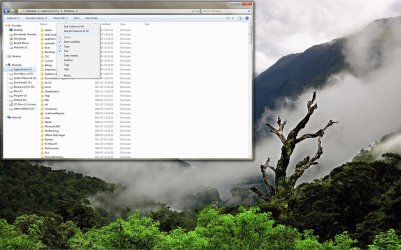
If you see the attached image you can see that the name column is greyed out. Its kinda annoying not being able to sort large folders by name or date properly. Do you I have never seen anything like it and googling didnt give me much. Only thing I could think of doing to fix this so far was to 'Start as administrator' but for some reason rightclicking on it doesnt yield that option. The account Im using is admin (its the only group its in).
 

Attachments
  • Desktop_2011_07_27_07_17_35_434.jpg
    Desktop_2011_07_27_07_17_35_434.jpg
    305.4 KB · Views: 61

My Computer My Computer

OS
Tomatoe
If you see the attached image you can see that the name column is greyed out. Its kinda annoying not being able to sort large folders by name or date properly. Do you I have never seen anything like it and googling didnt give me much. Only thing I could think of doing to fix this so far was to 'Start as administrator' but for some reason rightclicking on it doesnt yield that option. The account Im using is admin (its the only group its in).
You're misunderstanding what you're seeing.

When you right-click on the column headings to get the context menu that allows checking/un-checking various data items, and also allows you to rearrange the order of columns, the "name" item is grayed-out there because you CANNOT UN-CHECK IT. In other words, the bare minimum 1-column Explorer view would be to have just one column... with NAME. You can have more than that as well, but you can't have less than NAME. So you're not allowed to un-check NAME.

That right-click context menu allows you to select what columns you want, and what column sequence you want to see them in. The "More..." dialog shows a zillion items, and allows you to use the UP/DOWN buttons to rearrange whatever you have checked.

However every column heading shown in the actual Explorer View CAN ALWAYS BE CLICKED ON... to sort on the column into ascending/descending sequence. You can most certainly click on date modified, and you can most certainly click on name... or any other column that is visible (i.e. checked in that context-menu).

The grayed-out "name" item in the context menu has nothing to do with whether or not you can click on "name" column heading to sort into name-ascending or name-descending sequence. It simply means you cannot un-check the NAME column in your customized Explorer View.
 

My Computer My Computer

Computer type
PC/Desktop
Computer Manufacturer/Model Number
Home-built, two systems (1) and (2)
OS
Windows 7 Pro x64 (1), Win7 Pro X64 (2)
CPU
i5-3350p 3.1Ghz/6MB-cache (1); E8400 3.0Ghz/6MB-cache (2)
Motherboard
ASUS P8Z77-V Pro (1); ASUS P5Q3 (2)
Memory
8GB PC3-12800 DDR3 (1); 4GB PC3-10600 DDR3 (2)
Graphics Card(s)
ATI HD7750 (1), (see TV cards); ATI R7 250 (2)
Sound Card
Realtek ALC892 HD Audio (1); Realtek ALC1200 HD Audio (2)
Monitor(s) Displays
Eizo HD2441W LCD, Eizo S2433W (1); Eizo 24" S2433W (2)
Screen Resolution
1920x1200, 1920x1200 (1); 1920x1200 (2)
Hard Drives
(1) 1TB SATA-II (7200RPM), 2x2TB SATA-III (7200RPM), 250GB SATA-III (10000RPM) for OS; 2x2TB external USB 3.0

(2) 320GB SATA-II (7200RPM), 750GB SATA-II (7200RPM), 150GB SATA-II (10000RPM) for OS; 2TB external USB 3.0
PSU
Nesteq ECS-6001 600W (1); Nesteq ECS-5001 500W (2)
Case
Acousti-Case 360 (1) and (2)
Cooling
Noctua NH-U12P SE2 for CPU, 2x120mm case fans (1) and (2)
Keyboard
IBM PS/2 (1) and (2)
Mouse
Logitech MX Revolution wireless (1); Microsoft wired (2)
Internet Speed
100mbps down / 10mbps up
Antivirus
Microsoft Security Essentials; Malwarebyte Anti-Malware Pro
Browser
Firefox
Other Info
Ceton InfiniTV 4-tuner cablecard-enabled TV card as well as Hauppauge HVR-2250 OTA/ATSC 2-tuner TV card in (1), running under Win7 WMC
Yes you are right. It comes from the fact that I couldnt not sort alphabetically when I discovered the greyed out name. Works fine now though. Thanks for your response.
 

My Computer My Computer

OS
Tomatoe
Back
Top