
jtrout1020
New member
- Local time
- 3:50 PM
- Messages
- 3
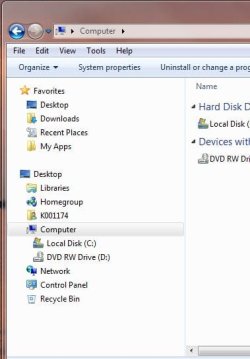
I am hoping someone can help me. I've done something to rearrange my navagation pane so that Libraries, homegroup, etc is now under desktop! It is driving me nuts and I am trying to figure out how to fix this.
I have added a screenshot attachment so someone can see where I'm at and tell me how to get back to the origional view of the navagation pane.
Thanks in advance!
I have added a screenshot attachment so someone can see where I'm at and tell me how to get back to the origional view of the navagation pane.
Thanks in advance!
Attachments
My Computer
- OS
- Windows7


