Need assistance to make DVD boot-able

WIN7 NIGHTMARE

New member
Member
VIP
Local time
4:57 AM
Messages
101
Greetings All,

Hope this is correct place to post the following;

1)...I had a friend copy the files of Win 7 (inc. hidden files) to a dvd - more of a back-up.

2)...I can see the files including the "set-up" file to get the ball rolling when booting into same.

3)...What my friend didn't do (or forgot) is to make that disc "bootable".

4)...I have copied the files from that disc to a folder on my desktop but, need to add/convert whatever it
is to make it bootable.

I would appreciate any help and assistance..Thanks in advance.
 

My Computer My Computer

Computer type
PC/Desktop
Computer Manufacturer/Model Number
dell desktop
OS
windows 7 home premium 32 bit
CPU
3.2ghz
Motherboard
u/k
Memory
2gigs
Graphics Card(s)
stock
Hard Drives
(1) 250gb SATA
Browser
Firefox
Simply copying Windows 7 files and folders to a DVD will not work.

You should obtain a Windows 7 .ISO file and then create a bootable DVD with it.

I know nothing about the command line procedure mentioned in post #4, so I'll leave you with him.
 
Last edited:

My Computer My Computer

Computer type
PC/Desktop
Computer Manufacturer/Model Number
Dell OptiPlex 9020
OS
Windows 7 Professional SP1 64-bit
CPU
Intel Core i7-4790 3.60 GHz
Memory
32 GB DDR3-1600 MHz
Graphics Card(s)
Integrated Intel HD Graphics 4600
Monitor(s) Displays
Viewsonic 32" LCD
Hard Drives
Kingston SATA 3 240 GB SSD
Internet Speed
Spectrum Internet 1000 Mbps
THANKS FOR THE REPLY..

I wouldn't think that there is a problem doing that because all the files, hidden included, were copied to a desktop folder......UNLESS, it has to be converted to an iso (?).
 

My Computer My Computer

Computer type
PC/Desktop
Computer Manufacturer/Model Number
dell desktop
OS
windows 7 home premium 32 bit
CPU
3.2ghz
Motherboard
u/k
Memory
2gigs
Graphics Card(s)
stock
Hard Drives
(1) 250gb SATA
Browser
Firefox
Flavalee

The OP wants to create a bootable iso file from the folder on his desktop.

I have done it many times, but I haven't got the patience to explain the command line method.

Probably easier for the OP to use a 3rd party tool such as gburner. gBurner - A powerful CD, DVD and BD burning software

gBurner - Make Bootable ISO Image File


For x64 also need the win7multiboot or win10multiboot file from this zip
View attachment bootimagesx64.zip

For x86 need the win7boot file from this zip
View attachment bootimagesx86.zip
 

My Computers My Computers

System One System Two

  • Computer type
    PC/Desktop
    OS
    7 X64
    CPU
    i5 8400
    Motherboard
    gigabyte b365m ds3h
    Memory
    2x8gb 3200mhz
    Hard Drives
    various
    PSU
    pure power 11 400w cm
    Case
    Coolermaster
    Cooling
    cryorig m9i
  • Computer type
    PC/Desktop
    OS
    7x64
    CPU
    g5400
    Motherboard
    ga b365m ds3h
    Memory
    8gb ddr4 2400
    PSU
    xfx pro 450w
SPECTACULAR!...Thanks for the reply!

I have to yet go to the links you posted but, did download the zip file "and have no clue"...grin...

Back after a bit as going to watch the "Pres" on the news.
 

My Computer My Computer

Computer type
PC/Desktop
Computer Manufacturer/Model Number
dell desktop
OS
windows 7 home premium 32 bit
CPU
3.2ghz
Motherboard
u/k
Memory
2gigs
Graphics Card(s)
stock
Hard Drives
(1) 250gb SATA
Browser
Firefox
@Flavalee

The OP wants to create a bootable iso file from the folder on his desktop.

I have done it many times, but I haven't got the patience to explain the command line method.

Probably easier for the OP to use a 3rd party tool such as gburner. gBurner - A powerful CD, DVD and BD burning software


For x64 also need the win7multiboot or win10multiboot file from this zip
View attachment 411393

For x86 need the win7boot file from this zip
View attachment 411394

___

Any freeware program around to facilitate this?
 

My Computer My Computer

Computer type
PC/Desktop
Computer Manufacturer/Model Number
dell desktop
OS
windows 7 home premium 32 bit
CPU
3.2ghz
Motherboard
u/k
Memory
2gigs
Graphics Card(s)
stock
Hard Drives
(1) 250gb SATA
Browser
Firefox
gburner is fully functional free trial for 30 days.
 

My Computers My Computers

System One System Two

  • Computer type
    PC/Desktop
    OS
    7 X64
    CPU
    i5 8400
    Motherboard
    gigabyte b365m ds3h
    Memory
    2x8gb 3200mhz
    Hard Drives
    various
    PSU
    pure power 11 400w cm
    Case
    Coolermaster
    Cooling
    cryorig m9i
  • Computer type
    PC/Desktop
    OS
    7x64
    CPU
    g5400
    Motherboard
    ga b365m ds3h
    Memory
    8gb ddr4 2400
    PSU
    xfx pro 450w
@Flavalee

The OP wants to create a bootable iso file from the folder on his desktop.

I have done it many times, but I haven't got the patience to explain the command line method.

Probably easier for the OP to use a 3rd party tool such as gburner. gBurner - A powerful CD, DVD and BD burning software

gBurner - Make Bootable ISO Image File


For x64 also need the win7multiboot or win10multiboot file from this zip
View attachment 411393

For x86 need the win7boot file from this zip
View attachment 411394

***
Ok, just now back to this -

1)...GBurner in and working.

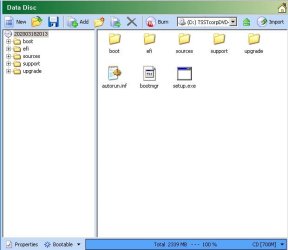
2)...Copied files into "burn window" (see picts).

3)
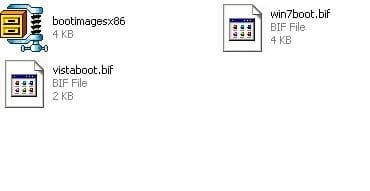
...Un-zipped the "boot image files and 2 were present (see picts).

4)...GBurner asked for boot info and displayed a box looking for location to which I
"gave it" the win7boot.bif file.

5)...Am I done and merely have to burn to a dvd OR, is there more I am forgetting?
 

Attachments

  • Picture0002.jpg
    Picture0002.jpg
    27.5 KB · Views: 9
  • Picture0001.jpg
    Picture0001.jpg
    5.8 KB · Views: 10

My Computer My Computer

Computer type
PC/Desktop
Computer Manufacturer/Model Number
dell desktop
OS
windows 7 home premium 32 bit
CPU
3.2ghz
Motherboard
u/k
Memory
2gigs
Graphics Card(s)
stock
Hard Drives
(1) 250gb SATA
Browser
Firefox
You have to save it as an iso file. It will ask you for name and destination.

Then it can be burnt to dvd or extracted to create bootable usb stick.
 

My Computers My Computers

System One System Two

  • Computer type
    PC/Desktop
    OS
    7 X64
    CPU
    i5 8400
    Motherboard
    gigabyte b365m ds3h
    Memory
    2x8gb 3200mhz
    Hard Drives
    various
    PSU
    pure power 11 400w cm
    Case
    Coolermaster
    Cooling
    cryorig m9i
  • Computer type
    PC/Desktop
    OS
    7x64
    CPU
    g5400
    Motherboard
    ga b365m ds3h
    Memory
    8gb ddr4 2400
    PSU
    xfx pro 450w
Thanks for reply!

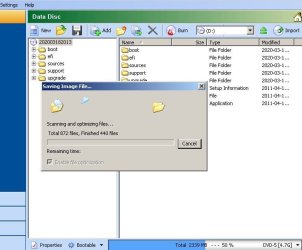
Have saved as .iso.....I now can see the iso created in file in my computer.....I also see the files (in previous post) in the GBurner window.

Do I remove these files or hit "burn" OR, close and re-open GBurner and place the newly created iso file there and hit burn?
 

Attachments

  • saved as iso.jpg
    saved as iso.jpg
    45.9 KB · Views: 7
  • saving iso.jpg
    saving iso.jpg
    38.4 KB · Views: 7

My Computer My Computer

Computer type
PC/Desktop
Computer Manufacturer/Model Number
dell desktop
OS
windows 7 home premium 32 bit
CPU
3.2ghz
Motherboard
u/k
Memory
2gigs
Graphics Card(s)
stock
Hard Drives
(1) 250gb SATA
Browser
Firefox
If you haven't already, you might want to delete the sources\ei.cfg file from the media so it can be used to install any edition.

To burn an iso:

Rt click the iso and there should be an option to burn it to dvd.

Alternatively, extract the iso to create bootable usb. The usb stick will be formatted, so make there is nothing on there that you want. Gburner can do it
gBurner - How to Setup Windows 7 from USB drive?
 

My Computers My Computers

System One System Two

  • Computer type
    PC/Desktop
    OS
    7 X64
    CPU
    i5 8400
    Motherboard
    gigabyte b365m ds3h
    Memory
    2x8gb 3200mhz
    Hard Drives
    various
    PSU
    pure power 11 400w cm
    Case
    Coolermaster
    Cooling
    cryorig m9i
  • Computer type
    PC/Desktop
    OS
    7x64
    CPU
    g5400
    Motherboard
    ga b365m ds3h
    Memory
    8gb ddr4 2400
    PSU
    xfx pro 450w
If you haven't already, you might want to delete the sources\ei.cfg file from the media so it can be used to install any edition.

To burn an iso:

Rt click the iso and there should be an option to burn it to dvd.

Alternatively, extract the iso to create bootable usb. The usb stick will be formatted, so make there is nothing on there that you want. Gburner can do it
gBurner - How to Setup Windows 7 from USB drive?

___

Just now getting back to this -

You have seen the picts and my results as pictured....When I placed the dvd into my computer, it did
auto-start....to the "setup icon"....

I have another Dell Desktop at my feet (the one I will jump off my table onto - grin) and have placed a formatted 1TB sata hard drive into it....Have set the bios to boot from dvd/cd rom as first device and it will not boot from the dvd/cd rom.

I have swapped out 4 different dvd optical drives and no luck,
 

My Computer My Computer

Computer type
PC/Desktop
Computer Manufacturer/Model Number
dell desktop
OS
windows 7 home premium 32 bit
CPU
3.2ghz
Motherboard
u/k
Memory
2gigs
Graphics Card(s)
stock
Hard Drives
(1) 250gb SATA
Browser
Firefox
Back
Top