Need Assitance...pls read

edilee012

New member
Member
VIP
Local time
11:14 PM
Messages
131
Couldn't acurately describe this in the title so this is what started just over a week ago up to maybe 2 weeks ago and I haven't installed anything new or updated drivers at the time this began.

When navigating through folder on my PC if I click to back up to the previous folder it will skip the previous folder, basically it is completely jumping a window. There's more...this problem is manifesting itself in a few different ways but all the same issue! When browsing the web and trying to go forward or backward a page it does the same thing as with the folders...it will skip the previous one and go to the one before that one. All menus when clicked will pop up as they should and close real fast when they normally stay open...happens with taskbar icon menus as well along with my favorites in IE8. If I keep clicking I will eventually get the desired menu to eventually stay open after 3-4 tries. This feels like a cat and mouse game since I am chasing menus and leaping past the windows and pages I want to navigate to.

I have re-installed and updated my mouse software but that was not the issue and since nothing other than minor program updates (windows updates,etc) I am stumped.

Any ideas are welcome...I have ran the /sfc scannow to verify system files are as they should be and it checked fine so if there is another utility I can run please tell me.
 

My Computer

Computer Manufacturer/Model Number
Custom Asus
OS
Win7 64
CPU
AMD Phenom X4 9950 2.6ghz
Motherboard
Asus Crosshair
Memory
8 gigs Corsair
Graphics Card(s)
2 X Nvidia Geforce 8800 GTS (G92) 512 in SLI
Sound Card
Onboard
Monitor(s) Displays
Samsung 22 inch
Screen Resolution
1920 X 1080
Hard Drives
WD 1 TB, WD 500 Gig, WD 320 Gig
PSU
Thermaltake 850 watt
Case
Raidmax
Cooling
Zalman 9700
Keyboard
Microsoft
Mouse
Logitech MX 518
Internet Speed
25 mbps
Can be one of many causes, work with me and we will try to find the cause.

Run in safe mode, see what happens.

Make a clean boot and give me the results.
http://support.microsoft.com/kb/929135

Try with the add-ons in IE removed.
Tools, internet options, advanced, reset.
 

My Computer

Computer type
PC/Desktop
Computer Manufacturer/Model Number
Dell XPS 420
OS
Windows 10, Home Clean Install
CPU
Intel Core2 processsor Q8200(2.33Ghz 1333FSB) Quad Core Tech
Motherboard
Dell
Memory
6 gb
Graphics Card(s)
ATI Radeon 256MB HD3650
Sound Card
Intergrated 7.1 Channel Audio
Monitor(s) Displays
Dell SP2009W 20"
Hard Drives
640 GB Serial ATA Hard drive
Cooling
Fan
Keyboard
Dell USB Keyboard
Mouse
Dell Premium Optical USB
Internet Speed
DSL 2.85
Since you didn't fill in your system specs we have no idea what hardware you're running... ;)

With that said it appears that when you're clicking the forward and back buttons the system thinks you are "double clicking". Regardless of what mouse you're using, uninstall any software that came with it and just use the default Win7 drivers...

Post back if that doesn't fix it...
 

My Computer

Computer Manufacturer/Model Number
Home Grown
OS
Windows 7 Ultimate (64)
CPU
i7-2600K
Motherboard
Asus P8P67-M Pro
Memory
G.SKILL Ripjaws X Series 8GB (2 x 4GB)
Graphics Card(s)
ATI 5750
Sound Card
On-Board
Monitor(s) Displays
LG W2486L
Screen Resolution
1920X1080
Hard Drives
Intel X-25M 80 Gig SSD | Intel X-25M 160 Gig SSD | WD Black 500MB - External eSata
PSU
Zalman ZM770-XT 770 Watts
Case
Antec 180 mini
Cooling
Cooler Master V8
Internet Speed
15MB - Cable
Other Info
Sissy OC - 4.6 @ 1.3175 24/7 | 18' Idle - 55' Load
Since you didn't fill in your system specs we have no idea what hardware you're running... ;)

With that said it appears that when you're clicking the forward and back buttons the system thinks you are "double clicking". Regardless of what mouse you're using, uninstall any software that came with it and just use the default Win7 drivers...

Post back if that doesn't fix it...

Think you may have nailed it first shot. Good going
 

My Computer

Computer type
PC/Desktop
Computer Manufacturer/Model Number
Dell XPS 420
OS
Windows 10, Home Clean Install
CPU
Intel Core2 processsor Q8200(2.33Ghz 1333FSB) Quad Core Tech
Motherboard
Dell
Memory
6 gb
Graphics Card(s)
ATI Radeon 256MB HD3650
Sound Card
Intergrated 7.1 Channel Audio
Monitor(s) Displays
Dell SP2009W 20"
Hard Drives
640 GB Serial ATA Hard drive
Cooling
Fan
Keyboard
Dell USB Keyboard
Mouse
Dell Premium Optical USB
Internet Speed
DSL 2.85

The link below is a great piece of free software which will provide all the info you need to fill in your system specs.

SPECCY- System Information Tool
http://www.piriform.com/speccy


My Computer

Computer Manufacturer/Model Number
Toshiba Satellite S875D-S7239 laptop
OS
MS Windows 7 Ultimate SP1 64-bit
CPU
AMD A10-4600M
Motherboard
AMD Pumori (Socket FT1)
Memory
6.00 GB Dual-Channel DDR3 @ 798MHz (11-11-12-28)
Graphics Card(s)
AMD Radeon HD 7660G
Sound Card
High Definition Audio Device
Monitor(s) Displays
Generic PnP Monitor (1600x900@60Hz)
Screen Resolution
1600x900@60Hz
Hard Drives
SSD 119GB Corsair CSSD-V128GB2 ATA Device
Keyboard
Standard PS/2 Keyboard
Mouse
HP Wireless Optical Mobile Mouse Model FHA-3410
Internet Speed
What the local pub, local coffee shop offers.
Other Info
Optical Drive:MATSHITA BD-CMB UJ160B ATA Device


Also have an Asus ha1002xp netbook with Win 7 Ultimate installed.
Think you may have nailed it first shot. Good going
The jury's still out, we'll see... :)

Regards-
 

My Computer

Computer Manufacturer/Model Number
Home Grown
OS
Windows 7 Ultimate (64)
CPU
i7-2600K
Motherboard
Asus P8P67-M Pro
Memory
G.SKILL Ripjaws X Series 8GB (2 x 4GB)
Graphics Card(s)
ATI 5750
Sound Card
On-Board
Monitor(s) Displays
LG W2486L
Screen Resolution
1920X1080
Hard Drives
Intel X-25M 80 Gig SSD | Intel X-25M 160 Gig SSD | WD Black 500MB - External eSata
PSU
Zalman ZM770-XT 770 Watts
Case
Antec 180 mini
Cooling
Cooler Master V8
Internet Speed
15MB - Cable
Other Info
Sissy OC - 4.6 @ 1.3175 24/7 | 18' Idle - 55' Load
Sounds like a double-tap to me too.
Try using the backspace key to navigate backwards. Does the problem persist then?
 

My Computer

OS
Windows 7 Enterprise
CPU
Intel Pentium Dual E2200 @2.2GHz
Motherboard
Gigabyte II-G31
Memory
4GB
Graphics Card(s)
Palit GForce 9500GT 1GB
Sound Card
onBoard
Hard Drives
WesternDigital: 250GB + 1TB + 1TB + 2TB
PSU
450W
Case
CoolerMaster CM690
Cooling
Corsair H50
Mouse
Logitech MX518
Just posted specs in my profile...curious to see exactly what can be determined from them on this particular issue ;)....this "menu and folder skipping" as I will call it would be hard pressed to be hardware related (removing mouse software to test this but I believe my removal and update earlier today might have ruled it out).

Edit: Forgot to mention...it is giving me so many problems using IE8 that I uninstalled and re-installed that but problem remains. Like the guys said it is like everything I am clicking is being "double tapped".
 

My Computer

Computer Manufacturer/Model Number
Custom Asus
OS
Win7 64
CPU
AMD Phenom X4 9950 2.6ghz
Motherboard
Asus Crosshair
Memory
8 gigs Corsair
Graphics Card(s)
2 X Nvidia Geforce 8800 GTS (G92) 512 in SLI
Sound Card
Onboard
Monitor(s) Displays
Samsung 22 inch
Screen Resolution
1920 X 1080
Hard Drives
WD 1 TB, WD 500 Gig, WD 320 Gig
PSU
Thermaltake 850 watt
Case
Raidmax
Cooling
Zalman 9700
Keyboard
Microsoft
Mouse
Logitech MX 518
Internet Speed
25 mbps
YOu did not uninstall IE8, you can only deactivate. A real test would be another broswer, Chrome or Firefox. YOu can even open another user account, see it it is better there. But, I think the suggestion regarding your mouse is a good one.
 

My Computer

Computer type
PC/Desktop
Computer Manufacturer/Model Number
Dell XPS 420
OS
Windows 10, Home Clean Install
CPU
Intel Core2 processsor Q8200(2.33Ghz 1333FSB) Quad Core Tech
Motherboard
Dell
Memory
6 gb
Graphics Card(s)
ATI Radeon 256MB HD3650
Sound Card
Intergrated 7.1 Channel Audio
Monitor(s) Displays
Dell SP2009W 20"
Hard Drives
640 GB Serial ATA Hard drive
Cooling
Fan
Keyboard
Dell USB Keyboard
Mouse
Dell Premium Optical USB
Internet Speed
DSL 2.85
YOu did not uninstall IE8, you can only deactivate. A real test would be another broswer, Chrome or Firefox. YOu can even open another user account, see it it is better there. But, I think the suggestion regarding your mouse is a good one.

Forgot to mention...yes it does it in Firefox also.
 

My Computer

Computer Manufacturer/Model Number
Custom Asus
OS
Win7 64
CPU
AMD Phenom X4 9950 2.6ghz
Motherboard
Asus Crosshair
Memory
8 gigs Corsair
Graphics Card(s)
2 X Nvidia Geforce 8800 GTS (G92) 512 in SLI
Sound Card
Onboard
Monitor(s) Displays
Samsung 22 inch
Screen Resolution
1920 X 1080
Hard Drives
WD 1 TB, WD 500 Gig, WD 320 Gig
PSU
Thermaltake 850 watt
Case
Raidmax
Cooling
Zalman 9700
Keyboard
Microsoft
Mouse
Logitech MX 518
Internet Speed
25 mbps
Try the suggestion regarding the mouse. That really sound like it will work.
 

My Computer

Computer type
PC/Desktop
Computer Manufacturer/Model Number
Dell XPS 420
OS
Windows 10, Home Clean Install
CPU
Intel Core2 processsor Q8200(2.33Ghz 1333FSB) Quad Core Tech
Motherboard
Dell
Memory
6 gb
Graphics Card(s)
ATI Radeon 256MB HD3650
Sound Card
Intergrated 7.1 Channel Audio
Monitor(s) Displays
Dell SP2009W 20"
Hard Drives
640 GB Serial ATA Hard drive
Cooling
Fan
Keyboard
Dell USB Keyboard
Mouse
Dell Premium Optical USB
Internet Speed
DSL 2.85
Excellent.

I think Win7Clutz has made an excellent educated guess.

Did you perhaps install the Logitech mouse driver that came with the mouse?

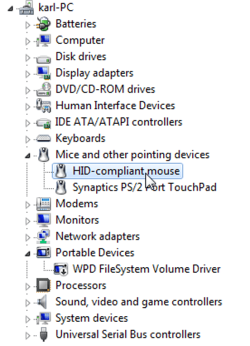
You can go into Device Manager, and disable the Logitech driver (if you installed such).

Win key | type DEVMGMT.MSC | Enter key

Here's a snapshot to show you what you are looking for except you should have an entry for your Logitech mouse.
 

Attachments

  • disablemousedriver.png
    disablemousedriver.png
    44.3 KB · Views: 0

My Computer

Computer Manufacturer/Model Number
Toshiba Satellite S875D-S7239 laptop
OS
MS Windows 7 Ultimate SP1 64-bit
CPU
AMD A10-4600M
Motherboard
AMD Pumori (Socket FT1)
Memory
6.00 GB Dual-Channel DDR3 @ 798MHz (11-11-12-28)
Graphics Card(s)
AMD Radeon HD 7660G
Sound Card
High Definition Audio Device
Monitor(s) Displays
Generic PnP Monitor (1600x900@60Hz)
Screen Resolution
1600x900@60Hz
Hard Drives
SSD 119GB Corsair CSSD-V128GB2 ATA Device
Keyboard
Standard PS/2 Keyboard
Mouse
HP Wireless Optical Mobile Mouse Model FHA-3410
Internet Speed
What the local pub, local coffee shop offers.
Other Info
Optical Drive:MATSHITA BD-CMB UJ160B ATA Device


Also have an Asus ha1002xp netbook with Win 7 Ultimate installed.
Couldn't acurately describe this in the title so this is what started just over a week ago up to maybe 2 weeks ago and I haven't installed anything new or updated drivers at the time this began.

When navigating through folder on my PC if I click to back up to the previous folder it will skip the previous folder, basically it is completely jumping a window. There's more...this problem is manifesting itself in a few different ways but all the same issue! When browsing the web and trying to go forward or backward a page it does the same thing as with the folders...it will skip the previous one and go to the one before that one. All menus when clicked will pop up as they should and close real fast when they normally stay open...happens with taskbar icon menus as well along with my favorites in IE8. If I keep clicking I will eventually get the desired menu to eventually stay open after 3-4 tries. This feels like a cat and mouse game since I am chasing menus and leaping past the windows and pages I want to navigate to.

I have re-installed and updated my mouse software but that was not the issue and since nothing other than minor program updates (windows updates,etc) I am stumped.

Any ideas are welcome...I have ran the /sfc scannow to verify system files are as they should be and it checked fine so if there is another utility I can run please tell me.

I guess its most probably a faulty mouse or a failing mouse (a single click is being sent as a double click). I once had a mouse that did the same thing. Try using another mouse to see if the same problem exists.

You can check it with the same mouse by switching the Left and Right buttons and checking if the problem is there.
Click Start and type 'Mouse'. Open the mouse properties and select 'Left-Handed' in 'Button Configuration'. Now your right button will act as the left button and vice-versa.
 

My Computer

Computer type
Laptop
Computer Manufacturer/Model Number
HP EliteBook 8530w Mobile Workstation
OS
Windows 7 Ultimate x64 (XP, 98SE, 95, 3.11, DOS 7.10 on VM) + Ubuntu 10.04 LTS Lucid Lynx
CPU
Intel Core 2 Duo Processor P8600 (2.40 GHz, 3 MB L2 cache)
Motherboard
Mobile Intel PM45 Express Chipset ICH9M-Enhanced
Memory
4GB 800 MHz DDR2 SDRAM
Graphics Card(s)
ATI Mobility FireGL V5700 with 256 MB
Sound Card
SoundMAX Integrated Digital HD Audio
Monitor(s) Displays
15.4-inch WXGA anti-glare (1280 x 800 resolution)
Screen Resolution
1280 x 800
Hard Drives
500GB + 1TB
Mouse
Synaptics PS/2 Port Touchpad, USB Mouse
Internet Speed
4 Mbps
Antivirus
MSE
Browser
Firefox, Chrome, IE
Other Info
Authentec AES2810 Fingerprint Reader
Faulty mouse it is or faulting anyways!

Uninstalled Logitech's software and problem still there..used another mouse and no problem..took it apart and blew it out and it is MUCH better but it seems it is time for another mouse. Thanks for the help! Never had a mouse actually fail...always cleaned them out if they started acting up and they keep on going...actually still have a PS2 Logitech mouse that is about 12 years old that works like a charm. I keep it around to use when I have a PC here I am working on that is short of a mouse.
 

My Computer

Computer Manufacturer/Model Number
Custom Asus
OS
Win7 64
CPU
AMD Phenom X4 9950 2.6ghz
Motherboard
Asus Crosshair
Memory
8 gigs Corsair
Graphics Card(s)
2 X Nvidia Geforce 8800 GTS (G92) 512 in SLI
Sound Card
Onboard
Monitor(s) Displays
Samsung 22 inch
Screen Resolution
1920 X 1080
Hard Drives
WD 1 TB, WD 500 Gig, WD 320 Gig
PSU
Thermaltake 850 watt
Case
Raidmax
Cooling
Zalman 9700
Keyboard
Microsoft
Mouse
Logitech MX 518
Internet Speed
25 mbps
Glad that we were able to help.
 

My Computer

Computer type
PC/Desktop
Computer Manufacturer/Model Number
Dell XPS 420
OS
Windows 10, Home Clean Install
CPU
Intel Core2 processsor Q8200(2.33Ghz 1333FSB) Quad Core Tech
Motherboard
Dell
Memory
6 gb
Graphics Card(s)
ATI Radeon 256MB HD3650
Sound Card
Intergrated 7.1 Channel Audio
Monitor(s) Displays
Dell SP2009W 20"
Hard Drives
640 GB Serial ATA Hard drive
Cooling
Fan
Keyboard
Dell USB Keyboard
Mouse
Dell Premium Optical USB
Internet Speed
DSL 2.85
Glad it worked out for you edilee012 :)
 

My Computer

Computer type
Laptop
Computer Manufacturer/Model Number
HP EliteBook 8530w Mobile Workstation
OS
Windows 7 Ultimate x64 (XP, 98SE, 95, 3.11, DOS 7.10 on VM) + Ubuntu 10.04 LTS Lucid Lynx
CPU
Intel Core 2 Duo Processor P8600 (2.40 GHz, 3 MB L2 cache)
Motherboard
Mobile Intel PM45 Express Chipset ICH9M-Enhanced
Memory
4GB 800 MHz DDR2 SDRAM
Graphics Card(s)
ATI Mobility FireGL V5700 with 256 MB
Sound Card
SoundMAX Integrated Digital HD Audio
Monitor(s) Displays
15.4-inch WXGA anti-glare (1280 x 800 resolution)
Screen Resolution
1280 x 800
Hard Drives
500GB + 1TB
Mouse
Synaptics PS/2 Port Touchpad, USB Mouse
Internet Speed
4 Mbps
Antivirus
MSE
Browser
Firefox, Chrome, IE
Other Info
Authentec AES2810 Fingerprint Reader
Hey,

You don't need to install or uninstall any software or drivers its just hardware issue you mouse is going bonkers get a new mouse and you will be at peace.:p
 

My Computer

Computer Manufacturer/Model Number
x
OS
xp, vista, seven
CPU
x
Motherboard
x
Memory
x
Graphics Card(s)
x
Sound Card
x
Monitor(s) Displays
x
Hard Drives
x
PSU
x
Case
x
Cooling
x
Back
Top