Need dsome help with RAM

pcysmith

New member
Local time
5:47 PM
Messages
17
Hi folks. I have a situation that is driving me bugs and I hope you guys can help me figure it out. Here's the deal:

About 3 weeks ago I put 4 2gb sticks of RAM in my machine. Got them from Crucial.com. (I'd had 2gbs before but took those out and gave them away so the 4 new ones would all match.) So here I am with 8gbs and it was fabulous. Right off the bat not only my CS4 but also my Photoshop7 both recognized the 8gbs and everything just flew.:huh:

Then a few days ago I noticed that PS7 was sluggish and, sure enough, when I checked I saw that it was only seeing 2gbs again. I know PS7 isn't even supposed to see it but it did and it was great.:(

The CS4 is still fine but I just don't like it as well as 7, call me crazy but there it is.
Does anybody know how I can get 7 to see the 8gbs again. I have no problem going into the registry but have no clue where to go. I have spent days searching for an answer but haven't found it.

Searching is an art in itself and I am not very skilled at it. Any input would be greatly appreciated. Thanks.

Here is my setup:

Windows 7 Home Premium (x64) (build 7600)
1.87 gigahertz Intel Core 2 Duo
64 kilobyte primary memory cache
4096 kilobyte secondary memory cache
64-bit ready
Multi-core (2 total)
Not hyper-threaded
250.05 Gigabytes Usable Hard Drive Capacity
107.45 Gigabytes Hard Drive Free Space
Board: Intel Corporation DG965WH AAD41692-306
Bus Clock: 266 megahertz
BIOS: Intel Corp. MQ96510J.86A.1754.2008.1117.0002 11/17/2008
8126 Megabytes Usable Installed Memory
Slot 'J1MY' has 2048 MB (serial number 0xFFFFFFFF)
Slot 'J2MY' has 2048 MB (serial number 0xFFFFFFFF)
Slot 'J3MY' has 2048 MB (serial number 0xFFFFFFFF)
Slot 'J4MY' has 2048 MB (serial number 0xFFFFFFFF)


My Computer

Computer type
PC/Desktop
Computer Manufacturer/Model Number
custom build
OS
windows 7 home premium SP1 x64
CPU
Intel Core 2 Duo E6320
Motherboard
Intel Corporation DG965WH (J1PR)
Memory
8 GB DDR2
Graphics Card(s)
G965 Express Chipset Family 8086-29A2
Sound Card
High Definition Audio Device
Monitor(s) Displays
DELL E198WFP on Intel G965 Express Chipset Family
Screen Resolution
1440x900 pixels
Hard Drives
Western Digital TB/3.5-inch (new format),Desktop/WD Caviar
WDC WD2500JD-00HBB0
Browser
Internet Explorer 11
Don't have a direct answer for you, but if, when you boot up, the BIOS reports 8GB memory, and CS4 thinks you have 8GB, then it seems to me the problem is isolated to CS7. You set some options unique to CS7 that forces a 2GB limit? I have trouble believing CS4 or CS7 would be worried about installed physical RAM. I would think it just asks for memory from the OS and, if the OS has it to give, it gives it. Sorry, best I can offer.
 

My Computer

Computer Manufacturer/Model Number
Built by OpSysWiz
OS
Win 7 Ultimate x64
CPU
i5-750
Motherboard
ASUS P7P55D-E
Memory
2 x 2GB Corsair DDR3 1600
Graphics Card(s)
eVGA 260 Core 216
Sound Card
X-FI Fatal1ty
Monitor(s) Displays
Samsung 21" S-PVA
Screen Resolution
1600x1200
Hard Drives
OCZ Vertex Turbo 60GB SSD, WD VelociRaptor
PSU
Antec Signature 850W
Case
Lian-Li PC-80B
Cooling
CoolerMaster Hyper 212 Plus, OCZ Freeze
Keyboard
Saitek Gamer
Mouse
MS Wheel Mouse Optical
Internet Speed
3Mb/sec
Photoshop 7 is a 32bit application it cannot make use of more then 2-3 GB or memory.
 

My Computer

Computer type
PC/Desktop
Computer Manufacturer/Model Number
Alienware Aurora ALX R4
OS
Windows 10 Pro (x64)
CPU
Intel Core i7-3930K (3.2GHz - 4.5GHz)
Motherboard
Alienware Aurora-R4 x79
Memory
4x Samsung 4GB PC3-12800 DDR3 (16GB 1600MHz)
Graphics Card(s)
Nvidia Geforce GTX 690
Sound Card
SteelSeries Siberia Elite
Monitor(s) Displays
Dell UltraSharp U3011
Screen Resolution
2560x1600
Hard Drives
Samsung 850 Pro 256 GB, Seagate 1TB Desktop Hybrid HDD, 2x Western Digital 4TB Green HDD
PSU
875W Some Dell PSU <.<
Case
Alienware Aurora ALX
Cooling
Custom Liquid Cooling (EK CPU & GPU blocks) dual EK 480RAD
Keyboard
Logitech G710+ Mechanical
Mouse
Logitech G700s
Internet Speed
Verizon Fios (50 mbps average)
Other Info
Server: Intel NUC D54250WYK: i5-4250U, 16GB, 256 GB mSATA, Windows Server 2012 R2
Photoshop 7 is a 32bit application it cannot make use of more then 2-3 GB or memory.

I know but that's the whole point of my agony: It did make use of it for 3 weeks. So there has to be a switch some where in the registry or the bios that let it happen and that some how got flipped off. I have searched the registry for anything to do with memory but didn't see anything thst sounded familiar. There are some items in the bios that can be changed with memory management turned off of auto. Does that sound promising? Also, shouldn't a 32bit app see at least 4GBs on a 64bit system? I would be happy with that but I can't get it going.

I'm just a little old cookey-baking grandmother who happens to be a photo shop addict and I can use any help at all to get PS7 moving again. There are those who will think I should stick with CS4 but I just don't like it as well and only use it for a few things I can't do with 7.

Thanks for taking the time to reply.
 

My Computer

Computer type
PC/Desktop
Computer Manufacturer/Model Number
custom build
OS
windows 7 home premium SP1 x64
CPU
Intel Core 2 Duo E6320
Motherboard
Intel Corporation DG965WH (J1PR)
Memory
8 GB DDR2
Graphics Card(s)
G965 Express Chipset Family 8086-29A2
Sound Card
High Definition Audio Device
Monitor(s) Displays
DELL E198WFP on Intel G965 Express Chipset Family
Screen Resolution
1440x900 pixels
Hard Drives
Western Digital TB/3.5-inch (new format),Desktop/WD Caviar
WDC WD2500JD-00HBB0
Browser
Internet Explorer 11
Open an elevated command prompt, Start > "cmd" hold CTRL+SHIFT then ENTER. try the following command.
Code:
bcdedit /set {current} increaseuserva 3072

Then restart. This will not make PS7 see all of your RAM because it cannot. But it will increase the virtual address space (supposedly). I do not promise this will do anything...
 

My Computer

Computer type
PC/Desktop
Computer Manufacturer/Model Number
Alienware Aurora ALX R4
OS
Windows 10 Pro (x64)
CPU
Intel Core i7-3930K (3.2GHz - 4.5GHz)
Motherboard
Alienware Aurora-R4 x79
Memory
4x Samsung 4GB PC3-12800 DDR3 (16GB 1600MHz)
Graphics Card(s)
Nvidia Geforce GTX 690
Sound Card
SteelSeries Siberia Elite
Monitor(s) Displays
Dell UltraSharp U3011
Screen Resolution
2560x1600
Hard Drives
Samsung 850 Pro 256 GB, Seagate 1TB Desktop Hybrid HDD, 2x Western Digital 4TB Green HDD
PSU
875W Some Dell PSU <.<
Case
Alienware Aurora ALX
Cooling
Custom Liquid Cooling (EK CPU & GPU blocks) dual EK 480RAD
Keyboard
Logitech G710+ Mechanical
Mouse
Logitech G700s
Internet Speed
Verizon Fios (50 mbps average)
Other Info
Server: Intel NUC D54250WYK: i5-4250U, 16GB, 256 GB mSATA, Windows Server 2012 R2
I tried that but it didn't work.
 

My Computer

Computer type
PC/Desktop
Computer Manufacturer/Model Number
custom build
OS
windows 7 home premium SP1 x64
CPU
Intel Core 2 Duo E6320
Motherboard
Intel Corporation DG965WH (J1PR)
Memory
8 GB DDR2
Graphics Card(s)
G965 Express Chipset Family 8086-29A2
Sound Card
High Definition Audio Device
Monitor(s) Displays
DELL E198WFP on Intel G965 Express Chipset Family
Screen Resolution
1440x900 pixels
Hard Drives
Western Digital TB/3.5-inch (new format),Desktop/WD Caviar
WDC WD2500JD-00HBB0
Browser
Internet Explorer 11
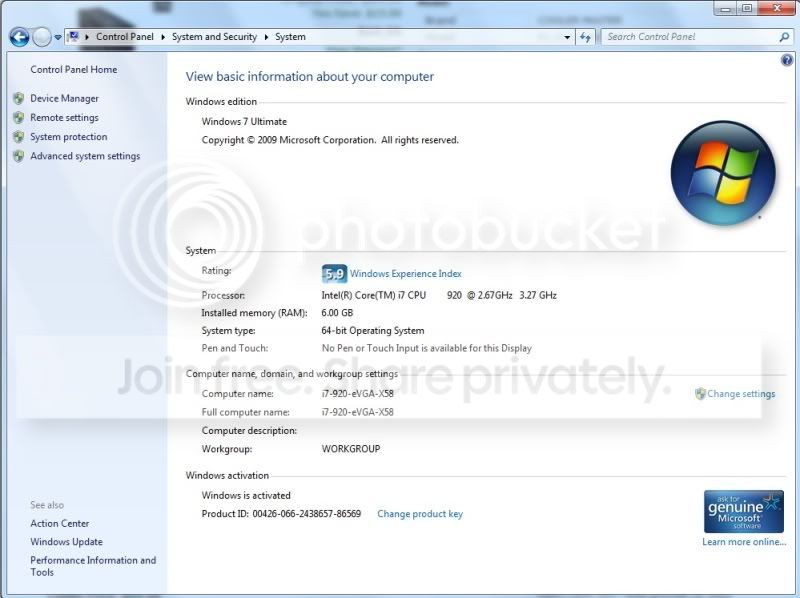
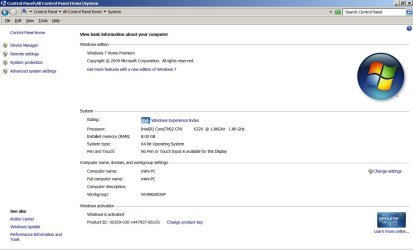
Control Panel > System and Security > System and show us the displayed panel, should look something like this:

SystemPanel.jpg
 

My Computer

Computer Manufacturer/Model Number
Built by OpSysWiz
OS
Win 7 Ultimate x64
CPU
i5-750
Motherboard
ASUS P7P55D-E
Memory
2 x 2GB Corsair DDR3 1600
Graphics Card(s)
eVGA 260 Core 216
Sound Card
X-FI Fatal1ty
Monitor(s) Displays
Samsung 21" S-PVA
Screen Resolution
1600x1200
Hard Drives
OCZ Vertex Turbo 60GB SSD, WD VelociRaptor
PSU
Antec Signature 850W
Case
Lian-Li PC-80B
Cooling
CoolerMaster Hyper 212 Plus, OCZ Freeze
Keyboard
Saitek Gamer
Mouse
MS Wheel Mouse Optical
Internet Speed
3Mb/sec
Here you go.
 

Attachments

  • system1.jpg
    system1.jpg
    85.2 KB · Views: 64

My Computer

Computer type
PC/Desktop
Computer Manufacturer/Model Number
custom build
OS
windows 7 home premium SP1 x64
CPU
Intel Core 2 Duo E6320
Motherboard
Intel Corporation DG965WH (J1PR)
Memory
8 GB DDR2
Graphics Card(s)
G965 Express Chipset Family 8086-29A2
Sound Card
High Definition Audio Device
Monitor(s) Displays
DELL E198WFP on Intel G965 Express Chipset Family
Screen Resolution
1440x900 pixels
Hard Drives
Western Digital TB/3.5-inch (new format),Desktop/WD Caviar
WDC WD2500JD-00HBB0
Browser
Internet Explorer 11
Your OS sees 8GB. Must be a limitation of CS7 or you've accidently set an option that limits useable memory. Search the user's guide.
 

My Computer

Computer Manufacturer/Model Number
Built by OpSysWiz
OS
Win 7 Ultimate x64
CPU
i5-750
Motherboard
ASUS P7P55D-E
Memory
2 x 2GB Corsair DDR3 1600
Graphics Card(s)
eVGA 260 Core 216
Sound Card
X-FI Fatal1ty
Monitor(s) Displays
Samsung 21" S-PVA
Screen Resolution
1600x1200
Hard Drives
OCZ Vertex Turbo 60GB SSD, WD VelociRaptor
PSU
Antec Signature 850W
Case
Lian-Li PC-80B
Cooling
CoolerMaster Hyper 212 Plus, OCZ Freeze
Keyboard
Saitek Gamer
Mouse
MS Wheel Mouse Optical
Internet Speed
3Mb/sec
Back
Top