
Need help ASAP: having Blue screen of death with MSKSSR.SYS

Laakas

New member
Local time
4:01 AM
Messages
12
Hi folks!

Glad to have re-gained my password again for this amazing forum.

3 days ago, I noticed having some Blue Screen of death. I was doing an update drivers of my soundcard from the company Antelope Audio that by the way I had installed their driver since 2014 and everything was working like a charm until 3 days ago. But I'm naming this situation because this is were my Blue screen of death starts. Maybe the new soundcard drivers had nothing to do with these Bluescreen.

Now, that day I was updating the new Audio Drivers and it's Control Panel software, I had a bluescreen of death and then when I reboot my computer, there was a second account log in that was created with the name VPN. Which I found very weird

So I went on and logged in my usual account and deleted that account. Because I know I never created that account. This is teh BSOD I had when that account was created:
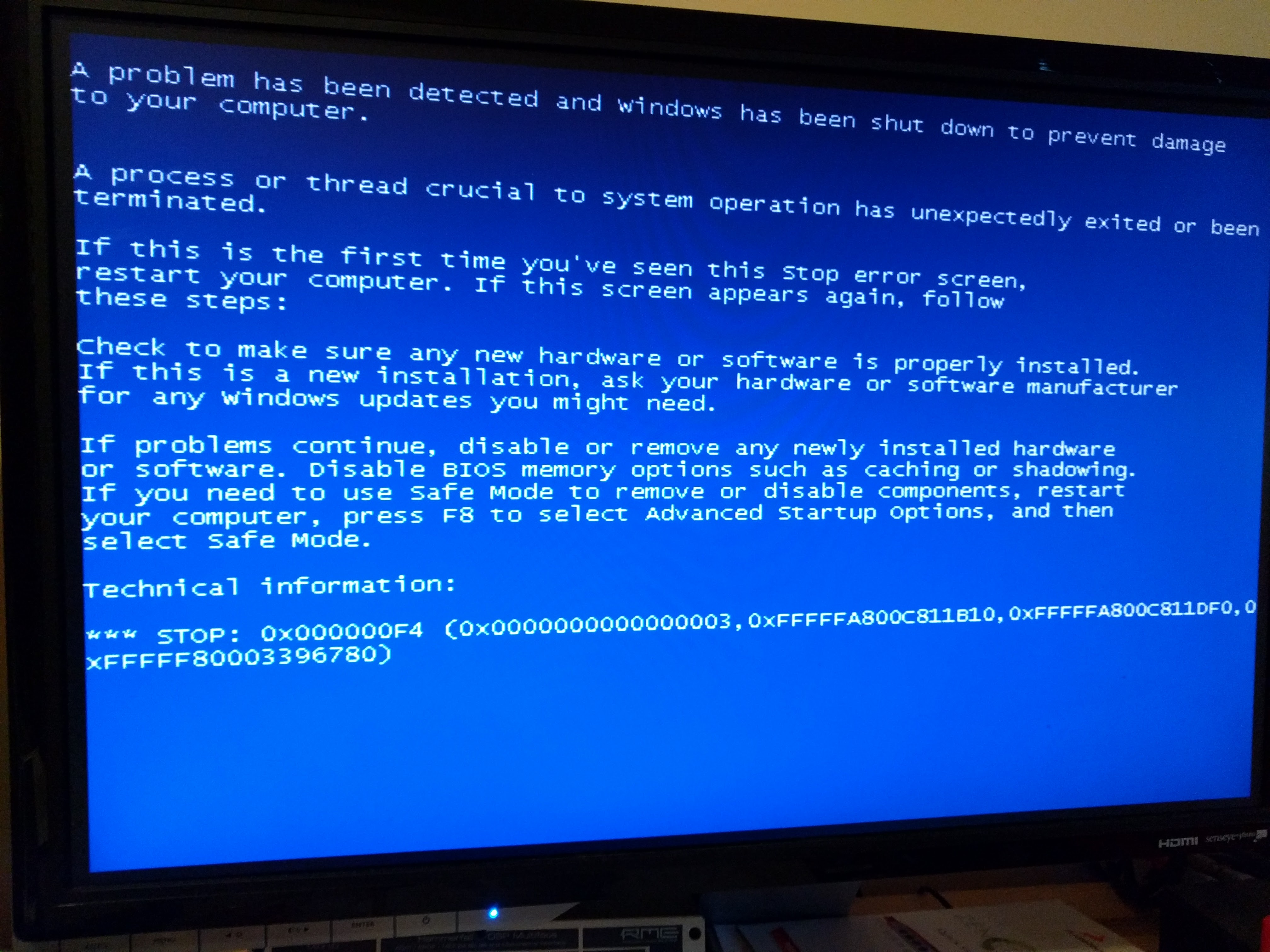
BWq10fL.jpg


Then today I logged in my usual account and was plyaing with my computer and as I do audio work and use audio music softwares (DAWs), in particular Reaper, when I come to launch Reaper, I had another BSOD with now the MSKSSR.SYS and looks like this
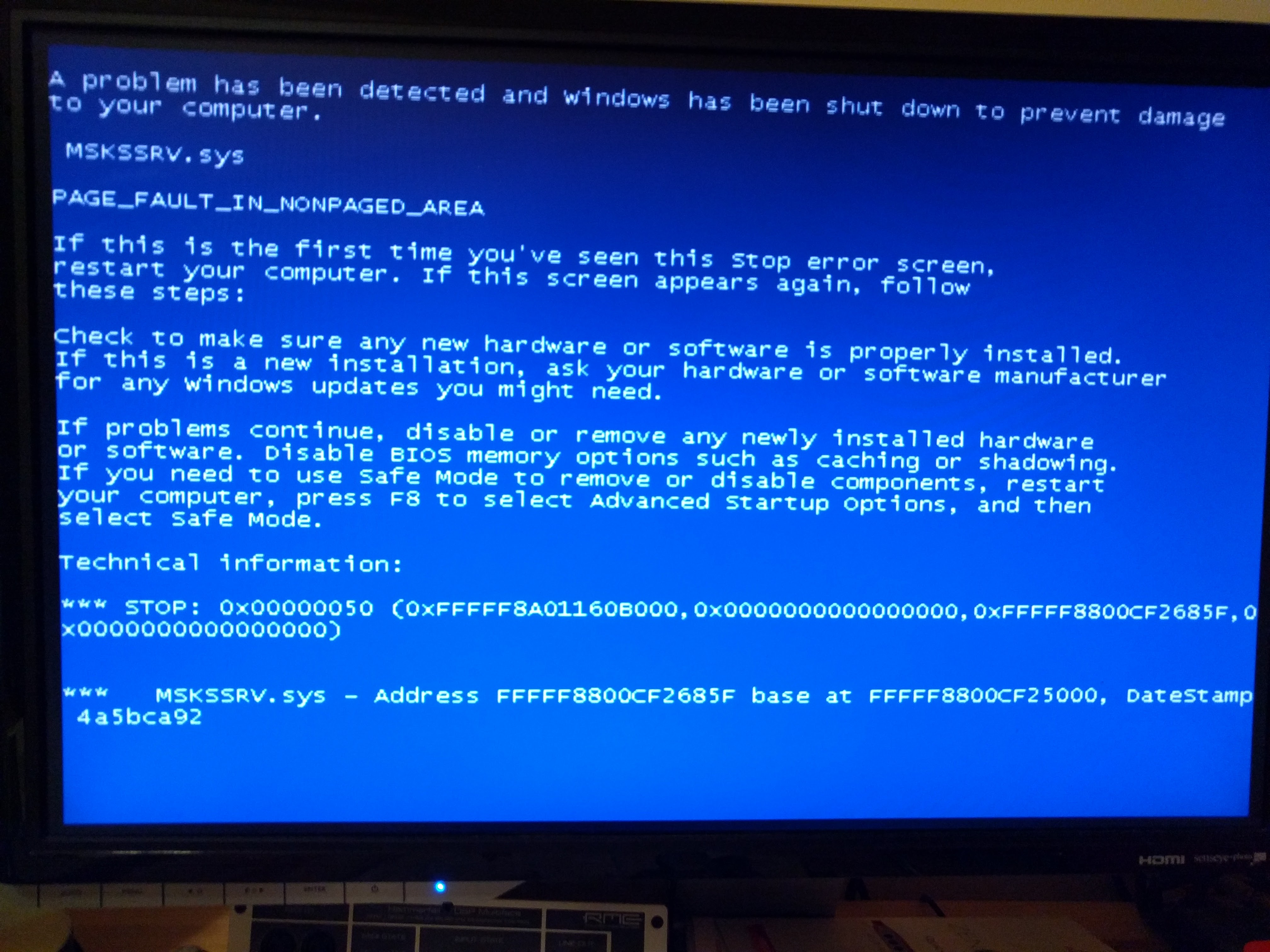
HjxpX31.jpg


Was wondering if anyone here can help me figure out whats going on here. Because I don't feel like re-installing again my computer in my new SSD that I just installed earlier this year, just before summer 2016.

Any help would be very very much appreciated.

Thank you so much in advance guys
 

My Computer My Computer

At a glance

Win7 Pro SP1i7 Intel Core 2600 3.40GHz
Computer type
PC/Desktop
OS
Win7 Pro SP1
CPU
i7 Intel Core 2600 3.40GHz

My Computer My Computer

At a glance

Windows 10/Windows 7 (My Idea- Virtual PC)Intel(R) Core(TM) i5-3470 CPU @ 3.20GHz16 GBnVidia GeForce GTX 750 Ti (2GB)
Computer type
PC/Desktop
Computer Manufacturer/Model Number
Lenovo Thinkcenter M92p
OS
Windows 10/Windows 7 (My Idea- Virtual PC)
CPU
Intel(R) Core(TM) i5-3470 CPU @ 3.20GHz
Motherboard
Lenovo MahoBay
Memory
16 GB
Graphics Card(s)
nVidia GeForce GTX 750 Ti (2GB)
Sound Card
nVidia HD Audio
Monitor(s) Displays
RCA 4KTV 50"
Screen Resolution
3840p x 2160p
Hard Drives
Onboard:
Seagate ST500DM009-2F110A 500GB
WDC WD4000FYYZ-01UL1B1 (WD-WCC131910831) [3726 GB]

USB 3.0
My Book 1140 (WCAZAD122454) [1862 GB]
Apple MDT MD10EAVS-00D7B0 (0000AB123473) [931 GB]

External:
WD Blue Innostar/Matsunichi (465 GB)
WD
PSU
Stock Thinkcenter M92p
Case
Stock Thinkcenter M92p
Cooling
Active
Keyboard
BYTEC BY-GA-KT-100-AC
Mouse
BYTEC
Internet Speed
1 GHz Down, 40 Mbps Up
Antivirus
Windows Defender
Browser
EDGE
Other Info
Old Other Info:
I finally have an Intel machine that has more than 8GB of Ram.
My ASUS M2N-SE AMD Windows 7 machine is back to Windows 7. Replaced the AMD 4400+ CPU and maxed out the RAM (4GB).
My Core Duo machine is only 2GB of Ram and it is locked to Windows XP in order to run Pro Tools 6.4, which I have been using since 2004.
I have one other Dell OptiPlex 980 tower, Identical to this one,
The BSOD only occurs when you start the program, right?

Try this hotfix:

https://support.microsoft.com/en-us/kb/2719594

I'm having trouble opening the link from here so you might have to copy it and paste it into the browser

Hi XweAponX

Thansk for the quick reply. Not when I start the software.. it lets me open lets REAPER and then when I try to add a plugin then I get the BSOD.

But again yesterday after I shared my problem here.. I was able to open Reaper and do a playback and there was no BSOD.

One other thing I noticed, is that I had these plugins made by this company Acustica (Acustica-Audio.com) AUDIO, they were all AUTHORIZED and were all working fine without any issue. Then yesterday after I had that BSOD, when I open Reaper or Studio One DAW and load up one of the plugins, its asking me to Authorize them again. But these plugins are already authorized.

And then when I opened I get this msg:

Imgur: The most awesome images on the Internet

IT's really really weird cuz these plugins have been working with no issue whatsover and never had any issue with them. I'm also a beta tester for this company

By the way, here are the links of the BSOD I had

BSOD 1 Imgur: The most awesome images on the Internet

BSOD 2 Imgur: The most awesome images on the Internet

Thanks hope you guys can help me out here

Appreciate
 

My Computer My Computer

At a glance

Win7 Pro SP1i7 Intel Core 2600 3.40GHz
Computer type
PC/Desktop
OS
Win7 Pro SP1
CPU
i7 Intel Core 2600 3.40GHz
The BSOD only occurs when you start the program, right?

Try this hotfix:

https://support.microsoft.com/en-us/kb/2719594

I'm having trouble opening the link from here so you might have to copy it and paste it into the browser

Hi XweAponX

Thansk for the quick reply. Not when I start the software.. it lets me open lets REAPER and then when I try to add a plugin then I get the BSOD.

But again yesterday after I shared my problem here.. I was able to open Reaper and do a playback and there was no BSOD.

One other thing I noticed, is that I had these plugins made by this company Acustica AUDIO Acustica-Audio.com , they were all AUTHORIZED and were all working fine without any issue. Then yesterday after I had that BSOD, when I open Reaper or Studio One DAW and load up one of the plugins, its asking me to Authorize them again. But these plugins are already authorized.

And then when I opened I get this msg:

Imgur: The most awesome images on the Internet

IT's really really weird cuz these plugins have been working with no issue whatsover and never had any issue with them. I'm also a beta tester for this company

By the way, here are the links of the BSOD I had

BSOD 1 Imgur: The most awesome images on the Internet

BSOD 2 Imgur: The most awesome images on the Internet

Thanks hope you guys can help me out here
 

My Computer My Computer

At a glance

Win7 Pro SP1i7 Intel Core 2600 3.40GHz
Computer type
PC/Desktop
OS
Win7 Pro SP1
CPU
i7 Intel Core 2600 3.40GHz
Looks like you were getting other BSOD numbers? The 0x0... numbers tell all, those are specific identifications why the system possibly crashed. IN your case, you also had the 0x00000050 error which points to a specific service failing.

Try this, see if this helps:
BSOD Randomly, STOP: 0x000000F4 Error

It might be related to why the Blue Screen happened, can you re-auth your Plugin? I've had this happen with Pro Tools constantly, with things that are not loaded into the Dongle. My iSotope oZone 3 gets hosed ALL the time, and that's old. Your Auth got corrupted it seems, call the company, tell them everything you posted in here, and see if theyll give you a new Auth. I'll look up the other numbers when I get home.

OK you got 0050 and 00F4, try both of the fixes I posted, create a restore point, install the hotfix for the 0050 error, then do the same for the 00F4 error,
 

My Computer My Computer

At a glance

Windows 10/Windows 7 (My Idea- Virtual PC)Intel(R) Core(TM) i5-3470 CPU @ 3.20GHz16 GBnVidia GeForce GTX 750 Ti (2GB)
Computer type
PC/Desktop
Computer Manufacturer/Model Number
Lenovo Thinkcenter M92p
OS
Windows 10/Windows 7 (My Idea- Virtual PC)
CPU
Intel(R) Core(TM) i5-3470 CPU @ 3.20GHz
Motherboard
Lenovo MahoBay
Memory
16 GB
Graphics Card(s)
nVidia GeForce GTX 750 Ti (2GB)
Sound Card
nVidia HD Audio
Monitor(s) Displays
RCA 4KTV 50"
Screen Resolution
3840p x 2160p
Hard Drives
Onboard:
Seagate ST500DM009-2F110A 500GB
WDC WD4000FYYZ-01UL1B1 (WD-WCC131910831) [3726 GB]

USB 3.0
My Book 1140 (WCAZAD122454) [1862 GB]
Apple MDT MD10EAVS-00D7B0 (0000AB123473) [931 GB]

External:
WD Blue Innostar/Matsunichi (465 GB)
WD
PSU
Stock Thinkcenter M92p
Case
Stock Thinkcenter M92p
Cooling
Active
Keyboard
BYTEC BY-GA-KT-100-AC
Mouse
BYTEC
Internet Speed
1 GHz Down, 40 Mbps Up
Antivirus
Windows Defender
Browser
EDGE
Other Info
Old Other Info:
I finally have an Intel machine that has more than 8GB of Ram.
My ASUS M2N-SE AMD Windows 7 machine is back to Windows 7. Replaced the AMD 4400+ CPU and maxed out the RAM (4GB).
My Core Duo machine is only 2GB of Ram and it is locked to Windows XP in order to run Pro Tools 6.4, which I have been using since 2004.
I have one other Dell OptiPlex 980 tower, Identical to this one,
Hi XweAponX

Thanks for replying. Yes I had 2 other BSOD before. & yes I can get new authorization thats not a problem at all. The problem is that when I come to load one Acustica plugins since yesterday, I'm getting that msg of necryptopp.dll. So it make it impossible to use the plugins

Also in your first response, I tried to download the FIX link your gave, I put my email address so they can send me the fix, but since this morning, I didn't receive any fix yet. I tried a second time and still didn't get any email to download the FIX. I even check in my junk folder. Nothing.

Any idea???
 

My Computer My Computer

At a glance

Win7 Pro SP1i7 Intel Core 2600 3.40GHz
Computer type
PC/Desktop
OS
Win7 Pro SP1
CPU
i7 Intel Core 2600 3.40GHz
Gah, sometimes you have to keep trying, try a different email address if you have one.

If you did any system updates between the time the plugin worked and the time you got the BSOD, try rolling those back. You can sort them by date installed, so you can chase down what updates were installed. Try a system restore.

Audio Engines are pretty finnicky, I've had to reinstall Windows on my Pro Tools machine several times, you have to make sure you are not installing ANY startup items at all, your DAW is basically a one-purpose machine, so you have to try to live without AV, and other startups like iTunes. The more you have loaded, the more it will interfere with the main Audio Engine. Are these plugins for Pro Tools or for something else like MOTU Digital Performer? It becomes especially dfifficult when you have a pre-built system like for with PreSonus hardware, running Pro Tools 10. Newer versions of PT can detect your hardware better, as they are no longer making the DIGI line of hardware. I have an old DIGI 001 running on XP, and there is practically nothing else on that system, and another with Pro Tools 8 for a Digi 003. Both are pretty barren systems. With Digi/AVID products before PT 10, you did not need an internet connection, but with PreSonus' default audio software, it has to be activated over the net. It depends what you have. My friend uses MOTU with pre-amps he made himself, but that is all on a MAC system, and it is equally fussy there.

If you can export all of the settings from your main Audio app, back them all up, I'd try removing it all and starting from scratch. But before you do that, try to get that Hotfix. I'll see if I can get it, cos it may fix the 0050 errors.

I also remember that there are conditions where a Pro Tools setup will crash and you have to reset the plugins cache. Dave from Sweetwater showed me how, but it has been a few years, and I'll have to dig through my old emails for the procedure.
 

My Computer My Computer

At a glance

Windows 10/Windows 7 (My Idea- Virtual PC)Intel(R) Core(TM) i5-3470 CPU @ 3.20GHz16 GBnVidia GeForce GTX 750 Ti (2GB)
Computer type
PC/Desktop
Computer Manufacturer/Model Number
Lenovo Thinkcenter M92p
OS
Windows 10/Windows 7 (My Idea- Virtual PC)
CPU
Intel(R) Core(TM) i5-3470 CPU @ 3.20GHz
Motherboard
Lenovo MahoBay
Memory
16 GB
Graphics Card(s)
nVidia GeForce GTX 750 Ti (2GB)
Sound Card
nVidia HD Audio
Monitor(s) Displays
RCA 4KTV 50"
Screen Resolution
3840p x 2160p
Hard Drives
Onboard:
Seagate ST500DM009-2F110A 500GB
WDC WD4000FYYZ-01UL1B1 (WD-WCC131910831) [3726 GB]

USB 3.0
My Book 1140 (WCAZAD122454) [1862 GB]
Apple MDT MD10EAVS-00D7B0 (0000AB123473) [931 GB]

External:
WD Blue Innostar/Matsunichi (465 GB)
WD
PSU
Stock Thinkcenter M92p
Case
Stock Thinkcenter M92p
Cooling
Active
Keyboard
BYTEC BY-GA-KT-100-AC
Mouse
BYTEC
Internet Speed
1 GHz Down, 40 Mbps Up
Antivirus
Windows Defender
Browser
EDGE
Other Info
Old Other Info:
I finally have an Intel machine that has more than 8GB of Ram.
My ASUS M2N-SE AMD Windows 7 machine is back to Windows 7. Replaced the AMD 4400+ CPU and maxed out the RAM (4GB).
My Core Duo machine is only 2GB of Ram and it is locked to Windows XP in order to run Pro Tools 6.4, which I have been using since 2004.
I have one other Dell OptiPlex 980 tower, Identical to this one,
Gah, sometimes you have to keep trying, try a different email address if you have one.

If you did any system updates between the time the plugin worked and the time you got the BSOD, try rolling those back. You can sort them by date installed, so you can chase down what updates were installed. Try a system restore.

Hey XweAponX, thanks again for the support, no I did NOT do any system update lately before BSOD. Matter of fact I don't have RETSORE enabled in my system. Which I think once I solve this issue i'm having right now I'll turn it back on for cases like this in the future

Audio Engines are pretty finnicky, I've had to reinstall Windows on my Pro Tools machine several times, you have to make sure you are not installing ANY startup items at all, your DAW is basically a one-purpose machine, so you have to try to live without AV, and other startups like iTunes. The more you have loaded, the more it will interfere with the main Audio Engine. Are these plugins for Pro Tools or for something else like MOTU Digital Performer? It becomes especially dfifficult when you have a pre-built system like for with PreSonus hardware, running Pro Tools 10. Newer versions of PT can detect your hardware better, as they are no longer making the DIGI line of hardware. I have an old DIGI 001 running on XP, and there is practically nothing else on that system, and another with Pro Tools 8 for a Digi 003. Both are pretty barren systems. With Digi/AVID products before PT 10, you did not need an internet connection, but with PreSonus' default audio software, it has to be activated over the net. It depends what you have. My friend uses MOTU with pre-amps he made himself, but that is all on a MAC system, and it is equally fussy there.

I totally hear ya Audio engines can sometimes be finicky but to be honest, with my soundcard since I bought it I never had any issue at all. Just this time that I came to to an update of firmware that by the way many who have the same soundcard using Win7 x64 bit as well did the udpate firmware and they had no issue at all. Thats the weird side of technology I guess.

And also for your info so you know, my computer isn't a all in one package system that you buy at a lets say BEST BUY store.. my computer is a custom computer. Every part was chosen ;-)


If you can export all of the settings from your main Audio app, back them all up, I'd try removing it all and starting from scratch. But before you do that, try to get that Hotfix. I'll see if I can get it, cos it may fix the 0050 errors.

I also remember that there are conditions where a Pro Tools setup will crash and you have to reset the plugins cache. Dave from Sweetwater showed me how, but it has been a few years, and I'll have to dig through my old emails for the procedure.

If you could find the hotfix, please upload it on dropbox or something would appreciate that.

Now, about the netcryptopp.dll issue I got with Acustica audio plugins that I shared the screenshot here, I went on and found that .dll file under System32 and renamed it as OLDnetcryptopp.dll. Then opened an acustica plugin and this time, I don't get that BAD Image error anymore.

I'm gonna see if I can it will re-create the needed file to authorized the plugins. because with this company, here how it goes to authorize a plugin.

You need to Install the plugin
Then Open your DAW and open that plugin
When you do open the plugin, you'll a msg on the left side of the plugin saying "authorize is requested".
That means the moment you load the plugin the first time, it creates a file that has the extension .SER
So it means if the plugin name is AMBER, the .SER file will be AMBER.SER
Then you need to log into your Acustica Account dashboard and upload that .SER file
And an authorization file with this extention .AUTH will be sent to you by email and you copy & paste it where the plugin is located and voila
 

My Computer My Computer

At a glance

Win7 Pro SP1i7 Intel Core 2600 3.40GHz
Computer type
PC/Desktop
OS
Win7 Pro SP1
CPU
i7 Intel Core 2600 3.40GHz
Hi Laakas,

Do you still have BSOD problems?
 

My Computer My Computer

At a glance

Windows 10 Proi5-650016GB DDR4 2133 Crucial Ballistix Sport LTMSI GeForce GTX 1060 GAMING X 6G
Computer type
PC/Desktop
Computer Manufacturer/Model Number
Custom build
OS
Windows 10 Pro
CPU
i5-6500
Motherboard
Gigabyte B150-HD3P-CF
Memory
16GB DDR4 2133 Crucial Ballistix Sport LT
Graphics Card(s)
MSI GeForce GTX 1060 GAMING X 6G
Sound Card
Intel Display Audio
Monitor(s) Displays
Liyama ProLite XB2483HSU-B2
Screen Resolution
1920 x 1080
Hard Drives
Crucial MX200 500GB & Toshiba DT01ACA300 3TB
PSU
Corsair RM550x
Case
Fractal Design Define S
Cooling
Cooler Master TX3 i
Keyboard
Func KB-460 (MX Red)
Mouse
Corsair Gaming M65 RGB
Antivirus
Bitdefender Total Security 2016 + MBAM Pro + MBAE Pro
Browser
Google Chrome
Other Info
Creative Sound Blaster Tactic3D Rage V2 headset
Hi Laakas,

Do you still have BSOD problems?

Hi axe0

After dealing with netcryptopp.dll and renamed that .DLL to OLDnetcryptopp.dll, I haven't had any BSOD since then.

But to be honest, I'd really appreciate if we could look into my system to double check if everything hasn't been altered by a false "move" that I'd have done by mistake or double check if I'm not at risk to have another BSOD later on etc...

I was even thinking maybe of doing an upgrade from my Win7 to Win 10 pro. Because a few days ago I was trying to update the new Software of my Antelope Soundcard and I had Antelope support with me online accessing my computer Via TeamViewer and unfortunately the NEW Software Control Panel update could not work with my Win 7 x64.

Reason: Is that my win7 is a custom one. And from the Antelope user, they told me that some of my Wnidows services in the Win version I have, have been disabled (not installed) example: in my Win 7 x64 i'm missing "Local Services" "Event Log service unavailble" etc...

And their new Control Panel software is not able to Connect to their SERVER etc..

And they suggested me to either Fix those Non-installed Windows Services, meaning I should have all windows services not altered, Or Re-install Windows 7 full version (Not custom) but I don't feel like re-installing everything as my System is running great and all my software and plugins are installed OR upgrade to Win 10 Pro Full version

This is where I am now.. any suggestion or help about these "missing services" is welcome
 

My Computer My Computer

At a glance

Win7 Pro SP1i7 Intel Core 2600 3.40GHz
Computer type
PC/Desktop
OS
Win7 Pro SP1
CPU
i7 Intel Core 2600 3.40GHz
Well what Antelope said is UTTER RUBBISH.
Those services are ARE on your system, and the default for them is ALLWAYS ON.
UNLESS you or malware have dissabled them

Every system is custom because most people change something.
Follow this tutorial to reset services
Services - Restore Default Services in Windows 7

Being unable to connect to thier server is another matter.

Roy
 

My Computer My Computer

At a glance

W7 home premium 32bit/W7HP 64bit/w10 tp insid...E5300 dual core3gbNvidia Geforce 7100 Nforce 630i
Computer type
PC/Desktop
Computer Manufacturer/Model Number
medionl/Aspire 6930G/acer x55a
OS
W7 home premium 32bit/W7HP 64bit/w10 tp insider ring
CPU
E5300 dual core
Motherboard
medion MS7366
Memory
3gb
Graphics Card(s)
Nvidia Geforce 7100 Nforce 630i
Monitor(s) Displays
avixc
Internet Speed
n (isp resticted to 72)
Antivirus
mse/pands
Browser
palemoon
Other Info
Belkin Fd7050 n USB using Railink RT2870 drivers, more upto date

My Computer My Computer

At a glance

Windows 10 Proi5-650016GB DDR4 2133 Crucial Ballistix Sport LTMSI GeForce GTX 1060 GAMING X 6G
Computer type
PC/Desktop
Computer Manufacturer/Model Number
Custom build
OS
Windows 10 Pro
CPU
i5-6500
Motherboard
Gigabyte B150-HD3P-CF
Memory
16GB DDR4 2133 Crucial Ballistix Sport LT
Graphics Card(s)
MSI GeForce GTX 1060 GAMING X 6G
Sound Card
Intel Display Audio
Monitor(s) Displays
Liyama ProLite XB2483HSU-B2
Screen Resolution
1920 x 1080
Hard Drives
Crucial MX200 500GB & Toshiba DT01ACA300 3TB
PSU
Corsair RM550x
Case
Fractal Design Define S
Cooling
Cooler Master TX3 i
Keyboard
Func KB-460 (MX Red)
Mouse
Corsair Gaming M65 RGB
Antivirus
Bitdefender Total Security 2016 + MBAM Pro + MBAE Pro
Browser
Google Chrome
Other Info
Creative Sound Blaster Tactic3D Rage V2 headset
torchwood axe0

Hey guys! Thanks so much for replying. I'll take look to check torchwood on how to RESET services back and also axe0 i'll get you the report of my system as soon as I'm back cuz I need to head to the hospital to see my mother ok!

Once again a big thanks.

Hopefully you guys can help me RESET my Win services so I can tell Antelope that they were wrong and will also show you the Antelope Service that is not RUNNING. Even when we go under services and we HIT START. Their Service is not STARTING UP. Its like it's being blocked by something. What I don't know.. but maybe you guys will be able to help fix and why their Service ain't starting in my system

Best,
 

My Computer My Computer

At a glance

Win7 Pro SP1i7 Intel Core 2600 3.40GHz
Computer type
PC/Desktop
OS
Win7 Pro SP1
CPU
i7 Intel Core 2600 3.40GHz

My Computer My Computer

At a glance

W7 home premium 32bit/W7HP 64bit/w10 tp insid...E5300 dual core3gbNvidia Geforce 7100 Nforce 630i
Computer type
PC/Desktop
Computer Manufacturer/Model Number
medionl/Aspire 6930G/acer x55a
OS
W7 home premium 32bit/W7HP 64bit/w10 tp insider ring
CPU
E5300 dual core
Motherboard
medion MS7366
Memory
3gb
Graphics Card(s)
Nvidia Geforce 7100 Nforce 630i
Monitor(s) Displays
avixc
Internet Speed
n (isp resticted to 72)
Antivirus
mse/pands
Browser
palemoon
Other Info
Belkin Fd7050 n USB using Railink RT2870 drivers, more upto date
Please remove all pirated programs and such from your system before we can start troubleshooting.
The Forum rules is meant for everything regarding piracy
  • Discussing it,
  • Asking for guidance,
  • Asking for a crack,
  • The use of it,
  • Etc.
4) No piracy or discussion of piracy allowed at all. Such as software, music, videos and other intellectual property violations (e.g. downloading youtube videos locally etc).
 

My Computer My Computer

At a glance

Windows 10 Proi5-650016GB DDR4 2133 Crucial Ballistix Sport LTMSI GeForce GTX 1060 GAMING X 6G
Computer type
PC/Desktop
Computer Manufacturer/Model Number
Custom build
OS
Windows 10 Pro
CPU
i5-6500
Motherboard
Gigabyte B150-HD3P-CF
Memory
16GB DDR4 2133 Crucial Ballistix Sport LT
Graphics Card(s)
MSI GeForce GTX 1060 GAMING X 6G
Sound Card
Intel Display Audio
Monitor(s) Displays
Liyama ProLite XB2483HSU-B2
Screen Resolution
1920 x 1080
Hard Drives
Crucial MX200 500GB & Toshiba DT01ACA300 3TB
PSU
Corsair RM550x
Case
Fractal Design Define S
Cooling
Cooler Master TX3 i
Keyboard
Func KB-460 (MX Red)
Mouse
Corsair Gaming M65 RGB
Antivirus
Bitdefender Total Security 2016 + MBAM Pro + MBAE Pro
Browser
Google Chrome
Other Info
Creative Sound Blaster Tactic3D Rage V2 headset
Well what Antelope said is UTTER RUBBISH.
Those services are ARE on your system, and the default for them is ALLWAYS ON.
UNLESS you or malware have dissabled them

Every system is custom because most people change something.
Follow this tutorial to reset services
Services - Restore Default Services in Windows 7

Being unable to connect to thier server is another matter.

Roy

Hi roy

Take a look here, this is the Antelope Service manager that normally should be RUNNING but it is in STOP mode. When I right click to START this service, nothing happens

And second Screenshot, is my soundcard (antelope) Control Panel that normally if the Antelope Service manager was running, when I Open the Control Panel, it should connect to their Server and it would have detected a serial ID number that would have appeared inside that Control Panel Box and meaning it would connect my Soundcard to their server.

And as long as Antelope Service Manager is NOT running, The new Control Panel won't discover my soundcard and I can NOT use the Control panel to be able to do any Routing of my soundcard or use any DSP built-in plugins etc.. etc..

Any idea how to fix this?? Or any questions I need to ask Antelope Support how by the way told me that the fact that I'm running a custom Windows, they won't be able to fix my issue because there are some Windows Services needed in order to have their new Control Panel update software to connect with their server

Thanks
 

My Computer My Computer

At a glance

Win7 Pro SP1i7 Intel Core 2600 3.40GHz
Computer type
PC/Desktop
OS
Win7 Pro SP1
CPU
i7 Intel Core 2600 3.40GHz
Please remove all pirated programs and such from your system before we can start troubleshooting.
The Forum rules is meant for everything regarding piracy
  • Discussing it,
  • Asking for guidance,
  • Asking for a crack,
  • The use of it,
  • Etc.
4) No piracy or discussion of piracy allowed at all. Such as software, music, videos and other intellectual property violations (e.g. downloading youtube videos locally etc).

Hi axe0

Should be fine to go now. I deleted the unwanted files or soft you've seen in my system. Should be fine to move forward.

Big thanks again for your time
 

My Computer My Computer

At a glance

Win7 Pro SP1i7 Intel Core 2600 3.40GHz
Computer type
PC/Desktop
OS
Win7 Pro SP1
CPU
i7 Intel Core 2600 3.40GHz

My Computer My Computer

At a glance

W7 home premium 32bit/W7HP 64bit/w10 tp insid...E5300 dual core3gbNvidia Geforce 7100 Nforce 630i
Computer type
PC/Desktop
Computer Manufacturer/Model Number
medionl/Aspire 6930G/acer x55a
OS
W7 home premium 32bit/W7HP 64bit/w10 tp insider ring
CPU
E5300 dual core
Motherboard
medion MS7366
Memory
3gb
Graphics Card(s)
Nvidia Geforce 7100 Nforce 630i
Monitor(s) Displays
avixc
Internet Speed
n (isp resticted to 72)
Antivirus
mse/pands
Browser
palemoon
Other Info
Belkin Fd7050 n USB using Railink RT2870 drivers, more upto date
Here we go:

Diagnostic Report (1.9.0027.0):
-----------------------------------------
Windows Validation Data-->

Validation Code: 0
Cached Online Validation Code: 0x0
Windows Product Key: *****-*****-GK4PY-FDWYH-7TP9F
Windows Product Key Hash: u3xU6PnmumgYLgUpnmbqEw9Q2OA=
Windows Product ID: 00371-OEM-8992671-00004
Windows Product ID Type: 2
Windows License Type: OEM SLP
Windows OS version: 6.1.7601.2.00010100.1.0.048
ID: {CB467794-30B9-4515-975E-00D4E814FCCB}(1)
Is Admin: Yes
TestCab: 0x0
LegitcheckControl ActiveX: N/A, hr = 0x80070002
Signed By: N/A, hr = 0x80070002
Product Name: Windows 7 Professional
Architecture: 0x00000009
Build lab: 7601.win7sp1_gdr.160211-0600
TTS Error:
Validation Diagnostic:
Resolution Status: N/A

Vista WgaER Data-->
ThreatID(s): N/A, hr = 0x80070002
Version: N/A, hr = 0x80070002

Windows XP Notifications Data-->
Cached Result: N/A, hr = 0x80070002
File Exists: No
Version: N/A, hr = 0x80070002
WgaTray.exe Signed By: N/A, hr = 0x80070002
WgaLogon.dll Signed By: N/A, hr = 0x80070002

OGA Notifications Data-->
Cached Result: N/A, hr = 0x80070002
Version: N/A, hr = 0x80070002
OGAExec.exe Signed By: N/A, hr = 0x80070002
OGAAddin.dll Signed By: N/A, hr = 0x80070002

OGA Data-->
Office Status: 109 N/A
OGA Version: N/A, 0x80070002
Signed By: N/A, hr = 0x80070002
Office Diagnostics: 025D1FF3-364-80041010_025D1FF3-229-80041010_025D1FF3-230-1_025D1FF3-517-80040154_025D1FF3-237-80040154_025D1FF3-238-2_025D1FF3-244-80070002_025D1FF3-258-3

Browser Data-->
Proxy settings: N/A
User Agent: Mozilla/4.0 (compatible; MSIE 8.0; Win32)
Default Browser: C:\Users\76Records\AppData\Local\Google\Chrome\Application\chrome.exe
Download signed ActiveX controls: Prompt
Download unsigned ActiveX controls: Disabled
Run ActiveX controls and plug-ins: Allowed
Initialize and script ActiveX controls not marked as safe: Disabled
Allow scripting of Internet Explorer Webbrowser control: Disabled
Active scripting: Allowed
Script ActiveX controls marked as safe for scripting: Allowed

File Scan Data-->

Other data-->
Office Details: <GenuineResults><MachineData><UGUID>{CB467794-30B9-4515-975E-00D4E814FCCB}</UGUID><Version>1.9.0027.0</Version><OS>6.1.7601.2.00010100.1.0.048</OS><Architecture>x64</Architecture><PKey>*****-*****-*****-*****-7TP9F</PKey><PID>00371-OEM-8992671-00004</PID><PIDType>2</PIDType><SID>S-1-5-21-2197470863-2475269169-4040883737</SID><SYSTEM><Manufacturer>System manufacturer</Manufacturer><Model>System Product Name</Model></SYSTEM><BIOS><Manufacturer>American Megatrends Inc.</Manufacturer><Version>3602</Version><SMBIOSVersion major="2" minor="6"/><Date>20121101000000.000000+000</Date></BIOS><HWID>1B8D0600018400FE</HWID><UserLCID>0409</UserLCID><SystemLCID>0409</SystemLCID><TimeZone>Eastern Standard Time(GMT-05:00)</TimeZone><iJoin>0</iJoin><SBID><stat>3</stat><msppid></msppid><name></name><model></model></SBID><OEM><OEMID>ACRSYS</OEMID><OEMTableID>ACRPRDCT</OEMTableID></OEM><GANotification/></MachineData><Software><Office><Result>109</Result><Products/><Applications/></Office></Software></GenuineResults>

Spsys.log Content: 0x80070002

Licensing Data-->
Software licensing service version: 6.1.7601.17514

Name: Windows(R) 7, Professional edition
Description: Windows Operating System - Windows(R) 7, OEM_SLP channel
Activation ID: 50e329f7-a5fa-46b2-85fd-f224e5da7764
Application ID: 55c92734-d682-4d71-983e-d6ec3f16059f
Extended PID: 00371-00178-926-700004-02-1033-7601.0000-2802016
Installation ID: 010976708231477774562556445900962185753422150223866410
Processor Certificate URL: SpcService Web Service
Machine Certificate URL: RacService Web Service
Use License URL: UseLicenseService Web Service
Product Key Certificate URL: PkcService Web Service
Partial Product Key: 7TP9F
License Status: Licensed
Remaining Windows rearm count: 2
Trusted time: 11/27/2016 5:08:40 PM

Windows Activation Technologies-->
HrOffline: 0x00000000
HrOnline: N/A
HealthStatus: 0x0000000000000000
Event Time Stamp: N/A
ActiveX: Registered, Version: 7.1.7600.16395
Admin Service: Registered, Version: 7.1.7600.16395
HealthStatus Bitmask Output:


HWID Data-->
HWID Hash Current: QgAAAAAABgABAAEAAAAJAAAAAQABAAEAHKKiSHzpGl10xJyfXNkOp+BlgpO84lheqmwwAbzIpi0eIq9XCQ1qxC5z

OEM Activation 1.0 Data-->
N/A

OEM Activation 2.0 Data-->
BIOS valid for OA 2.0: yes
Windows marker version: 0x20001
OEMID and OEMTableID Consistent: yes
BIOS Information:
ACPI Table Name OEMID Value OEMTableID Value
APIC ALASKA A M I
FACP ALASKA A M I
HPET ALASKA A M I
MCFG ALASKA A M I
SSDT SataRe SataTabl
DMAR INTEL SNB
BGRT ALASKA A M I
SLIC ACRSYS ACRPRDCT
 

My Computer My Computer

At a glance

Win7 Pro SP1i7 Intel Core 2600 3.40GHz
Computer type
PC/Desktop
OS
Win7 Pro SP1
CPU
i7 Intel Core 2600 3.40GHz
Back
Top