Hello all,
I am new to the forum and I want to thank you all for taking the time to read this and for any help you may be able to provide. I consider myself fairly computer savvy, but I will be the first to admit, I know little about creating networks. I will provide the most details I can and see where this goes.
I am in need of creating a small business network for 4 computers and 3 printers. All systems are running some form of Windows 7. We have specific software that we are required to use to operate our business, and in need of using this software on at least 2, but ideally 3 of the computers that will be connected to this network. The internet source is cable internet from our local cable provider, CassComm. The internet CAT6 ethernet cable comes into the building and goes into a Netgear N300 Wifi Router. It then splits two two different computers, but I will be adding two additional computers to it soon, along with an iPad. All connections, with the exception of the iPad, will be wired connections. I already have the cables in place and have a Netgear switch on the way from Amazon.com. Again, excuse my lack of knowledge, but I assume I need to make one of these computers a "server". The newest computer is the one I would like to be the server and to store the database that this software requires. The software we are running is Martech Systems WinFair Management. Their website address is Blue Ribbon Software According to their instructions, we have to have a TCP/IP network configured for this software to function properly across multiple systems. This is where I get lost. I understand that it is easy to create homegroups in Windows 7 for file and printer sharing, but I have no idea what I'm doing in regard to setting up the TCP/IP network. I know that with some assistance I can make it happen, because I feel that I have enough computer knowledge to navigate instructions. I will attach the blurb from the software company in regard to a network below, in hopes that it will answer any other questions you may have. Again, I greatly appreciate any help you can provide!
In order to operate MarTech Systems, Inc software in a multiuser network mode, the following
items are required:
• You must have an operational TCP/IP local area network already in place. An
operational TCP/IP LAN is defined as when you are able to ping the IP addresses
and DNS names of other systems on your network. If you do not have the expertise
yourself to configure a Microsoft network and map network drives, you must find
someone locally to assist you with this. This is not a task that can be accomplished
easily over the telephone. If you need extended assistance from our Help Desk to
physically connect the network, it will be a billable call and must be pre-scheduled
to be completed during business hours.
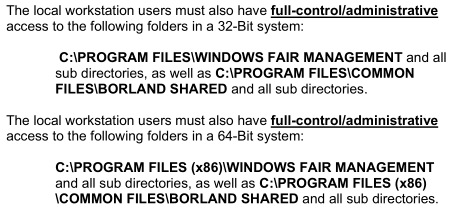
• In order to properly install and maintain the software, the user must have
administrative access to their desktop to install the software as a local user. To
operate the software in a networked environment, the user must also have
administrative access to the network resources that will be used to define the shared
storage area on the network where the databases will be maintained. If you do not
have those rights to your computer, you must find the person within your office that
has those rights. That person will be able to install your software and set the BDE
properly.
I am new to the forum and I want to thank you all for taking the time to read this and for any help you may be able to provide. I consider myself fairly computer savvy, but I will be the first to admit, I know little about creating networks. I will provide the most details I can and see where this goes.
I am in need of creating a small business network for 4 computers and 3 printers. All systems are running some form of Windows 7. We have specific software that we are required to use to operate our business, and in need of using this software on at least 2, but ideally 3 of the computers that will be connected to this network. The internet source is cable internet from our local cable provider, CassComm. The internet CAT6 ethernet cable comes into the building and goes into a Netgear N300 Wifi Router. It then splits two two different computers, but I will be adding two additional computers to it soon, along with an iPad. All connections, with the exception of the iPad, will be wired connections. I already have the cables in place and have a Netgear switch on the way from Amazon.com. Again, excuse my lack of knowledge, but I assume I need to make one of these computers a "server". The newest computer is the one I would like to be the server and to store the database that this software requires. The software we are running is Martech Systems WinFair Management. Their website address is Blue Ribbon Software According to their instructions, we have to have a TCP/IP network configured for this software to function properly across multiple systems. This is where I get lost. I understand that it is easy to create homegroups in Windows 7 for file and printer sharing, but I have no idea what I'm doing in regard to setting up the TCP/IP network. I know that with some assistance I can make it happen, because I feel that I have enough computer knowledge to navigate instructions. I will attach the blurb from the software company in regard to a network below, in hopes that it will answer any other questions you may have. Again, I greatly appreciate any help you can provide!
In order to operate MarTech Systems, Inc software in a multiuser network mode, the following
items are required:
• You must have an operational TCP/IP local area network already in place. An
operational TCP/IP LAN is defined as when you are able to ping the IP addresses
and DNS names of other systems on your network. If you do not have the expertise
yourself to configure a Microsoft network and map network drives, you must find
someone locally to assist you with this. This is not a task that can be accomplished
easily over the telephone. If you need extended assistance from our Help Desk to
physically connect the network, it will be a billable call and must be pre-scheduled
to be completed during business hours.
• In order to properly install and maintain the software, the user must have
administrative access to their desktop to install the software as a local user. To
operate the software in a networked environment, the user must also have
administrative access to the network resources that will be used to define the shared
storage area on the network where the databases will be maintained. If you do not
have those rights to your computer, you must find the person within your office that
has those rights. That person will be able to install your software and set the BDE
properly.
My Computer
At a glance
Windows 7 professional 64-BitCore i34GB Ram
- Computer type
- PC/Desktop
- Computer Manufacturer/Model Number
- Dell
- OS
- Windows 7 professional 64-Bit
- CPU
- Core i3
- Memory
- 4GB Ram