Need help installing Windows 7 with my specs

qolyn

New member
Local time
4:21 AM
Messages
5
Hello guys! :drool:
Thanks for reading my thread. My specs you can see in my profile. I am running a hackintosh. That means when my PC boots I can choose between MacOS and Windows 11. Now I want to use Win7 instead of Win11. I have the problems that i don´t know where to get the USB 3.1 drivers for me. Also when I try to boot from a Win7 USB i created it gets stuck at the "starting windows" in the beginning after loading files.
Can somebody help me please or send me an ISO that will work for me?

Thanks!! :D
 

My Computers

System One System Two

  • Computer type
    PC/Desktop
    Computer Manufacturer/Model Number
    custom build
    OS
    MacOS/ Win 10 64bit
    CPU
    Intel Core i5-9400F
    Motherboard
    ASUS PRIME B360-PLUS
    Memory
    16GB
    Graphics Card(s)
    Radeon RX 580 Series
    Hard Drives
    226GB SSD, 450GB SSD
  • Computer type
    PC/Desktop
You can integrate usb3 support with dism++ and the usb3 update and drivers that are attached at the bottom of all my posts.

Mount boot.wim image 2

then integrate the update

then integrate the drivers.

save the image ( direct save)

then unmount the image

If you are using nvme disk, also integrate the two nvme updates - which are attached at the bottom of all my posts.

Then do the same by mounting your image from install.wim

You also need the win7 drivers for your graphics card.
 

My Computers

System One System Two

  • Computer type
    PC/Desktop
    OS
    7 X64
    CPU
    i5 8400
    Motherboard
    gigabyte b365m ds3h
    Memory
    2x8gb 3200mhz
    Hard Drives
    various
    PSU
    pure power 11 400w cm
    Case
    Coolermaster
    Cooling
    cryorig m9i
  • Computer type
    PC/Desktop
    OS
    7x64
    CPU
    g5400
    Motherboard
    ga b365m ds3h
    Memory
    8gb ddr4 2400
    PSU
    xfx pro 450w
now i come that far that i can come up to the windows 7 install windows, but then no usb support.. i did the thing with the drivers per Asus EZ installer. Is there a youtube tutorial for the thing you told me? Or can you upload a iso with the drivers in it? Would be very cool from you!!

You can integrate usb3 support with dism++ and the usb3 update and drivers that are attached at the bottom of all my posts.

Mount boot.wim image 2

then integrate the update

then integrate the drivers.

save the image ( direct save)

then unmount the image

If you are using nvme disk, also integrate the two nvme updates - which are attached at the bottom of all my posts.

Then do the same by mounting your image from install.wim

You also need the win7 drivers for your graphics card.
 

My Computers

System One System Two

  • Computer type
    PC/Desktop
    Computer Manufacturer/Model Number
    custom build
    OS
    MacOS/ Win 10 64bit
    CPU
    Intel Core i5-9400F
    Motherboard
    ASUS PRIME B360-PLUS
    Memory
    16GB
    Graphics Card(s)
    Radeon RX 580 Series
    Hard Drives
    226GB SSD, 450GB SSD
  • Computer type
    PC/Desktop

My Computers

System One System Two

  • Computer type
    PC/Desktop
    OS
    7 X64
    CPU
    i5 8400
    Motherboard
    gigabyte b365m ds3h
    Memory
    2x8gb 3200mhz
    Hard Drives
    various
    PSU
    pure power 11 400w cm
    Case
    Coolermaster
    Cooling
    cryorig m9i
  • Computer type
    PC/Desktop
    OS
    7x64
    CPU
    g5400
    Motherboard
    ga b365m ds3h
    Memory
    8gb ddr4 2400
    PSU
    xfx pro 450w

My Computers

System One System Two

  • Computer type
    PC/Desktop
    Computer Manufacturer/Model Number
    custom build
    OS
    MacOS/ Win 10 64bit
    CPU
    Intel Core i5-9400F
    Motherboard
    ASUS PRIME B360-PLUS
    Memory
    16GB
    Graphics Card(s)
    Radeon RX 580 Series
    Hard Drives
    226GB SSD, 450GB SSD
  • Computer type
    PC/Desktop

My Computers

System One System Two

  • Computer type
    PC/Desktop
    OS
    7 X64
    CPU
    i5 8400
    Motherboard
    gigabyte b365m ds3h
    Memory
    2x8gb 3200mhz
    Hard Drives
    various
    PSU
    pure power 11 400w cm
    Case
    Coolermaster
    Cooling
    cryorig m9i
  • Computer type
    PC/Desktop
    OS
    7x64
    CPU
    g5400
    Motherboard
    ga b365m ds3h
    Memory
    8gb ddr4 2400
    PSU
    xfx pro 450w
Now it works! It automatically boots into Windows over the stick. USB works. How do I install it now? Here is a screenshot of how it looks when i boot to the stick :)
WhatsApp Image 2022-05-01 at 09.58.14.jpeg
try my boot media
17514x64v30.iso

It works on my b365 motherboard.
 

My Computers

System One System Two

  • Computer type
    PC/Desktop
    Computer Manufacturer/Model Number
    custom build
    OS
    MacOS/ Win 10 64bit
    CPU
    Intel Core i5-9400F
    Motherboard
    ASUS PRIME B360-PLUS
    Memory
    16GB
    Graphics Card(s)
    Radeon RX 580 Series
    Hard Drives
    226GB SSD, 450GB SSD
  • Computer type
    PC/Desktop

My Computers

System One System Two

  • Computer type
    PC/Desktop
    OS
    7 X64
    CPU
    i5 8400
    Motherboard
    gigabyte b365m ds3h
    Memory
    2x8gb 3200mhz
    Hard Drives
    various
    PSU
    pure power 11 400w cm
    Case
    Coolermaster
    Cooling
    cryorig m9i
  • Computer type
    PC/Desktop
    OS
    7x64
    CPU
    g5400
    Motherboard
    ga b365m ds3h
    Memory
    8gb ddr4 2400
    PSU
    xfx pro 450w
What do you mean? Should i do these steps on Windows 7 or here on Win 11?
You had better use this on your installation media:

Update your Win 7 installation media

- - - Updated - - -

I am really not very into that topic. Just need Win 7. Would it be possible that you create me an ISO that i just need to install on my USB with Rufus and then boot it? Would be so nice of you!


You had better use this on your installation media:

Update your Win 7 installation media

- - - Updated - - -

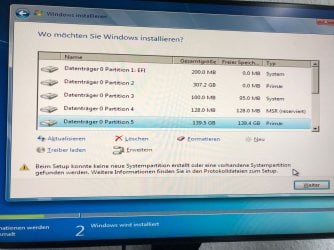
Now I come more far. I did the thing you told me, now it looks like that. I cant choose any storage where i can install it.
WhatsApp Image 2022-05-01 at 17.26.50.jpegWhatsApp Image 2022-05-01 at 17.39.49.jpeg

You had better use this on your installation media:

Update your Win 7 installation media
 

My Computers

System One System Two

  • Computer type
    PC/Desktop
    Computer Manufacturer/Model Number
    custom build
    OS
    MacOS/ Win 10 64bit
    CPU
    Intel Core i5-9400F
    Motherboard
    ASUS PRIME B360-PLUS
    Memory
    16GB
    Graphics Card(s)
    Radeon RX 580 Series
    Hard Drives
    226GB SSD, 450GB SSD
  • Computer type
    PC/Desktop
Delete the existing partitions. Windows setup will automatically create the partitions it wants.

Why do you have a 200 mb efi System partition and a 100mb System partition?

Why is partition 2 showing as 307.2gb with 0 free ?

If there is something on the disk you want to keep, do not use Windows setup.

Use winntsetup instead.
 

My Computers

System One System Two

  • Computer type
    PC/Desktop
    OS
    7 X64
    CPU
    i5 8400
    Motherboard
    gigabyte b365m ds3h
    Memory
    2x8gb 3200mhz
    Hard Drives
    various
    PSU
    pure power 11 400w cm
    Case
    Coolermaster
    Cooling
    cryorig m9i
  • Computer type
    PC/Desktop
    OS
    7x64
    CPU
    g5400
    Motherboard
    ga b365m ds3h
    Memory
    8gb ddr4 2400
    PSU
    xfx pro 450w
now it looks like that.


The Windows Setup cannot process the case of more than one boot partition ("System") detected. You need to delete one of them or at least remove its boot flag.
 

My Computer

Computer type
PC/Desktop
OS
Windows 7 Home Premium
Back
Top