
Solved Need Help Deleting Legacy Registry keys W7 64 bit

cuttingedgetech

New member
Local time
11:49 PM
Messages
12
Location
USA
I'm trying to delete some Legacy Registry Keys on W7 64 bit, and when i right click on the key to change the permissions to allow full control I receive a windows security prompt "unable to save permission Changes on Legacy.." Is there a work around for this. I may just be obsessive compulsive here, but I like to keep a clean registry. I uninstalled Dekart Private Disk, and I have more than a page of Legacy Keys left from this program. The screen shot only shows a few of them. Does anyone know of an app or any method that I can use to elevate my rights to allow me to remove Legacy Keys on W7 64 bit? I'm positive it's safe to remove these keys. Thanks in Advance!!
 

Attachments
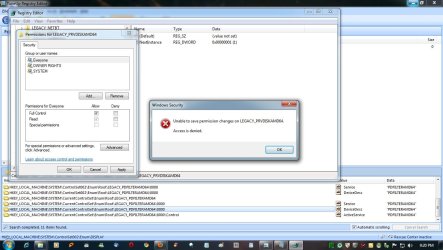
  • legacy registry keys.jpg
    legacy registry keys.jpg
    122.9 KB · Views: 195

My Computer My Computer

At a glance

Windows 7 Ultimate x64 XP Pro x32.
Computer Manufacturer/Model Number
I build my own machines
OS
Windows 7 Ultimate x64 XP Pro x32.
Hello Cuttingedgetech, and welcome to Seven Forums.

You will need to take ownership of the registry key first before you will be able to change it's permissions. Step 3 of OPTION TWO in Method Two of the tutorial below can help show you how to if needed.

Take Ownership of file - Vista Forums

Hope this helps,
Shawn
 

My Computer My Computer

At a glance

64-bit Windows 11 Pro for WorkstationsIntel i7-8700K OC'd to 5 GHz64 GB (4x16GB) G.SKILL TridentZ RGB DDR4 3600...ASUS ROG-STRIX-GTX1080TI-O11G-GAMING
Computer type
PC/Desktop
Computer Manufacturer/Model Number
Self built custom
OS
64-bit Windows 11 Pro for Workstations
CPU
Intel i7-8700K OC'd to 5 GHz
Motherboard
ASUS ROG Maximus XI Formula Z390
Memory
64 GB (4x16GB) G.SKILL TridentZ RGB DDR4 3600 MHz
Graphics Card(s)
ASUS ROG-STRIX-GTX1080TI-O11G-GAMING
Sound Card
Integrated
Monitor(s) Displays
2 x Samsung Odyssey G7 27"
Screen Resolution
2560x1440
Hard Drives
1TB Samsung 990 PRO M.2,
4TB Samsung 990 PRO PRO M.2,
TerraMaster F8 SSD Plus NAS
PSU
Seasonic Prime Titanium 850W
Case
Thermaltake Core P3
Cooling
Corsair Hydro H115i
Keyboard
Logitech wireless K800
Mouse
Logitech MX Master 4
Internet Speed
2 Gb/s Download and 100 Mb/s Upload
Antivirus
Malwarebyte Anti-Malware Premium
Browser
Google Chrome
Other Info
Logitech Z625 speaker system,
Logitech BRIO 4K Pro webcam,
HP Color LaserJet Pro MFP M477fdn,
APC SMART-UPS RT 1000 XL - SURT1000XLI,
Galaxy S23 Plus phone
Thanks Brink. I tried following step 3, and its not working for me. I must be doing something wrong. I must be overlooking something in the instructions. I'll keep trying, and get back with you. Thanks!
 

My Computer My Computer

At a glance

Windows 7 Ultimate x64 XP Pro x32.
Computer Manufacturer/Model Number
I build my own machines
OS
Windows 7 Ultimate x64 XP Pro x32.
There are a couple of points here. Firstly, since the key is in the HKLM branch of the registry, you will need to invoke regedit to run with administrative privileges. Secondly, the path contains Enum and this generally indicates that the key is generated (enumerated) upon boot. There are a number of keys in the registry which are volatile and which are recreated during boot up.
 

My Computer My Computer

At a glance

Windows 8.1 Pro RTM x64Intel Core-i5-3570K 4-core @ 3.4GHz (Ivy Brid...4 x 4GB DDR3-1600 Corsair Vengeance CMZ8GX3M2...MSI GeForce GTX770 Gaming OC 2GB
Computer type
PC/Desktop
Computer Manufacturer/Model Number
Dwarf Dwf/11/2012 r09/2013
OS
Windows 8.1 Pro RTM x64
CPU
Intel Core-i5-3570K 4-core @ 3.4GHz (Ivy Bridge) (OC 4.4GHz)
Motherboard
ASRock Z77 Extreme4-M
Memory
4 x 4GB DDR3-1600 Corsair Vengeance CMZ8GX3M2A1600C9B (16GB)
Graphics Card(s)
MSI GeForce GTX770 Gaming OC 2GB
Sound Card
Realtek High Definition on board solution (ALC 898)
Monitor(s) Displays
ViewSonic VA1912w Widescreen (VGA)
Screen Resolution
1440x900
Hard Drives
OCZ Agility 3 SSD 120GB SATA III x2 (RAID 0)
Samsung HD501LJ 500GB SATA II x2
Hitachi HDS721010CLA332 1TB SATA II
Iomega 1.5TB Ext USB 2.0
WD 2.0TB Ext USB 3.0
PSU
XFX Pro Series 850W Semi-Modular
Case
Gigabyte IF233
Cooling
1 x 120mm Front Inlet 1 x 120mm Rear Exhaust
Keyboard
Microsoft Comfort Curve Keyboard 3000 (USB)
Mouse
Microsoft Comfort Mouse 3000 for Business (USB)
Internet Speed
NetGear DG834Gv3 ADSL Modem/Router (Ethernet) ~4.0 Mb/s (O2)
Antivirus
Avast! 8.0.1497
Browser
IE 11
Other Info
Optical Drive: HL-DT-ST BD-RE BH10LS30 SATA Bluray
Lexmark S305 Printer/Scanner/Copier (USB)
WEI Score: 8.1/8.1/8.5/8.5/8.25
Asus Eee PC 1011PX Netbook (Windows 7 x86 Starter)
Changing permissions in Enum keys is not a very good idea. In any case, the issue of deleting legacy keys should arise only if there is a problem reinstalling that particular software, otherwise the registry is so huge, a dozen extra entries here or there are immaterial.
 

My Computer My Computer

At a glance

Windows 7 x64 pro/ Windows 7 x86 Pro/ XP SP3 x86
Computer Manufacturer/Model Number
Too many to describe...
OS
Windows 7 x64 pro/ Windows 7 x86 Pro/ XP SP3 x86
Thanks Brink! That worked. I had not taken ownership of the key. I also had to delete each subcontainer separately because the child objects were not inheriting the permissions from the parent objects. I tried several times, and the only way i could make the child object inherit from the parent was to edit each subcontainer separately. Thanks a Million!!
 

My Computer My Computer

At a glance

Windows 7 Ultimate x64 XP Pro x32.
Computer Manufacturer/Model Number
I build my own machines
OS
Windows 7 Ultimate x64 XP Pro x32.
Nice Forum! I hope to absorb all the knowledge I can. Maybe someday I may even be useful around here :)
 

My Computer My Computer

At a glance

Windows 7 Ultimate x64 XP Pro x32.
Computer Manufacturer/Model Number
I build my own machines
OS
Windows 7 Ultimate x64 XP Pro x32.
You're msot welcome Cuttingedgetech. I'm glad to hear that you got it sorted. :)
 

My Computer My Computer

At a glance

64-bit Windows 11 Pro for WorkstationsIntel i7-8700K OC'd to 5 GHz64 GB (4x16GB) G.SKILL TridentZ RGB DDR4 3600...ASUS ROG-STRIX-GTX1080TI-O11G-GAMING
Computer type
PC/Desktop
Computer Manufacturer/Model Number
Self built custom
OS
64-bit Windows 11 Pro for Workstations
CPU
Intel i7-8700K OC'd to 5 GHz
Motherboard
ASUS ROG Maximus XI Formula Z390
Memory
64 GB (4x16GB) G.SKILL TridentZ RGB DDR4 3600 MHz
Graphics Card(s)
ASUS ROG-STRIX-GTX1080TI-O11G-GAMING
Sound Card
Integrated
Monitor(s) Displays
2 x Samsung Odyssey G7 27"
Screen Resolution
2560x1440
Hard Drives
1TB Samsung 990 PRO M.2,
4TB Samsung 990 PRO PRO M.2,
TerraMaster F8 SSD Plus NAS
PSU
Seasonic Prime Titanium 850W
Case
Thermaltake Core P3
Cooling
Corsair Hydro H115i
Keyboard
Logitech wireless K800
Mouse
Logitech MX Master 4
Internet Speed
2 Gb/s Download and 100 Mb/s Upload
Antivirus
Malwarebyte Anti-Malware Premium
Browser
Google Chrome
Other Info
Logitech Z625 speaker system,
Logitech BRIO 4K Pro webcam,
HP Color LaserJet Pro MFP M477fdn,
APC SMART-UPS RT 1000 XL - SURT1000XLI,
Galaxy S23 Plus phone
Back
Top