I'm having trouble using the now well-publicized Microsoft-provided PowerShell technique for determining if the hardware BIOS and Windows OS has been properly updated to mitigate Spectre and Meltdown.
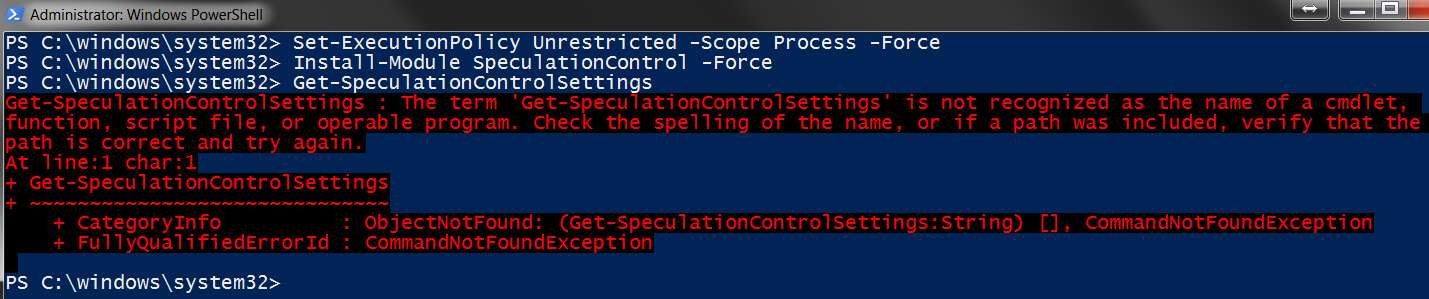
I had no problem running the recipe on my Win10 system, and getting the predicted results displayed back. However when trying the identical steps on my Win7 system it appeared that PowerShell was simply not recognizing anything. Everything got rejected with "... is not recognized as the name of a cmdlet".
I finally concluded that the version of PowerShell (i.e. Windows Management Framework) provided with Win7 SP1 is only 2.0, whereas the version of WMF with Win10 is 5.1. And surely this must be why the PowerShell commands specified in the current story are just flat not working.
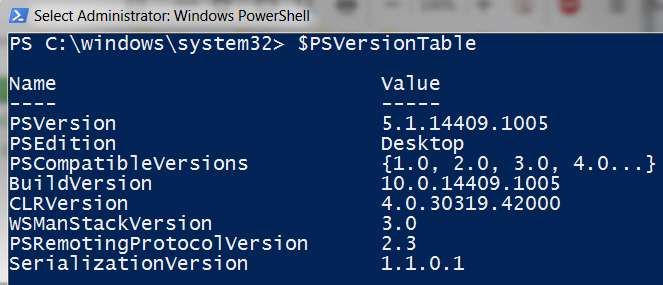
So I did some online hunting and discovered Microsoft's instructions on how to install WMF 5.1 on a Win7 SP1 system. And it seemed to install perfectly. The use of the $PSVersionTable command now displays the same values as is shown in my Win10 system:
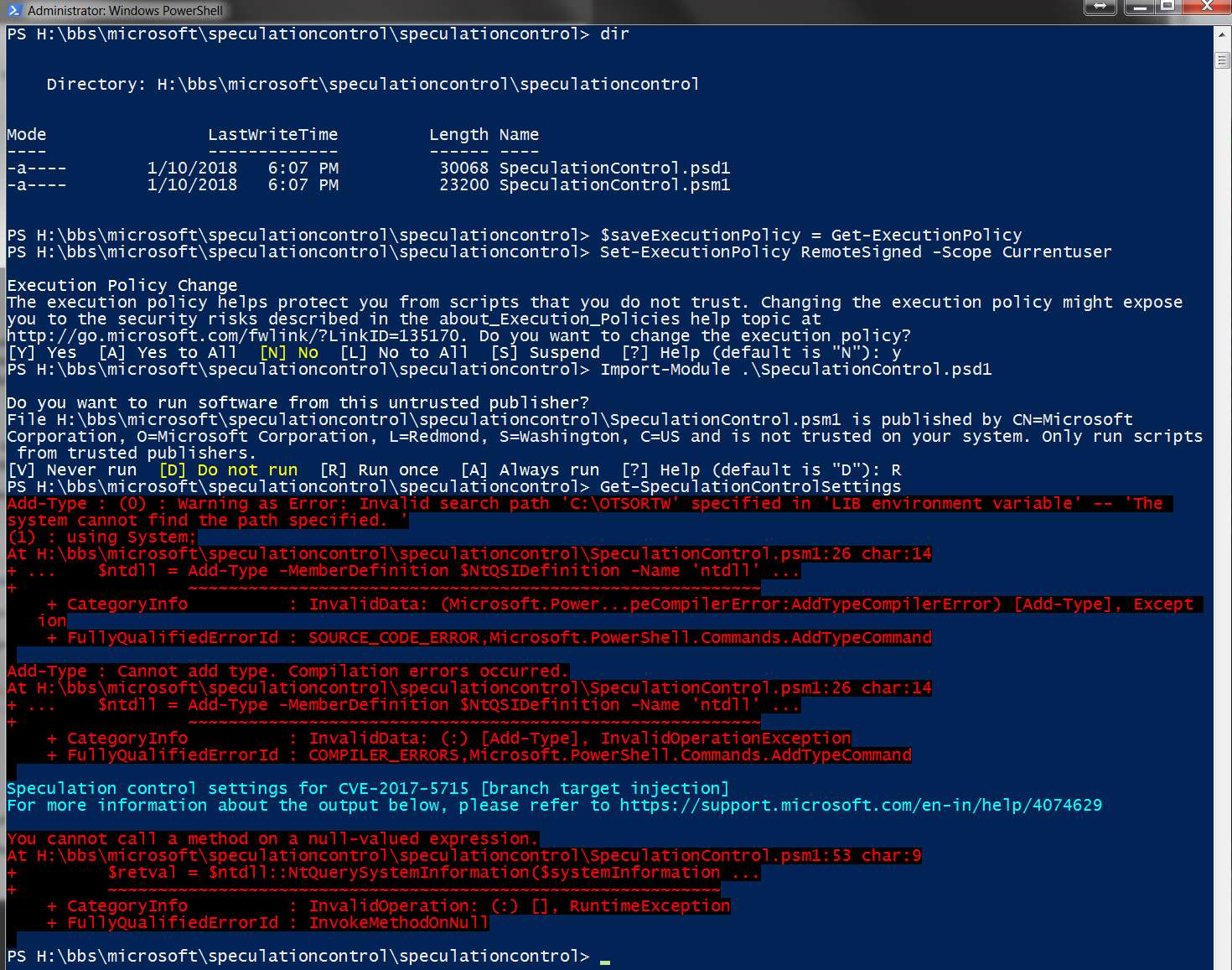
I next performed the few steps that had worked without incident in Win10, and all seemed to be going fine... until the final command which is the crucial command that displays the results of the hardware and software inquiry, in order to determine if my system's vulnerability has been mitigated correctly.
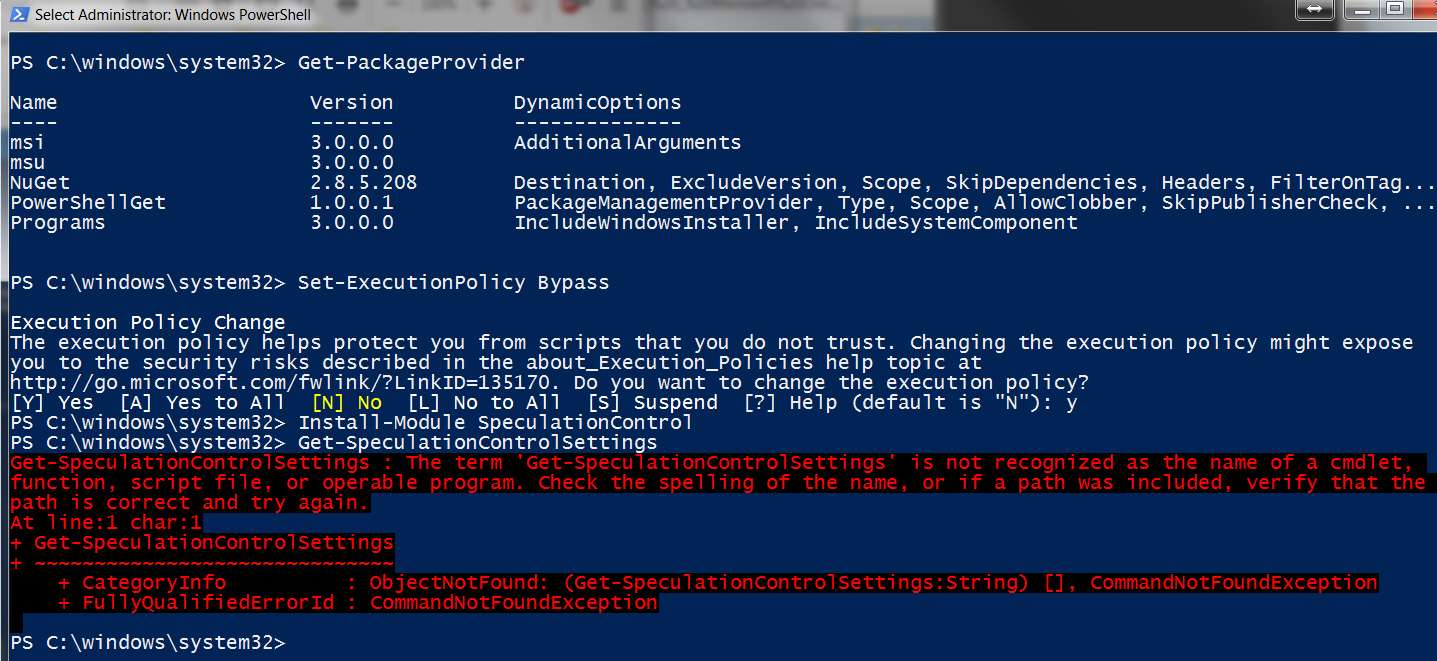
So my question of a PowerShell expert is what is the problem with my Win7 environment, which is responsible for the error message: The term 'Get-SpeculationControlSettings' is not recognized as the name of a cmdlet.
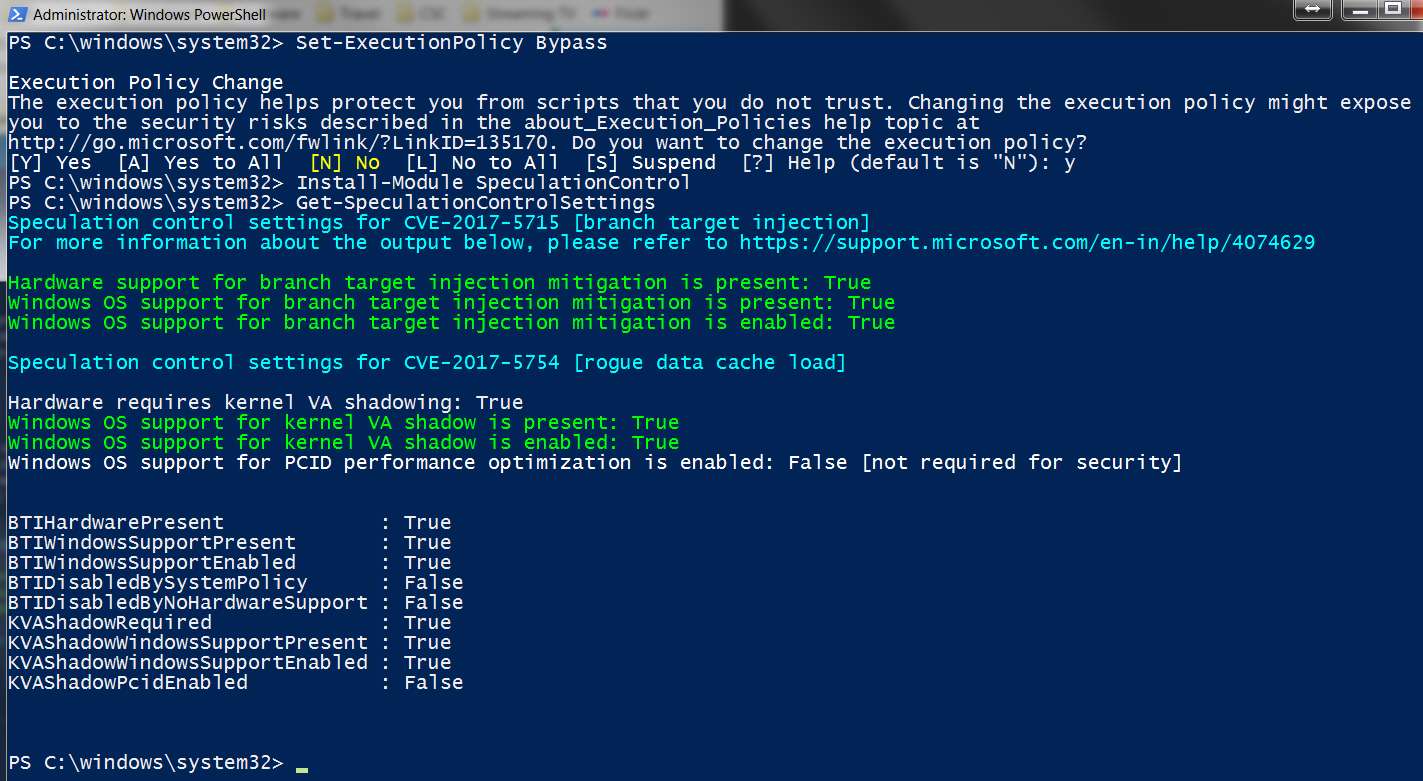
This is how the same steps produced the correct results in Win10, because Get-SpeculationControlSettings worked fine in Win10. So why didn't that command work in Win7?
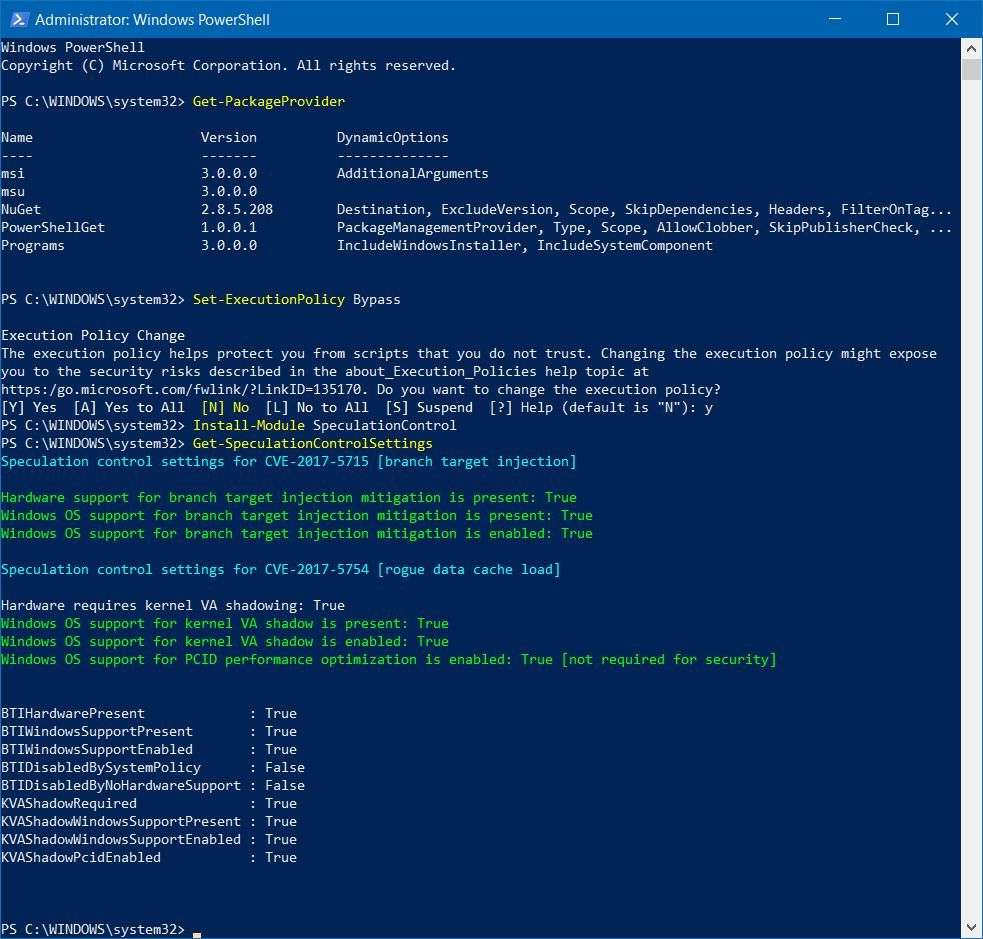
I had no problem running the recipe on my Win10 system, and getting the predicted results displayed back. However when trying the identical steps on my Win7 system it appeared that PowerShell was simply not recognizing anything. Everything got rejected with "... is not recognized as the name of a cmdlet".
I finally concluded that the version of PowerShell (i.e. Windows Management Framework) provided with Win7 SP1 is only 2.0, whereas the version of WMF with Win10 is 5.1. And surely this must be why the PowerShell commands specified in the current story are just flat not working.
So I did some online hunting and discovered Microsoft's instructions on how to install WMF 5.1 on a Win7 SP1 system. And it seemed to install perfectly. The use of the $PSVersionTable command now displays the same values as is shown in my Win10 system:
I next performed the few steps that had worked without incident in Win10, and all seemed to be going fine... until the final command which is the crucial command that displays the results of the hardware and software inquiry, in order to determine if my system's vulnerability has been mitigated correctly.
So my question of a PowerShell expert is what is the problem with my Win7 environment, which is responsible for the error message: The term 'Get-SpeculationControlSettings' is not recognized as the name of a cmdlet.
This is how the same steps produced the correct results in Win10, because Get-SpeculationControlSettings worked fine in Win10. So why didn't that command work in Win7?
My Computer
At a glance
Windows 7 Pro x64 (1), Win7 Pro X64 (2)i5-3350p 3.1Ghz/6MB-cache (1); E8400 3.0Ghz/6...8GB PC3-12800 DDR3 (1); 4GB PC3-10600 DDR3 (2)ATI HD7750 (1), (see TV cards); ATI R7 250 (2)
- Computer type
- PC/Desktop
- Computer Manufacturer/Model Number
- Home-built, two systems (1) and (2)
- OS
- Windows 7 Pro x64 (1), Win7 Pro X64 (2)
- CPU
- i5-3350p 3.1Ghz/6MB-cache (1); E8400 3.0Ghz/6MB-cache (2)
- Motherboard
- ASUS P8Z77-V Pro (1); ASUS P5Q3 (2)
- Memory
- 8GB PC3-12800 DDR3 (1); 4GB PC3-10600 DDR3 (2)
- Graphics Card(s)
- ATI HD7750 (1), (see TV cards); ATI R7 250 (2)
- Sound Card
- Realtek ALC892 HD Audio (1); Realtek ALC1200 HD Audio (2)
- Monitor(s) Displays
- Eizo HD2441W LCD, Eizo S2433W (1); Eizo 24" S2433W (2)
- Screen Resolution
- 1920x1200, 1920x1200 (1); 1920x1200 (2)
- Hard Drives
- (1) 1TB SATA-II (7200RPM), 2x2TB SATA-III (7200RPM), 250GB SATA-III (10000RPM) for OS; 2x2TB external USB 3.0
(2) 320GB SATA-II (7200RPM), 750GB SATA-II (7200RPM), 150GB SATA-II (10000RPM) for OS; 2TB external USB 3.0
- PSU
- Nesteq ECS-6001 600W (1); Nesteq ECS-5001 500W (2)
- Case
- Acousti-Case 360 (1) and (2)
- Cooling
- Noctua NH-U12P SE2 for CPU, 2x120mm case fans (1) and (2)
- Keyboard
- IBM PS/2 (1) and (2)
- Mouse
- Logitech MX Revolution wireless (1); Microsoft wired (2)
- Internet Speed
- 100mbps down / 10mbps up
- Antivirus
- Microsoft Security Essentials; Malwarebyte Anti-Malware Pro
- Browser
- Firefox
- Other Info
- Ceton InfiniTV 4-tuner cablecard-enabled TV card as well as Hauppauge HVR-2250 OTA/ATSC 2-tuner TV card in (1), running under Win7 WMC