
Solved Need help getting rid of second copy of my printer in device list

The computer icon in Devices and Printers shows a yellow triangle?

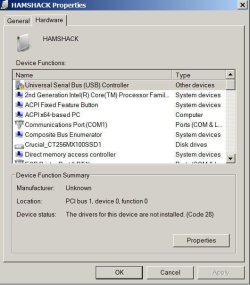
Right click on your Computer (Hamshock) icon in Devices and Printers->Properties. Select Hardware tab.

Scroll down. I'm guessing you'll see a device listed with that yellow triangle. Select the device and click the Properties button. Give us a snapshot of what you get.

Thanks CG

Here ya go.
 

Attachments
  • problem.jpg
    problem.jpg
    45.2 KB · Views: 21

My Computer My Computer

At a glance

Windows `10 Professional 64bitIntel i5 [email protected]Corsair Vengeance DDR3 1600 16GNVIDIA GeForce GT520 1GHz
Computer type
PC/Desktop
Computer Manufacturer/Model Number
Home Built
OS
Windows `10 Professional 64bit
CPU
Intel i5 [email protected]
Motherboard
MSI P67A-GD55 (MS7681)
Memory
Corsair Vengeance DDR3 1600 16G
Graphics Card(s)
NVIDIA GeForce GT520 1GHz
Sound Card
Realtek High Definition Audio
Monitor(s) Displays
Haans G 241
Screen Resolution
1600X1024
Hard Drives
Crucial MX100 256GB SSD
PSU
OCZ ModXStream Modular High Performance 500 Watt
Case
Rosewill Challenger-U3
Cooling
Just Fans
Keyboard
Kensington K64338B
Mouse
Microsoft wheel mouse 1.1A
Internet Speed
240.0 Mbps
Antivirus
ESET Internet Security
Browser
Firefox
Other Info
SuperAntiSpyware-Pro
Malwarebytes (Premium)
Kerish Doctor
Check if both these files exist

C:\Windows\inf\usbport.inf
C:\Windows\inf\usbport.pnf
 

My Computer My Computer

At a glance

Desk 1: Win 7 Pro x32; Desk 2: Windows 10 x64
Computer type
PC/Desktop
Computer Manufacturer/Model Number
Dell Optiplex 360 and Optiplex 755
OS
Desk 1: Win 7 Pro x32; Desk 2: Windows 10 x64
Hard Drives
500GB Crucial SSD in both Desktops
Other Info
Buffalo 6TB NAS, Raid 1
I will ComputerGeek.

That computer is shut down for the night. I'll get back to you tomorrow.

Thanks for the help.
 

My Computer My Computer

At a glance

Windows `10 Professional 64bitIntel i5 [email protected]Corsair Vengeance DDR3 1600 16GNVIDIA GeForce GT520 1GHz
Computer type
PC/Desktop
Computer Manufacturer/Model Number
Home Built
OS
Windows `10 Professional 64bit
CPU
Intel i5 [email protected]
Motherboard
MSI P67A-GD55 (MS7681)
Memory
Corsair Vengeance DDR3 1600 16G
Graphics Card(s)
NVIDIA GeForce GT520 1GHz
Sound Card
Realtek High Definition Audio
Monitor(s) Displays
Haans G 241
Screen Resolution
1600X1024
Hard Drives
Crucial MX100 256GB SSD
PSU
OCZ ModXStream Modular High Performance 500 Watt
Case
Rosewill Challenger-U3
Cooling
Just Fans
Keyboard
Kensington K64338B
Mouse
Microsoft wheel mouse 1.1A
Internet Speed
240.0 Mbps
Antivirus
ESET Internet Security
Browser
Firefox
Other Info
SuperAntiSpyware-Pro
Malwarebytes (Premium)
Kerish Doctor
My Computer My Computer

At a glance

Windows `10 Professional 64bitIntel i5 [email protected]Corsair Vengeance DDR3 1600 16GNVIDIA GeForce GT520 1GHz
Computer type
PC/Desktop
Computer Manufacturer/Model Number
Home Built
OS
Windows `10 Professional 64bit
CPU
Intel i5 [email protected]
Motherboard
MSI P67A-GD55 (MS7681)
Memory
Corsair Vengeance DDR3 1600 16G
Graphics Card(s)
NVIDIA GeForce GT520 1GHz
Sound Card
Realtek High Definition Audio
Monitor(s) Displays
Haans G 241
Screen Resolution
1600X1024
Hard Drives
Crucial MX100 256GB SSD
PSU
OCZ ModXStream Modular High Performance 500 Watt
Case
Rosewill Challenger-U3
Cooling
Just Fans
Keyboard
Kensington K64338B
Mouse
Microsoft wheel mouse 1.1A
Internet Speed
240.0 Mbps
Antivirus
ESET Internet Security
Browser
Firefox
Other Info
SuperAntiSpyware-Pro
Malwarebytes (Premium)
Kerish Doctor

My Computer My Computer

At a glance

Win 10 Pro x64Intel I5-2500K @3.3GHz16GB G.Skill Ripjaws X (4x4GB)EVGA GeForce 750 Ti SC 2GB
Computer type
PC/Desktop
Computer Manufacturer/Model Number
Self Built
OS
Win 10 Pro x64
CPU
Intel I5-2500K @3.3GHz
Motherboard
Asrock P67 Extreme4
Memory
16GB G.Skill Ripjaws X (4x4GB)
Graphics Card(s)
EVGA GeForce 750 Ti SC 2GB
Sound Card
ASUS Xonar DG 5.1 Channels 24-bit 96KHz PCI Interface Sound
Monitor(s) Displays
auria eq2367
Screen Resolution
1920 x 1080
Hard Drives
250GB Samsung 850 EVO SSD
1TB WD Blue
1TB Hitachi
PSU
SeaSonic X 650W 80 Plus Gold
Case
Corsair Obsidian 750D
Cooling
Corsair H60, Three 140mm case fans
Keyboard
Logitech Wireless Keyboard K520
Mouse
Logitech Wireless Mouse M310
Internet Speed
Wave Broadband ~ 100 dn 5 up
Antivirus
Windows Defender, Malwarebytes Premium
Browser
Edge, IE11, Chrome
Other Info
Laptop specs: HP g7-1365dx /
CPU: AMD A6-3420M APU with Radeon(tm) HD Graphics /
RAM: Crucial 8Gb (2x4Gb) /
SSD: Crucial M4-CT128M4SSD2 ATA Device/ FW 000F /
GFX: AMD Radeon HD 6520G /
OS: Windows 10 Pro x64
@derekimo
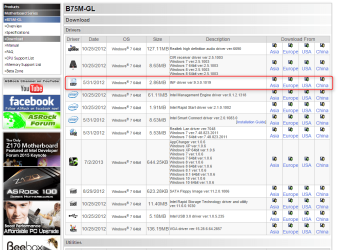
I would try reinstalling the chipset drivers

The missing files are Windows OS files published by Microsoft. As OS files not likely to be distributed from a vendor website unless vendor installer also happens to install or point to an MS KB (Chipset drivers would contain the vendor .INF and distributable files the vendor publishes) Those MS files shouldn't go missing but not the first time i've found uninstallers somehow muck with Microsoft usb installation files :mad:

@jadinolf
  • Navigate to C:\Windows\System32\DriverStore\FileRepository
  • Scroll down. Find the folder name that starts usbport.inf_
  • You may see more then one folder with name starting usbport.inf_. IF YOU DO: you want the folder with the most recent date
  • Open the folder. You should find copies of the 2 missing files you need. Copy them to C:\windows\inf
  • Reboot your machine.
Any luck?
 

My Computer My Computer

At a glance

Desk 1: Win 7 Pro x32; Desk 2: Windows 10 x64
Computer type
PC/Desktop
Computer Manufacturer/Model Number
Dell Optiplex 360 and Optiplex 755
OS
Desk 1: Win 7 Pro x32; Desk 2: Windows 10 x64
Hard Drives
500GB Crucial SSD in both Desktops
Other Info
Buffalo 6TB NAS, Raid 1
OK, don't try it.
 

My Computer My Computer

At a glance

Win 10 Pro x64Intel I5-2500K @3.3GHz16GB G.Skill Ripjaws X (4x4GB)EVGA GeForce 750 Ti SC 2GB
Computer type
PC/Desktop
Computer Manufacturer/Model Number
Self Built
OS
Win 10 Pro x64
CPU
Intel I5-2500K @3.3GHz
Motherboard
Asrock P67 Extreme4
Memory
16GB G.Skill Ripjaws X (4x4GB)
Graphics Card(s)
EVGA GeForce 750 Ti SC 2GB
Sound Card
ASUS Xonar DG 5.1 Channels 24-bit 96KHz PCI Interface Sound
Monitor(s) Displays
auria eq2367
Screen Resolution
1920 x 1080
Hard Drives
250GB Samsung 850 EVO SSD
1TB WD Blue
1TB Hitachi
PSU
SeaSonic X 650W 80 Plus Gold
Case
Corsair Obsidian 750D
Cooling
Corsair H60, Three 140mm case fans
Keyboard
Logitech Wireless Keyboard K520
Mouse
Logitech Wireless Mouse M310
Internet Speed
Wave Broadband ~ 100 dn 5 up
Antivirus
Windows Defender, Malwarebytes Premium
Browser
Edge, IE11, Chrome
Other Info
Laptop specs: HP g7-1365dx /
CPU: AMD A6-3420M APU with Radeon(tm) HD Graphics /
RAM: Crucial 8Gb (2x4Gb) /
SSD: Crucial M4-CT128M4SSD2 ATA Device/ FW 000F /
GFX: AMD Radeon HD 6520G /
OS: Windows 10 Pro x64
@derekimo
I would try reinstalling the chipset drivers
The missing files are Windows OS files published by Microsoft. As OS files not likely to be distributed from a vendor website unless vendor installer also happens to install or point to an MS KB (Chipset drivers would contain the vendor .INF and distributable files the vendor publishes) Those MS files shouldn't go missing but not the first time i've found uninstallers somehow muck with Microsoft usb installation files :mad:

@jadinolf
  • Navigate to C:\Windows\System32\DriverStore\FileRepository
  • Scroll down. Find the folder name that starts usbport.inf_
  • You may see more then one folder with name starting usbport.inf_. IF YOU DO: you want the folder with the most recent date
  • Open the folder. You should find copies of the 2 missing files you need. Copy them to C:\windows\inf
  • Reboot your machine.
Any luck?
I'm sorry but this is getting too confusing.
I have two USBport folders.
This is the most recent.
What now??
 

My Computer My Computer

At a glance

Windows `10 Professional 64bitIntel i5 [email protected]Corsair Vengeance DDR3 1600 16GNVIDIA GeForce GT520 1GHz
Computer type
PC/Desktop
Computer Manufacturer/Model Number
Home Built
OS
Windows `10 Professional 64bit
CPU
Intel i5 [email protected]
Motherboard
MSI P67A-GD55 (MS7681)
Memory
Corsair Vengeance DDR3 1600 16G
Graphics Card(s)
NVIDIA GeForce GT520 1GHz
Sound Card
Realtek High Definition Audio
Monitor(s) Displays
Haans G 241
Screen Resolution
1600X1024
Hard Drives
Crucial MX100 256GB SSD
PSU
OCZ ModXStream Modular High Performance 500 Watt
Case
Rosewill Challenger-U3
Cooling
Just Fans
Keyboard
Kensington K64338B
Mouse
Microsoft wheel mouse 1.1A
Internet Speed
240.0 Mbps
Antivirus
ESET Internet Security
Browser
Firefox
Other Info
SuperAntiSpyware-Pro
Malwarebytes (Premium)
Kerish Doctor
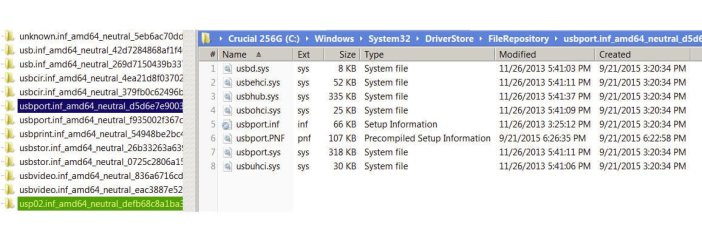
You may see more then one folder with name starting usbport.inf_. IF YOU DO: you want the folder with the most recent date
Use the folder with the most recent date.
 

My Computer My Computer

At a glance

Desk 1: Win 7 Pro x32; Desk 2: Windows 10 x64
Computer type
PC/Desktop
Computer Manufacturer/Model Number
Dell Optiplex 360 and Optiplex 755
OS
Desk 1: Win 7 Pro x32; Desk 2: Windows 10 x64
Hard Drives
500GB Crucial SSD in both Desktops
Other Info
Buffalo 6TB NAS, Raid 1
@derekimo
I would try reinstalling the chipset drivers
The missing files are Windows OS files published by Microsoft. As OS files not likely to be distributed from a vendor website unless vendor installer also happens to install or point to an MS KB (Chipset drivers would contain the vendor .INF and distributable files the vendor publishes) Those MS files shouldn't go missing but not the first time i've found uninstallers somehow muck with Microsoft usb installation files :mad:

@jadinolf
  • Navigate to C:\Windows\System32\DriverStore\FileRepository
  • Scroll down. Find the folder name that starts usbport.inf_
  • You may see more then one folder with name starting usbport.inf_. IF YOU DO: you want the folder with the most recent date
  • Open the folder. You should find copies of the 2 missing files you need. Copy them to C:\windows\inf
  • Reboot your machine.
Any luck?
Sorry- which are the chipset drivers?Try what the page is calling them or I am lost.
 

My Computer My Computer

At a glance

Windows `10 Professional 64bitIntel i5 [email protected]Corsair Vengeance DDR3 1600 16GNVIDIA GeForce GT520 1GHz
Computer type
PC/Desktop
Computer Manufacturer/Model Number
Home Built
OS
Windows `10 Professional 64bit
CPU
Intel i5 [email protected]
Motherboard
MSI P67A-GD55 (MS7681)
Memory
Corsair Vengeance DDR3 1600 16G
Graphics Card(s)
NVIDIA GeForce GT520 1GHz
Sound Card
Realtek High Definition Audio
Monitor(s) Displays
Haans G 241
Screen Resolution
1600X1024
Hard Drives
Crucial MX100 256GB SSD
PSU
OCZ ModXStream Modular High Performance 500 Watt
Case
Rosewill Challenger-U3
Cooling
Just Fans
Keyboard
Kensington K64338B
Mouse
Microsoft wheel mouse 1.1A
Internet Speed
240.0 Mbps
Antivirus
ESET Internet Security
Browser
Firefox
Other Info
SuperAntiSpyware-Pro
Malwarebytes (Premium)
Kerish Doctor
Follow these steps
  • Navigate to C:\Windows\System32\DriverStore\FileRepository
  • Scroll down. Find the folder name that starts usbport.inf_
  • You may see more then one folder with name starting usbport.inf_. IF YOU DO: you want the folder with the most recent date
  • Open the folder. You should find copies of the 2 missing files you need. Copy them to C:\windows\inf
  • Reboot your machine.
Any luck?
 

My Computer My Computer

At a glance

Desk 1: Win 7 Pro x32; Desk 2: Windows 10 x64
Computer type
PC/Desktop
Computer Manufacturer/Model Number
Dell Optiplex 360 and Optiplex 755
OS
Desk 1: Win 7 Pro x32; Desk 2: Windows 10 x64
Hard Drives
500GB Crucial SSD in both Desktops
Other Info
Buffalo 6TB NAS, Raid 1
Follow these steps
  • Navigate to C:\Windows\System32\DriverStore\FileRepository
  • Scroll down. Find the folder name that starts usbport.inf_
  • You may see more then one folder with name starting usbport.inf_. IF YOU DO: you want the folder with the most recent date
  • Open the folder. You should find copies of the 2 missing files you need. Copy them to C:\windows\inf
  • Reboot your machine.
Any luck?
I thought I had already replied but I don't see it.
Here is the screen capture I made but have no idea what to do with them. This screen capture shows the latest of two.

Also, I installed the chipset driver but no change.
 

Attachments

  • usbport.jpg
    usbport.jpg
    85.5 KB · Views: 1

My Computer My Computer

At a glance

Windows `10 Professional 64bitIntel i5 [email protected]Corsair Vengeance DDR3 1600 16GNVIDIA GeForce GT520 1GHz
Computer type
PC/Desktop
Computer Manufacturer/Model Number
Home Built
OS
Windows `10 Professional 64bit
CPU
Intel i5 [email protected]
Motherboard
MSI P67A-GD55 (MS7681)
Memory
Corsair Vengeance DDR3 1600 16G
Graphics Card(s)
NVIDIA GeForce GT520 1GHz
Sound Card
Realtek High Definition Audio
Monitor(s) Displays
Haans G 241
Screen Resolution
1600X1024
Hard Drives
Crucial MX100 256GB SSD
PSU
OCZ ModXStream Modular High Performance 500 Watt
Case
Rosewill Challenger-U3
Cooling
Just Fans
Keyboard
Kensington K64338B
Mouse
Microsoft wheel mouse 1.1A
Internet Speed
240.0 Mbps
Antivirus
ESET Internet Security
Browser
Firefox
Other Info
SuperAntiSpyware-Pro
Malwarebytes (Premium)
Kerish Doctor
Check if both these files exist

C:\Windows\inf\usbport.inf
C:\Windows\inf\usbport.pnf

ComputerGeek, I have neither of these.
You said you didn't see either of these files. There is a copy of each in usbport folders. Using the folder with the most recent date, copy each of the files to the directory where they belong.
 

My Computer My Computer

At a glance

Desk 1: Win 7 Pro x32; Desk 2: Windows 10 x64
Computer type
PC/Desktop
Computer Manufacturer/Model Number
Dell Optiplex 360 and Optiplex 755
OS
Desk 1: Win 7 Pro x32; Desk 2: Windows 10 x64
Hard Drives
500GB Crucial SSD in both Desktops
Other Info
Buffalo 6TB NAS, Raid 1
I know there are several different files in the usbport_ folder. You only want to copy file usbport.inf and usbport.pnf to C:\Windows\inf
 

My Computer My Computer

At a glance

Desk 1: Win 7 Pro x32; Desk 2: Windows 10 x64
Computer type
PC/Desktop
Computer Manufacturer/Model Number
Dell Optiplex 360 and Optiplex 755
OS
Desk 1: Win 7 Pro x32; Desk 2: Windows 10 x64
Hard Drives
500GB Crucial SSD in both Desktops
Other Info
Buffalo 6TB NAS, Raid 1
I know there are several different files in the usbport_ folder. You only want to copy file usbport.inf and usbport.pnf to C:\Windows\inf

Thank you. Just got up and when I get to the computer, I'll do it.
 

My Computer My Computer

At a glance

Windows `10 Professional 64bitIntel i5 [email protected]Corsair Vengeance DDR3 1600 16GNVIDIA GeForce GT520 1GHz
Computer type
PC/Desktop
Computer Manufacturer/Model Number
Home Built
OS
Windows `10 Professional 64bit
CPU
Intel i5 [email protected]
Motherboard
MSI P67A-GD55 (MS7681)
Memory
Corsair Vengeance DDR3 1600 16G
Graphics Card(s)
NVIDIA GeForce GT520 1GHz
Sound Card
Realtek High Definition Audio
Monitor(s) Displays
Haans G 241
Screen Resolution
1600X1024
Hard Drives
Crucial MX100 256GB SSD
PSU
OCZ ModXStream Modular High Performance 500 Watt
Case
Rosewill Challenger-U3
Cooling
Just Fans
Keyboard
Kensington K64338B
Mouse
Microsoft wheel mouse 1.1A
Internet Speed
240.0 Mbps
Antivirus
ESET Internet Security
Browser
Firefox
Other Info
SuperAntiSpyware-Pro
Malwarebytes (Premium)
Kerish Doctor
I know there are several different files in the usbport_ folder. You only want to copy file usbport.inf and usbport.pnf to C:\Windows\inf

Thank you. Just got up and when I get to the computer, I'll do it.
Done!

These files replaced the files that were in .inf.

Mark is still there. Yes, I rebooted.

For the record, I did a restore last night and even that didn't help.

Give up? I'm ready to.:(
 

Attachments

  • today.jpg
    today.jpg
    22 KB · Views: 25

My Computer My Computer

At a glance

Windows `10 Professional 64bitIntel i5 [email protected]Corsair Vengeance DDR3 1600 16GNVIDIA GeForce GT520 1GHz
Computer type
PC/Desktop
Computer Manufacturer/Model Number
Home Built
OS
Windows `10 Professional 64bit
CPU
Intel i5 [email protected]
Motherboard
MSI P67A-GD55 (MS7681)
Memory
Corsair Vengeance DDR3 1600 16G
Graphics Card(s)
NVIDIA GeForce GT520 1GHz
Sound Card
Realtek High Definition Audio
Monitor(s) Displays
Haans G 241
Screen Resolution
1600X1024
Hard Drives
Crucial MX100 256GB SSD
PSU
OCZ ModXStream Modular High Performance 500 Watt
Case
Rosewill Challenger-U3
Cooling
Just Fans
Keyboard
Kensington K64338B
Mouse
Microsoft wheel mouse 1.1A
Internet Speed
240.0 Mbps
Antivirus
ESET Internet Security
Browser
Firefox
Other Info
SuperAntiSpyware-Pro
Malwarebytes (Premium)
Kerish Doctor
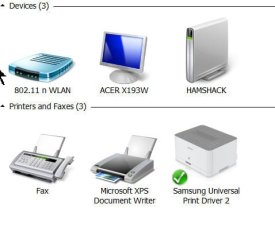
Done!

These files replaced the files that were in .inf.
Replaced? Then the files were really there? Which is OK. Can be easy to overlook them if that was the case when you looked last time.

Give up? I'm ready to.
I will say, it seemed odd your post #21 showed a controller with code 28 (drivers not installed) yet your.nfo file didn't report such a problem :confused:

Try this: do you have any USB 2.0 ports? Try connecting a device to each port (any usb 2.0 in particular). If it connects in OK in each case, then, yea, will give up. May just be another of those great Windows mysteries! Not worth the effort if everything is working.
 

My Computer My Computer

At a glance

Desk 1: Win 7 Pro x32; Desk 2: Windows 10 x64
Computer type
PC/Desktop
Computer Manufacturer/Model Number
Dell Optiplex 360 and Optiplex 755
OS
Desk 1: Win 7 Pro x32; Desk 2: Windows 10 x64
Hard Drives
500GB Crucial SSD in both Desktops
Other Info
Buffalo 6TB NAS, Raid 1
Done!

These files replaced the files that were in .inf.
Replaced? Then the files were really there? Which is OK. Can be easy to overlook them if that was the case when you looked last time.

Give up? I'm ready to.
I will say, it seemed odd your post #21 showed a controller with code 28 (drivers not installed) yet your.nfo file didn't report such a problem :confused:

Try this: do you have any USB 2.0 ports? Try connecting a device to each port (any usb 2.0 in particular). If it connects in OK in each case, then, yea, will give up. May just be another of those great Windows mysteries! Not worth the effort if everything is working.

CG, it may be because I disabled the USB controller instead of deleting it. I noticed that when I did that the "mark" on the computer graphic went away.

I will take your advice and get back to you.

I guess that plugging a flash drive into every socket will find the culprit if there is one.

This all started after installing Hallmark Greeting Card 2016. I'm sure that I caused the problem but how- I don 't know.
 

My Computer My Computer

At a glance

Windows `10 Professional 64bitIntel i5 [email protected]Corsair Vengeance DDR3 1600 16GNVIDIA GeForce GT520 1GHz
Computer type
PC/Desktop
Computer Manufacturer/Model Number
Home Built
OS
Windows `10 Professional 64bit
CPU
Intel i5 [email protected]
Motherboard
MSI P67A-GD55 (MS7681)
Memory
Corsair Vengeance DDR3 1600 16G
Graphics Card(s)
NVIDIA GeForce GT520 1GHz
Sound Card
Realtek High Definition Audio
Monitor(s) Displays
Haans G 241
Screen Resolution
1600X1024
Hard Drives
Crucial MX100 256GB SSD
PSU
OCZ ModXStream Modular High Performance 500 Watt
Case
Rosewill Challenger-U3
Cooling
Just Fans
Keyboard
Kensington K64338B
Mouse
Microsoft wheel mouse 1.1A
Internet Speed
240.0 Mbps
Antivirus
ESET Internet Security
Browser
Firefox
Other Info
SuperAntiSpyware-Pro
Malwarebytes (Premium)
Kerish Doctor
Done!

These files replaced the files that were in .inf.
Replaced? Then the files were really there? Which is OK. Can be easy to overlook them if that was the case when you looked last time.

Give up? I'm ready to.
I will say, it seemed odd your post #21 showed a controller with code 28 (drivers not installed) yet your.nfo file didn't report such a problem :confused:

Try this: do you have any USB 2.0 ports? Try connecting a device to each port (any usb 2.0 in particular). If it connects in OK in each case, then, yea, will give up. May just be another of those great Windows mysteries! Not worth the effort if everything is working.

CG, it may be because I disabled the USB controller instead of deleting it. I noticed that when I did that the "mark" on the computer graphic went away.

I will take your advice and get back to you.

I guess that plugging a flash drive into every socket will find the culprit if there is one.

This all started after installing Hallmark Greeting Card 2016. I'm sure that I caused the problem but how- I don 't know.
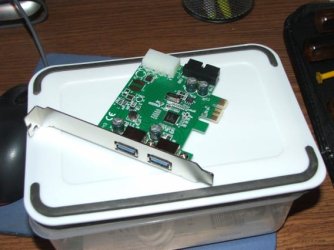
It MAY be a USB card that has two ports in the back of the computer ans two in the front. The reason I never suspected it is because I really don't use it and had even forgotten it is there. It's out now.

Take a look at this.
 

Attachments

  • today.jpg
    today.jpg
    19.6 KB · Views: 16

My Computer My Computer

At a glance

Windows `10 Professional 64bitIntel i5 [email protected]Corsair Vengeance DDR3 1600 16GNVIDIA GeForce GT520 1GHz
Computer type
PC/Desktop
Computer Manufacturer/Model Number
Home Built
OS
Windows `10 Professional 64bit
CPU
Intel i5 [email protected]
Motherboard
MSI P67A-GD55 (MS7681)
Memory
Corsair Vengeance DDR3 1600 16G
Graphics Card(s)
NVIDIA GeForce GT520 1GHz
Sound Card
Realtek High Definition Audio
Monitor(s) Displays
Haans G 241
Screen Resolution
1600X1024
Hard Drives
Crucial MX100 256GB SSD
PSU
OCZ ModXStream Modular High Performance 500 Watt
Case
Rosewill Challenger-U3
Cooling
Just Fans
Keyboard
Kensington K64338B
Mouse
Microsoft wheel mouse 1.1A
Internet Speed
240.0 Mbps
Antivirus
ESET Internet Security
Browser
Firefox
Other Info
SuperAntiSpyware-Pro
Malwarebytes (Premium)
Kerish Doctor
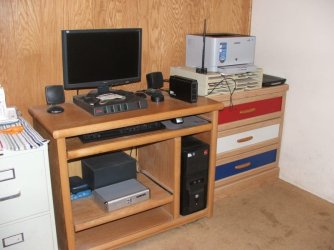
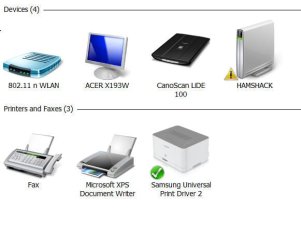
Well, CompurerGeek, all appears to be well now. I really appreciate you patience in this matter and for those of you peeking at my dilemma, thanks for standing by.
I removed the USB card and haven't checked it since I have spent what 3 or four days on this. Of course it wasn't all the USB controller thing. Of course, Windows could have been more helpful other than "we don't know what it is but it needs a driver but it doesn't need a driver".

The card in question is attached and so is the computer in my Ham Shack.

Thanks very much for everything ComputerGeek.

I expected the card to be on top. Oh well.........
 

Attachments

  • usb30.jpg
    usb30.jpg
    32.2 KB · Views: 16
  • wendi.jpg
    wendi.jpg
    57.2 KB · Views: 0

My Computer My Computer

At a glance

Windows `10 Professional 64bitIntel i5 [email protected]Corsair Vengeance DDR3 1600 16GNVIDIA GeForce GT520 1GHz
Computer type
PC/Desktop
Computer Manufacturer/Model Number
Home Built
OS
Windows `10 Professional 64bit
CPU
Intel i5 [email protected]
Motherboard
MSI P67A-GD55 (MS7681)
Memory
Corsair Vengeance DDR3 1600 16G
Graphics Card(s)
NVIDIA GeForce GT520 1GHz
Sound Card
Realtek High Definition Audio
Monitor(s) Displays
Haans G 241
Screen Resolution
1600X1024
Hard Drives
Crucial MX100 256GB SSD
PSU
OCZ ModXStream Modular High Performance 500 Watt
Case
Rosewill Challenger-U3
Cooling
Just Fans
Keyboard
Kensington K64338B
Mouse
Microsoft wheel mouse 1.1A
Internet Speed
240.0 Mbps
Antivirus
ESET Internet Security
Browser
Firefox
Other Info
SuperAntiSpyware-Pro
Malwarebytes (Premium)
Kerish Doctor
Back
Top