Solved Need help installing new graphics card driver

jdtdwp

New member
Member
Local time
2:16 PM
Messages
35
I have an Asus UL80Jt laptop and I want to install a new driver for my graphics card because some of the games that I play were lagging extremely badly. The graphics card I have is a Nvidia GeForce 310m. This is what I've tried so far:

- I downloaded the newest driver from Asus.com for my specific computer and installed it. When I went to restart my computer, I got the starting Windows screen and then it just went black and I let it sit for 20 minutes and still nothing. So I held the power until it turned off and then rebooted, hit f8 and then did "last known good configuration" since the black screen problem happened every time I tried to restart.

- Since that driver download didn't work, I tried two or three different drivers from the Nvidia website (Versions 306.23 and 280.26). They all produced the same result as the one I downloaded from Asus.

- The last thing I did was uninstall the current driver from Device Manager and then attempted to reinstall the last driver that I tried (280.26). When I did this I was able to get to the login screen and then I got to my desktop and it froze. So I had to do another hard restart. This happened a few times and again I had to do "last known good configuration".

Now I am stuck with no graphics card driver at all! Please help if you know what's wrong or if I was using the wrong drivers. Thank you!
 

My Computer

Computer Manufacturer/Model Number
Asus UL80Jt Notebook
OS
Windows 7 Home Premium 64-bit
CPU
Intel Core i3 330UM @ 1.20GHz
Motherboard
ASUSTeK Computer Inc. UL80Jt (Socket 989)
Memory
4.00 GB Dual-Channel DDR3 @ 531MHz (7-7-7-20)
Graphics Card(s)
1024Mb Nvidia GeForce 310m
Sound Card
Realtek High Definition Audio
Hard Drives
466GB Seagate ST9500325AS (SATA)

My Computers

System One System Two

  • Computer type
    PC/Desktop
    Computer Manufacturer/Model Number
    ALWAYS UNDER CONSTRUCTION
    OS
    Windows 11 Pro
    CPU
    Ryzen 9 5900X
    Motherboard
    Asus X570 Crosshair Viii Hero
    Memory
    32GB G Skill DDR4-3600
    Graphics Card(s)
    EVGA RTX 3080 FTW 3 Ultra
    Sound Card
    On Board/Sennheiser PC37X Headset
    Monitor(s) Displays
    3 X Asus 27"
    Screen Resolution
    2560x1440
    Hard Drives
    2 X 1 TB NVME drives
    PSU
    EVGA 850
    Case
    Phanteks Eclipse P400A
    Cooling
    EVGA 280 AIO
    Keyboard
    Logitech G510s/ Logitech G13
    Mouse
    Logitech G502
    Internet Speed
    24/1
    Antivirus
    ESET/MBAM Pro/SAS Pro
    Browser
    Chrome/ Firefox/ Edge
  • Computer type
    Laptop
    System Manufacturer/Model Number
    Dell 16 Plus
    OS
    Windows 11 Pro
    CPU
    Intel Ultra 9 288V
    Memory
    32 GB LPDDR5X 8533
    Monitor(s) Displays
    16" Mini-LED HDR600 Touch 90 Hz
    Screen Resolution
    2560X1600
    Hard Drives
    1 TB NVME
  • Like
Reactions: Arc
Thanks for the quick response! I will give this a try. Would leftover files from the old driver cause this problem?
 

My Computer

Computer Manufacturer/Model Number
Asus UL80Jt Notebook
OS
Windows 7 Home Premium 64-bit
CPU
Intel Core i3 330UM @ 1.20GHz
Motherboard
ASUSTeK Computer Inc. UL80Jt (Socket 989)
Memory
4.00 GB Dual-Channel DDR3 @ 531MHz (7-7-7-20)
Graphics Card(s)
1024Mb Nvidia GeForce 310m
Sound Card
Realtek High Definition Audio
Hard Drives
466GB Seagate ST9500325AS (SATA)
Yes they would. Older drivers and new drivers cause a lot of problems. But sometimes, the newer drivers just don't work well with some cards. I know people who are running drivers a year old to avoid problems from newer drivers.

Also, you should probably use your Asus drivers from the Asus site. But if they are like Nvidia drivers from Nvidia. Select custom install and check the checkbox that says "Clean Install". Then install.
 

My Computers

System One System Two

  • Computer type
    PC/Desktop
    Computer Manufacturer/Model Number
    ALWAYS UNDER CONSTRUCTION
    OS
    Windows 11 Pro
    CPU
    Ryzen 9 5900X
    Motherboard
    Asus X570 Crosshair Viii Hero
    Memory
    32GB G Skill DDR4-3600
    Graphics Card(s)
    EVGA RTX 3080 FTW 3 Ultra
    Sound Card
    On Board/Sennheiser PC37X Headset
    Monitor(s) Displays
    3 X Asus 27"
    Screen Resolution
    2560x1440
    Hard Drives
    2 X 1 TB NVME drives
    PSU
    EVGA 850
    Case
    Phanteks Eclipse P400A
    Cooling
    EVGA 280 AIO
    Keyboard
    Logitech G510s/ Logitech G13
    Mouse
    Logitech G502
    Internet Speed
    24/1
    Antivirus
    ESET/MBAM Pro/SAS Pro
    Browser
    Chrome/ Firefox/ Edge
  • Computer type
    Laptop
    System Manufacturer/Model Number
    Dell 16 Plus
    OS
    Windows 11 Pro
    CPU
    Intel Ultra 9 288V
    Memory
    32 GB LPDDR5X 8533
    Monitor(s) Displays
    16" Mini-LED HDR600 Touch 90 Hz
    Screen Resolution
    2560X1600
    Hard Drives
    1 TB NVME
Ok thanks! Also when using Driver Sweeper would I want to clean Nvidia Chipset or Nvidia Display or both?
 

My Computer

Computer Manufacturer/Model Number
Asus UL80Jt Notebook
OS
Windows 7 Home Premium 64-bit
CPU
Intel Core i3 330UM @ 1.20GHz
Motherboard
ASUSTeK Computer Inc. UL80Jt (Socket 989)
Memory
4.00 GB Dual-Channel DDR3 @ 531MHz (7-7-7-20)
Graphics Card(s)
1024Mb Nvidia GeForce 310m
Sound Card
Realtek High Definition Audio
Hard Drives
466GB Seagate ST9500325AS (SATA)
Nvidia display ONLY.
 

My Computers

System One System Two

  • Computer type
    PC/Desktop
    Computer Manufacturer/Model Number
    ALWAYS UNDER CONSTRUCTION
    OS
    Windows 11 Pro
    CPU
    Ryzen 9 5900X
    Motherboard
    Asus X570 Crosshair Viii Hero
    Memory
    32GB G Skill DDR4-3600
    Graphics Card(s)
    EVGA RTX 3080 FTW 3 Ultra
    Sound Card
    On Board/Sennheiser PC37X Headset
    Monitor(s) Displays
    3 X Asus 27"
    Screen Resolution
    2560x1440
    Hard Drives
    2 X 1 TB NVME drives
    PSU
    EVGA 850
    Case
    Phanteks Eclipse P400A
    Cooling
    EVGA 280 AIO
    Keyboard
    Logitech G510s/ Logitech G13
    Mouse
    Logitech G502
    Internet Speed
    24/1
    Antivirus
    ESET/MBAM Pro/SAS Pro
    Browser
    Chrome/ Firefox/ Edge
  • Computer type
    Laptop
    System Manufacturer/Model Number
    Dell 16 Plus
    OS
    Windows 11 Pro
    CPU
    Intel Ultra 9 288V
    Memory
    32 GB LPDDR5X 8533
    Monitor(s) Displays
    16" Mini-LED HDR600 Touch 90 Hz
    Screen Resolution
    2560X1600
    Hard Drives
    1 TB NVME
Ok I cleaned the Nvidia display only and now I downloaded the newest driver for my computer from Asus. When I try to install I get this message: "Setup failed to read the required Display Driver to be used with this package. Setup will not continue." Should I try a different older driver or is something wrong?
 

My Computer

Computer Manufacturer/Model Number
Asus UL80Jt Notebook
OS
Windows 7 Home Premium 64-bit
CPU
Intel Core i3 330UM @ 1.20GHz
Motherboard
ASUSTeK Computer Inc. UL80Jt (Socket 989)
Memory
4.00 GB Dual-Channel DDR3 @ 531MHz (7-7-7-20)
Graphics Card(s)
1024Mb Nvidia GeForce 310m
Sound Card
Realtek High Definition Audio
Hard Drives
466GB Seagate ST9500325AS (SATA)
Are you sure you downloaded the correct driver for your card? It shouldn't do that. The only time I know of it doing that is if it is the wrong driver. If you have to, reinstall the older driver.

It's possible it was a bad download too.
 

My Computers

System One System Two

  • Computer type
    PC/Desktop
    Computer Manufacturer/Model Number
    ALWAYS UNDER CONSTRUCTION
    OS
    Windows 11 Pro
    CPU
    Ryzen 9 5900X
    Motherboard
    Asus X570 Crosshair Viii Hero
    Memory
    32GB G Skill DDR4-3600
    Graphics Card(s)
    EVGA RTX 3080 FTW 3 Ultra
    Sound Card
    On Board/Sennheiser PC37X Headset
    Monitor(s) Displays
    3 X Asus 27"
    Screen Resolution
    2560x1440
    Hard Drives
    2 X 1 TB NVME drives
    PSU
    EVGA 850
    Case
    Phanteks Eclipse P400A
    Cooling
    EVGA 280 AIO
    Keyboard
    Logitech G510s/ Logitech G13
    Mouse
    Logitech G502
    Internet Speed
    24/1
    Antivirus
    ESET/MBAM Pro/SAS Pro
    Browser
    Chrome/ Firefox/ Edge
  • Computer type
    Laptop
    System Manufacturer/Model Number
    Dell 16 Plus
    OS
    Windows 11 Pro
    CPU
    Intel Ultra 9 288V
    Memory
    32 GB LPDDR5X 8533
    Monitor(s) Displays
    16" Mini-LED HDR600 Touch 90 Hz
    Screen Resolution
    2560X1600
    Hard Drives
    1 TB NVME
Well I have the model for my computer saved on the Asus website and I went to downloads for it and they have 3 different versions of Nvidia graphics drivers. I tried installing all 3 and all of them produce the same problem.
 

My Computer

Computer Manufacturer/Model Number
Asus UL80Jt Notebook
OS
Windows 7 Home Premium 64-bit
CPU
Intel Core i3 330UM @ 1.20GHz
Motherboard
ASUSTeK Computer Inc. UL80Jt (Socket 989)
Memory
4.00 GB Dual-Channel DDR3 @ 531MHz (7-7-7-20)
Graphics Card(s)
1024Mb Nvidia GeForce 310m
Sound Card
Realtek High Definition Audio
Hard Drives
466GB Seagate ST9500325AS (SATA)
you might try these steps to install only the graphics driver.

1.Download the preferred driver and save it to the desktop.
2.Double click the installer and you will see a screen where it will be extracted to, change that to your desktop.
3.Open Device Manager through Control Panel.
4.Expand Display adapters and right click the name for yours and choose Update Driver\Browse my Computer. Select the driver folder you just saved on the desktop. Click Next.
5. Your system should say "Windows has successfully updated your driver software".

If you get a window saying you already have the most current driver, go back to step 4 and choose Uninstall Driver software instead. Then restart from step 3.
View attachment 228491 View attachment 228492
 

My Computer

Computer type
PC/Desktop
Computer Manufacturer/Model Number
Home Built Desktop By DataTech
OS
Windows 7 Ultimate X64 SP1
CPU
Intel i5-2550K, Differing ~4.4-4.8GHz No built in GPU
Motherboard
ASUS P8Z68-V PRO/GEN3
Memory
16GB G.Skill Sniper 1866MHz @ 2133MHz 2x8GB
Graphics Card(s)
ASUS GTX650TIB-DC2OC-2GD5, (650TI Boost)
Sound Card
Onboard Realtek 5-1
Monitor(s) Displays
Samsung P2570HD
Screen Resolution
1920x1080
Hard Drives
Samsung 840 Pro 256GB SSD for OS, 500GB Seagate Constellation (Enterprise drive) for Data
PSU
Corsair HX650W
Case
Inwin Dragon Rider
Cooling
Hyper 212 EVO w/two Noctua fans, push-pull, @1300 RPM
Keyboard
E-Z Eyes, bright yellow keys with large characters
Mouse
steelseries SENSEI Laser Pro Gaming
Internet Speed
48-51Mbs Mbs down, 11 Mbs up Xfinity Cable
Antivirus
Norton Internet Security 2013
Browser
IE 10, Opera, Pale Moon if needed
Other Info
4 case fans, LG BluRay-RE, ASUS DVD-RW, Mr. Fusion power supply, 1.21 gigawatts.
My graphics driver doesn't show up in device manager after I uninstalled it. The only thing that shows up under display adapters is Intel(R) HD Graphics.
 

My Computer

Computer Manufacturer/Model Number
Asus UL80Jt Notebook
OS
Windows 7 Home Premium 64-bit
CPU
Intel Core i3 330UM @ 1.20GHz
Motherboard
ASUSTeK Computer Inc. UL80Jt (Socket 989)
Memory
4.00 GB Dual-Channel DDR3 @ 531MHz (7-7-7-20)
Graphics Card(s)
1024Mb Nvidia GeForce 310m
Sound Card
Realtek High Definition Audio
Hard Drives
466GB Seagate ST9500325AS (SATA)
I just tried to install Nvidia version 306.23 which is supposedly the right driver for the card in my computer according to the Nvidia website. When I restarted my computer I got the same black screen described in my first post. When I did last known good configuration I looked in Programs and Features and it says that version 306.23 is installed on my computer but I don't see it in device manager.
 

My Computer

Computer Manufacturer/Model Number
Asus UL80Jt Notebook
OS
Windows 7 Home Premium 64-bit
CPU
Intel Core i3 330UM @ 1.20GHz
Motherboard
ASUSTeK Computer Inc. UL80Jt (Socket 989)
Memory
4.00 GB Dual-Channel DDR3 @ 531MHz (7-7-7-20)
Graphics Card(s)
1024Mb Nvidia GeForce 310m
Sound Card
Realtek High Definition Audio
Hard Drives
466GB Seagate ST9500325AS (SATA)
Try opening the Nvidia Control panel and see if your card is identified. For some reason, your card is not being seen by Windows.
 

My Computers

System One System Two

  • Computer type
    PC/Desktop
    Computer Manufacturer/Model Number
    ALWAYS UNDER CONSTRUCTION
    OS
    Windows 11 Pro
    CPU
    Ryzen 9 5900X
    Motherboard
    Asus X570 Crosshair Viii Hero
    Memory
    32GB G Skill DDR4-3600
    Graphics Card(s)
    EVGA RTX 3080 FTW 3 Ultra
    Sound Card
    On Board/Sennheiser PC37X Headset
    Monitor(s) Displays
    3 X Asus 27"
    Screen Resolution
    2560x1440
    Hard Drives
    2 X 1 TB NVME drives
    PSU
    EVGA 850
    Case
    Phanteks Eclipse P400A
    Cooling
    EVGA 280 AIO
    Keyboard
    Logitech G510s/ Logitech G13
    Mouse
    Logitech G502
    Internet Speed
    24/1
    Antivirus
    ESET/MBAM Pro/SAS Pro
    Browser
    Chrome/ Firefox/ Edge
  • Computer type
    Laptop
    System Manufacturer/Model Number
    Dell 16 Plus
    OS
    Windows 11 Pro
    CPU
    Intel Ultra 9 288V
    Memory
    32 GB LPDDR5X 8533
    Monitor(s) Displays
    16" Mini-LED HDR600 Touch 90 Hz
    Screen Resolution
    2560X1600
    Hard Drives
    1 TB NVME
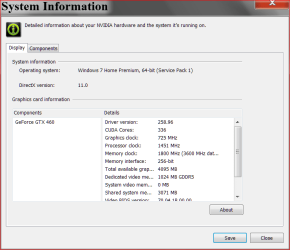
Start Orb and type nvidia. You should see NVIDIA Control Panel. Tick on it. Lower left corner tick on system information. What driver does it say you have?
Did you make note of the driver that came with the computer?
Just for now.PNG
We also need your ((My System Specs)) Use User CP at the top of the page and this little program. When your computer will allow you to.
http://www.piriform.com/speccy
 
Last edited:

My Computer

Computer type
PC/Desktop
Computer Manufacturer/Model Number
Home made Desktop
OS
Windows 10 Pro. 64/ version 1709 Windows 7 Pro/64
CPU
Intel i7-6800K @ 4.3
Motherboard
ASUS X-99 Deluxe II
Memory
Corsair Platinum 16 gig @2400
Graphics Card(s)
EVGA GTX 1070 OC
Monitor(s) Displays
Asus 27" LED LCD/VE278Q
Screen Resolution
1920-1080 or 1280-720 HDMI
Hard Drives
INTEL SSD 730-240 Gb Sata 3.0/
PSU
EVGA Platium 1200W
Case
Phanteks Luxe Tempered Glass 8 fans/ one radiator
Cooling
XSPC/ Water Cooled CPU
Keyboard
Das 4 Professional
Mouse
Logitech M705/MX Anywhere 2-S
Internet Speed
100 mbits
Antivirus
Microsoft Security Essentials/ Malwarebytes Premium 3.0/ SAS
Browser
I.E. 11 default/Firefox/ ISP Time Warner Cable/Spectrum
Other Info
LG BluRay Burner/
Sound system-KLipsch-THX/
Icy Dock ssd Hot Swap bays.

Nvidia Control Panel is not showing up when I search for it.
 

My Computer

Computer Manufacturer/Model Number
Asus UL80Jt Notebook
OS
Windows 7 Home Premium 64-bit
CPU
Intel Core i3 330UM @ 1.20GHz
Motherboard
ASUSTeK Computer Inc. UL80Jt (Socket 989)
Memory
4.00 GB Dual-Channel DDR3 @ 531MHz (7-7-7-20)
Graphics Card(s)
1024Mb Nvidia GeForce 310m
Sound Card
Realtek High Definition Audio
Hard Drives
466GB Seagate ST9500325AS (SATA)
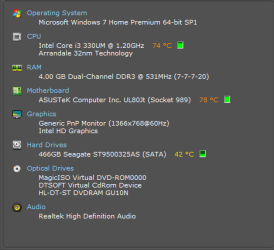
This is what I got from Speccy:
Computer Specs.png
 

My Computer

Computer Manufacturer/Model Number
Asus UL80Jt Notebook
OS
Windows 7 Home Premium 64-bit
CPU
Intel Core i3 330UM @ 1.20GHz
Motherboard
ASUSTeK Computer Inc. UL80Jt (Socket 989)
Memory
4.00 GB Dual-Channel DDR3 @ 531MHz (7-7-7-20)
Graphics Card(s)
1024Mb Nvidia GeForce 310m
Sound Card
Realtek High Definition Audio
Hard Drives
466GB Seagate ST9500325AS (SATA)
You are running on the Intel built in graphics. Let check another way to see if you have any Nvidia drivers installed.
1. Device Manager
2. Display
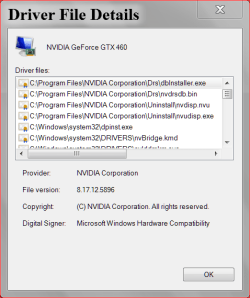
3. Right click on the drop down (nvidia ???) and select properties.
4. Driver
FOR NOW.PNG

http://www.geforce.com/drivers
 

My Computer

Computer type
PC/Desktop
Computer Manufacturer/Model Number
Home made Desktop
OS
Windows 10 Pro. 64/ version 1709 Windows 7 Pro/64
CPU
Intel i7-6800K @ 4.3
Motherboard
ASUS X-99 Deluxe II
Memory
Corsair Platinum 16 gig @2400
Graphics Card(s)
EVGA GTX 1070 OC
Monitor(s) Displays
Asus 27" LED LCD/VE278Q
Screen Resolution
1920-1080 or 1280-720 HDMI
Hard Drives
INTEL SSD 730-240 Gb Sata 3.0/
PSU
EVGA Platium 1200W
Case
Phanteks Luxe Tempered Glass 8 fans/ one radiator
Cooling
XSPC/ Water Cooled CPU
Keyboard
Das 4 Professional
Mouse
Logitech M705/MX Anywhere 2-S
Internet Speed
100 mbits
Antivirus
Microsoft Security Essentials/ Malwarebytes Premium 3.0/ SAS
Browser
I.E. 11 default/Firefox/ ISP Time Warner Cable/Spectrum
Other Info
LG BluRay Burner/
Sound system-KLipsch-THX/
Icy Dock ssd Hot Swap bays.
To help us help you would you please add your systems specs? Here's how: http://www.sevenforums.com/tutorials/180324-system-info-see-your-system-specs.html#post1530002
Under System Manufacturer/Model Number add whether it is a desktop or laptop and whether self built.

Log in to Seven Forums and you will be able to transfer the info directly to the specs page in your profile from within the System Info app.
After doing this your specs will be available in each of your posts. Click on mine in the lower left to see how it should look.:)
Full instructions in the tutorial.
 

My Computer

Computer type
PC/Desktop
Computer Manufacturer/Model Number
Home Built Desktop By DataTech
OS
Windows 7 Ultimate X64 SP1
CPU
Intel i5-2550K, Differing ~4.4-4.8GHz No built in GPU
Motherboard
ASUS P8Z68-V PRO/GEN3
Memory
16GB G.Skill Sniper 1866MHz @ 2133MHz 2x8GB
Graphics Card(s)
ASUS GTX650TIB-DC2OC-2GD5, (650TI Boost)
Sound Card
Onboard Realtek 5-1
Monitor(s) Displays
Samsung P2570HD
Screen Resolution
1920x1080
Hard Drives
Samsung 840 Pro 256GB SSD for OS, 500GB Seagate Constellation (Enterprise drive) for Data
PSU
Corsair HX650W
Case
Inwin Dragon Rider
Cooling
Hyper 212 EVO w/two Noctua fans, push-pull, @1300 RPM
Keyboard
E-Z Eyes, bright yellow keys with large characters
Mouse
steelseries SENSEI Laser Pro Gaming
Internet Speed
48-51Mbs Mbs down, 11 Mbs up Xfinity Cable
Antivirus
Norton Internet Security 2013
Browser
IE 10, Opera, Pale Moon if needed
Other Info
4 case fans, LG BluRay-RE, ASUS DVD-RW, Mr. Fusion power supply, 1.21 gigawatts.
The only thing under display adapters is Intel(R) HD Graphics. The Nvidia GeForce 310m was there until I uninstalled it in attempt to get a new driver working.
 

My Computer

Computer Manufacturer/Model Number
Asus UL80Jt Notebook
OS
Windows 7 Home Premium 64-bit
CPU
Intel Core i3 330UM @ 1.20GHz
Motherboard
ASUSTeK Computer Inc. UL80Jt (Socket 989)
Memory
4.00 GB Dual-Channel DDR3 @ 531MHz (7-7-7-20)
Graphics Card(s)
1024Mb Nvidia GeForce 310m
Sound Card
Realtek High Definition Audio
Hard Drives
466GB Seagate ST9500325AS (SATA)
Okay that is what I though. You downloaded drivers but they where not installed.
See if this is to your computers liking.
Drivers | GeForce
All you have to do is follow the on screen instructions.
-----------------
Here is a little rule of the thumb I go by.
Before replacing any driver or bios wright down in a little book the driver/bio you have and the new one you are installing. Keep notes on the effect you do or do not get with the new ones.
I never replace drivers or bios that are working properly just because their/there are new ones.
-----------------------
Looking at you post #16 your computer is running hot, (cpu-74c,) that I'm assuming is being on the web here. I'm not a lappy person but it seem high to me without a heavy load.
 

My Computer

Computer type
PC/Desktop
Computer Manufacturer/Model Number
Home made Desktop
OS
Windows 10 Pro. 64/ version 1709 Windows 7 Pro/64
CPU
Intel i7-6800K @ 4.3
Motherboard
ASUS X-99 Deluxe II
Memory
Corsair Platinum 16 gig @2400
Graphics Card(s)
EVGA GTX 1070 OC
Monitor(s) Displays
Asus 27" LED LCD/VE278Q
Screen Resolution
1920-1080 or 1280-720 HDMI
Hard Drives
INTEL SSD 730-240 Gb Sata 3.0/
PSU
EVGA Platium 1200W
Case
Phanteks Luxe Tempered Glass 8 fans/ one radiator
Cooling
XSPC/ Water Cooled CPU
Keyboard
Das 4 Professional
Mouse
Logitech M705/MX Anywhere 2-S
Internet Speed
100 mbits
Antivirus
Microsoft Security Essentials/ Malwarebytes Premium 3.0/ SAS
Browser
I.E. 11 default/Firefox/ ISP Time Warner Cable/Spectrum
Other Info
LG BluRay Burner/
Sound system-KLipsch-THX/
Icy Dock ssd Hot Swap bays.
Back
Top