Need help my sound

anhtuan2364

New member
Local time
10:17 PM
Messages
4
Location
Vietnam
Hello everybody

I'm a new register, And i get an error with my Audio Service, It not running, I started every Dependencies service, but it still not working, I have read some the same error in this 4rum but i can not solves my problem. So i need any member help me. The computer had no sound is so boring:cry:

P/S: First of all i get 1079 error and then i had 1083 error Messages:" The executable program that this service is configured to run in does not implement the service"
Thanks you for your helping me:)
 

My Computer

Computer Manufacturer/Model Number
Foxconn G31V
OS
Windows 7 Ultmate 32 bit
CPU
Intel 5300 2.6Ghz
Motherboard
Foxconn G31V
Memory
1Ghz Kingston
Graphics Card(s)
Intel G31/G33 Express Chipset
Sound Card
Built-in Realtek
Monitor(s) Displays
Fujitsu 1024X800
Hard Drives
Seagate
Have you download the latest audio driver from Foxconn?

Do you have any yellow warnings in device manager?

When does your error pop up?
 

My Computer

Computer Manufacturer/Model Number
Dell and Custom
OS
Systems 1 and 2: Windows 7 Enterprise x64, Win 8 Developer
CPU
System 1: i7 [email protected], System 2: AMD FX-4100 Zambezi 3.6G
Motherboard
System 1:Dell 06NWYK System 2: ASUS M5A97 AM3+
Memory
System 1: 8GB System 2: 8GB
Graphics Card(s)
System 1: ATI FirePro V4800 System 2: Radeon HD 6850
Sound Card
System 1: onboard System 2: onboard
Monitor(s) Displays
System1: Viewsonic HDMI 24"
Screen Resolution
System 1: 1920x1080 System 2: 1920x1080
Hard Drives
System 1: Mirrored .5B drives System 2: Seagate Barracuda ST1000DM003 1TB 7200 RPM 64MB Cache SATA 6.0Gb/s
Case
System 1: Dell System 2: Cooler Master
Internet Speed
10 MBPS
Thank you for your repply!

I have been download the latest driver from Foxconn and Realtek web site, It woring properly, but the Speaker icon in taskbar is red warnings and the message is "Audio service is not running". In additional, when the win7's setup complete all of them is working normally but when i update some drivers (my built-in VGA card, my build-in Realtek Audio, my build-in Infrared ). When i power the computer in the next day. I had the problem as i desbribed.
Pls help me:D

In the Computer Management / Services/ Window Audio Properties have a C:\Windows\System32\svchost.exe -k LocalService which is that right? And I added Local Service Account in Log On tab and then i start service again but unsuccesful
 
Last edited:

My Computer

Computer Manufacturer/Model Number
Foxconn G31V
OS
Windows 7 Ultmate 32 bit
CPU
Intel 5300 2.6Ghz
Motherboard
Foxconn G31V
Memory
1Ghz Kingston
Graphics Card(s)
Intel G31/G33 Express Chipset
Sound Card
Built-in Realtek
Monitor(s) Displays
Fujitsu 1024X800
Hard Drives
Seagate
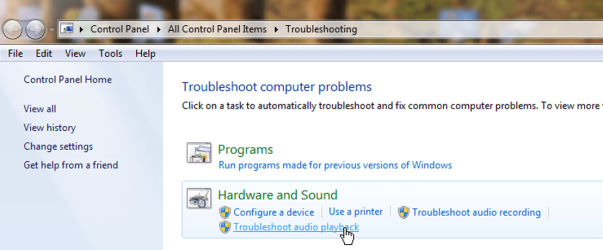
WIN key | type Troubleshooting | ENTER key
WIN is the key with the wavy flag.

See attachment.
Audio Troubleshooting.png
 

My Computer

Computer Manufacturer/Model Number
Toshiba Satellite S875D-S7239 laptop
OS
MS Windows 7 Ultimate SP1 64-bit
CPU
AMD A10-4600M
Motherboard
AMD Pumori (Socket FT1)
Memory
6.00 GB Dual-Channel DDR3 @ 798MHz (11-11-12-28)
Graphics Card(s)
AMD Radeon HD 7660G
Sound Card
High Definition Audio Device
Monitor(s) Displays
Generic PnP Monitor (1600x900@60Hz)
Screen Resolution
1600x900@60Hz
Hard Drives
SSD 119GB Corsair CSSD-V128GB2 ATA Device
Keyboard
Standard PS/2 Keyboard
Mouse
HP Wireless Optical Mobile Mouse Model FHA-3410
Internet Speed
What the local pub, local coffee shop offers.
Other Info
Optical Drive:MATSHITA BD-CMB UJ160B ATA Device


Also have an Asus ha1002xp netbook with Win 7 Ultimate installed.
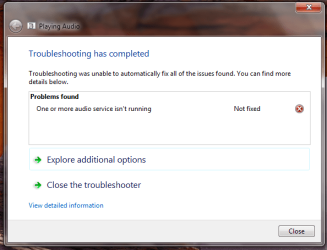
I tried but it as my attachment
 

Attachments

  • can not fix problem.png
    can not fix problem.png
    25.4 KB · Views: 10

My Computer

Computer Manufacturer/Model Number
Foxconn G31V
OS
Windows 7 Ultmate 32 bit
CPU
Intel 5300 2.6Ghz
Motherboard
Foxconn G31V
Memory
1Ghz Kingston
Graphics Card(s)
Intel G31/G33 Express Chipset
Sound Card
Built-in Realtek
Monitor(s) Displays
Fujitsu 1024X800
Hard Drives
Seagate
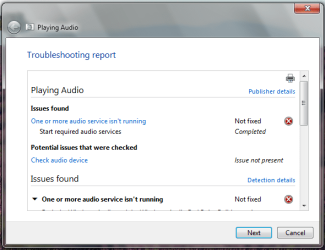
And if you click on : View detailed explanation
then what appears.

Oh yes, View detailed information appears at the bottom and can easily be overlooked.
 

My Computer

Computer Manufacturer/Model Number
Toshiba Satellite S875D-S7239 laptop
OS
MS Windows 7 Ultimate SP1 64-bit
CPU
AMD A10-4600M
Motherboard
AMD Pumori (Socket FT1)
Memory
6.00 GB Dual-Channel DDR3 @ 798MHz (11-11-12-28)
Graphics Card(s)
AMD Radeon HD 7660G
Sound Card
High Definition Audio Device
Monitor(s) Displays
Generic PnP Monitor (1600x900@60Hz)
Screen Resolution
1600x900@60Hz
Hard Drives
SSD 119GB Corsair CSSD-V128GB2 ATA Device
Keyboard
Standard PS/2 Keyboard
Mouse
HP Wireless Optical Mobile Mouse Model FHA-3410
Internet Speed
What the local pub, local coffee shop offers.
Other Info
Optical Drive:MATSHITA BD-CMB UJ160B ATA Device


Also have an Asus ha1002xp netbook with Win 7 Ultimate installed.
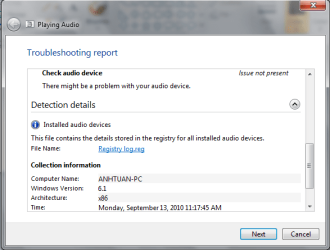
details1.png

details2.pngThe Details infomation is as my attachments
 

My Computer

Computer Manufacturer/Model Number
Foxconn G31V
OS
Windows 7 Ultmate 32 bit
CPU
Intel 5300 2.6Ghz
Motherboard
Foxconn G31V
Memory
1Ghz Kingston
Graphics Card(s)
Intel G31/G33 Express Chipset
Sound Card
Built-in Realtek
Monitor(s) Displays
Fujitsu 1024X800
Hard Drives
Seagate
Excellent.

I've never examined a Registry log.reg, but--
could you zip that file for me and attach same to your next post?

I will give you the approach I would follow, although my explanation is weak.

I would go into device managment, and disable and remove the drivers for all devices which show a yellow triangle or worse yet, a red stop sign.

Then I would shutdown 100% the computer. Don't just "hibernate' or 'sleep', but actually shut power off.

Now power on the computer. MS will install drivers without any effort on your part. Let MS install drivers. Do NOT install any more drivers after MS finishes installing their own default drivers.

Your sound will probably work now.

Let me know the results and I'll suggest a change to MS update to guarantee that update fetches the latest updated drivers that MS has. These are, generally, not the very, very latest drivers from the manufacturer.

Oh yes, to run device management:
WIN | type DEVMGMT.MSC | ENTER

You want to Right-click on the device with a yellow triangle and choose disable, if the option is there, choose Uninstall if the option is there.
 

My Computer

Computer Manufacturer/Model Number
Toshiba Satellite S875D-S7239 laptop
OS
MS Windows 7 Ultimate SP1 64-bit
CPU
AMD A10-4600M
Motherboard
AMD Pumori (Socket FT1)
Memory
6.00 GB Dual-Channel DDR3 @ 798MHz (11-11-12-28)
Graphics Card(s)
AMD Radeon HD 7660G
Sound Card
High Definition Audio Device
Monitor(s) Displays
Generic PnP Monitor (1600x900@60Hz)
Screen Resolution
1600x900@60Hz
Hard Drives
SSD 119GB Corsair CSSD-V128GB2 ATA Device
Keyboard
Standard PS/2 Keyboard
Mouse
HP Wireless Optical Mobile Mouse Model FHA-3410
Internet Speed
What the local pub, local coffee shop offers.
Other Info
Optical Drive:MATSHITA BD-CMB UJ160B ATA Device


Also have an Asus ha1002xp netbook with Win 7 Ultimate installed.
Back
Top