Need help on network sharing

ilovejdmtoy

New member
Local time
2:45 PM
Messages
3
Hello, this is my first post. If I did anything wrong, I am very sorry. :p


I am setting up a computer as server in my office so certain people in my office can access the shared drive from their own computers. (and I want to restrict other people from accessing the files on this shared drive)

I have had this shared drive to everyone with full access and this server computer does have its own login password.

When I first had it setup, I remember any computer trying to access it require a password (credential) like this. And all the computers I did try to access the server had the "Remember my credentials" unchecked.

connection-dialog.jpg


However now seems any computers as long as it gets connected in our office network can access it without credential anymore.

I have checked all these computers' credential manager, and there is no saved credential at all.

So where did I do wrong on this?
 

My Computer

Computer type
PC/Desktop
OS
Windows 7 64bit home premium
Hello, this is my first post. If I did anything wrong, I am very sorry. :p


I am setting up a computer as server in my office so certain people in my office can access the shared drive from their own computers. (and I want to restrict other people from accessing the files on this shared drive)

I have had this shared drive to everyone with full access and this server computer does have its own login password.

When I first had it setup, I remember any computer trying to access it require a password (credential) like this. And all the computers I did try to access the server had the "Remember my credentials" unchecked.

connection-dialog.jpg


However now seems any computers as long as it gets connected in our office network can access it without credential anymore.

I have checked all these computers' credential manager, and there is no saved credential at all.

So where did I do wrong on this?

You didn't do anything wrong. :)

The problem is that once a machine as been accessed using credentials, Windows tends to remember those credentials so you don't have to type them in the next time. I believe there is a local security policy where you can change this behavior so it requires a user name and password to be typed in each time.

There are other ways to share with only certain Users but it involves setting up a Homegroup.
 

My Computer

Computer type
PC/Desktop
Computer Manufacturer/Model Number
Home built
OS
Windows 7 Ult, Windows 8.1 Pro,
CPU
Q9650-4.275GHz, E8600 4.5GHz, E6750-3.8GHz
Motherboard
Evga 780i FTW
Memory
G.Skill PC2 9600 1200Mhz 5 5 5 15 2T
Graphics Card(s)
GTX480
Sound Card
Asus Xonar D2
Monitor(s) Displays
HannsG
Screen Resolution
1680X1050
Hard Drives
GSkill Phoenix Pro 120GB SSD
PSU
ThermalTake Toughpower 1000Watt modular
Case
ThermalTake XaserV
Cooling
Xigmatek S1283
Keyboard
Logitech G15
Mouse
Logitech G9
Internet Speed
T1
chev65, thank for your replying, do you know which Local security policy do I need to change and also is there anyway I can just block some computers from access the network computer at all?
 

My Computer

Computer type
PC/Desktop
OS
Windows 7 64bit home premium
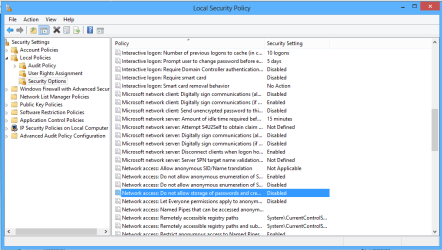
Ok found the policy but haven't tested it, you would need to make the adjustment on all machines that you don't want to store passwords on. Second picture, Local Policy>Security Options>Network Access...

If you require that some users have access to your shared folders but you want to pick and choose the file access for other users,... you would need to set up a Homegroup between your machine and the other trusted machines you want to give full access too.

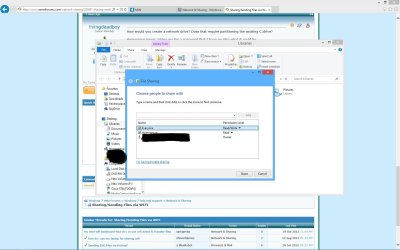
The machines which you don't want to give full access too should not be added to the Homegroup. If these machines require access to certain folders then you simply share those certain folders with "Everyone" using the Homegroup style share settings like in the picture.

Notice how this folder is shared with both the Homegroup and with Everyone? This shares that folder with all machines in the Workgroup and alsothe Homegroup, if you don't add Everyone then only the Homegroup machines will have access.

You have to click on "Share With" then "Specific People" then click little down arrow then choose "Add" then Select Everyone. :)
 

Attachments

  • Screenshot (3) name removed.jpg
    Screenshot (3) name removed.jpg
    130.9 KB · Views: 2
  • local security policy do not store credentials.PNG
    local security policy do not store credentials.PNG
    22.6 KB · Views: 5

My Computer

Computer type
PC/Desktop
Computer Manufacturer/Model Number
Home built
OS
Windows 7 Ult, Windows 8.1 Pro,
CPU
Q9650-4.275GHz, E8600 4.5GHz, E6750-3.8GHz
Motherboard
Evga 780i FTW
Memory
G.Skill PC2 9600 1200Mhz 5 5 5 15 2T
Graphics Card(s)
GTX480
Sound Card
Asus Xonar D2
Monitor(s) Displays
HannsG
Screen Resolution
1680X1050
Hard Drives
GSkill Phoenix Pro 120GB SSD
PSU
ThermalTake Toughpower 1000Watt modular
Case
ThermalTake XaserV
Cooling
Xigmatek S1283
Keyboard
Logitech G15
Mouse
Logitech G9
Internet Speed
T1
Thanks for your help. I will give this a try later and let you know. :)
 

My Computer

Computer type
PC/Desktop
OS
Windows 7 64bit home premium
Back
Top