Solved need help recovering HDD for Samsung NP-QX410

vid4763

New member
Member
Local time
6:43 PM
Messages
94
Location
Niagara Falls/ Buffalo, NY
Hello,

I'm seeking help trying to bring back to life my college son's Samsung NP_QX410-So2 US

He gave me the laptop to fix and keep. If possible., If, with hopefully some expert advice, I can fix it, my wife and I planto hand it down to our 10 yr old son.

So here is what I know of it so far:

Samsung SATA HDD HM641JI (P/N HM641 JI/SCC)

4G Ram

When I boot up computer, besides general lag probably bcz of problems, I can basically click f2 or f4 for Samsung recovery or f8 for optional startup screen (windows starts....restore point, networking, command mode....etc....)

I have tried f4 to go to Samsung recovery. it gets to a certain point, before any real options are available and just hangs.

I have tried f8 and tried restore point and repair windows and have gotten basically the same results.

So, I am asking for help on what to try next to breath some life back into this thing. it's a very nice laptop and would really like to be able to restore.

I do not have recovery or installation disks.

Thanks!!!!
 

My Computer My Computer

At a glance

windows 7 professional 64 bit Version 6.1.760...Intel(R) Pentium(R) CPU B970 @ 2.30GHz, 2300 ...8GbIntel HD Graphics Driver Vers 9.17.10.3347 Da...
Computer type
Laptop
Computer Manufacturer/Model Number
Toshiba Satellite c855-s5214
OS
windows 7 professional 64 bit Version 6.1.7601 Service Pack 1 Build 7601
CPU
Intel(R) Pentium(R) CPU B970 @ 2.30GHz, 2300 Mhz, 2 cores
Motherboard
Toshiba Portable BIOS Insyde Corp Version 1.60 Date 4/20/12
Memory
8Gb
Graphics Card(s)
Intel HD Graphics Driver Vers 9.17.10.3347 Date 10/31/20
Hard Drives
SanDisk Extreme Pro SSD 480 Gb (approx. 381gb free)
Firmware Version X21200RL
Migrated and Installed 4/3/2015
Antivirus
BitDefender AntiVirus Free Edition Version 1.0.21.1099
Browser
Internet Explorer 11 update version 11.0.16
Other Info
Additional Systems:

Samsung NP-QX410 Laptop Windows 7 Home Premium SP1
Samsung 850 EVO 250G 4G ram
Avast! Free 2015

Toshiba A205-S7468 Laptop Windows 7 Ultimate
WD 320G HDD 4G ram
AVG free 2015
I'd guess Samsung will gladly sell you recovery disks for a possibly exorbitant sum.

Have you pounded on the Samsung web site and your documentation enough to satisfy you that the only way to access the recovery partition on the hard disk is via F4?

Does it now fully boot and "run", however poorly?
 

My Computer My Computer

At a glance

Windows 7 Home Premium SP1, 64-bitIntel Skylake i5-6600K, not overclocked8 GB HyperX DDR4-2666 (2 x 4 GB)none; graphics are integrated on CPU
Computer type
PC/Desktop
Computer Manufacturer/Model Number
Ignatz Special; 4 speed manual gearbox; factory air conditioning; one of one
OS
Windows 7 Home Premium SP1, 64-bit
CPU
Intel Skylake i5-6600K, not overclocked
Motherboard
AsRock Z170M Extreme 4, micro ATX
Memory
8 GB HyperX DDR4-2666 (2 x 4 GB)
Graphics Card(s)
none; graphics are integrated on CPU
Sound Card
onboard: Realtek ALC1150; external: USB Behringer UF0-202
Monitor(s) Displays
Dell S2340M 23 inch IPS
Screen Resolution
1600 x 900
Hard Drives
System: Crucial MX100 series SSD, 128 GB;
Data: Samsung Spinpoint 103SJ, 1 TB;
Backup: WD Caviar Green WD30EZRX-00D8PB0, 3 TB
PSU
Rosewill SilentNight 500 watt fanless, semi-modular
Case
Antec Solo II
Cooling
Noctua NH-U12S; Noctua F12 intake, Noctua S12A exhaust
Keyboard
Microsoft 200 6JH-00001 USB
Mouse
Dell or Microsoft optical wired; USB
Antivirus
Microsoft Security Essentials and Malwarebytes Premium
Browser
Pale Moon
Other Info
All fans PWM; speeds at idle: CPU circa 500 rpm; intake circa 600 rpm; exhaust circa 600 rpm; CPU temps 27 idle and 47 C load in a warm room (27 C/81 F) when running Intel Extreme Tuning Utility stress test.

My Computer My Computer

At a glance

Vista, Windows7, Mint Mate, Zorin, Windows 8from 1.6GHz Duo to i7
Computer Manufacturer/Model Number
HP, Dell, Gateway, Toshiba - 4 laptops and 2 desktops
OS
Vista, Windows7, Mint Mate, Zorin, Windows 8
CPU
from 1.6GHz Duo to i7
Monitor(s) Displays
2x HP w2207
Hard Drives
5x HDD, 7x SSD, 12x Externals
Keyboard
with trackball - no mices
Mouse
Trackball mice
Internet Speed
DSL 6000
@ ignatzatsonic

I'd guess Samsung will gladly sell you recovery disks for a possibly exorbitant sum.

Have you pounded on the Samsung web site and your documentation enough to satisfy you that the only way to access the recovery partition on the hard disk is via F4?

Does it now fully boot and "run", however poorly?


Samsung site & docs are useless. I did try F4 but wasn't successful. I've temporarily switched gears and replaced the HDD witch a Seagate from an older Compaq (Vista OS) that had failed a few years ago to see if we could recover some picture and document files. If we can recover either of the HDD's I was thinking I might be able to either reformat the drives or I have an Image disk from my Satellite that might work?

I don't want to sound like I know what I'm doing. I DON'T.

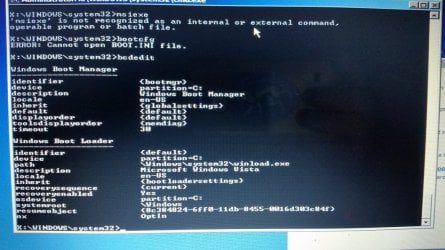
I have some images that might help. Any ideas are welcome to steer me in a positive direction if there is any possibility of recovering/restoring these drive, either or both. inve$tment is an issue, as we have limited re$ources to waste on futile cause.

Here are the images....
 

Attachments

  • 20150305_142959.jpg
    20150305_142959.jpg
    54 KB · Views: 0
  • 20150305_140512.jpg
    20150305_140512.jpg
    66.3 KB · Views: 0
  • 20150305_032404.jpg
    20150305_032404.jpg
    100.2 KB · Views: 0
  • 20150305_032416.jpg
    20150305_032416.jpg
    64.2 KB · Views: 0
  • 20150305_035047.jpg
    20150305_035047.jpg
    35.5 KB · Views: 0
  • 20150305_172816.jpg
    20150305_172816.jpg
    52.5 KB · Views: 0
  • 20150305_171705.jpg
    20150305_171705.jpg
    70 KB · Views: 0
  • 20150305_171655.jpg
    20150305_171655.jpg
    66.5 KB · Views: 0
  • 20150305_121432.jpg
    20150305_121432.jpg
    50.7 KB · Views: 0
  • 20150305_035111.jpg
    20150305_035111.jpg
    54.3 KB · Views: 0
  • 20150306_060857.jpg
    20150306_060857.jpg
    34.7 KB · Views: 0
  • 20150305_210404.jpg
    20150305_210404.jpg
    30 KB · Views: 0
  • 20150305_192027.jpg
    20150305_192027.jpg
    60.3 KB · Views: 0
  • 20150305_184403.jpg
    20150305_184403.jpg
    48.3 KB · Views: 0
  • 20150305_173127.jpg
    20150305_173127.jpg
    58.1 KB · Views: 0
  • 20150306_060922.jpg
    20150306_060922.jpg
    37.6 KB · Views: 0

My Computer My Computer

At a glance

windows 7 professional 64 bit Version 6.1.760...Intel(R) Pentium(R) CPU B970 @ 2.30GHz, 2300 ...8GbIntel HD Graphics Driver Vers 9.17.10.3347 Da...
Computer type
Laptop
Computer Manufacturer/Model Number
Toshiba Satellite c855-s5214
OS
windows 7 professional 64 bit Version 6.1.7601 Service Pack 1 Build 7601
CPU
Intel(R) Pentium(R) CPU B970 @ 2.30GHz, 2300 Mhz, 2 cores
Motherboard
Toshiba Portable BIOS Insyde Corp Version 1.60 Date 4/20/12
Memory
8Gb
Graphics Card(s)
Intel HD Graphics Driver Vers 9.17.10.3347 Date 10/31/20
Hard Drives
SanDisk Extreme Pro SSD 480 Gb (approx. 381gb free)
Firmware Version X21200RL
Migrated and Installed 4/3/2015
Antivirus
BitDefender AntiVirus Free Edition Version 1.0.21.1099
Browser
Internet Explorer 11 update version 11.0.16
Other Info
Additional Systems:

Samsung NP-QX410 Laptop Windows 7 Home Premium SP1
Samsung 850 EVO 250G 4G ram
Avast! Free 2015

Toshiba A205-S7468 Laptop Windows 7 Ultimate
WD 320G HDD 4G ram
AVG free 2015
@ Whs

Use any live Linux CD and see whether that works. If yes, we know at least that the hardware is OK.

Here is a choice: https://www.google.com/search?q=liv...8&sourceid=ie7&rlz=1I7MXGB_enUS532&gws_rd=ssl

Thanks for the advice. I have no experience with Linux, so I'm not sure how to go about that. please have a look at the updated info. If Linux can help I would gladly follow up with that. if you could offer any beginner help with the Linux approach here it would be appreciated.

I don't mean to complicate the issue by juggling 2 sick HDD's. The Seagate (Vista) has been sitting in a drawer for a "rainy day" to be worked on and a few files recovered from. all but one of the uploaded images is from the Seagate. I switched the Samsung (windows 7) out because I was getting nowhere and thought I might have better luck with the older Seagate (that's what I get for thinking).....
 

My Computer My Computer

At a glance

windows 7 professional 64 bit Version 6.1.760...Intel(R) Pentium(R) CPU B970 @ 2.30GHz, 2300 ...8GbIntel HD Graphics Driver Vers 9.17.10.3347 Da...
Computer type
Laptop
Computer Manufacturer/Model Number
Toshiba Satellite c855-s5214
OS
windows 7 professional 64 bit Version 6.1.7601 Service Pack 1 Build 7601
CPU
Intel(R) Pentium(R) CPU B970 @ 2.30GHz, 2300 Mhz, 2 cores
Motherboard
Toshiba Portable BIOS Insyde Corp Version 1.60 Date 4/20/12
Memory
8Gb
Graphics Card(s)
Intel HD Graphics Driver Vers 9.17.10.3347 Date 10/31/20
Hard Drives
SanDisk Extreme Pro SSD 480 Gb (approx. 381gb free)
Firmware Version X21200RL
Migrated and Installed 4/3/2015
Antivirus
BitDefender AntiVirus Free Edition Version 1.0.21.1099
Browser
Internet Explorer 11 update version 11.0.16
Other Info
Additional Systems:

Samsung NP-QX410 Laptop Windows 7 Home Premium SP1
Samsung 850 EVO 250G 4G ram
Avast! Free 2015

Toshiba A205-S7468 Laptop Windows 7 Ultimate
WD 320G HDD 4G ram
AVG free 2015
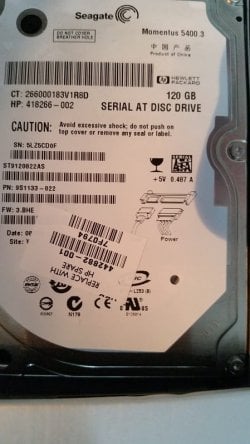
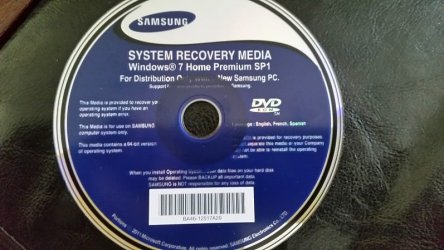
I discovered Samsung recovery disk in the dvd drive. had asked my son if he had one, but said he didn't. LOL. I will investigate this with the Samsung HDD as I know it will not help with the Seagate (Vista)
 

Attachments

  • 20150306_073016.jpg
    20150306_073016.jpg
    58 KB · Views: 0

My Computer My Computer

At a glance

windows 7 professional 64 bit Version 6.1.760...Intel(R) Pentium(R) CPU B970 @ 2.30GHz, 2300 ...8GbIntel HD Graphics Driver Vers 9.17.10.3347 Da...
Computer type
Laptop
Computer Manufacturer/Model Number
Toshiba Satellite c855-s5214
OS
windows 7 professional 64 bit Version 6.1.7601 Service Pack 1 Build 7601
CPU
Intel(R) Pentium(R) CPU B970 @ 2.30GHz, 2300 Mhz, 2 cores
Motherboard
Toshiba Portable BIOS Insyde Corp Version 1.60 Date 4/20/12
Memory
8Gb
Graphics Card(s)
Intel HD Graphics Driver Vers 9.17.10.3347 Date 10/31/20
Hard Drives
SanDisk Extreme Pro SSD 480 Gb (approx. 381gb free)
Firmware Version X21200RL
Migrated and Installed 4/3/2015
Antivirus
BitDefender AntiVirus Free Edition Version 1.0.21.1099
Browser
Internet Explorer 11 update version 11.0.16
Other Info
Additional Systems:

Samsung NP-QX410 Laptop Windows 7 Home Premium SP1
Samsung 850 EVO 250G 4G ram
Avast! Free 2015

Toshiba A205-S7468 Laptop Windows 7 Ultimate
WD 320G HDD 4G ram
AVG free 2015
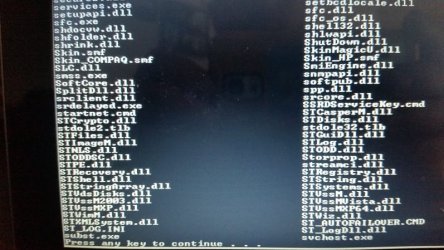
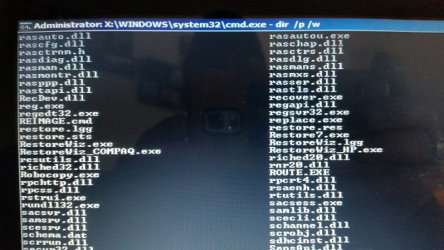
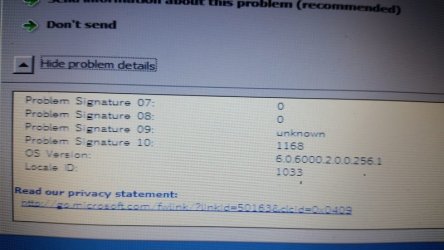
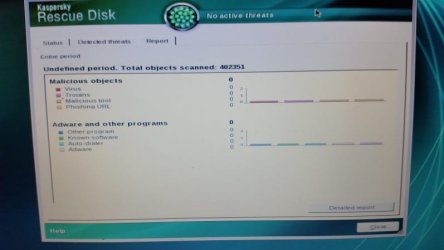
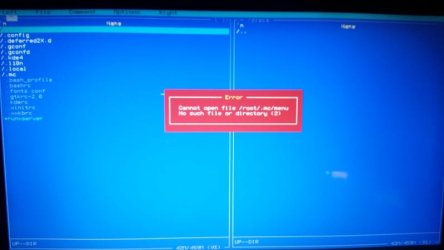
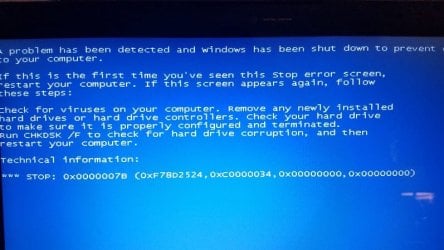
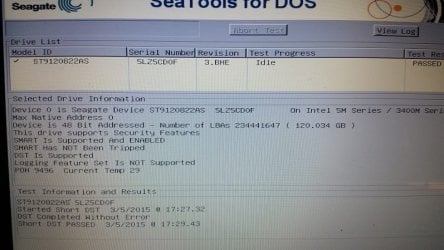
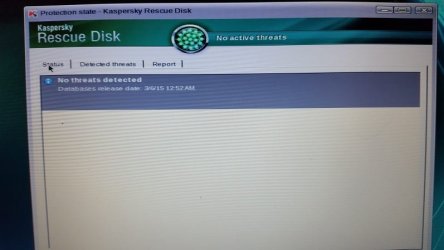
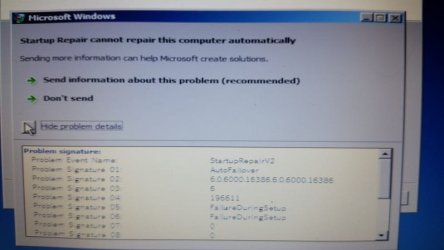
So far, with the Seagate (Vista) HDD I've tried all F8 options. Have BSOD, or seems so. I can get to Startup repair and it gets basically nowhere. I checked Memory diagnostic(extended), checked out OK. I get to command prompt from the startup repair utility, can see Directories. I've tried restore points, nothing. I downloaded and burned Seatools for DOS, says HDD is fine, I believe. I've downloaded and burned Kasperky bootable AV rescue disk. found my internet and updated virus database and it found no threats. Doing the same with Bitdefender and will post those results.

I'm well out of my element at this point. trying to learn as much as I can get advice with. remaining optimistic it's not hopeless.

Is this BSOD? Is it fatal? Or is it a corrupt damaged MBR?

Thanks anyone and everyone for reading and any thoughtful advice and guidance you have to offer!!!
 

My Computer My Computer

At a glance

windows 7 professional 64 bit Version 6.1.760...Intel(R) Pentium(R) CPU B970 @ 2.30GHz, 2300 ...8GbIntel HD Graphics Driver Vers 9.17.10.3347 Da...
Computer type
Laptop
Computer Manufacturer/Model Number
Toshiba Satellite c855-s5214
OS
windows 7 professional 64 bit Version 6.1.7601 Service Pack 1 Build 7601
CPU
Intel(R) Pentium(R) CPU B970 @ 2.30GHz, 2300 Mhz, 2 cores
Motherboard
Toshiba Portable BIOS Insyde Corp Version 1.60 Date 4/20/12
Memory
8Gb
Graphics Card(s)
Intel HD Graphics Driver Vers 9.17.10.3347 Date 10/31/20
Hard Drives
SanDisk Extreme Pro SSD 480 Gb (approx. 381gb free)
Firmware Version X21200RL
Migrated and Installed 4/3/2015
Antivirus
BitDefender AntiVirus Free Edition Version 1.0.21.1099
Browser
Internet Explorer 11 update version 11.0.16
Other Info
Additional Systems:

Samsung NP-QX410 Laptop Windows 7 Home Premium SP1
Samsung 850 EVO 250G 4G ram
Avast! Free 2015

Toshiba A205-S7468 Laptop Windows 7 Ultimate
WD 320G HDD 4G ram
AVG free 2015
You've got a Samsung laptop that uses a Samsung hard drive and you have a Samsung "System Recovery" disc that was shipped with that Samsung laptop.

I assume you'd like to use that Samsung recovery disc to restore to that Samsung drive. Yes or no?

What specifically happens if you try?

Or are you instead more interested in trying to recover some type of personal data that is now on the hard drive?

I'm unclear why you are attempting to use another hard drive "Seagate Vista".
 

My Computer My Computer

At a glance

Windows 7 Home Premium SP1, 64-bitIntel Skylake i5-6600K, not overclocked8 GB HyperX DDR4-2666 (2 x 4 GB)none; graphics are integrated on CPU
Computer type
PC/Desktop
Computer Manufacturer/Model Number
Ignatz Special; 4 speed manual gearbox; factory air conditioning; one of one
OS
Windows 7 Home Premium SP1, 64-bit
CPU
Intel Skylake i5-6600K, not overclocked
Motherboard
AsRock Z170M Extreme 4, micro ATX
Memory
8 GB HyperX DDR4-2666 (2 x 4 GB)
Graphics Card(s)
none; graphics are integrated on CPU
Sound Card
onboard: Realtek ALC1150; external: USB Behringer UF0-202
Monitor(s) Displays
Dell S2340M 23 inch IPS
Screen Resolution
1600 x 900
Hard Drives
System: Crucial MX100 series SSD, 128 GB;
Data: Samsung Spinpoint 103SJ, 1 TB;
Backup: WD Caviar Green WD30EZRX-00D8PB0, 3 TB
PSU
Rosewill SilentNight 500 watt fanless, semi-modular
Case
Antec Solo II
Cooling
Noctua NH-U12S; Noctua F12 intake, Noctua S12A exhaust
Keyboard
Microsoft 200 6JH-00001 USB
Mouse
Dell or Microsoft optical wired; USB
Antivirus
Microsoft Security Essentials and Malwarebytes Premium
Browser
Pale Moon
Other Info
All fans PWM; speeds at idle: CPU circa 500 rpm; intake circa 600 rpm; exhaust circa 600 rpm; CPU temps 27 idle and 47 C load in a warm room (27 C/81 F) when running Intel Extreme Tuning Utility stress test.
@ ignatzatsonic

I apologize for the confusion (I totally understand and was afraid of that happening).

I registered on the Vista Forum for help with the Seagate (Vista OS) for help with that HDD. I will keep only posts re Samsung HDD (Windows 7) to this Forum.

To answer your question, I just re inserted the Samsung HM641JI HDD into the laptop. As I just discovered the Samsung Windows 7 Recovery disk last night (the one my son said didn't exist). As I post this I am for the 1st time attempting whatever the rescue disk may be able to do. time permitting, I will also try the Kaspersky bootable AV disk to see if it can test for infection. I will post back with any findings. Thanks for inquiring!
 

My Computer My Computer

At a glance

windows 7 professional 64 bit Version 6.1.760...Intel(R) Pentium(R) CPU B970 @ 2.30GHz, 2300 ...8GbIntel HD Graphics Driver Vers 9.17.10.3347 Da...
Computer type
Laptop
Computer Manufacturer/Model Number
Toshiba Satellite c855-s5214
OS
windows 7 professional 64 bit Version 6.1.7601 Service Pack 1 Build 7601
CPU
Intel(R) Pentium(R) CPU B970 @ 2.30GHz, 2300 Mhz, 2 cores
Motherboard
Toshiba Portable BIOS Insyde Corp Version 1.60 Date 4/20/12
Memory
8Gb
Graphics Card(s)
Intel HD Graphics Driver Vers 9.17.10.3347 Date 10/31/20
Hard Drives
SanDisk Extreme Pro SSD 480 Gb (approx. 381gb free)
Firmware Version X21200RL
Migrated and Installed 4/3/2015
Antivirus
BitDefender AntiVirus Free Edition Version 1.0.21.1099
Browser
Internet Explorer 11 update version 11.0.16
Other Info
Additional Systems:

Samsung NP-QX410 Laptop Windows 7 Home Premium SP1
Samsung 850 EVO 250G 4G ram
Avast! Free 2015

Toshiba A205-S7468 Laptop Windows 7 Ultimate
WD 320G HDD 4G ram
AVG free 2015
UPDATE

I was unable to get anywhere with the Samsung Recovery Media disk.

I was able to get to a screen where it looked like I had the option to reinstall Windows 7 (not really sure if that's what it was) or try to repair. I chose to repair and it hung for some time. So I rebooted, checked the F2 (CMOS or BIOS ? ) for the boot order. It had been set, I presume, by my son when trying to fix with Samsung. So all this time it'd had been trying to boot from the dvd drive anyway. I changed order to #1 HDD, #2 DVD. I got to the Windows is starting screen (black with the colored windows logo animation) it did so for about a minute and I saw a BLUE SCREEN flash quickly then it rebooted. BSOD???

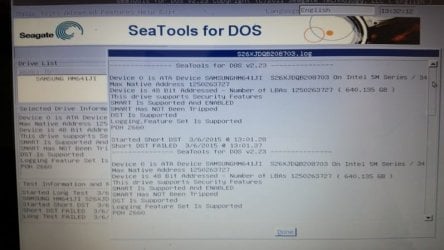
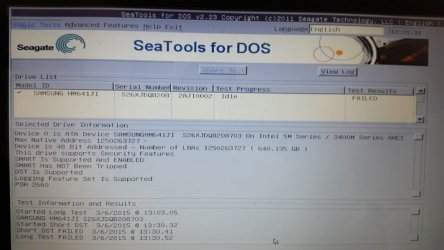
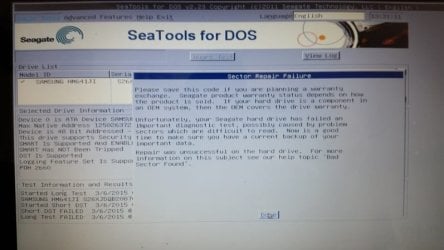
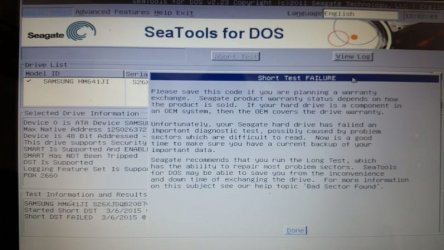
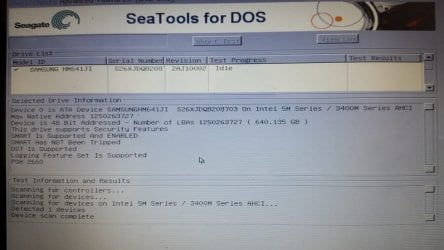
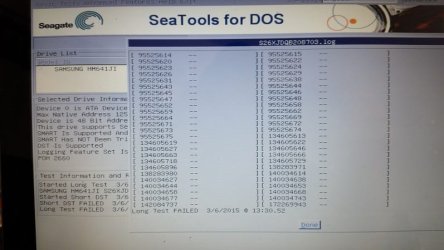
I decided to run the Seatools for DOS in the hope it would recognize the Samsung drive and diagnostic test it for errors. It FAILED the short test. SeaTools suggested the long test might repair it. It FAILED the long test and suggested contacting manufacturer for replacement. I've attached screen shots of test results.

Are my conclusions then correct? The Samsung drive is D.O.A.?? unrepairable and unusable??
 

Attachments

  • 20150306_143139.jpg
    20150306_143139.jpg
    48.9 KB · Views: 0
  • 20150306_143059.jpg
    20150306_143059.jpg
    48.1 KB · Views: 0
  • 20150306_143039.jpg
    20150306_143039.jpg
    46.9 KB · Views: 0
  • 20150306_140256.jpg
    20150306_140256.jpg
    51.4 KB · Views: 0
  • 20150306_140056.jpg
    20150306_140056.jpg
    46.9 KB · Views: 1
  • 20150306_143148.jpg
    20150306_143148.jpg
    52.1 KB · Views: 0

My Computer My Computer

At a glance

windows 7 professional 64 bit Version 6.1.760...Intel(R) Pentium(R) CPU B970 @ 2.30GHz, 2300 ...8GbIntel HD Graphics Driver Vers 9.17.10.3347 Da...
Computer type
Laptop
Computer Manufacturer/Model Number
Toshiba Satellite c855-s5214
OS
windows 7 professional 64 bit Version 6.1.7601 Service Pack 1 Build 7601
CPU
Intel(R) Pentium(R) CPU B970 @ 2.30GHz, 2300 Mhz, 2 cores
Motherboard
Toshiba Portable BIOS Insyde Corp Version 1.60 Date 4/20/12
Memory
8Gb
Graphics Card(s)
Intel HD Graphics Driver Vers 9.17.10.3347 Date 10/31/20
Hard Drives
SanDisk Extreme Pro SSD 480 Gb (approx. 381gb free)
Firmware Version X21200RL
Migrated and Installed 4/3/2015
Antivirus
BitDefender AntiVirus Free Edition Version 1.0.21.1099
Browser
Internet Explorer 11 update version 11.0.16
Other Info
Additional Systems:

Samsung NP-QX410 Laptop Windows 7 Home Premium SP1
Samsung 850 EVO 250G 4G ram
Avast! Free 2015

Toshiba A205-S7468 Laptop Windows 7 Ultimate
WD 320G HDD 4G ram
AVG free 2015
Back
Top