Solved need help reinstalling updates after upgrade

total confusion

New member
Member
VIP
Local time
2:06 PM
Messages
188
Location
NY
I did the reinstall (upgrade), that went great so far...
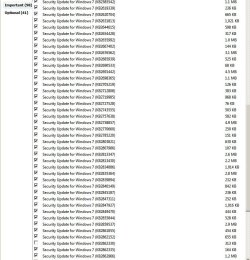
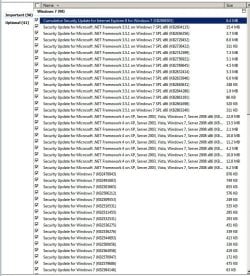
I have 98 updates that (still) have to be installed. Do I need all of those?? Is there any particular order in which they should be installed?
When it first booted 8 or 9 were on the "Install & shutdown" button. They installed successfully. When I rebooted (and after configuration) it again showed on the shutdown that there were more updates to be installed. I foolishly assumed that it was going to load them a few at a time until they were all done. WRONG:mad:
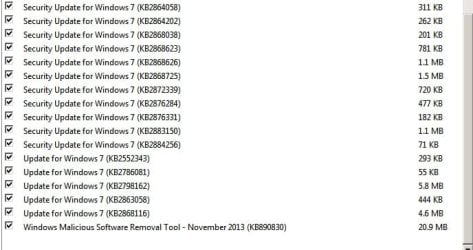
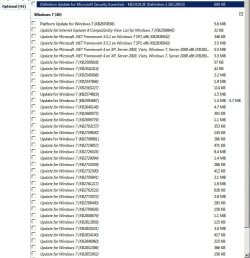
Once I had started the process of install then shutdown I discover it wants to install 133 all at the same time. That took over an hour. I'm thinking no problem, I reboot and then it says it failed to configure, reverting. Now the "install updates then shut down" is again lite up. (I'm afraid to even hit it) Of the 133, 22 did install successfully. I also have 41 optional updates too. The Microsoft Security Essential (600 kb) I know I need. What makes those others more important? They look the same to me.

On the pg 2 there is one that is unchecked, I didn't uncheck any???
 

Attachments
  • pg 1.jpg
    pg 1.jpg
    145.8 KB · Views: 0
  • pg2.jpg
    pg2.jpg
    94.9 KB · Views: 0
  • page 3.jpg
    page 3.jpg
    37.1 KB · Views: 12
  • optional.jpg
    optional.jpg
    89.2 KB · Views: 0

My Computer

Computer type
PC/Desktop
Computer Manufacturer/Model Number
Acer Aspire E700 dsktop
OS
Windows 7 Pro
CPU
Intel 2 quad Q6600
Motherboard
Acer fg965M
Memory
4 GB
Graphics Card(s)
Nvidia GeForce GTS 450 1TB
Sound Card
RealTek
Monitor(s) Displays
Acer 22" X223w
Hard Drives
1TB WD Caviar Black (internal)
1TB WD My Book Essential
PSU
500W coolmaster Extreme Power Plus
Case
Acer
Cooling
case fan
Keyboard
acer
Mouse
acer
Internet Speed
56k
Antivirus
Microsoft Security Essentials
Browser
IE 8
Other Info
I hate IE 9 10 & 11
Is your Windows 7 installation disc an old one that is prior to Service Pack 1. If it is then you will get a huge number of updates, this is normal & you should go through the updating process until there are no more.
When I did my upgrade so time ago from a prior to SP1 version I had over 2gb of updates.
 

My Computer

Computer type
PC/Desktop
Computer Manufacturer/Model Number
Self built using existing case
OS
Windows 7 Home Premium 64 bit sp1
CPU
Intel i5 3570 3.4Ghz Ivy Bridge SKT 1155 quad core
Motherboard
Gigabyte Z77-HD3 SKT 1155 2xSata 3, 4x USB 3.0
Memory
G-Skill Rip Jaws 16Gb (8x2) DDR3 -1600 PC3 12800 CL 10 red
Graphics Card(s)
Gigabyte NVIDIA GT610 1Gb DDR3 810/1200 PCI-E 2.0 Silent
Sound Card
NVIDIA High Definition & Realtech High Definition Audio
Monitor(s) Displays
2 x Philips 226V4L 16:9 aspect ratio
Screen Resolution
1920 x 1080 HD
Hard Drives
Samsung 840 Pro 256gb SSD, SATA 3.
Hitachi Touro Portable 1tb, USB 3.0 HDD used for image b/ups.
PSU
Corsair VS450
Case
Codeng
Cooling
PSU fan & CPU fan
Keyboard
Logitech
Mouse
Logitech Wireless trackball M570
Internet Speed
Wireless 3G. 3mg down & 550kb up.
Antivirus
Bitdefender Internet Security 2020
Browser
Opera (Current Version) & Firefox
Other Info
MS Office 2013 Pro. Davis weather station software. MGE Nova 600 avr UPS.
You need all Important and Optional Updates except Bingware which you can hide (and hide, and hide...).

If they fail or foil just keep rebooting and Checking For Updates to install, rebooting and repeat, until there are no more. Reboots will normally sort even repeat failures eventually. If not report back error messages and failure behavior to our Updates forum.

Seems the normal number with SP1.

Other tips to get and keep a perfect Clean Reinstall - Factory OEM Windows 7
are the same for retail.
 
Hi
This was one of those "repair" (upgrade) installs. Why they refer to it as an upgrade sure beats me. Call it what it is. I don't know why Microsoft ever switched from just popping your disk in and hitting repair. This is such a HUGE pain. I downloaded the ISO with SP1 I needed from Microsoft via digital river. That was about as up to date as I could hope for.

It seems like the more updates I got, the more unstable my system got. When I put in SP1 I lost my Windows backup utility. It just quit working and kept telling me I hadn't set it up yet, but it wouldn't let me set it up either!! Because I had always been able to just backup to my external HD I got sloppy and never made a new shot of the C drive. By the time I wanted to it was too late. Some files were corrupt others were just plain gone. As soon as I can get these updates done I'll burn a new ISO as well as a backup. That is if the updates don't screwup my connection between Windows Pro backup and my external HD again.
So on the ones it's calling "Optional", does that mean I don't need them, don't bother with them? What about the one marked platform?? I hear you on "Bing" bro, couldn't agree more! I don't even use it anyway.
Thanks for the other advise, I'll keep plugging away until I get them loaded.
Thanks
George
 

My Computer

Computer type
PC/Desktop
Computer Manufacturer/Model Number
Acer Aspire E700 dsktop
OS
Windows 7 Pro
CPU
Intel 2 quad Q6600
Motherboard
Acer fg965M
Memory
4 GB
Graphics Card(s)
Nvidia GeForce GTS 450 1TB
Sound Card
RealTek
Monitor(s) Displays
Acer 22" X223w
Hard Drives
1TB WD Caviar Black (internal)
1TB WD My Book Essential
PSU
500W coolmaster Extreme Power Plus
Case
Acer
Cooling
case fan
Keyboard
acer
Mouse
acer
Internet Speed
56k
Antivirus
Microsoft Security Essentials
Browser
IE 8
Other Info
I hate IE 9 10 & 11
Install all of the upgrades including the optional ones, otherwise it will keep requesting they be installed later on & this is irritating.
I always install all the upgrades.

When doing a repair using the installation DVD, you have to be careful that you don't go to repair install. When you get to that window, look at all the info & you will one that says "Repair this computer". I think that's what it says & from memory it's down on the LH lower part. Admittedly it is easy to miss.
 

My Computer

Computer type
PC/Desktop
Computer Manufacturer/Model Number
Self built using existing case
OS
Windows 7 Home Premium 64 bit sp1
CPU
Intel i5 3570 3.4Ghz Ivy Bridge SKT 1155 quad core
Motherboard
Gigabyte Z77-HD3 SKT 1155 2xSata 3, 4x USB 3.0
Memory
G-Skill Rip Jaws 16Gb (8x2) DDR3 -1600 PC3 12800 CL 10 red
Graphics Card(s)
Gigabyte NVIDIA GT610 1Gb DDR3 810/1200 PCI-E 2.0 Silent
Sound Card
NVIDIA High Definition & Realtech High Definition Audio
Monitor(s) Displays
2 x Philips 226V4L 16:9 aspect ratio
Screen Resolution
1920 x 1080 HD
Hard Drives
Samsung 840 Pro 256gb SSD, SATA 3.
Hitachi Touro Portable 1tb, USB 3.0 HDD used for image b/ups.
PSU
Corsair VS450
Case
Codeng
Cooling
PSU fan & CPU fan
Keyboard
Logitech
Mouse
Logitech Wireless trackball M570
Internet Speed
Wireless 3G. 3mg down & 550kb up.
Antivirus
Bitdefender Internet Security 2020
Browser
Opera (Current Version) & Firefox
Other Info
MS Office 2013 Pro. Davis weather station software. MGE Nova 600 avr UPS.
Ranger
I've found the less updates the better. If it's optional that usually (not always) means it's not necessary. Best to go to the knowledge Base and see what the update is for, then decide if you really, really need it.
I just had to do this repair because their stupid updates messed up my system files. I've had the exact same update keep trying to install itself over and over. Unless you right click it and hide it it will keep giving it to you too.
I wasn't using the installation DVD, I was using the ISO download that included the service pack. If I used the installation DVD I would have had to reinstall the service pack too. A night mare I don't care to ever have to deal with ever again.
Thanks for the thought though.
 

My Computer

Computer type
PC/Desktop
Computer Manufacturer/Model Number
Acer Aspire E700 dsktop
OS
Windows 7 Pro
CPU
Intel 2 quad Q6600
Motherboard
Acer fg965M
Memory
4 GB
Graphics Card(s)
Nvidia GeForce GTS 450 1TB
Sound Card
RealTek
Monitor(s) Displays
Acer 22" X223w
Hard Drives
1TB WD Caviar Black (internal)
1TB WD My Book Essential
PSU
500W coolmaster Extreme Power Plus
Case
Acer
Cooling
case fan
Keyboard
acer
Mouse
acer
Internet Speed
56k
Antivirus
Microsoft Security Essentials
Browser
IE 8
Other Info
I hate IE 9 10 & 11
Many important patches and drivers arrive via Optional Updates which are not readily discernable by the consumer as needed when you may need them. For this reason you should always install all of them. Problems with Windows Updates are one in a million so not to be feared.

In your case if your install got tipped with the original install of SP1 as you say then you wouldn't want an image after that until it was corrected. You needed to come here where the top experts on Windows Updates reside to help you set it right. Then an image would have some worth. Otherwise you'd want to set it back using System Restore or your last good image. There's no reason to suffer with issues when we are here to help you sort them.

Ignoring or choosing Updates is XP-think and not necessary or smart for Win7.
 
Greg
Yeah I'm trying to get all of these in and working before I do a full backup of the HD. I have a My Book and it backs up my Doc's and Pic's right along. Once in a while I'll move stuff over there in a separate folder and date it. Then I can clean out the ones on my desktop so it boots faster. I've also gotten where I backup really important stuff to disk.
I do a lot of graphics work and some of those files can get pretty big. I get that stuff into the My Book. It's a 1 TB so got lots of room.
I have a bunch that don't seem to want to install. I assume it means it is dependent on something in the Optional folder?
As to this forum... Best darn site on the net! The people are always helpful, respectful, and just plain nice.
George
 

My Computer

Computer type
PC/Desktop
Computer Manufacturer/Model Number
Acer Aspire E700 dsktop
OS
Windows 7 Pro
CPU
Intel 2 quad Q6600
Motherboard
Acer fg965M
Memory
4 GB
Graphics Card(s)
Nvidia GeForce GTS 450 1TB
Sound Card
RealTek
Monitor(s) Displays
Acer 22" X223w
Hard Drives
1TB WD Caviar Black (internal)
1TB WD My Book Essential
PSU
500W coolmaster Extreme Power Plus
Case
Acer
Cooling
case fan
Keyboard
acer
Mouse
acer
Internet Speed
56k
Antivirus
Microsoft Security Essentials
Browser
IE 8
Other Info
I hate IE 9 10 & 11
Back
Top