JavaScript is disabled. For a better experience, please enable JavaScript in your browser before proceeding.
You are using an out of date browser. It may not display this or other websites correctly.
You should upgrade or use an
alternative browser .
NEED HELP With Automatic Updates
So last night I turned off my computer at 9pm and it went to install updates, since then its been stuck at "installing 5 out of 20 updates" for 13 HOURS and hasnt moved a single update forward. I was wondering if I should just disconnect power to my computer as I do not want to wait for 72 hours to figure out thats it's not installing anything but stuck on a single update. Thanks for your guys help.
Computer type PC/Desktop Computer Manufacturer/Model Number Custom Build OS Windows 7 Home Premium 64 Bit CPU intel core i7 3770 Motherboard Asus Sabertooth Z77 Memory 8 Gb DDR3 Ram Graphics Card(s) Nvidia GTX 960 with 4 gb dedicated memory Hard Drives 1 Terabyte Harddrive Antivirus Avast Browser Google Chrome
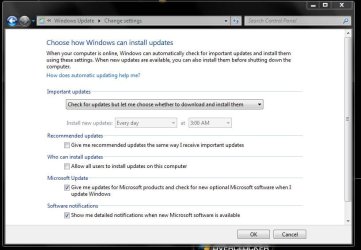
First off you should have Windows update set to check for updates, but let you decide to download and install them.
I would just restart the PC, what else can ya do :huh:
Capture.JPG
80.1 KB
· Views: 1
Computer type PC/Desktop Computer Manufacturer/Model Number Skylake Special #666 OS Windows 10 Pro x64 CPU Intel Core i7 6700K Motherboard Asus Sabertooth Z170 Mark 1 Memory GSkill TridentZ RGB 16GB 3600 16-16-16-36 Graphics Card(s) EVGA GTX 980 Ti SC x2 Sound Card Realtek High Definition Monitor(s) Displays AOC G2460PG Screen Resolution 1920 x 1080 144Hz Hard Drives Samsung 860 Pro 256GB, Seagate Barracuda 4TB x2 PSU EVGA 1000 P2, EVGA White Custom Braided Cables Case Corsair Vengeance C70 Gunmetal Black Cooling Corsair H100i v2, Corsair ML120 x2, Thermal Grizzly Kryonaut Keyboard Logitech G910 Orion Spectrum Mouse Logitech G700s Internet Speed Verizon Fios Quantum Gateway 75/75 Antivirus Windows Defender, Malwarebytes Free 3.8.3 Browser Chrome Other Info Corsair SP120 x4, LG Blu-ray Drive, Durabrand HT-395 100 Watt Dolby Digital Amp, Corsair H2100 Wireless 7.1 Headset
New member
Thread Starter
Oh okay so if I just turned off the power strip to the computer then it should allow me to start it back up and the system won't be corrupt
Computer type PC/Desktop Computer Manufacturer/Model Number Custom Build OS Windows 7 Home Premium 64 Bit CPU intel core i7 3770 Motherboard Asus Sabertooth Z77 Memory 8 Gb DDR3 Ram Graphics Card(s) Nvidia GTX 960 with 4 gb dedicated memory Hard Drives 1 Terabyte Harddrive Antivirus Avast Browser Google Chrome
There`s no guarantee there, but like I said, what else can ya do ??
I would hold the power button down until the PC shuts off, don`t do it with the power strip.
Computer type PC/Desktop Computer Manufacturer/Model Number Skylake Special #666 OS Windows 10 Pro x64 CPU Intel Core i7 6700K Motherboard Asus Sabertooth Z170 Mark 1 Memory GSkill TridentZ RGB 16GB 3600 16-16-16-36 Graphics Card(s) EVGA GTX 980 Ti SC x2 Sound Card Realtek High Definition Monitor(s) Displays AOC G2460PG Screen Resolution 1920 x 1080 144Hz Hard Drives Samsung 860 Pro 256GB, Seagate Barracuda 4TB x2 PSU EVGA 1000 P2, EVGA White Custom Braided Cables Case Corsair Vengeance C70 Gunmetal Black Cooling Corsair H100i v2, Corsair ML120 x2, Thermal Grizzly Kryonaut Keyboard Logitech G910 Orion Spectrum Mouse Logitech G700s Internet Speed Verizon Fios Quantum Gateway 75/75 Antivirus Windows Defender, Malwarebytes Free 3.8.3 Browser Chrome Other Info Corsair SP120 x4, LG Blu-ray Drive, Durabrand HT-395 100 Watt Dolby Digital Amp, Corsair H2100 Wireless 7.1 Headset