Hi, all
I know there are lots of threads on this, but it seems like everyone's issues are SLIGHTLY different. Sorry for any duplication.
I basically can't install ANY Windows updates. Every time a new update comes out, my computer downloads it, and attempts to install it on shutdown... and it always fails with a 646.
I tried installing them manually, and that didn't help. I tried running the Microsoft FixIt, and that didn't help. I have hidden a lot of them so they'll stop installing, but since I hide ALL of them, I figure I'm probably exposing myself to some nasty security breaches.
So I found this page which describes how to solve the problem by editing the registry. Fine, I'm brave
But there's a problem.
HKEY_USERS\.DEFAULT\Software\Microsoft\Windows\CurrentVersion\Explorer\User Shell Folders\AppData exists, and has the right value (%USERPROFILE%\AppData\Roaming).
Ditto HKEY_CURRENT_USER\Software\Microsoft\Windows\CurrentVersion\Explorer\User Shell Folders\AppData.
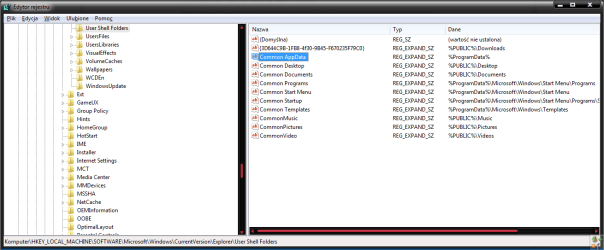
But HKEY_LOCAL_MACHINE\Software\Microsoft\Windows\CurrentVersion\Explorer\User Shell Folders\ doesn't contain an AppData key!
Should I "just" make it? Is it as simple as New > Key, and type in the value it's supposed to have? I've edited the registry before, but I've never created new keys.
Is this what's causing my problem?
Thanks!
I know there are lots of threads on this, but it seems like everyone's issues are SLIGHTLY different. Sorry for any duplication.
I basically can't install ANY Windows updates. Every time a new update comes out, my computer downloads it, and attempts to install it on shutdown... and it always fails with a 646.
I tried installing them manually, and that didn't help. I tried running the Microsoft FixIt, and that didn't help. I have hidden a lot of them so they'll stop installing, but since I hide ALL of them, I figure I'm probably exposing myself to some nasty security breaches.
So I found this page which describes how to solve the problem by editing the registry. Fine, I'm brave
But there's a problem.
HKEY_USERS\.DEFAULT\Software\Microsoft\Windows\CurrentVersion\Explorer\User Shell Folders\AppData exists, and has the right value (%USERPROFILE%\AppData\Roaming).
Ditto HKEY_CURRENT_USER\Software\Microsoft\Windows\CurrentVersion\Explorer\User Shell Folders\AppData.
But HKEY_LOCAL_MACHINE\Software\Microsoft\Windows\CurrentVersion\Explorer\User Shell Folders\ doesn't contain an AppData key!
Should I "just" make it? Is it as simple as New > Key, and type in the value it's supposed to have? I've edited the registry before, but I've never created new keys.
Is this what's causing my problem?
Thanks!
My Computer
- OS
- Windows 7