Need help with Autoruns

grits

New member
Power User
VIP
Local time
3:43 PM
Messages
582
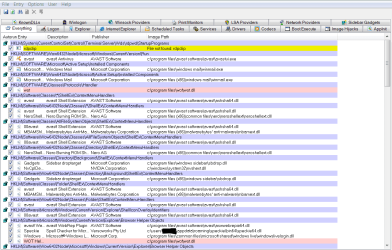
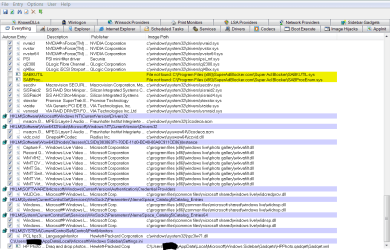
I installed & ran scan last week for a certain problem which I do believe is resolved but now don't know what to do about the rest of the scan results, I have absolutly no idea what any of it means. I'll post a couple screenshots of the results so you can tell me what problems show up & what to do to correct them? The 3rd shot is the one I was originally looking for. I just unticked it so far, will delete it next.

Thanks.
 

Attachments

  • 1st shot of Autoruns.PNG
    1st shot of Autoruns.PNG
    44.7 KB · Views: 16
  • 2nd shot Autoruns.PNG
    2nd shot Autoruns.PNG
    42.6 KB · Views: 11
  • 3rd shot Autoruns.PNG
    3rd shot Autoruns.PNG
    37.3 KB · Views: 11

My Computer

Computer type
PC/Desktop
Computer Manufacturer/Model Number
emachines
OS
Microsoft Windows 7 Home Premium 64-bit 7601 Multiprocessor Free Service Pack 1
CPU
AMD Athlon(tm) II X2 220 Processor
Motherboard
eMachines EL1358G
Memory
3.00 GB
Graphics Card(s)
NVIDIA GeForce 6150SE nForce 430
Sound Card
Realtek High Definition Audio
Screen Resolution
1280 x 1024 x 32 bits (4294967296 colors) @ 60 Hz
Hard Drives
(1) WDC WD10 EADX-22TDHB0 SCSI Disk Device (2) Generic- Multi-Card USB Device
Keyboard
came with PC
Mouse
came with PC
Antivirus
Avast
Browser
IE 9
Other Info
don't know how to get info for the other 5 areas
Autoruns shows you all the pieces of software that get loaded and run when Windows starts. The descriptions of each item can be rather cryptic. Use Google to get more meaningful information about any particular one.

The entries you unchecked, because they reference files that couldn't be found when Windows starts up, will not have any effect on your system because the files aren't getting loaded. Deleting the entries will save a tiny amount of space in your registry, but that about all.

Most people use Autoruns to determine if there is unwanted software running on their system. It takes a while to learn how to be able to recognize "normal" Windows modules from other ones. Your system has a lot of extra stuff running on it which suggests it was a pre-built system that the supplier loaded up with it's own software. This is not necessarily bad as long as you find that software useful or helpful.

Unchecking an item causes Windows to not load it at startup. The software itself is still there; Windows just won't load it. Deleting an entry from Autoruns also stops the item from being loaded, but does not delete it. Unchecking is a safe way to determine if the item is needed or not; if you uncheck something and reboot and then find you do need the item you can simply re-check it and then reboot to get it back.
 

My Computer

Computer type
PC/Desktop
Computer Manufacturer/Model Number
Custom built
OS
Win7-64
CPU
Intel i7-3770S
Motherboard
ASUS P8Z77-M
Memory
16GB
Graphics Card(s)
nVidia GT630
Sound Card
onboard
Monitor(s) Displays
dual
Screen Resolution
1920x1200 (primary) 1050x1680 (secondary)
Hard Drives
128GB SSD (boot)
64GB SSD (Temp/My Documents)
500GB (photos/videos)
1TB (rendered video, backups)
PSU
650W
Case
Thermaltake A30
Cooling
Thermaltake
Keyboard
Logitech Lighted
Mouse
Kensington Expert Mouse (trackball)
Internet Speed
FIOS 35/35
Antivirus
MS Security Essentials
Browser
Chrome (beta)
Better late than never?

Birk, I'm sorry, :( I should have thanked you & gave you a rep 4 months ago for your good explanation. :thumbsup:
I'm now going thru my list of postings to clear things up & evidently an old post doesn't have the rep symbol.
 

My Computer

Computer type
PC/Desktop
Computer Manufacturer/Model Number
emachines
OS
Microsoft Windows 7 Home Premium 64-bit 7601 Multiprocessor Free Service Pack 1
CPU
AMD Athlon(tm) II X2 220 Processor
Motherboard
eMachines EL1358G
Memory
3.00 GB
Graphics Card(s)
NVIDIA GeForce 6150SE nForce 430
Sound Card
Realtek High Definition Audio
Screen Resolution
1280 x 1024 x 32 bits (4294967296 colors) @ 60 Hz
Hard Drives
(1) WDC WD10 EADX-22TDHB0 SCSI Disk Device (2) Generic- Multi-Card USB Device
Keyboard
came with PC
Mouse
came with PC
Antivirus
Avast
Browser
IE 9
Other Info
don't know how to get info for the other 5 areas
Back
Top