Need help with back up my computer for windows10

winkawak

New member
Member
VIP
Local time
1:11 PM
Messages
107
I have 1 SSD which i used to installed my windows 7pro and 2 hdd i used to installed games and small programs on.

1. Do I need to back up my hdd too? or just ssd?
2. If i only need to back up my ssd does that mean i can unplug my hdd and it will work plugging it back in after windows 10 finished installing on ssd?

Im using create system image feature in windows 7 pro but for some reason only 1 of my hdd drive shows up as a option to save image on. Any ideas?

Should i use a third party image program beside microsoft?
Is system image best method of backing up?
 

My Computer My Computer

Computer type
PC/Desktop
OS
windows 7 pro 64bit
CPU
i7 5820k
Motherboard
Asrock x99x killer
Memory
Crucial ballistix sport 2x4gb
Graphics Card(s)
Msi gtx 970
Hard Drives
Crucial mx100 256gb
Wd blue 1 tb
PSU
evga 850w
see comments in bold

I have 1 SSD which i used to installed my windows 7pro and 2 hdd i used to installed games and small programs on.

1. Do I need to back up my hdd too? or just ssd?

If you are talking about backing up your current Windows installation, you need to back up the C partition and and any other partition marked as "system" in Windows Disk Management. Most likely you've got a System Reserved partition. Back it up.

2. If i only need to back up my ssd does that mean i can unplug my hdd and it will work plugging it back in after windows 10 finished installing on ssd?

You should unplug your HDD before upgrading Windows to the SSD. Yes, the other drive should work after plugging it back in.

Im using create system image feature in windows 7 pro but for some reason only 1 of my hdd drive shows up as a option to save image on. Any ideas?

Not sure. Windows Backup and Restore can be strange. It may not want you to backup to one hard drive because it contains some portion of Windows.

Should i use a third party image program beside microsoft?
Is system image best method of backing up?

I would use Macrium Reflect Free Edition.

Yes, system imaging is the best backup method.

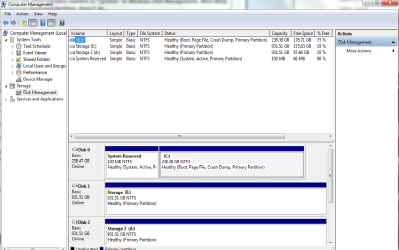
You probably ought to post a screen shot of Windows Disk Management so people can see what's going on with your partitions and hard drives.
 

My Computer My Computer

Computer type
PC/Desktop
Computer Manufacturer/Model Number
Ignatz Special; 4 speed manual gearbox; factory air conditioning; one of one
OS
Windows 7 Home Premium SP1, 64-bit
CPU
Intel Skylake i5-6600K, not overclocked
Motherboard
AsRock Z170M Extreme 4, micro ATX
Memory
8 GB HyperX DDR4-2666 (2 x 4 GB)
Graphics Card(s)
none; graphics are integrated on CPU
Sound Card
onboard: Realtek ALC1150; external: USB Behringer UF0-202
Monitor(s) Displays
Dell S2340M 23 inch IPS
Screen Resolution
1600 x 900
Hard Drives
System: Crucial MX100 series SSD, 128 GB;
Data: Samsung Spinpoint 103SJ, 1 TB;
Backup: WD Caviar Green WD30EZRX-00D8PB0, 3 TB
PSU
Rosewill SilentNight 500 watt fanless, semi-modular
Case
Antec Solo II
Cooling
Noctua NH-U12S; Noctua F12 intake, Noctua S12A exhaust
Keyboard
Microsoft 200 6JH-00001 USB
Mouse
Dell or Microsoft optical wired; USB
Antivirus
Microsoft Security Essentials and Malwarebytes Premium
Browser
Pale Moon
Other Info
All fans PWM; speeds at idle: CPU circa 500 rpm; intake circa 600 rpm; exhaust circa 600 rpm; CPU temps 27 idle and 47 C load in a warm room (27 C/81 F) when running Intel Extreme Tuning Utility stress test.
heres my disk management, only c drive is where os is installed
 

Attachments

  • Untitled.png
    Untitled.png
    35.2 KB · Views: 1

My Computer My Computer

Computer type
PC/Desktop
OS
windows 7 pro 64bit
CPU
i7 5820k
Motherboard
Asrock x99x killer
Memory
Crucial ballistix sport 2x4gb
Graphics Card(s)
Msi gtx 970
Hard Drives
Crucial mx100 256gb
Wd blue 1 tb
PSU
evga 850w
OK. If you want to back up your existing installation, I'd just make one image file containing both the System Reserved partition and C.

That image file will take up somewhere around 20 GB. I'd store it on disk 1 or disk 2.

I'd use Macrium.

If you want to move to an SSD, you could clean install 7 onto the SSD or you could clone the existing install to the SSD or you could restore the image file you made to the SSD.

After you get an install of Win 7 on the SSD, you could then do an "upgrade install" to Windows 10. After that is activated, you could then do a clean install of Win 10 on the SSD if you insist on clean installs.

You could do the job with Windows built-in Backup and Restore, but that application is cranky enough that I would not personally use it.
 

My Computer My Computer

Computer type
PC/Desktop
Computer Manufacturer/Model Number
Ignatz Special; 4 speed manual gearbox; factory air conditioning; one of one
OS
Windows 7 Home Premium SP1, 64-bit
CPU
Intel Skylake i5-6600K, not overclocked
Motherboard
AsRock Z170M Extreme 4, micro ATX
Memory
8 GB HyperX DDR4-2666 (2 x 4 GB)
Graphics Card(s)
none; graphics are integrated on CPU
Sound Card
onboard: Realtek ALC1150; external: USB Behringer UF0-202
Monitor(s) Displays
Dell S2340M 23 inch IPS
Screen Resolution
1600 x 900
Hard Drives
System: Crucial MX100 series SSD, 128 GB;
Data: Samsung Spinpoint 103SJ, 1 TB;
Backup: WD Caviar Green WD30EZRX-00D8PB0, 3 TB
PSU
Rosewill SilentNight 500 watt fanless, semi-modular
Case
Antec Solo II
Cooling
Noctua NH-U12S; Noctua F12 intake, Noctua S12A exhaust
Keyboard
Microsoft 200 6JH-00001 USB
Mouse
Dell or Microsoft optical wired; USB
Antivirus
Microsoft Security Essentials and Malwarebytes Premium
Browser
Pale Moon
Other Info
All fans PWM; speeds at idle: CPU circa 500 rpm; intake circa 600 rpm; exhaust circa 600 rpm; CPU temps 27 idle and 47 C load in a warm room (27 C/81 F) when running Intel Extreme Tuning Utility stress test.
If you want to move to an SSD, you could clean install 7 onto the SSD or you could clone the existing install to the SSD or you could restore the image file you made to the SSD.

After you get an install of Win 7 on the SSD, you could then do an "upgrade install" to Windows 10. After that is activated, you could then do a clean install of Win 10 on the SSD if you insist on clean installs.

You could do the job with Windows built-in Backup and Restore, but that application is cranky enough that I would not personally use it.

You lost me on this part. Why am i doing this after i create a system image of c and reserved? Windows 7 pro is already installed on the ssd c drive. can i just upgrade to windows 10 after creating system image? difference between upgrade vs clean install?
 

My Computer My Computer

Computer type
PC/Desktop
OS
windows 7 pro 64bit
CPU
i7 5820k
Motherboard
Asrock x99x killer
Memory
Crucial ballistix sport 2x4gb
Graphics Card(s)
Msi gtx 970
Hard Drives
Crucial mx100 256gb
Wd blue 1 tb
PSU
evga 850w
see comments in bold

If you want to move to an SSD, you could clean install 7 onto the SSD or you could clone the existing install to the SSD or you could restore the image file you made to the SSD.

After you get an install of Win 7 on the SSD, you could then do an "upgrade install" to Windows 10. After that is activated, you could then do a clean install of Win 10 on the SSD if you insist on clean installs.

You could do the job with Windows built-in Backup and Restore, but that application is cranky enough that I would not personally use it.

You lost me on this part. Why am i doing this after i create a system image of c and reserved?


I lost you on what part? Why are you doing what?


Windows 7 pro is already installed on the ssd c drive. can i just upgrade to windows 10 after creating system image?


If you have Win 7 pro on the SSD, you can upgrade to Win 10 with or without creating a system image. If you don't want a system image of Win 7 pro, don't make one. If you have no intention whatsoever of ever wanting to return to Win 7 come hell or high water, why bother making a system image of Win 7? The purpose of an image is to let you easily return to some former operating system. Maybe you don't care about that at all. That's fine and it's your personal choice.

difference between upgrade vs clean install?

It's debatable. Purists always want to do a clean install. A clean install would wipe the drive clean and remove any remnants of the previous installation. An upgrade install would not. You may never notice any real-world difference between an upgrade install and a clean install. If you do an upgrade install, I think you can revert to Win 7 from within Win 10, without restoring a previously made system image, for 30 days. If you do a clean install, you could not revert to Win 7 unless you had a system image of that Win 7 install or had some means of doing a clean install of Windows 7.
 

My Computer My Computer

Computer type
PC/Desktop
Computer Manufacturer/Model Number
Ignatz Special; 4 speed manual gearbox; factory air conditioning; one of one
OS
Windows 7 Home Premium SP1, 64-bit
CPU
Intel Skylake i5-6600K, not overclocked
Motherboard
AsRock Z170M Extreme 4, micro ATX
Memory
8 GB HyperX DDR4-2666 (2 x 4 GB)
Graphics Card(s)
none; graphics are integrated on CPU
Sound Card
onboard: Realtek ALC1150; external: USB Behringer UF0-202
Monitor(s) Displays
Dell S2340M 23 inch IPS
Screen Resolution
1600 x 900
Hard Drives
System: Crucial MX100 series SSD, 128 GB;
Data: Samsung Spinpoint 103SJ, 1 TB;
Backup: WD Caviar Green WD30EZRX-00D8PB0, 3 TB
PSU
Rosewill SilentNight 500 watt fanless, semi-modular
Case
Antec Solo II
Cooling
Noctua NH-U12S; Noctua F12 intake, Noctua S12A exhaust
Keyboard
Microsoft 200 6JH-00001 USB
Mouse
Dell or Microsoft optical wired; USB
Antivirus
Microsoft Security Essentials and Malwarebytes Premium
Browser
Pale Moon
Other Info
All fans PWM; speeds at idle: CPU circa 500 rpm; intake circa 600 rpm; exhaust circa 600 rpm; CPU temps 27 idle and 47 C load in a warm room (27 C/81 F) when running Intel Extreme Tuning Utility stress test.
i want to back up or create a imgae in case the installation of windows 10 goes south. I dont want to lose my data.
 

My Computer My Computer

Computer type
PC/Desktop
OS
windows 7 pro 64bit
CPU
i7 5820k
Motherboard
Asrock x99x killer
Memory
Crucial ballistix sport 2x4gb
Graphics Card(s)
Msi gtx 970
Hard Drives
Crucial mx100 256gb
Wd blue 1 tb
PSU
evga 850w
i want to back up or create a imgae in case the installation of windows 10 goes south. I dont want to lose my data.

Then make a system image of C and System Reserved with an application such as Macrium Reflect Free Edition. Learn how to use the application--making an image, making a recovery disk, testing the recovery disk, and learning the restoration process. If you don't, you will have a false sense of security and end up in the toilet at the worst possible time.

Have a Plan B. Imaging isn't perfect. It could fail. What will you do if it fails? Rely on Plan B.

I'd recommend you also back up your DATA ONLY, NOT WINDOWS, by ordinary means--copying with the mouse or keyboard to a safe location. This would not rely on imaging.

In other words: DON'T rely on imaging to back up your DATA.
 

My Computer My Computer

Computer type
PC/Desktop
Computer Manufacturer/Model Number
Ignatz Special; 4 speed manual gearbox; factory air conditioning; one of one
OS
Windows 7 Home Premium SP1, 64-bit
CPU
Intel Skylake i5-6600K, not overclocked
Motherboard
AsRock Z170M Extreme 4, micro ATX
Memory
8 GB HyperX DDR4-2666 (2 x 4 GB)
Graphics Card(s)
none; graphics are integrated on CPU
Sound Card
onboard: Realtek ALC1150; external: USB Behringer UF0-202
Monitor(s) Displays
Dell S2340M 23 inch IPS
Screen Resolution
1600 x 900
Hard Drives
System: Crucial MX100 series SSD, 128 GB;
Data: Samsung Spinpoint 103SJ, 1 TB;
Backup: WD Caviar Green WD30EZRX-00D8PB0, 3 TB
PSU
Rosewill SilentNight 500 watt fanless, semi-modular
Case
Antec Solo II
Cooling
Noctua NH-U12S; Noctua F12 intake, Noctua S12A exhaust
Keyboard
Microsoft 200 6JH-00001 USB
Mouse
Dell or Microsoft optical wired; USB
Antivirus
Microsoft Security Essentials and Malwarebytes Premium
Browser
Pale Moon
Other Info
All fans PWM; speeds at idle: CPU circa 500 rpm; intake circa 600 rpm; exhaust circa 600 rpm; CPU temps 27 idle and 47 C load in a warm room (27 C/81 F) when running Intel Extreme Tuning Utility stress test.
i want to back up or create a imgae in case the installation of windows 10 goes south. I dont want to lose my data.

Then make a system image of C and System Reserved with an application such as Macrium Reflect Free Edition. Learn how to use the application--making an image, making a recovery disk, testing the recovery disk, and learning the restoration process. If you don't, you will have a false sense of security and end up in the toilet at the worst possible time.

Have a Plan B. Imaging isn't perfect. It could fail. What will you do if it fails? Rely on Plan B.

I'd recommend you also back up your DATA ONLY, NOT WINDOWS, by ordinary means--copying with the mouse or keyboard to a safe location. This would not rely on imaging.

In other words: DON'T rely on imaging to back up your DATA.
ok, last thing i wanna make sure u said no need to back up the hdd with game installed correct? just unplug the hdd and plug it back in when ssd is instaleld with windows 10?
 

My Computer My Computer

Computer type
PC/Desktop
OS
windows 7 pro 64bit
CPU
i7 5820k
Motherboard
Asrock x99x killer
Memory
Crucial ballistix sport 2x4gb
Graphics Card(s)
Msi gtx 970
Hard Drives
Crucial mx100 256gb
Wd blue 1 tb
PSU
evga 850w
ok, last thing i wanna make sure u said no need to back up the hdd with game installed correct? just unplug the hdd and plug it back in when ssd is instaleld with windows 10?

When in doubt, back up all partitions. Why not?

I don't game.

Your Windows installation is on C and System Reserved.

I've never installed anything anywhere other than C.

I suspect an unplug and plug back in will work as Windows will see that drive just as it had before--not an OS drive.

But to be safe, you should get other opinions and back up all partitions on all drives.
 

My Computer My Computer

Computer type
PC/Desktop
Computer Manufacturer/Model Number
Ignatz Special; 4 speed manual gearbox; factory air conditioning; one of one
OS
Windows 7 Home Premium SP1, 64-bit
CPU
Intel Skylake i5-6600K, not overclocked
Motherboard
AsRock Z170M Extreme 4, micro ATX
Memory
8 GB HyperX DDR4-2666 (2 x 4 GB)
Graphics Card(s)
none; graphics are integrated on CPU
Sound Card
onboard: Realtek ALC1150; external: USB Behringer UF0-202
Monitor(s) Displays
Dell S2340M 23 inch IPS
Screen Resolution
1600 x 900
Hard Drives
System: Crucial MX100 series SSD, 128 GB;
Data: Samsung Spinpoint 103SJ, 1 TB;
Backup: WD Caviar Green WD30EZRX-00D8PB0, 3 TB
PSU
Rosewill SilentNight 500 watt fanless, semi-modular
Case
Antec Solo II
Cooling
Noctua NH-U12S; Noctua F12 intake, Noctua S12A exhaust
Keyboard
Microsoft 200 6JH-00001 USB
Mouse
Dell or Microsoft optical wired; USB
Antivirus
Microsoft Security Essentials and Malwarebytes Premium
Browser
Pale Moon
Other Info
All fans PWM; speeds at idle: CPU circa 500 rpm; intake circa 600 rpm; exhaust circa 600 rpm; CPU temps 27 idle and 47 C load in a warm room (27 C/81 F) when running Intel Extreme Tuning Utility stress test.
Back
Top