need help with crashed laptop and Windows Easy Transfer

bsteward

New member
Local time
10:48 AM
Messages
8
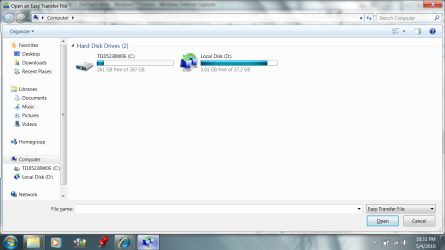
My Compaq dv2000 laptop burnt up after water was spilled on keyboard. So I bought a new windows 7 toshiba satellite t135. I managed to remove the old 40 gig 2 1/2 hard drive from the Compaq and bought a Vantec USB kit that connects to the old ide compaq hard drive. When i plugged it into the usb on the new toshiba it recognizes it and i can surf through the old files i want to restore but it sees it and the new drive on the toshiba both as "internal drives" or local drives, not external, when I go through the wizard on WET. From what I can tell, the Easy Transfer only works with external drives? I watched a youtube on WET and I'm not ever getting a "file" to transfer off of the old PC. I have gotten to the point where I can drill down to each individual files and transfer one at a time but that will take forever and not transfer my settings and email info, etc. When I firt bought the vantec adapter, it said that WET had to be installed on "both computers", so me like a dummy assumed the old hard drive would be consdiered "old computer" and I downloaded and installed WET on that old drive. I also have it installed on the new drive. I wonder if there is a way to (or if I need to) deinstall from old drive? I have attched a picture of the WET screen hwing the two hard drives. D is the old one; notice both are local.

Any ideas?
 

Attachments

  • Untitled.png
    Untitled.png
    83.6 KB · Views: 8

My Computer My Computer

At a glance

windows 7
Computer Manufacturer/Model Number
Toshiba Satelitte t135
OS
windows 7

My Computer My Computer

At a glance

windows 7Phenom II AMD Dragon 3.5GhzDDR3 4GBATI Radeon 512Mb
Computer Manufacturer/Model Number
built up
OS
windows 7
CPU
Phenom II AMD Dragon 3.5Ghz
Memory
DDR3 4GB
Graphics Card(s)
ATI Radeon 512Mb
Monitor(s) Displays
HP L1506
Screen Resolution
1152 x 864
Hard Drives
WDC 1 TB SATA-II Green Power
Keyboard
HP wireless keyboard
Mouse
HP Optic
Internet Speed
1GB
so does this mean the old hard drive has to be in a "computer" as opposed to just connected by an adapter? Hope not bcause the computer is fried (no power).
 

My Computer My Computer

At a glance

windows 7
Computer Manufacturer/Model Number
Toshiba Satelitte t135
OS
windows 7
that tutorial says that when WET asks "what computer are you on" it says to select "this is my old computer". When I do that it starts scanning my new computer (the toshiba). Is that what I want to do?

screenshot
 

Attachments

  • Untitled2.jpg
    Untitled2.jpg
    95.9 KB · Views: 8

My Computer My Computer

At a glance

windows 7
Computer Manufacturer/Model Number
Toshiba Satelitte t135
OS
windows 7
let system check it..
 

My Computer My Computer

At a glance

windows 7Phenom II AMD Dragon 3.5GhzDDR3 4GBATI Radeon 512Mb
Computer Manufacturer/Model Number
built up
OS
windows 7
CPU
Phenom II AMD Dragon 3.5Ghz
Memory
DDR3 4GB
Graphics Card(s)
ATI Radeon 512Mb
Monitor(s) Displays
HP L1506
Screen Resolution
1152 x 864
Hard Drives
WDC 1 TB SATA-II Green Power
Keyboard
HP wireless keyboard
Mouse
HP Optic
Internet Speed
1GB
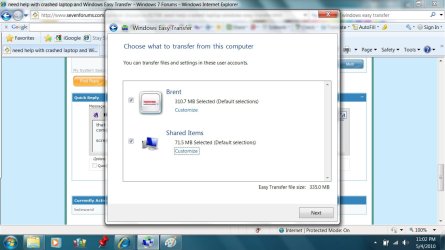
ryo, I did let windows check it, and that last attched screenshot is what it found, unless I'm not understanding what you mean by check it
 

My Computer My Computer

At a glance

windows 7
Computer Manufacturer/Model Number
Toshiba Satelitte t135
OS
windows 7
when you hit next bottom..what's is appear?
 

My Computer My Computer

At a glance

windows 7Phenom II AMD Dragon 3.5GhzDDR3 4GBATI Radeon 512Mb
Computer Manufacturer/Model Number
built up
OS
windows 7
CPU
Phenom II AMD Dragon 3.5Ghz
Memory
DDR3 4GB
Graphics Card(s)
ATI Radeon 512Mb
Monitor(s) Displays
HP L1506
Screen Resolution
1152 x 864
Hard Drives
WDC 1 TB SATA-II Green Power
Keyboard
HP wireless keyboard
Mouse
HP Optic
Internet Speed
1GB
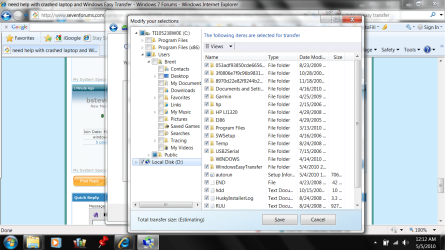
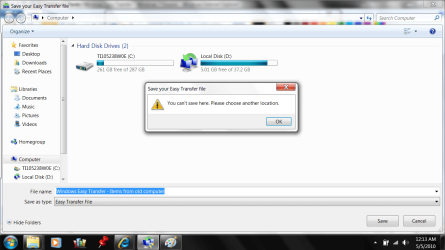
it takes me to a screen that lets me custom select what directories/folders i want and so I unchecked everything having to do with C drive and also "shared", but then selected the entire D drive. It estimated file size at about 30 mb, then I tried to hit "save" and got a message saying "you cant save here"
 

My Computer My Computer

At a glance

windows 7
Computer Manufacturer/Model Number
Toshiba Satelitte t135
OS
windows 7
heres some screen shots showing what it did. I cant figure out where it tried to save "to". Also note size is 80mb, not 30mb
 

Attachments

  • Untitled3.png
    Untitled3.png
    120.6 KB · Views: 10
  • Untitled4.png
    Untitled4.png
    78.6 KB · Views: 12

My Computer My Computer

At a glance

windows 7
Computer Manufacturer/Model Number
Toshiba Satelitte t135
OS
windows 7
you save into your computer.. trying save to the other harddisk and for your sign make new folder at there.
 

My Computer My Computer

At a glance

windows 7Phenom II AMD Dragon 3.5GhzDDR3 4GBATI Radeon 512Mb
Computer Manufacturer/Model Number
built up
OS
windows 7
CPU
Phenom II AMD Dragon 3.5Ghz
Memory
DDR3 4GB
Graphics Card(s)
ATI Radeon 512Mb
Monitor(s) Displays
HP L1506
Screen Resolution
1152 x 864
Hard Drives
WDC 1 TB SATA-II Green Power
Keyboard
HP wireless keyboard
Mouse
HP Optic
Internet Speed
1GB
I'm still lost here. Can anyone else suggest a way to work around this?
 

My Computer My Computer

At a glance

windows 7
Computer Manufacturer/Model Number
Toshiba Satelitte t135
OS
windows 7
cant tell from my screen shot where its trying to save to? To "my computer". If I try and save to D I don't think it will fit. If I try to C, Im concerned that will cause problem because that where im trying to extract the transfer file to?
 

My Computer My Computer

At a glance

windows 7
Computer Manufacturer/Model Number
Toshiba Satelitte t135
OS
windows 7
i saw your screenshot file transfer just 335MB, and your D drive still have free 5GB. so why not you save at drive D
 

My Computer My Computer

At a glance

windows 7Phenom II AMD Dragon 3.5GhzDDR3 4GBATI Radeon 512Mb
Computer Manufacturer/Model Number
built up
OS
windows 7
CPU
Phenom II AMD Dragon 3.5Ghz
Memory
DDR3 4GB
Graphics Card(s)
ATI Radeon 512Mb
Monitor(s) Displays
HP L1506
Screen Resolution
1152 x 864
Hard Drives
WDC 1 TB SATA-II Green Power
Keyboard
HP wireless keyboard
Mouse
HP Optic
Internet Speed
1GB
Back
Top