Need help with error code on ISO burn

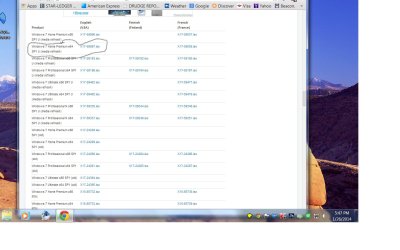
I downloaded it from this link but i will do it again if you think it will help. I am running win 7 64 bit sp1
 

Attachments

  • Untitled.jpg
    Untitled.jpg
    107.3 KB · Views: 1

My Computer

Computer type
Laptop
Computer Manufacturer/Model Number
asus U56E
OS
win 7 64 Home edition
CPU
2430 i5 intel
Motherboard
?Asus
Memory
6
Graphics Card(s)
imtegrated
Sound Card
Microsoft
Hard Drives
WDC WD6400BPVT-80HXZT3 ATA Device
Antivirus
Kaspersky trial AV 2014
Browser
chrome
I don't see that you tried what I suggested, burn a disc from a file (any file) on the hard drive. Have to verify that the drive will actually work with another file. If it does then the iso file you have is suspect. If it doesn't work with some other file then it puts the problem back on, probably, the hard drive itself.
 

My Computer

Computer type
PC/Desktop
Computer Manufacturer/Model Number
My Own Build
OS
Windows 10 64 bit
CPU
Intel i7 6700K
Motherboard
ASUS ROG Maximus VIII Hero
Memory
16GB Corsair Dominator
Graphics Card(s)
Intel CPU Graphics
Sound Card
RealTek
Monitor(s) Displays
27" Dell S2719dgf
Screen Resolution
2560X1440
Hard Drives
1 TB Samsung 850 EVO SSD for Win 10 Pro
500GB Samsung 850 EVO SSD for Win 10 Insider
2 TB drive for backup
PSU
EVGA Supernova 750G2
Case
BeQuiet Silent Base 600
Cooling
Deepcool Captain 120EX
Keyboard
Microsoft Wireless 2000
Mouse
Microsoft wireless
Internet Speed
100 MB/sec (Cable)
Antivirus
Microsoft Defender and Malwarebytes
Browser
Edge/Firefox
Other Info
Cakewalk (Sonar) by BandLab and Studio One 4.1 Pro recording studio software. MOTU 896Mk3 Hybrid recording interface, Frontier Tranzport wireless control unit, Behringer X-Touch Control Surface.
Five USB connected optical drives for CD Audio production using Nero BurningROM
Try Jack`s suggestion :)
 

My Computer

Computer type
PC/Desktop
Computer Manufacturer/Model Number
Skylake Special #666
OS
Windows 10 Pro x64
CPU
Intel Core i7 6700K
Motherboard
Asus Sabertooth Z170 Mark 1
Memory
GSkill TridentZ RGB 16GB 3600 16-16-16-36
Graphics Card(s)
EVGA GTX 980 Ti SC x2
Sound Card
Realtek High Definition
Monitor(s) Displays
AOC G2460PG
Screen Resolution
1920 x 1080 144Hz
Hard Drives
Samsung 860 Pro 256GB, Seagate Barracuda 4TB x2
PSU
EVGA 1000 P2, EVGA White Custom Braided Cables
Case
Corsair Vengeance C70 Gunmetal Black
Cooling
Corsair H100i v2, Corsair ML120 x2, Thermal Grizzly Kryonaut
Keyboard
Logitech G910 Orion Spectrum
Mouse
Logitech G700s
Internet Speed
Verizon Fios Quantum Gateway 75/75
Antivirus
Windows Defender, Malwarebytes Free 3.8.3
Browser
Chrome
Other Info
Corsair SP120 x4, LG Blu-ray Drive, Durabrand HT-395 100 Watt Dolby Digital Amp, Corsair H2100 Wireless 7.1 Headset
Oh man, i had to run out but when I got back i remembered i had some offline recovery disks that I know worked and did boot fine so i tried them again and it seems that even those won't boot anymore.

The boot order was set to boot from the disc first but all i hear is the whining of it trying to fully boot up but it fails to complete it .
 

My Computer

Computer type
Laptop
Computer Manufacturer/Model Number
asus U56E
OS
win 7 64 Home edition
CPU
2430 i5 intel
Motherboard
?Asus
Memory
6
Graphics Card(s)
imtegrated
Sound Card
Microsoft
Hard Drives
WDC WD6400BPVT-80HXZT3 ATA Device
Antivirus
Kaspersky trial AV 2014
Browser
chrome
Then I'd use a new ISO provided in Step 1 written to flash stick installer with tool provided in Step 2 of Clean Reinstall - Factory OEM Windows 7.

To boot the flash stick, set the HDD to boot first in BIOS setup then trigger the stick to boot using the one-time BIOS Boot menu key for your PC, listed under USB, Removable or HD's. You may have to expand the listing to see it.

If stick starts the install over again after the install reboots then unplug it.

If stick fails to boot try unplugging the DVD drive. It may be faulty.
 
Thanks for the assistance.
 

My Computer

Computer type
Laptop
Computer Manufacturer/Model Number
asus U56E
OS
win 7 64 Home edition
CPU
2430 i5 intel
Motherboard
?Asus
Memory
6
Graphics Card(s)
imtegrated
Sound Card
Microsoft
Hard Drives
WDC WD6400BPVT-80HXZT3 ATA Device
Antivirus
Kaspersky trial AV 2014
Browser
chrome
Code:
[QUOTE="gregrocker, post: 2671110, member: 7980"]Then I'd use a new ISO provided in Step 1 written to flash stick installer with tool provided in Step 2 of [URL="http://www.sevenforums.com/tutorials/219487-clean-reinstall-factory-oem-windows-7-a.html#post1839164"]Clean Reinstall - Factory OEM Windows 7.[/URL]
 
To boot the flash stick, set the HDD to boot first in BIOS setup then[B][SIZE=4] trigger the stick to boot using the one-time BIOS Boot menu key for your PC, listed under USB, Removable or HD's. You may have to expand the listing to see it. [/SIZE][/B]
[B][SIZE=4] [/SIZE][/B]
If stick starts the install over again after the install reboots then unplug it.
 
If stick fails to boot try unplugging the DVD drive. It may be faulty.[/QUOTE]

The highlighted info above i don't understand , i did manage to get the ISO on a thumb drive but i don't see any options to boot from the usb and i looked everywhere.

I used another computer to download a new ISO image and when i tried to boot using my laptop (Asus u56e ) it still won't do it. The drive makes noise but eventually starts up with the normal screen which reads starting windows.

The dvd drive looks like it's not reading anything.

Where would i buy a replacement drive since it may be faulty , i would like to have it internal if that's possible.
 

My Computer

Computer type
Laptop
Computer Manufacturer/Model Number
asus U56E
OS
win 7 64 Home edition
CPU
2430 i5 intel
Motherboard
?Asus
Memory
6
Graphics Card(s)
imtegrated
Sound Card
Microsoft
Hard Drives
WDC WD6400BPVT-80HXZT3 ATA Device
Antivirus
Kaspersky trial AV 2014
Browser
chrome
Every PC has a one-time BIOS boot menu key. On Asus it's normally F8 but can be another which may be shown on the first boot screen. You would hold that key to access the Boot Menu, then choose the flash stick to boot.

The stick will only be bootable if you used the tool specified in my earlier post to write the ISO to stick.

If you cannot find the one-time Boot Menu key, then enter BIOS setup to set the Flash Stick to boot first, before HDD. However this may require unplugging the flash stick after first reboot during install since otherwise it will restart the install when it reboots.

The way to access BIOS to change the boot order if needed is shown here: How to Boot A Computer from CD or DVD - YouTube
 
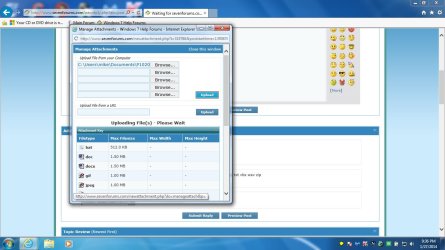
I am trying to upload some pictures from my camera but can't seem to get them to post , they are jpeg/s , I want you to see what I'm looking at because it's confusing.

Any idea why i can't post?
 

My Computer

Computer type
Laptop
Computer Manufacturer/Model Number
asus U56E
OS
win 7 64 Home edition
CPU
2430 i5 intel
Motherboard
?Asus
Memory
6
Graphics Card(s)
imtegrated
Sound Card
Microsoft
Hard Drives
WDC WD6400BPVT-80HXZT3 ATA Device
Antivirus
Kaspersky trial AV 2014
Browser
chrome
Your clicking the paperclip icon and then the choose file button right? After choosing the file click upload. (Not the upload button by the url.)

Then scroll down and click close this window, then click post quick reply.
 

My Computer

Computer type
PC/Desktop
Computer Manufacturer/Model Number
Custom Built
OS
Windows 10 Pro
CPU
AMD Ryzen 5 2400G Processor with Radeon RX Vega 11 Graphics
Motherboard
ASRock X470 Master SLI/AC AM4 AMD Promontory X470 SATA 6Gb/s
Memory
G.SKILL Ripjaws V Series 16GB (2 x 8GB) 288-Pin DDR4 SDRAM D
Graphics Card(s)
2047MB NVIDIA GeForce GTX 1060 6GB (EVGA)
Sound Card
Motherboard Built in
Monitor(s) Displays
Acer R240HY bidx 23.8-Inch IPS HDMI DVI VGA (1920 x 1080) Wi
Screen Resolution
1920 x 1080
Hard Drives
1TB Sandisk SSD PLUS (Main drive)
500 GB Seagate 7200 RPM (Games)
500 GB Western Digital 7200 RPM (Virtual Machines)
PSU
CORSAIR TX Series TX650M 650W 80+ Gold Modular Power Supply
Case
CORSAIR CARBIDE SPEC-02 Mid-Tower Gaming Case, Red LED Fan
Cooling
220mm, two 120mm, and four 60mm fans
Keyboard
Wired Dell keyboard
Mouse
Wireless Logitech mouse
Internet Speed
250mb down, 30mb up
Antivirus
Panda Cloud Antivirus
Browser
Chrome-ish x64
Other Info
Your awesome for reading this.
After thinking about it i think the best thing to do is replace the drive , the thing is making whining and constant scratching noises non stop , i need to keep the drive popped open for it to stop.

Where would i purchase a replacement drive for a laptop

Thank you
 

My Computer

Computer type
Laptop
Computer Manufacturer/Model Number
asus U56E
OS
win 7 64 Home edition
CPU
2430 i5 intel
Motherboard
?Asus
Memory
6
Graphics Card(s)
imtegrated
Sound Card
Microsoft
Hard Drives
WDC WD6400BPVT-80HXZT3 ATA Device
Antivirus
Kaspersky trial AV 2014
Browser
chrome
Check the manufacturer's Support site for replacement parts.

Compare with what Google shopping finds when you search for the model number and "replace optical drive." I find drives ranging from manufacturer's part at $58 down to exact match on eBay for $17.

Access the drive itself to get a part number to refine your search and see more options.

Compare the choices closely to make sure there's no question it is the replacement drive. Call or email the vendor's Customer Service to clarify if necessary. If eBay I always email them to confirm it will work which has never failed before, but they will refund if you need to ship it back.

You can ask back at any stage for help with your search.
 
I am still trying to post pics and it just won't go.
 

Attachments

  • Untitled.jpg
    Untitled.jpg
    102.7 KB · Views: 3

My Computer

Computer type
Laptop
Computer Manufacturer/Model Number
asus U56E
OS
win 7 64 Home edition
CPU
2430 i5 intel
Motherboard
?Asus
Memory
6
Graphics Card(s)
imtegrated
Sound Card
Microsoft
Hard Drives
WDC WD6400BPVT-80HXZT3 ATA Device
Antivirus
Kaspersky trial AV 2014
Browser
chrome
Alright having major issues here, i have been able to boot from the thumb drive in bios and everything looks like it's going well with the windows welcome screen and i even have no issues getting to the custom install screen .

However once i move on and it shows windows is installing updates , all of a sudden i get the (windows needs to check the file system) and once it does it's just corruption city . Everything is no good in the file system according to the screen ,
a screen then pops up and says windows failed to start.

It says insert your windows disk and start over but nothing works and the screen keeps going back to the windows failed to start error.

I have downloaded the ISO multiple times and it happens each time regardless of which ISO image i use.
Please help.

I used the download tool that Gregrocker provided each time.
 

My Computer

Computer type
Laptop
Computer Manufacturer/Model Number
asus U56E
OS
win 7 64 Home edition
CPU
2430 i5 intel
Motherboard
?Asus
Memory
6
Graphics Card(s)
imtegrated
Sound Card
Microsoft
Hard Drives
WDC WD6400BPVT-80HXZT3 ATA Device
Antivirus
Kaspersky trial AV 2014
Browser
chrome
I can't do those tests because my disk drive is out of order thus the reason for my inquiring about booting off of USB.


Both chkdsk and sfc/scannow show no problems.
 

My Computer

Computer type
Laptop
Computer Manufacturer/Model Number
asus U56E
OS
win 7 64 Home edition
CPU
2430 i5 intel
Motherboard
?Asus
Memory
6
Graphics Card(s)
imtegrated
Sound Card
Microsoft
Hard Drives
WDC WD6400BPVT-80HXZT3 ATA Device
Antivirus
Kaspersky trial AV 2014
Browser
chrome
What is PW?
 

My Computer

Computer type
Laptop
Computer Manufacturer/Model Number
asus U56E
OS
win 7 64 Home edition
CPU
2430 i5 intel
Motherboard
?Asus
Memory
6
Graphics Card(s)
imtegrated
Sound Card
Microsoft
Hard Drives
WDC WD6400BPVT-80HXZT3 ATA Device
Antivirus
Kaspersky trial AV 2014
Browser
chrome
Never mind GR, you were online until a few minutes ago and there's no doubt in my mind you know and saw my quick response as to what PW meant(i told you in the past i am brand new to this stuff ) you decided to ignore me anyway , and then you log off while i'm patiently waiting. (class guy)

And NO i don't buy you didn't know i was waiting, not even a little, sorry . It's bad enough that you hijack other members threads to feed your big ass ego but when you play games with people who are counting on you thats BS .


Stop jumping in and trying to flex your muscle (hold on i got to laugh) ok, i'm back , i think most people receiving help are perfectly happy without your nonsense , pick who you want to help and stick with them till the end but DO NOT jump in to other perfectly capable and equally qualified fellow members postings , it makes you look like a jackass.

Being the nice guy that i am i appreciate your efforts but then again you left me very disappointed every time.
 

My Computer

Computer type
Laptop
Computer Manufacturer/Model Number
asus U56E
OS
win 7 64 Home edition
CPU
2430 i5 intel
Motherboard
?Asus
Memory
6
Graphics Card(s)
imtegrated
Sound Card
Microsoft
Hard Drives
WDC WD6400BPVT-80HXZT3 ATA Device
Antivirus
Kaspersky trial AV 2014
Browser
chrome
Back
Top