Need help with Error Message

slackerhd

New member
Local time
2:44 PM
Messages
3
Hey Guys,

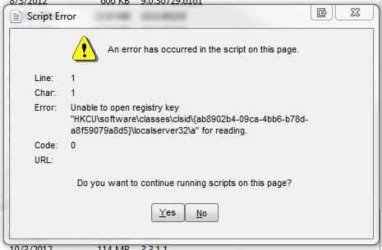
I'm getting this script error alert all the time in Windows 7. I attached an image of the alert.

Any idea what's causing it and how to fix it? Thanks in advance!
 

Attachments

  • cbc486cb2eb34e83b8e8be6ca6a6475d_A.jpeg
    cbc486cb2eb34e83b8e8be6ca6a6475d_A.jpeg
    29 KB · Views: 14

My Computer

Computer type
PC/Desktop
Computer Manufacturer/Model Number
HP
OS
Windows 7 Home Premium (64 bit)
CPU
Intel Core i7 2600
Memory
12GB

My Computer

Computer type
PC/Desktop
Computer Manufacturer/Model Number
Dell XPS 420
OS
Windows 10, Home Clean Install
CPU
Intel Core2 processsor Q8200(2.33Ghz 1333FSB) Quad Core Tech
Motherboard
Dell
Memory
6 gb
Graphics Card(s)
ATI Radeon 256MB HD3650
Sound Card
Intergrated 7.1 Channel Audio
Monitor(s) Displays
Dell SP2009W 20"
Hard Drives
640 GB Serial ATA Hard drive
Cooling
Fan
Keyboard
Dell USB Keyboard
Mouse
Dell Premium Optical USB
Internet Speed
DSL 2.85
The quickest way to correct the problem is a system restore from before the problem began.
http://www.sevenforums.com/tutorials/700-system-restore.html

I tried that but there are no restore points prior to when the problem began...

Here's what happened:

I noticed that my internet speed was unstable. This happened once in the past due to a Trojan virus, which I successfully removed with AVG.

But my trial expired and my PC was unprotected for a few months so I figured I contracted another virus. So I found an activation code and ran the AVG scan and it removed the virus...but the internet speed was still unstable.

So I ran the scan over and over again only to see that it kept finding and removing the virus. I eventually decided that the virus was immune to AVG and downloaded Kaspersky which seems to have removed the virus.

However, now I have this Script Error all the time...
 

My Computer

Computer type
PC/Desktop
Computer Manufacturer/Model Number
HP
OS
Windows 7 Home Premium (64 bit)
CPU
Intel Core i7 2600
Memory
12GB

My Computer

Computer type
PC/Desktop
Computer Manufacturer/Model Number
Custom
OS
Dual Boot: Windows 8.1 & Server 2012r2 VMs: Kali Linux, Backbox, Matriux, Windows 8.1
CPU
A10 7700 Kavari SteamRoller
Motherboard
ASUS A88XM-PLUS (FM2+ )
Memory
8GB DDR3 SDRAM PC3-8500
Graphics Card(s)
1024MB ATI AMD Radeon R7 Graphics
Sound Card
Realtek High Definition Audio
Monitor(s) Displays
Samsung
Hard Drives
SSD Crucial 120gb
WD VelociRaptor 1tb
PSU
Rosewill Gaming 650w
Case
Rosewill Galaxy 2
Internet Speed
55/12
Antivirus
Malwarebytes, MSE, SAS
Browser
FireFox, Chrome
Try looking at this link and follow the instructions to change the registry value. It is likely related to the Trojan you referenced.


Keep in mind, this involved editing the registry. It is strongly advised to backup the registry before attempting the suggestions in the link.

To backup your registry see: http://www.sevenforums.com/tutorials/4230-registry-backup-restore.html


POWELIKS Levels Up With New Autostart Mechanism

Thanks. I didn't even realize it was a virus because I figured the scan "must have removed it."

I eventually downloaded some program called ESET or something and ran it a few times. Then after restarting the PC, no more multiple dllhost processes or alerts. But knowing my luck, I probably just jinxed myself. Fingers crossed...

Thanks again for the guidance!

 

My Computer

Computer type
PC/Desktop
Computer Manufacturer/Model Number
HP
OS
Windows 7 Home Premium (64 bit)
CPU
Intel Core i7 2600
Memory
12GB
Try looking at this link and follow the instructions to change the registry value. It is likely related to the Trojan you referenced.


Keep in mind, this involved editing the registry. It is strongly advised to backup the registry before attempting the suggestions in the link.

To backup your registry see: http://www.sevenforums.com/tutorials/4230-registry-backup-restore.html


POWELIKS Levels Up With New Autostart Mechanism

Thanks. I didn't even realize it was a virus because I figured the scan "must have removed it."

I eventually downloaded some program called ESET or something and ran it a few times. Then after restarting the PC, no more multiple dllhost processes or alerts. But knowing my luck, I probably just jinxed myself. Fingers crossed...

Thanks again for the guidance!
You're welcome, what other anti virus/malware software have you ran? Running only Anti-virus might not have cleaned everything up, assuming you still have lingering malware.

Assuming you haven't done any of this, please perform the following:

Run Malwarebytes, Do a Custom Scan, Check the box to scan for Rootkits and Scan C:
http://www.sevenforums.com/tutorials/338716-malwarebytes-anti-malware-free.html

You can safely Quarantine the results of this scan but please post the log file that is generated in your next post (If nothing is found, no need to attach it)

Download and run Superantispyware:
SUPERAntiSpyware - Downloading File

Download and run AdwCleaner:
AdwCleaner Download

Attach the log files created by these programs on your next post

One last thing:
Click Start > Type "Internet Options" in the search bar > Press Enter > Go to Connections Tab > Lan Settings > Ensure Proxy server has no check mark
 

My Computer

Computer type
PC/Desktop
Computer Manufacturer/Model Number
Custom
OS
Dual Boot: Windows 8.1 & Server 2012r2 VMs: Kali Linux, Backbox, Matriux, Windows 8.1
CPU
A10 7700 Kavari SteamRoller
Motherboard
ASUS A88XM-PLUS (FM2+ )
Memory
8GB DDR3 SDRAM PC3-8500
Graphics Card(s)
1024MB ATI AMD Radeon R7 Graphics
Sound Card
Realtek High Definition Audio
Monitor(s) Displays
Samsung
Hard Drives
SSD Crucial 120gb
WD VelociRaptor 1tb
PSU
Rosewill Gaming 650w
Case
Rosewill Galaxy 2
Internet Speed
55/12
Antivirus
Malwarebytes, MSE, SAS
Browser
FireFox, Chrome
I would not run AVG since it bloated up 10 years ago and fell out of favor. It has never been recommended here but often shows up with problems. I'd uninstall it to try free lightweight MSE or the slightly more aggressive Panda Cloud free which may resolve your problems. If not work through the other Troubleshooting Steps for Windows 7.

In addition the HP factory install is the worst possible install one can have of Win7, larded with bloatware and duplicate utilities that interfere with better versions built into the OS. Look over Clean Reinstall Windows 7 which compiles everything that works best in tens of thousands of installs we've directly helped do here, and has been used by over a million consumers without a single complaint. You'll go from buggy crap install to the best install in the world in a day.
 
Back
Top