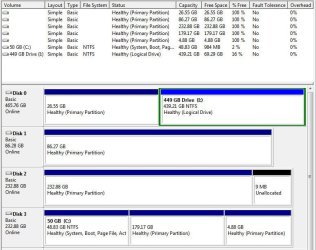
Well what it turned out to be was that all of the partitions that I could not access were hidden.
Wow! Wonder how that happened, as a result of the "repair" you did to Win7 after the new mobo install?
So with the help of Partition Wizard I was able to unhide them.
Just one of the many tools available with this excellent product.
But when I rebooted they would be hidden again.
Remarkable.
Quite a mystery, here. I had previously noticed and remarked in one of my earlier posts that they were all "primary", whereas your one still-visible partition was "logical". But it's still totally inexplicable to me why booting to Win7 would somehow make them hidden?
I have no idea how/why this would happen... never saw that before..
So I found that if I changed them to Logical partitions then they would not get hidden after a reboot.
Fascinating. Consistent with your I partition, which was also visible (inside of the "extended partition" on that drive"), but the mystery is still what is causing Win7 to hide those primary partitions. Why?
But again, yet another one of the valuable tools available in the PW bag of tricks to do just about anything you want to fix things using your own experience, creativity and logic.
In fact, I used PW just yesterday to convert a FAT32 partition to NTFS on my brother-in-law's old WinXP system to resolve another anomaly.
PW is an invaluable and dependable 3rd-party product, in my opinion... to help solve many issues with a very user-friendly GUI. It's never let me down.
So now I am able to access all of my drives and Partitions from Win 7.
Fantastic! Excellent solution!!!
And of course, this new configuration will still work just fine going forward, even if you do end up reinstalling Win7 from scratch sometime down the road.
Getting your partitions back and not losing any data was obviously the goal of the mission, and you have emerged victorious. PW is your friend.
Glad to have been able to help.
I'm still honestly quite surprised that with your fairly dramatic hardware change that you were nevertheless still able to use your previously existing Win7 system, with just whatever "repair" did as well as what Win7 probably did when it first booted in the new hardware environment.
Again, just my own personal habits, but I would use the opportunity to do a fresh Win7 reinstall along with all your 3rd-party software products, etc.. I realize this is a nuisance, and time-consuming, and you need to be on your toes to preserve your data currently on your C drive, but given the situation you might just put it on the "to do" list.
Anyway, you've emerged victorious!
P.S. - hope you installed PW in your Win7 system as well, as it's very useful in that environment as well (and also shows the Win7-assigned drive letters, which do not appear in the standalone boot version).
If you need to do something which you set up while running Win7, that can't be done while Win7 is running, it will request a re-boot to complete the operation(s). At re-boot time it will kick in during pre-boot, and essentially look like the standalone boot CD appearance, except that it has been given the script for the remaining operation(s) that need to be completed before exiting and allowing the normal Win7 boot process to proceed.