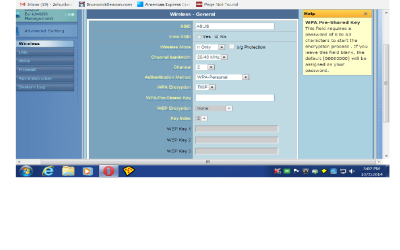
need help with router settings page/have screenshots

jonnyhillow

Banned
Local time
12:27 AM
Messages
637
Location
NJ native & NC
I have a Dell desktop running win 7 sp1 64 bit and i have a modem called a smart RG , my router is a Asus RT N10 .

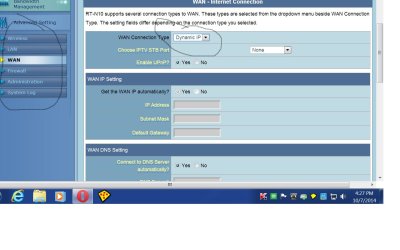
I am confused about the dynamic IP choice as seen in the screenshot and all the options on the left . Wan,Wireless, Lan etc... what exactly do i need to click on to get this thing to work ?

I currently have my ethernet cable from the computer connected to the routers lan port , i have another ethernet cable connected to the wan port on the router and that goes into the modems lan port , the telephone wire is correctly connected .

It seems when i take the ethernet cable from the computer out of the router i loose wireless which i don't want.

When can this be removed so i can get wireless?
Thanks
 

Attachments
  • Untitled.jpg
    Untitled.jpg
    94.7 KB · Views: 0
  • Untitled.png
    Untitled.png
    58.4 KB · Views: 2

My Computer My Computer

At a glance

Microsoft Windows 7 Home Premium 64-bit 7601 ...Intel(R) Core(TM) i5-2430M CPU @ 2.40GHz6.00 GBIntel(R) HD Graphics 3000
Computer type
Laptop
Computer Manufacturer/Model Number
Asus laptop U56E
OS
Microsoft Windows 7 Home Premium 64-bit 7601 Multiprocessor Free Service Pack 1
CPU
Intel(R) Core(TM) i5-2430M CPU @ 2.40GHz
Motherboard
ASUSTeK Computer Inc. U56E
Memory
6.00 GB
Graphics Card(s)
Intel(R) HD Graphics 3000
Sound Card
(1) High Definition Audio Device (2) High Definition Audio
Screen Resolution
1366 x 768 x 32 bits (4294967296 colors) @ 60 Hz
Hard Drives
WDC WD6400BPVT-80HXZT3
Are you sure you have the correct model number for your router? The reason i ask is because when I go to the asus support site and search for the router; it tells me no data is found. Please double check the model number for your router and repost if needed.
 

My Computer My Computer

At a glance

Windows 7 ultimate 64-bitIntel I7 2600K 3.4ghzCorsair 16gb ddr3 1600mhzNvidia Geforce gt 430
Computer type
PC/Desktop
Computer Manufacturer/Model Number
custom built
OS
Windows 7 ultimate 64-bit
CPU
Intel I7 2600K 3.4ghz
Motherboard
Asus Evo P8P67
Memory
Corsair 16gb ddr3 1600mhz
Graphics Card(s)
Nvidia Geforce gt 430
Sound Card
Sound Blaster Titanium x-fi pci express
Monitor(s) Displays
Dell E198WFP
Hard Drives
1 western digital 2TB drive.
PSU
Antec 1200 watt
Case
Inwin Dragon Rider
Cooling
6 case supplied cooling fans
Keyboard
logitech mk700
Mouse
logitech m705
Internet Speed
25-50mbps download; 10mbps upload(i think)
Antivirus
avg free 2014
Browser
mozilla firefox
Other Info
Also have a pretty bad speaker setup which is a klipsch promedia 5.1 surround speaker setup with huge subwoofer and lg blu ray player/writer. Also a hp officejet pro 8600 plus wireless all in one and a logitech s7500 webcam.
Are you sure you have the correct model number for your router? The reason i ask is because when I go to the asus support site and search for the router; it tells me no data is found. Please double check the model number for your router and repost if needed.


Oddly that does happen but it is the correct router information.
 

My Computer My Computer

At a glance

Microsoft Windows 7 Home Premium 64-bit 7601 ...Intel(R) Core(TM) i5-2430M CPU @ 2.40GHz6.00 GBIntel(R) HD Graphics 3000
Computer type
Laptop
Computer Manufacturer/Model Number
Asus laptop U56E
OS
Microsoft Windows 7 Home Premium 64-bit 7601 Multiprocessor Free Service Pack 1
CPU
Intel(R) Core(TM) i5-2430M CPU @ 2.40GHz
Motherboard
ASUSTeK Computer Inc. U56E
Memory
6.00 GB
Graphics Card(s)
Intel(R) HD Graphics 3000
Sound Card
(1) High Definition Audio Device (2) High Definition Audio
Screen Resolution
1366 x 768 x 32 bits (4294967296 colors) @ 60 Hz
Hard Drives
WDC WD6400BPVT-80HXZT3
I found the manual here. Having recently set up a router and separate modem I have found there are different ways of doing things. The first is how you have it set up, a dynamic (changing) IP address between modem and router, the second is a fixed IP address between the two, and the third is setting the Modem to Bridge mode & setting the router up in PPPoE mode, if you require port forwarding the latter is what you need to do unless your modem has its own port forwarding capabilities.

Removing the Ethernet from your computer shouldn't make you lose a wireless connection, but with the actual password field being blank the password is 00000000 and I suspect you are not entering this into Windows when you try to connect to your Router wirelessly. I would set the password to something you can remember that isn't eight 0's, then remove the Ethernet cable from your PC and connect to your Asus router using the password you put in the router's config page.
 

My Computer My Computer

At a glance

Windows 7 Ultimate x64Intil i7-86016Gb Corsair XMS3 1600MHzMSI N470GTXTwin FrozR II
Computer type
PC/Desktop
Computer Manufacturer/Model Number
Self Built
OS
Windows 7 Ultimate x64
CPU
Intil i7-860
Motherboard
Gigabyte GA-P55a-UD6
Memory
16Gb Corsair XMS3 1600MHz
Graphics Card(s)
MSI N470GTXTwin FrozR II
Monitor(s) Displays
Samsung S23A700D
Hard Drives
1x Samsung 840Pro SSD 256Gb for Windows
2x WD Green 2Tb (for Storage)
1x Western Digital Caviar Black 2 TB 7200 RPM (also for storage)
1x Samsung HD501LJ 500Gb for Ubuntu
PSU
Antec TruePower New Blue Modular 750W
Case
Antec 300
Cooling
Cosair H70
Internet Speed
60Mb/s DL, 3Mb/s UL
Antivirus
Norton Internet Security
Browser
IE, FF, Chrome
Back
Top